I’d choose an AI email tool by the workflows it can run, not just the copy it can write. For SaaS, that means using product, CRM, and billing data to send the right onboarding, activation, expansion, renewal, and churn-prevention messages - and stop them when a customer’s status changes.
My comparison of 5 platforms, dated October 3, 2026, covers AI generation, lifecycle workflows, personalization data, and retention management and cost. Here’s my shortlist by fit:
Quick Comparison
| Platform | AI generation | Workflow fit | Personalization data | Retention and cost checks |
|---|---|---|---|---|
| Customer.io | Drafting and in-workflow LLM actions | Product-event journeys | User attributes, events, and account relationships | Measure retained usage; budget for profiles, sends, and data maintenance |
| ActiveCampaign | Campaign drafts and brand tools | CRM-led nurture and follow-up | CRM fields plus synced product and billing data | Test renewal outcomes; check contact, tier, and integration costs |
| HubSpot Marketing Hub | Email drafting and content reuse | CRM-led marketing, sales, and service | Contact, company, deal, and ticket records | Check product-data sync, contact costs, and onboarding fees |
| Klaviyo | Email copy and flow generation | Simple event-based SaaS sequences | Profiles and events; validate account mapping | Test commerce-based predictions against subscriptions; check send and contact limits |
| Sequenzy | Email sequences, delays, and branching | Billing-led onboarding and payment recovery | Billing signals and connected product data | Verify recovery reporting and governance; pricing is send-based |
I’d give data and workflows 60% of the selection score, retention management and cost 25%, and AI generation 15%. Then I’d run 1 pilot with a randomized holdout, measuring activation, renewal, or expansion rather than opens alone.
<u>Before committing</u>, test identity matching, suppression, exit rules, AI review, and total annual cost. A good draft won’t fix a message sent to the wrong customer.
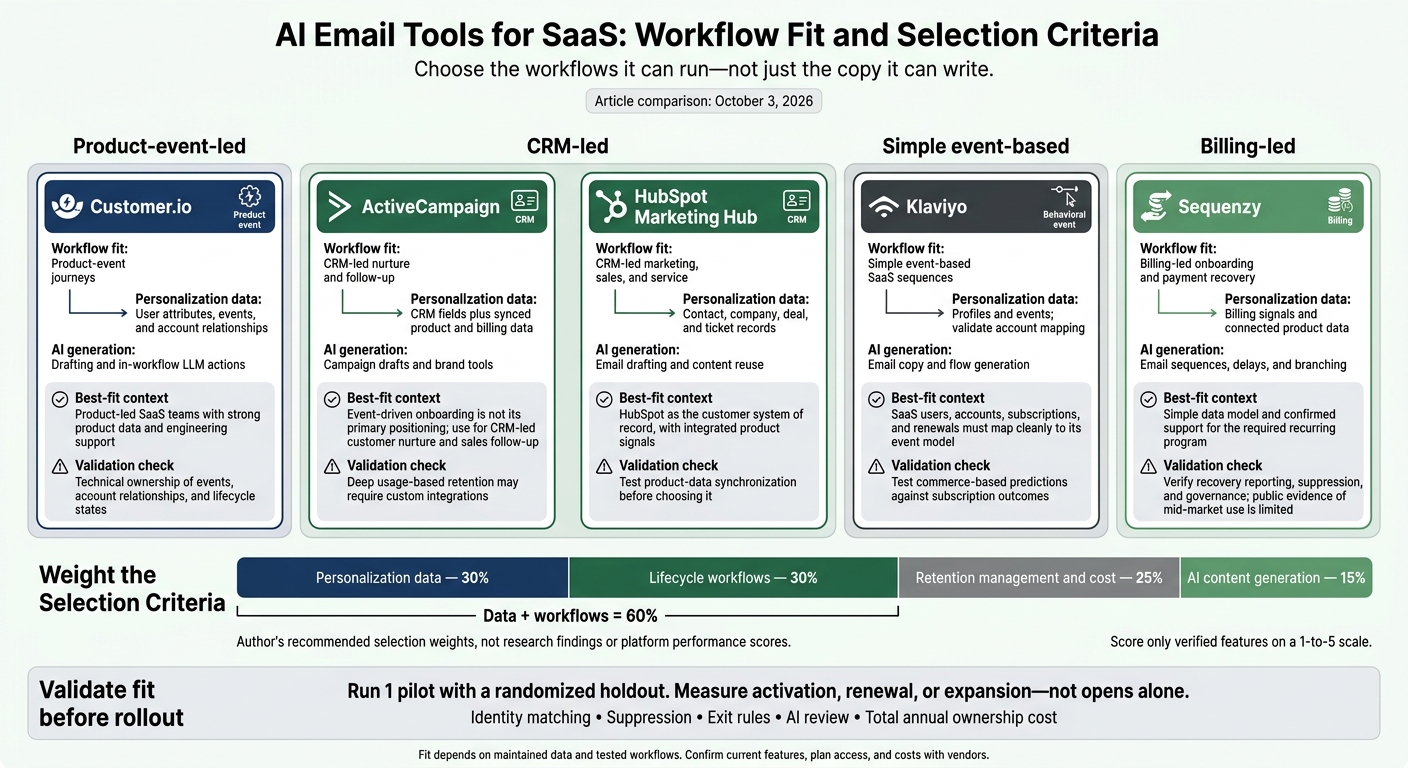
AI Email Tools for SaaS: Workflow Fit and Selection Criteria
How I Built Email Ai Agent for Saas Platforms - Dreamlit Ai Review, Demo & Tutorial
sbb-itb-6e7333f
1. Customer.io
Customer.io works best when lifecycle programs run on clean product events and clearly assigned workflow ownership.
Customer.io fits product-led SaaS teams with strong product data and engineering support. Its strength is execution, not copy generation: it triggers messages based on signup, feature use, subscription changes, and inactivity. Before launch, define stable user and account IDs, event names, consent fields, and who owns each integration. APIs, SDKs, webhooks, and reverse ETL offer several ways to bring data into the platform. Data quality sets the limits for AI output, workflow reliability, and retention performance.
AI Content Generation
Customer.io’s documented in-workflow LLM actions can process data within a workflow and save results as journey attributes. Treat them as workflow logic rather than a copywriting tool. Check plan access, data-sharing rules, and output review requirements. Require human approval for sensitive claims, and check generated content against approved product messaging. Use these actions to support journeys, not replace them.
Lifecycle Workflows
The visual journey builder supports triggers, delays, conditions, branching, and actions across email and other channels. Set exit rules and suppression before launch so converted users stop receiving activation prompts and journeys don’t conflict. Event accuracy and data quality matter as much as workflow design - sending more messages won’t make up for either.
Personalization Data
Customer.io supports profile attributes, behavioral segments, objects, and Liquid syntax for conditional content. Model accounts or workspaces alongside people when renewal and expansion decisions happen at the account level. Focus on plan, role, renewal date, adoption, and seat usage. Add fallback content for missing fields so incomplete data doesn’t break a message.
Retention Management and Cost
Pricing starts at $100/month for Essentials, with 5,000 profiles and 1 million emails per month. Premium starts at $1,000/month, billed annually. Confirm current limits and included integrations, then budget for profile volume, object records, AI usage, implementation, and data maintenance.
Run a 30-60-day pilot with a holdout group where practical. Measure activation and retained usage alongside engineering hours. Email engagement alone won’t tell you whether the program improves retention.
2. ActiveCampaign
ActiveCampaign is one of the best email marketing platforms for small business teams that need CRM-led lifecycle emails. It combines email automation, segmentation, a built-in CRM, and actions across email, SMS, WhatsApp, and CRM. Its strength is coordinating workflows around CRM data, rather than deep product-event automation.
AI Content Generation
AI Campaign Builder turns a natural-language brief into email drafts, subject lines, copy, calls to action, and images. Predictive Sending optimizes send timing, not content or retention outcomes. Use it when getting workflows live faster matters more than AI copy depth.
Lifecycle Workflows
Branching automations respond to contact behavior, CRM activity, and app data across email, SMS, WhatsApp, and CRM actions. Teams can use these for onboarding, trial nurture, renewal reminders, win-back, and expansion workflows.
Check whether predictive scoring tracks retention risk or just lead-conversion intent. The platform works best when sales, marketing, and support already share account data.
Personalization Data
Use plan tier, active seats, renewal date, support status, and account ownership from Salesforce, Microsoft Dynamics 365, product events, billing, or support tools.
Before committing, assess email platform compatibility by testing account-level behavior. Deeper SaaS personalization may need integrations or custom objects, and access to premium CRM connectors can depend on the plan. Data mapping, not email volume, drives the main implementation cost.
Retention Management and Cost
Listed starting prices are $15/month for Starter (1,000 contacts), $49/month for Plus, and $79/month for Pro. Confirm current limits and feature access. Budget for seats, messaging usage, middleware, and integration maintenance, too.
For the first program, use a control group. Measure activation or renewal outcomes alongside customer-success workload, not just clicks.
3. HubSpot Marketing Hub
HubSpot fits retention teams that already use its CRM for marketing, sales, and service. Contact, company, deal, and ticket records give teams a shared basis for lifecycle messaging. If your team relies on high-volume product events, test data synchronization before choosing it.
AI Content Generation
Breeze can draft and refine marketing emails. Content Remix turns existing blogs, pages, videos, or files into email content in your company’s brand voice. Test whether it can produce a full lifecycle sequence rather than just individual emails. Review AI-generated copy for accuracy and relevance to your customers.
Lifecycle Workflows
Workflows enroll records based on properties, events, dates, or lists, then branch and take action on related records. Teams can use the same record set to trigger onboarding, expansion, renewal, and churn-reducing email campaigns.
Check which plan includes the workflows, journey tools, and record types you need. Test re-enrollment and exit rules to prevent customers from restarting a program they’ve already completed.
Personalization Data
CRM status is not adoption data. Use contract properties for billing context and feature events for customer behavior. Feed product telemetry through integrations or custom behavioral events. Document how you match identities, how often data updates, and how you handle missing data.
Add timestamps to synced usage fields, and suppress usage-based messages when that data is stale.
Retention Management and Cost
Marketing Hub Professional starts at $800 per month with annual billing, includes 2,000 marketing contacts, and carries a $3,000 onboarding fee. Enterprise starts at $3,600 per month, includes 10,000 contacts, and carries a $7,000 onboarding fee. HubSpot works best when it replaces several systems rather than serving only as an email sender.
For teams whose lifecycle data lives mainly in the CRM, HubSpot is an efficient option. If product events need to drive most messages, compare the next platform.
4. Klaviyo
Klaviyo is built for ecommerce. SaaS teams should use it only when users, accounts, subscriptions, and renewals map cleanly to its event model.
AI Content Generation
Klaviyo’s AI drafts subject lines and email copy from campaign goals and supports testing across campaigns and flows. Its flow AI turns natural-language instructions into a flow trigger and structure. This feature is available on paid accounts.
For SaaS, stick to simple lifecycle sequences. Review drafts for SaaS terms, contract language, and customer-success goals rather than ecommerce framing. The test is whether the copy fits the SaaS journey, not just the campaign.
Lifecycle Workflows
Flows can start from events, list membership, or segment entry. Conditional filters control whether messages or other actions occur.
Test a feature-adoption flow to see whether branching and suppression logic handle SaaS lifecycle states correctly. Measure activation and time to value against a holdout group. This requires an account and event model that supports those comparisons.
Personalization Data
Useful inputs include plan tier, seat count, role, renewal date, feature-use events, and other profile properties. Test whether Klaviyo can distinguish administrators from end users and prevent conflicting account-level messages.
Complex buying groups, sales-assisted renewals, and deeper customer-success workflows may still need a separate CRM or customer-success system.
Retention Management and Cost
Klaviyo’s churn-risk and lifetime-value predictions are commerce-oriented. Check them against subscription outcomes before using them to prioritize renewal outreach. Also verify that reporting aligns with billing data before treating predictions as retention signals.
The documented free allowance includes 500 emails to 250 contacts and 150 SMS credits. Use the pricing calculator for paid plans, then budget for event instrumentation, integrations, and retention reporting tied to billing data. Factor these limits into comparisons with the more SaaS-native platforms below.
5. Sequenzy
Sequenzy combines marketing automation, transactional email, and AI-generated sequences for SaaS onboarding, renewal, churn prevention, and billing recovery. Its focus is lifecycle automation tied to billing events, rather than a broad CRM or ecommerce stack. Sequenzy fits teams that want billing-led lifecycle automation, but public evidence of mid-market use is limited. Request security documentation, support response targets, and references from comparable SaaS customers.
AI Content Generation
Reported capabilities include generating subject lines, copy, delays, and branching logic from prompts. This extends AI generation beyond email copy to lifecycle sequence logic. Test editing, selective regeneration, brand controls, and approval before activation. Measure manual revision time, not just how fast the first draft appears.
Lifecycle Workflows
Retention teams should test whether billing events trigger recovery workflows and stop them at the right time. Sequenzy documents visual sequences, event tracking, subscriber-triggered workflows, and transactional sending through an API. Advertised use cases include onboarding, usage alerts, dunning, upgrades, and cancellations.
Start with failed-payment recovery. Test duplicate-event handling, exit after payment recovery, re-entry, and pause or rollback controls. Verify permissions, approvals, and audit logs rather than assuming enterprise controls are available.
Personalization Data
Key integrations include Stripe, Clerk, Supabase, and PostHog. The Stripe integration is described as syncing subscription status, MRR, plan changes, payment failures, and cancellations.
Verify connector events, sync frequency, and historical-data limits. Check how user, account, and subscription identifiers map to billing status so billing messages reach the right person.
Retention Management and Cost
For mid-market SaaS, pricing needs to support enough retention volume to justify the tool. Pricing is send-based, with unlimited contacts: the free plan includes 2,500 emails per month, and Starter costs $19 per month for 15,000 emails. Confirm current rates, overages, and whether transactional sends count toward the same allowance.
Revenue attribution and goal tracking are listed features, but the evidence does not establish a dedicated churn-prediction or net-revenue-retention module. Check recovered revenue against billing records before relying on campaign attribution. When comparing platforms, weigh execution speed against the need for deeper retention analytics.
Compare Features, Data, and Costs
Native means vendor-documented. Integration-dependent means another system supplies the data or functionality. Plan-restricted means access depends on the tier. Not verified means the supplied evidence does not confirm the feature.
Use these tables to separate copy generation from the data, workflows, and cost controls a SaaS retention program needs.
AI Content Generation
| Platform | Documented generation | Brand controls and reuse | Limits and review |
|---|---|---|---|
| Customer.io | Native: AI-assisted drafting, translation, and LLM actions that store outputs as journey attributes. | Brand guidance and editing controls: Unconfirmed. | Sequence generation and approvals: Unconfirmed. Check AI-credit limits. |
| ActiveCampaign | Native: AI Campaign Builder, AI Content Generator, and AI Brand Kit. | Reusable AI assets: Unconfirmed. | Plan-restricted. Sequence generation and approvals: Unconfirmed. |
| HubSpot Marketing Hub | Subject-line, body, and sequence generation: Not verified. | Brand controls and reuse: Unconfirmed. | AI credits and approvals: Unconfirmed. |
For Klaviyo and Sequenzy, verify SaaS-specific generation, brand controls, reuse, AI allowances, and approvals.
Generated copy does not create workflow logic. Before sending renewal or expansion messages, review the offer, account eligibility, suppression rules, and exit conditions. Test whether customer signals produce copy suited to each lifecycle stage rather than generic messages.
Lifecycle Workflows
Compare orchestration first for onboarding, activation, expansion, renewal, and churn prevention.
| Platform | Verified orchestration | SaaS program dependencies | Restrictions or gaps |
|---|---|---|---|
| Customer.io | Native: event-driven orchestration across email, SMS, push, in-app messaging, webhooks, and APIs. | Integration-dependent: product milestones, renewal dates, billing, usage, and customer-success ownership. | Verify waits, re-entry, frequency caps, transactional setup, and SaaS templates. |
| ActiveCampaign | Native: CRM-led automation, conditional journeys, and CRM task assignment. | Integration-dependent: product and subscription signals. | Plan-restricted: predictive sending requires Pro. Transactional sending and global suppression: Unconfirmed. |
| HubSpot Marketing Hub | CRM-connected marketing automation. | Integration-dependent: product usage, billing, and account health. | Branching, waits, frequency caps, transactional access, and required tiers: Unconfirmed. |
For Klaviyo and Sequenzy, verify SaaS-specific orchestration, event connections, suppression, frequency limits, cross-channel actions, and transactional scope.
Evaluate each program from onboarding through win-back separately. Template counts won't tell you whether a workflow fits. Transactional messages also need separate checks for sending infrastructure, consent handling, and reporting.
Personalization Data
| Platform | Documented data model | Inputs required from other systems | Identity and account-level checks |
|---|---|---|---|
| Customer.io | Native: people, objects, and custom relationships. | Integration-dependent: product events, billing, plan, seats, renewal dates, and health scores. | Map users to workspaces and subscriptions. Plan-restricted: premium integrations and warehouse destinations. |
| ActiveCampaign | Native: segmentation, CRM actions, and predictive lead scoring. | Integration-dependent: usage, subscription fields, seats, and renewal dates. | User-to-account mapping, account aggregation, and retention-specific scores: Unconfirmed. |
| HubSpot Marketing Hub | Native: contact, company, deal, and ticket records. | Integration-dependent: product events, billing, plan, seats, and health signals. | Verify contact-to-company and subscription matching, plus synchronization. |
For account-level personalization in Klaviyo and Sequenzy, confirm synchronized fields, user-to-account-to-subscription relationships, and aggregation.
Match identities before personalizing copy. Document user ID, account ID, and subscription ID. Test changed email addresses, duplicate records, timestamps, and sync delays. One recipient's engagement cannot establish whether an entire account is healthy or eligible to expand.
Retention Management and Cost
| Platform | Subscription evidence | Controls and measurement | Other costs |
|---|---|---|---|
| Customer.io | Essentials: $100/month, billed monthly, 5,000 profiles, 1 million emails/month. Premium: $1,000/month, billed yearly, custom volumes. | Verify permissions, approvals, collaboration, deliverability, testing, and account reporting. | Overages: $0.009/profile, $0.12/1,000 emails, $10/100,000 AI credits. |
| ActiveCampaign | Starts at $15/month; price varies with contacts and features. Billing frequency and included volume: Unconfirmed. | Verify roles, approvals, authentication, suppression, testing, and account reporting. | AI allowances, integrations, and setup fees: Unconfirmed. |
| HubSpot Marketing Hub | Price, billing frequency, and limits: Unconfirmed. | Verify collaboration, approvals, deliverability, testing, and CRM-linked reporting. | AI, required tiers, onboarding, and integrations: Unconfirmed. |
| Klaviyo | Price, billing frequency, and limits: Unconfirmed. | Permissions, approvals, testing, deliverability, and SaaS account reporting: Unconfirmed. | AI, integrations, setup, and administration: Unconfirmed. |
| Sequenzy | Price, billing frequency, and limits: Unconfirmed. | Governance, collaboration, deliverability, testing, and account reporting: Unconfirmed. | AI, implementation, and integrations: Unconfirmed. |
Compare total annual ownership cost, including instrumentation, migration, authentication, integrations, analytics, and recurring QA. Connect campaign data to product milestones, CRM outcomes, and billing records to measure activation, renewal, expansion, and net revenue retention.
The next section examines what these tradeoffs mean for each platform's strengths and limits for retention teams.
Strengths and Limits for Retention Teams
Use this table to qualify fit, not rank vendors. Fit depends on the data your team can maintain - not how many AI writing features a platform offers.
| Platform | Use case | Strength | Limit | Fit requirement |
|---|---|---|---|---|
| Customer.io | Event-driven onboarding and adoption | Best for event-driven lifecycle orchestration. | Requires a disciplined event taxonomy and regular data governance. | Technical ownership of events, account relationships, and lifecycle states. |
| ActiveCampaign | CRM-led customer nurture and sales follow-up | Shared records for marketing and sales. | Deep usage-based retention may require custom integrations. | Existing use of ActiveCampaign’s CRM and reliable product-data sync. |
| HubSpot Marketing Hub | CRM-led retention across marketing, sales, and service | Shared governance across customer-facing teams. | Costs and operating overhead increase as contacts, automation volume, and reporting needs grow. | HubSpot as the customer system of record, with integrated product signals. |
| Klaviyo | High-volume personalized messaging | Marketer-controlled segmentation and testing. | SaaS account hierarchies and subscription-state modeling need validation. | Reliable synchronization of SaaS events and account data. |
| Sequenzy | Narrow billing-led lifecycle programs | AI-generated sequences tied to subscription signals. | Account-level reporting, suppression, and governance need trial validation. | Simple data model and confirmed support for the required recurring program. |
Platform fit matters only when data ownership and message priority are clear.
Assign ownership of shared data. Agree on field definitions, owners, update frequency, and allowed uses so teams can run these tools reliably. Document which source wins when values disagree.
Resolve message priority before generating copy. Shared visibility helps prevent marketing offers from colliding with renewal negotiations or support escalations. Set a policy that puts operational notices ahead of promotional sends and requires explicit approval for exceptions. If eligibility data is stale, pause the affected promotional workflow.
One broadcast does not prove lifecycle readiness. One-time campaigns need an audience snapshot, approval, suppression rules, and reporting. Recurring programs also need durable state management, re-entry rules, version control, monitoring, and an accountable owner. Ask vendors to show those controls - not just a polished email draft.
Recommendations and Pilot Checklist
Use the comparison above to narrow your shortlist, then test 1 program in a pilot.
Match the Platform to Your Data and Workflows
Choose a platform that can run your journeys, not just write better drafts. AI cannot fix missing identities, stale subscription data, or unreliable triggers. Use the table below to match each platform to your data and workflow readiness. Before selection, require tests of data intake, workflows, and reporting.
Set Weights for the 4 Criteria
Weight personalization data at 30%, lifecycle workflows at 30%, retention management and cost at 25%, and AI content generation at 15%.
Score only verified features, using a 1-to-5 scale. Attach test evidence, integration requirements, implementation labor, add-ons, and projected usage to each score.
Test 1 Program Before Rollout
Before rollout, confirm that event names, properties, timestamps, and latency limits are documented. Check for stable user, account, workspace, and subscription IDs, plus reliable usage and billing sync.
Set AI brand and compliance policies. Require human approval for claims, pricing, and sensitive retention copy. Test suppression rules and fallbacks for missing data.
Pilot 1 program with a randomized holdout. Record baseline delivery, bounce, complaint, conversion, and relevant revenue metrics. Choose the primary outcome: activation, renewal, or expansion. Set the observation window, sample-size requirement, and stop conditions before sending.
Compare incremental outcomes, not opens or clicks. Treat results from small samples as directional.
Use the table to test fit, not repeat vendor positioning.
| Platform | Pilot test | Required conditions | Primary pilot check |
|---|---|---|---|
| Customer.io | Event-driven pilot with cross-channel handoffs | Real-time product events, stable profile and account identities, object relationships, and technical data ownership | Confirm that activation or usage events drive the correct branches, personalization, suppressions, and downstream outcome reporting. |
| ActiveCampaign | CRM-linked lifecycle handoffs | Clean CRM fields, lifecycle stages, consent, and dependable sync | Verify that CRM stage or customer-status changes trigger the intended sequence without duplicate or conflicting sends. |
| HubSpot Marketing Hub | CRM-centered pilot with product-usage sync | Reliable synchronization of product usage, subscription, support, and account data into HubSpot | Test whether a CRM-centered workflow identifies the target lifecycle state and attributes renewal, expansion, or activation outcomes. |
| Klaviyo | Behavioral or predictive audience test | Correct profile and event mapping, usable predictive inputs, consent management, and appropriate account-level handling | Compare behavioral or predictive audience selection with a deterministic control and check personalization accuracy. |
| Sequenzy | 1 AI-drafted lifecycle sequence | Verified billing triggers, event or tag quality, AI review controls, and revenue attribution | Run 1 AI-drafted sequence and verify trigger timing, factual accuracy, suppression behavior, and incremental conversion or recovery. |
FAQs
How can I pilot lifecycle emails with a small customer base?
Map your customer journey to pinpoint key activation milestones and the actions users take to reach them. Work on one lifecycle stage at a time. Start with onboarding, where engagement is typically highest.
Use behavior-based triggers, such as a first login or feature activation, instead of fixed dates. Send timely, helpful content that guides users to their next step. Track platform analytics and adjust your approach as you scale.
Which lifecycle workflow should I automate first?
Automate your onboarding sequence first. It typically drives the highest engagement, making it the best starting point for your lifecycle program. Map the path to your First Value Moment, then build emails that help users reach that milestone. Once onboarding is live, add retention and win-back workflows.
For guidance on mid-market and PE-backed lifecycle programs, consult the Email Service Business Directory.
How can I migrate tools without disrupting active journeys?
Choose platforms with reliable event tracking, webhooks, and direct API integrations. The new system should support idempotency keys to prevent duplicate sends. It also needs clear exit rules that remove users from a flow as soon as they reach an activation milestone.
Before switching, map your existing customer journey stages. Then configure the new platform’s tracking to match your current behavior-based triggers.