Anomaly detection is a powerful way to identify sudden changes in email campaign performance, such as drops in open rates or spikes in unsubscribes. These changes often signal technical issues, deliverability problems, or content missteps that can hurt revenue and sender reputation. Automated systems can detect these issues 3–7 days faster than manual reviews, helping you act quickly to minimize losses.
Key Takeaways:
- Common Problems: Low open rates, high unsubscribes, or delivery issues often stem from domain reputation decay, outdated email lists, or technical errors like misconfigured DNS records.
- Metrics to Watch: Focus on meaningful metrics like click-through rates, revenue per email, and bounce rates while avoiding misleading "vanity metrics."
- AI's Role: Tools using supervised and unsupervised learning analyze historical data to set baselines and flag deviations in real time.
- Fixing Issues: Address technical problems, refine content, and use tools like Klaviyo or Mailchimp for monitoring and alerts.
Why It Matters: Automated emails make up just 2% of total sends but drive 37% of email revenue. A single broken email flow can cost you $7.01 per missed conversion. Real-time anomaly detection ensures your campaigns stay on track.
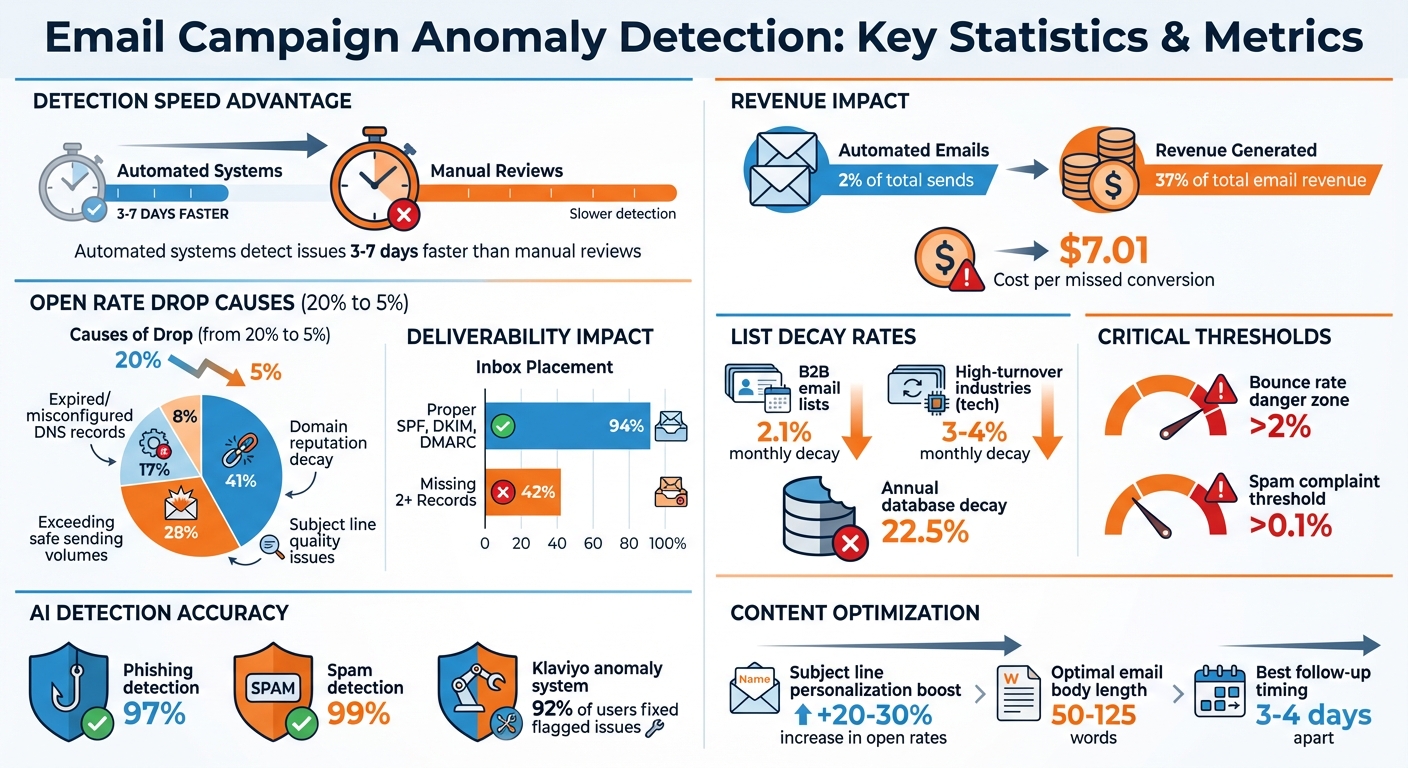
Email Campaign Anomaly Detection Statistics and Key Metrics
Common Anomalies in Email Campaigns
Unusual email metrics often point to underlying issues that need immediate attention. Recognizing these anomalies can help you respond quickly and effectively. Below, we’ll dive into the key issues affecting open rates, unsubscribes, and bounces.
Sudden Drops in Open Rates
If your open rates suddenly plummet - from, say, 20% to 5% - it’s a clear sign of trouble. While it’s tempting to blame subject lines, infrastructure issues are often the real culprit, accounting for about 92% of such drops. Here’s how these issues break down:
- Domain reputation decay: 41%
- Exceeding safe sending volumes: 28%
- Expired or misconfigured DNS records: 17%
- Subject line quality issues: 8%
Domain reputation is particularly fragile. For cold email campaigns, domains tend to perform best within the first 22 to 60 days. By 4–6 months, open rates often fall from 46–52% to around 34–40%. This decline suggests it may be time to reduce sending volumes or even rest the domain. Additionally, domains with properly configured SPF, DKIM, and DMARC records achieve a 94% inbox placement rate, compared to just 42% for domains missing two or more of these records.
"Low open rates aren't random - they're a signal. They point to issues with deliverability, list quality, sender reputation, timing, recognition, or even how your past campaigns have trained subscribers to ignore you".
Spikes in Unsubscribes
A sudden increase in unsubscribes can indicate a breakdown in trust with your audience. Common causes include:
- Irrelevant content
- Excessive sending frequency, which leads to email fatigue
- Misleading messaging, where the email content fails to match the promise of the subject line
B2B email lists naturally decay at a rate of about 2.1% per month, as people change jobs or companies close. In high-turnover industries like tech, this rate can climb to 3–4% monthly. Neglecting regular list cleaning can result in not only higher unsubscribe rates but also increased spam complaints, which can harm your sender reputation.
Unusual Bounce Rates or Delivery Issues
Bounce rates are a critical metric for sender reputation. If your bounce rate exceeds 2%, your entire email program could be at risk. Jack Blaut, Founder of Outbound Republic, emphasizes this point:
"If your hard bounce rate exceeds 2%, providers start throttled delivery".
This issue can snowball, as Mary Youngblood, Campaign Abuse Desk Compliance Manager at Adobe, explains:
"One bad metric causes another, that impacts reputation, that causes another, that impacts inbox placement".
High bounce rates often stem from outdated or "dirty" email lists. These lists may contain invalid addresses, syntax errors, or spam traps. For large-scale senders, even a 0.1% increase in hard bounces can signal deeper systemic issues. Additionally, minor bounce spikes can trigger ISP spam filters almost immediately.
Technical errors also play a role in delivery problems. Examining SMTP error codes can provide valuable insights:
- 550 codes: Hard bounces (e.g., invalid email addresses)
- 554 codes: Spam blocks
- 421 codes: Throttling due to suspected account compromise
Each of these errors is a clear warning sign that requires quick action to safeguard your sender reputation.
sbb-itb-6e7333f
How AI and Machine Learning Detect Anomalies
AI-driven systems are changing the game when it comes to detecting campaign issues, spotting problems 3–7 days faster than traditional manual reviews. These tools analyze past performance data to establish a "normal" baseline, flagging anything that deviates from it. They use two main approaches: supervised learning, which relies on labeled data, and unsupervised learning, which identifies anomalies without prior labels.
Supervised vs. Unsupervised Learning Methods
Supervised learning is particularly effective for identifying known issues like spam or phishing. By training on labeled examples, it achieves impressive accuracy rates - 97% for phishing detection and 99% for spam detection using email header data. However, its biggest limitation is that it can only detect issues it has been trained to recognize.
Unsupervised learning, on the other hand, doesn't need labeled data. It identifies patterns and clusters on its own, making it ideal for spotting new, unexpected anomalies. For instance, in July 2021, Klaviyo's data science team, led by Olof Jacobson, implemented an anomaly detection system using a modified Cumulative Sum Control Chart (CUSUM) algorithm. This system flagged unexpected disruptions in email flows, and over nine months, 92% of users addressed the broken integrations it identified.
| Feature | Supervised Learning | Unsupervised Learning |
|---|---|---|
| Data Requirement | Needs labeled "normal" and "abnormal" data | Works with unlabeled data; autonomously finds patterns |
| Detection Capability | Recognizes known, pre-identified patterns | Identifies unknown or emerging anomalies |
| Accuracy | Extremely high for specific categories (up to 99%) | More prone to false positives, flagging any significant outlier |
| Best Use Case | Spam, phishing, or specific technical failures | Detecting new performance drops or unexpected behaviors |
Both methods rely on historical data to fine-tune their anomaly detection systems.
Using Historical Data to Set Baselines
To determine what’s "normal", most platforms analyze a rolling 30-day average for metrics like open and click-through rates. From this data, they calculate the mean and standard deviation, triggering alerts when performance falls outside a threshold - typically 2.5 to 3 standard deviations. Systems also account for predictable patterns, like lower engagement on weekends or seasonal spikes during the holidays.
However, external factors can complicate these baselines. For example, Apple’s 2021 Mail Privacy Protection update caused open rates to jump by nearly 18 percentage points due to pre-loaded tracking pixels. This means historical data from before such changes might need adjustments to filter out misleading trends.
These baselines form the foundation for real-time alert systems.
Real-Time Monitoring and Alerts
After establishing baselines, real-time dashboards continuously track performance metrics, flagging deviations as they occur. These dashboards update frequently - hourly for spend data and daily for engagement metrics - to ensure issues are caught quickly. Alerts are tiered by severity to prioritize responses. For example:
- A 10–20% drop in click-through rates might require action within 24 hours.
- A 30% budget overspend could demand attention within 4 hours.
- A complete halt in conversion tracking would trigger an immediate, high-priority alert.
Olof Jacobson explains that each unusual observation contributes to a cumulative "surprise value." Once this value crosses a predefined threshold, the system flags the data as anomalous. This method is effective for catching both sudden drops and gradual performance changes that might otherwise slip through the cracks.
How to Fix Detected Anomalies
When your monitoring system flags an issue, taking swift action can stop the problem from escalating. Addressing technical, strategic, and automation-related issues promptly ensures your email campaigns keep running smoothly.
Pause and Investigate Campaigns
Critical issues require immediate attention. If your campaign experiences a sudden halt in conversions or a budget spike of 40% or more, pause it right away to minimize losses. For less severe anomalies - like a 12% drop in click-through rates - you have up to 24 hours to investigate.
Take, for example, a retail company in February 2026. They noticed a sudden drop in open rates for a promotional campaign. Anomaly detection revealed a typo in the subject line. Correcting the error and resending the email restored open rates to normal levels. This highlights the importance of checking for simple mistakes like broken links, DNS misconfigurations (SPF, DKIM, and DMARC records), and malfunctioning tracking pixels. Keep an eye on bounce rates - if they exceed 2% - or spam complaints - if they surpass 0.1% - as these can harm your sender reputation.
Segmenting your audience (by industry, company size, or job title) can also help pinpoint whether the issue is widespread or localized. Since email databases naturally decay at 22.5% annually, performing a list hygiene check every 90 days is crucial to remove invalid addresses and avoid triggering anomalies.
Once you’ve addressed technical glitches, shift your focus to refining your content strategy to regain campaign momentum.
Optimize Campaign Content and Strategy
Sometimes, content adjustments are the key to reengaging your audience. For instance, a software company promoting a product in February 2026 experienced a spike in unsubscribes. The problem? Their sales language was too pushy. Switching to a more customer-focused tone reduced unsubscribes and improved engagement. Small tweaks like adding a company name or relevant context to your subject line can increase open rates by 20–30%. Similarly, keeping your email body concise - between 50 and 125 words - can maximize response rates.
A/B testing is another effective way to refine your campaigns. Instead of guessing, test one variable at a time - such as subject lines, CTA wording, or send times. Aim for at least 1,000 opens per variant to ensure your results are statistically reliable. If engagement drops due to repetitive subject lines, experiment with different formats. For example, switch from questions to statements or use new personalization triggers. Follow-up emails spaced 3–4 days apart often yield the best results, especially when they add new value rather than rehashing previous messages.
Once immediate problems are under control, leveraging automation tools can help maintain and optimize performance.
Use Tools from the Email Service Business Directory
The right tools can handle much of the heavy lifting. Platforms like Klaviyo monitor automated workflows - such as abandoned cart emails - and send alerts if metrics like "emails sent" drop to zero, often catching broken integrations before they impact sales. Mailchimp provides real-time mobile notifications for significant changes in click rates or unsubscribes, with direct links to the relevant reports.
For deliverability concerns, Campaign Monitor offers domain-specific tracking (e.g., Gmail, Yahoo, Outlook), helping you identify if reputation issues are tied to a particular provider. Meanwhile, Sendigram's Email Checker cleans your email list by removing spam traps, typos, and outdated addresses that could harm deliverability. As Chris Bibey, a content marketing consultant, puts it:
If you're sending to spam traps, typos, or outdated addresses, you're not just hurting your deliverability. You're also wasting time and money.
To find the best tools for your needs, visit the Email Service Business Directory (https://emailservicebusiness.com). This resource lets you compare platforms side-by-side, whether you’re managing e-commerce campaigns, B2B outreach, or automated customer retention workflows.
Conclusion
Anomaly detection plays a critical role in protecting your email revenue and reputation by spotting issues before they spiral out of control. Without automation, problems like broken tracking pixels or delivery failures can go unnoticed for days, leading to lost revenue. Automated systems, on the other hand, can catch these issues 3–7 days earlier.
The impact of automation is undeniable: automated emails account for only 2% of total email volume but drive an impressive 37% of email revenue. For example, a broken abandoned cart flow could cost you $7.01 per potential conversion. This is why focusing on meaningful metrics - such as revenue per email and conversion rates - is far more valuable than relying on vanity metrics, which can often be skewed by privacy updates.
To ensure your email campaigns are running smoothly, anomaly detection relies on three key steps: establishing 30-day rolling baselines, setting up tiered alerts for deviations, and regularly fine-tuning thresholds. The best tools simplify this process by offering real-time monitoring and instantly notifying you via mobile alerts if something goes wrong.
Looking for the right platform to elevate your campaigns? Check out the Email Service Business Directory to compare top email marketing platforms tailored to your needs.
FAQs
What’s the fastest way to tell if an open-rate drop is deliverability or content?
To figure out if a drop in open rates is tied to deliverability or content, start by looking for technical deliverability issues. These could include high bounce rates, spam complaints, or problems with your domain's reputation. If none of these issues stand out, the decline might be linked to shifts in your content strategy or subject line effectiveness.
How do I set anomaly alert thresholds without getting too many false alarms?
To cut down on false alarms when setting anomaly alert thresholds, consider using statistical models or machine learning techniques that adjust to normal performance changes. Dynamic thresholds, created from historical data, can help separate true anomalies from routine fluctuations. Make it a habit to regularly review and fine-tune these thresholds to strike the right balance between sensitivity and specificity, ensuring they match the unique performance trends of your campaign.
What 3–5 metrics should I track to catch revenue-impacting email issues early?
To stay ahead of email issues that could impact revenue, keep an eye on these important metrics:
- Revenue per subscriber: This shows how much revenue each subscriber generates, giving insight into overall financial performance.
- Reply rates: A strong indicator of how engaged your audience is with your emails.
- Open rates and click-through rates: These help assess how effective your campaigns are at capturing attention and driving action.
- Domain reputation scores: Critical for ensuring your emails are delivered and maintaining trust with recipients.
By regularly monitoring these, you can catch potential problems before they affect your bottom line.