CRM-email integration eliminates manual tasks like logging emails, reduces data silos, and improves team collaboration. Businesses can save time, enhance data accuracy, and boost campaign performance. Here’s what you need to know:
- Data Preparation: Audit and clean your CRM data to remove duplicates and outdated records. Use "upsert" logic to prevent duplicate entries during integration.
- Sync Rules: Define clear field mappings, set up two-way real-time syncing, and establish privacy exclusions to protect sensitive data.
- Permissions: Use a dedicated integration account with proper permissions and configure role-based access for users.
- Scalability: Choose the right sync method (native, middleware, or custom API) based on your needs and monitor API usage to avoid limits.
- Data Governance: Regularly audit data, maintain a shared data dictionary, and ensure compliance with regulations like GDPR.
- Performance Monitoring: Track metrics like sync lag, bounce rates, and open rates to identify and resolve issues quickly.
CRM-email integration can reduce manual data entry by 50–60% and shorten sales cycles by 34%. Focus on clean data, clear workflows, and consistent reviews to ensure long-term success.
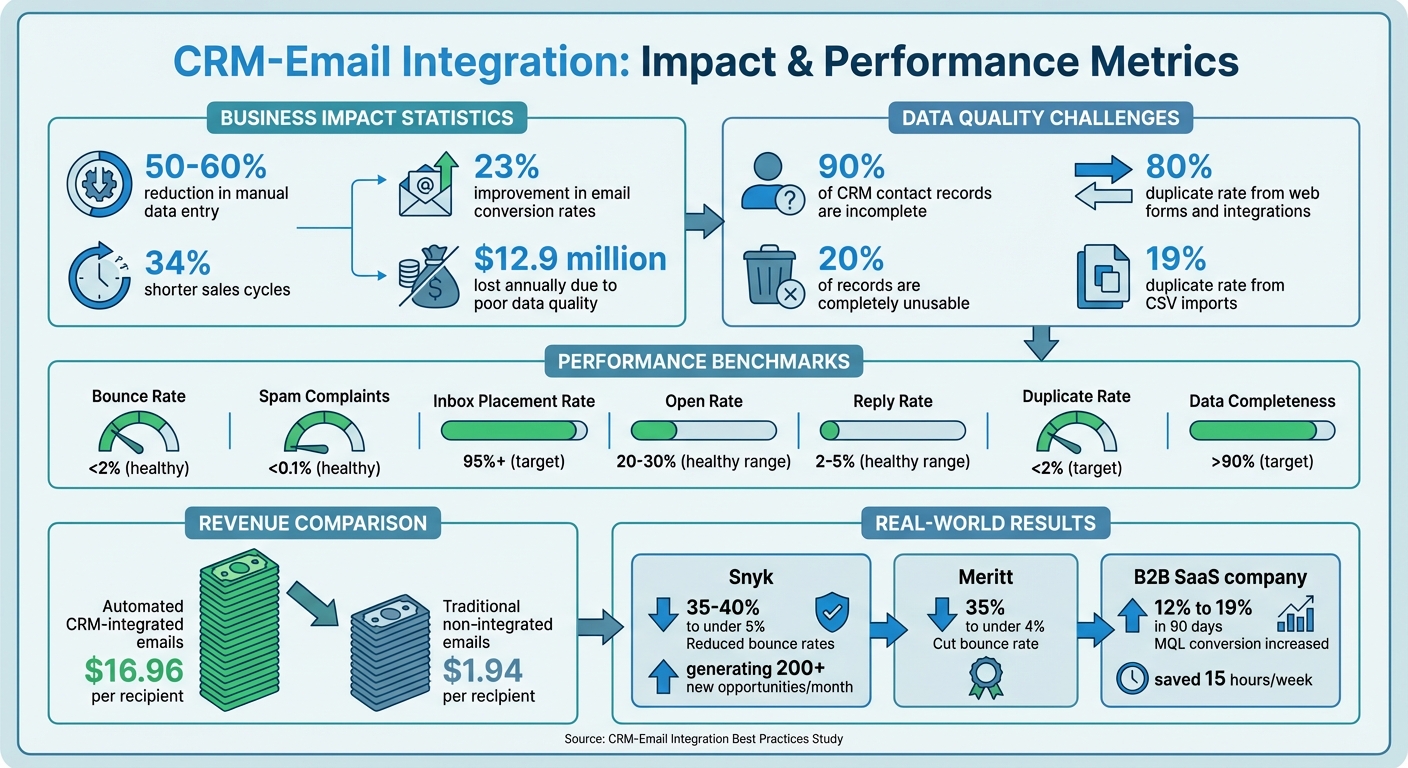
CRM-Email Integration Impact: Key Statistics and Performance Metrics
Integrating email marketing with CRM
sbb-itb-6e7333f
Getting Ready for CRM-Email Integration
To ensure a smooth CRM-email integration, thorough preparation is key. By addressing data quality, defining sync rules, and setting permissions, you can avoid common pitfalls and create a system that scales effectively.
Clean and Validate Your Data
Did you know that around 90% of CRM contact records are incomplete, and 20% are completely unusable? On top of that, B2B contact information decays by 30% annually - that’s nearly a third of your database becoming outdated every year.
Start by auditing your data to understand the scale of the problem. Check key fields like email addresses, phone numbers, and company names for completion rates. Pay close attention to duplicate records - especially since duplicates from web forms and integrations occur at an 80% rate, compared to just 19% for CSV imports. Before making any changes, back up your CRM data to preserve custom fields and relationships.
Next, tackle deduplication. Use exact matching for identical emails or domains and fuzzy matching algorithms to catch variations (e.g., "IBM" vs. "International Business Machines"). Standardize formats for company names, phone numbers (international format is ideal), job titles, and addresses. This ensures that segmentation works correctly after integration.
Real-world examples show how impactful this can be. In early 2026, Snyk used Prospeo to clean its sales team's pipeline. By implementing 7-day refresh cycles and verifying data before importing, they reduced email bounce rates from 35-40% to under 5%, generating over 200 new opportunities per month. Similarly, Meritt, a professional services firm, cut their bounce rate from 35% to under 4% by verifying email addresses before syncing them into CRM records, safeguarding their domain reputation.
"The most expensive data cleaning mistake is the one you can't undo. Always backup before you begin." – ApexVerify
To avoid creating duplicate records during integration, use "upsert" logic. This searches for existing records by email or unique ID before adding new ones. Test your field mapping and deduplication logic with a small batch of 10–50 records before running a full integration. Also, protect manually verified fields from being overwritten by automated tools.
Once your data is validated and standardized, you’re ready to set up clear data ownership and sync rules.
Set Up Data Ownership and Sync Rules
Your CRM should serve as the master record - the ultimate source of truth for all contact information. Meanwhile, your email platform should act as a specialized activity layer, reporting engagement data back to the CRM.
Start by creating a shared data dictionary. This document defines every field’s name, purpose, and allowed values across both systems, preventing issues like "field drift." For instance, one system might label a role as "CEO", while another uses "Chief Executive Officer". Consolidate duplicate fields and explicitly map custom ones. Don’t rely on default mappings - manually configure attributes like "Lead Source", "Data Provider", and "Verification Date" to ensure accurate attribution.
"The integration itself takes 15 minutes. Getting it right - field mapping, deduplication, verification before import, refresh cycles - that's where teams either build a clean pipeline or create a mess that compounds every quarter." – Prospeo Team
Decide on sync direction and frequency. A two-way, near real-time sync (updates every 5–10 minutes) ensures changes in your email client - like replies or unsubscribes - are instantly reflected in the CRM. This kind of synchronization can boost email open rates by 20%, as it allows teams to act on engagement signals immediately. Be sure to set privacy exclusions to prevent internal conversations, personal messages, or sensitive data from syncing into shared CRM records.
To maintain data integrity, restrict the ability to create or edit new fields to specific roles, such as your RevOps team. When setting up bidirectional sync, keep an eye on daily API usage limits, as syncing a single contact can consume multiple API calls.
Once your sync parameters are defined, confirm that account permissions are configured correctly for secure integration.
Check Account Permissions
Use a dedicated integration account - not a personal admin account - for connecting the systems. This account needs broad permissions to read, create, and update records in both platforms.
Grant the integration user CRUD permissions (Create, Read, Update, Delete) for core objects like Accounts, Contacts, Leads, and Activities. Set field-level security (FLS) for specific fields. For instance, "Read" access is required for account types and languages, while "Edit" access is necessary for metrics like email opens, clicks, and bounce status.
End users also need permissions to access integration features, such as email sidebars in Gmail or Outlook. Assign roles like "Content Admin" or "Approved Email Admin" to handle templates and compliance settings. Instead of using vendor-provided default permission sets, clone them and enable only the features your team needs - this simplifies training and change management.
| Permission Type | Target User | Purpose |
|---|---|---|
| System Admin / Integration User | Dedicated Service Account | Full CRUD access to sync objects and manage API calls |
| Field User / End User | Sales/Support Reps | Access to email sidebars, tracking metrics, and templates |
| Content Admin | Marketing/Compliance | Permission to approve email templates, fragments, and restricted words |
"Engagement users need active Sales or Service Cloud user accounts to access Marketing Cloud Connect functionality." – Salesforce Help
Finally, ensure that your CRM API user is properly connected to the email platform’s status field. This enables seamless cross-cloud functionality.
Creating a Sync Strategy That Scales
Once you've ensured data quality and proper permissions, the next step is to design a sync strategy that can handle enterprise-level campaigns. Your sync approach should align with your data volume, team size, and how quickly you need to act.
Pick the Right Sync Method
Start by deciding the sync direction. A one-way sync moves data from your CRM to your email platform, but it leaves gaps - your CRM won’t capture replies, unsubscribes, or engagement metrics. A two-way sync keeps both platforms updated. For instance, when a prospect replies or a deal stage changes, the updates reflect across both systems. Without this alignment, teams working with outdated data could see a 15% drop in closed deals.
Sync frequency is another critical choice. Real-time sync (updating every 5–10 minutes) allows immediate responses, such as following up after a prospect opens an email multiple times. On the other hand, batch sync (hourly or daily) creates delays that might result in missed opportunities. Companies using real-time sync have reported up to a 20% boost in email open rates.
Next, choose the integration type based on your needs:
- Native integrations: Quick to set up (15–30 minutes) and reliable, though they offer limited control over field mapping.
- Middleware tools: Platforms like Zapier or Make provide flexibility for custom workflows but charge per task, which can get pricey if you're syncing thousands of records daily.
- Custom API integrations: These offer full control and bidirectional sync but require 2–4 hours of setup and careful monitoring of API limits.
Keep an eye on your API usage. High-volume syncing can quickly eat into API call limits. For instance, syncing one contact between HubSpot and Salesforce may use up to 4 API calls per record. Syncing 5,000 contacts daily could mean 20,000 API calls - enough to hit daily limits.
| Integration Type | Setup Time | Sync Direction | Field Mapping | Best For |
|---|---|---|---|---|
| Native | 15–30 min | One-way | Limited | Small teams; simple outbound |
| Middleware | 1–2 hours | Configurable | Full control | Multi-tool stacks; custom routing |
| Bidirectional/API | 2–4 hours | Two-way | Full control | Enterprise/RevOps; full attribution |
"Success isn't determined by the software you buy; it's determined by the blueprint you create before you ever click 'connect.'" – Trent Little, Evenbound
Once you've selected your sync method, test your configurations thoroughly to ensure everything works as intended.
Test and Document Field Mapping
Start by testing with 10 sample records that represent a mix of data types: new leads, existing customers, and edge cases like international phone numbers or special characters. Manually trigger the sync and check every field in both systems. Look out for issues like duplicate entries, broken personalization tokens, or incorrect mappings.
To prevent errors and misalignment, document your field mappings in a clear, four-column table that includes:
- Source Field: Where the data originates.
- Destination Field: Where it’s being sent.
- Field Type: The format or data type.
- Transformation Logic: Any changes applied during the sync.
For example, if your email platform labels a contact as "Engaged" but your CRM uses "Marketing Qualified Lead", note that transformation. This documentation helps prevent "field drift", where fields gradually fall out of sync. Pay special attention to custom fields like "Lead Source", "Data Provider", "Last Open Date", and "Verification Date", as these are essential for tracking ROI and ensuring data accuracy.
Test for looping triggers, which occur when an update in one system causes a chain reaction of updates between platforms, potentially overloading your API calls. Always run these tests in a sandbox or developer trial environment to avoid disrupting live data.
"Mismatched field naming between systems is one of the most common causes of CRM sync failures - and it's invisible until it's causing real problems." – Alex Berman
Finally, flag required fields in your destination system. For example, if your CRM mandates a "Company Name" but your email platform allows this field to be blank, the sync could fail without warning. Standardize these fields before connecting your systems to avoid such roadblocks.
Managing Data Quality and Security
For enterprise-level scalability, maintaining strong governance and security is just as important as syncing data efficiently. Once you've established a syncing strategy, the next step is ensuring that data across platforms remains clean and secure. Consider this: $12.9 million is lost annually due to poor data quality, and 76% of CRM users admit that less than half of their data is accurate or complete. Without strict governance, your integration could end up being a source of errors instead of actionable insights.
Create Data Governance Rules
Data governance is like a safety net - it keeps your data organized and accurate. Start by standardizing formats for names, phone numbers, and addresses before they even enter your system. For categories like "Industry" or "Lead Source", use picklists instead of free-text fields to avoid spelling inconsistencies. For example, a dropdown ensures your team doesn’t enter "CEO", "Chief Executive Officer", and "C.E.O." as separate values.
Assign data stewards to oversee quality in marketing, sales, and customer success. A data dictionary is another key tool - it defines each field’s name, purpose, and allowable values so everyone speaks the same "data language". This can help avoid sync issues, like when one platform uses "Engaged" while another expects "Marketing Qualified Lead."
"Governance is the system of policies, roles, and metrics that ensures cleaning - and everything else - happens consistently." – Prospeo Team
Deduplication is another critical area. Keep duplicate records below 5% by implementing oversight. Establish data lifecycle policies to guide how records are created, maintained, archived, and deleted, ensuring compliance with regulations like GDPR and CCPA. Remember, contact data decays at a rate of 20–30% annually because people change jobs, so setting up automatic enrichment workflows is essential.
| CRM Governance KPI | Target Metric | Impact of "Bad" Data |
|---|---|---|
| Duplicate Rate | <2% | >5% inflates pipeline and skews reports |
| Data Completeness | >90% | <70% leads to reps fabricating data |
| Email Bounce Rate | <2% | >5% damages sender reputation |
| Contact Decay Rate | <5% per quarter | >8% indicates enrichment is not running |
Beyond governance, protecting your data is equally important. Centralized access and control are key to keeping customer information secure.
Keep Customer Data in One Place
Centralizing customer data makes real-time segmentation and personalization possible, which can significantly boost results. For example, companies with integrated systems experience an average 23% improvement in email conversion rates.
Use Role-Based Access Control (RBAC) to limit who can view, edit, or export sensitive customer data. Clearly define permissions and document retention policies, including how long data is stored and how deletion requests are handled. If you're emailing European contacts, you'll also need documented processes for handling "right to be forgotten" requests under GDPR.
Adopt a zero-trust architecture, which requires continuous authentication for every data access request. This approach evaluates risk factors like device security, network conditions, and user behavior. Unlike older perimeter-based security models, zero-trust is better suited for distributed work environments. If AI tools are interacting with your CRM data, set up specific "write permissions" and audit trails for these non-human actors.
Track Sync Logs and System Performance
Keep a close eye on your sync status with real-time dashboards to catch errors immediately. For critical data, even a delay of a few minutes can be unacceptable. Monitor API usage and set up alerts for sync failures, nearing API limits, or bounce rates exceeding 2%.
Make it a habit to review sync logs weekly to spot recurring issues. Look for field mapping errors where data isn’t transferring due to mismatched formats. Watch out for partial visibility issues, such as emails not appearing in your CRM because of incorrect filter settings. Use audit trails to verify that data remains accurate and compliant throughout the syncing process.
Incorporate data quality metrics into your weekly sales and marketing operations meetings to ensure accountability. Track key metrics like bounce rates, spam complaints, inbox placement rates, and lead scoring accuracy. High-performing teams aim for an inbox placement rate of 95% or higher and spam complaints below 0.1%. If these numbers dip, dig into the sync logs to determine whether the root cause is dirty data, configuration errors, or API throttling.
Scaling Your Integration for Growth
Once you've established solid data and sync foundations, the next step is scaling your integration effectively. This requires the right combination of tools, automation, and skilled teams to ensure your systems can handle growth without faltering. As your contact database grows and email volumes rise, having scalable infrastructure and capabilities becomes essential.
Use Tools Built for Scale
Not all platforms are built to handle enterprise-level data volumes. For instance, Salesforce is widely regarded as the gold standard for enterprises, while HubSpot is often chosen for its ability to align marketing and sales efforts seamlessly. If you're working in environments with strict compliance requirements, tools like ZoomInfo (enterprise contracts typically range from $15,000 to $40,000 annually) and Cognism (usually between $1,000 and $3,000 monthly) are designed to manage millions of records effortlessly.
A two-engine architecture can be a game-changer for scaling outreach while protecting your domain reputation. In this setup, your CRM functions as the "System of Record", while dedicated outreach tools like Instantly or Salesforge serve as the "System of Action". This separation allows you to bypass CRM sending limits and scale outreach across multiple mailboxes without putting your primary domain at risk. For example, in March 2026, UniteSync implemented this strategy with Salesforge, achieving an impressive 85.26% positive reply rate and onboarding 4–5 new creators daily.
For operations handling large volumes, bidirectional API sync becomes indispensable. Unlike one-way native imports, bidirectional sync ensures real-time updates for activity logs, stage changes, and ownership updates across systems.
Once you've established scalable tools, the next step is to automate repetitive processes to boost efficiency.
Automate Repetitive Tasks
Automation is the key to maintaining scalability as your operations grow. By setting up behavior-based triggers, you can respond to buying signals instantly. For instance, if a prospect opens your pricing email three times without replying, an automated workflow could create a task for a follow-up call. In early 2026, a B2B SaaS company with 8,000 contacts implemented a five-email automated nurturing sequence with conditional workflows based on engagement. Within just 90 days, their MQL conversion rate increased from 12% to 19%, while automation saved 15 hours per week of manual work.
Automated reply handling can also streamline workflows. AI agents can categorize responses (e.g., "Interested" or "Meeting Requested") and sync only qualified leads to your CRM, preventing unnecessary data clutter and keeping the sales team focused on high-value opportunities. For contact enrichment, consider using waterfall enrichment tools like Clay, which pull data from multiple vendors in sequence to maximize coverage for extensive lead lists. Additionally, automated warming tools can gradually increase email outreach volumes, safeguarding your sender reputation.
Train Your Team
Scaling your integration isn't just about tools and automation - it also requires a well-trained team. Role-based training ensures that sales reps learn the features they need, while marketing specialists focus on tools relevant to their workflows. Assigning power users as internal champions can also help drive adoption and provide support without overwhelming your IT team.
To support your team, set up a dedicated help channel (e.g., "#CRM-Helpline") for quick assistance. Incorporate CRM training into one-on-one meetings during the first six months post-integration. Provide resources like video tutorials, quick-start guides, and FAQs that are accessible 24/7 for troubleshooting. Regular retrospective meetings can also help gather feedback on what’s working and what needs improvement.
"Training and enablement... is a marathon, not a sprint." – Keap
Standardizing data entry practices is another critical step. A shared data dictionary can define how fields like "Lead Status" should be used across platforms, preventing automation errors and ensuring consistent communication. To encourage team engagement, consider measuring and rewarding metrics like monthly active users and feature adoption.
For more guidance on selecting email marketing platforms that integrate seamlessly with your CRM, check out the Email Service Business Directory (https://emailservicebusiness.com) for a curated list of enterprise-ready options.
Keeping Your Integration Running Smoothly
Once your CRM-email integration is set up, the real work begins. Keeping it running efficiently requires consistent monitoring and regular maintenance to avoid disruptions and missed opportunities. By staying proactive, you can ensure your system remains effective and continues to deliver results.
Monitor Performance Metrics
To keep your integration on track, start by keeping an eye on key performance metrics. One of the most critical indicators is sync lag - data should sync every 5–10 minutes at most. If syncing takes longer, it could skew lead scoring by as much as 30%, potentially delaying timely follow-ups. Set up alerts to notify you about sync failures or delays, especially for high-priority leads.
Deliverability metrics are equally important. Aim to keep your bounce rate below 2% and spam complaints under 0.1%. Strive for an inbox placement rate of 95% or higher; a sudden dip in open rates often points to deliverability problems rather than weak content. For example, if your emails show a 25% open rate but only a 1% reply rate, it’s a sign that, while your subject lines are compelling, the email body or call-to-action might need tweaking. Weekly log audits can help you spot silent errors before they escalate into bigger problems.
"Once I had it set up and was sending, I saw excellent open rates with high deliverability. But when I saw the high number of opened emails, I was able to hone in on my calling campaigns even further." – Tim Savage, CEO, Net New Solutions
| Metric Category | Key Indicator | Healthy Benchmark |
|---|---|---|
| Deliverability | Bounce Rate | < 2% |
| Deliverability | Spam Complaints | < 0.1% |
| Engagement | Open Rate | 20–30% |
| Engagement | Reply Rate | 2–5% |
| Integration | Sync Frequency | Every 5–10 minutes |
Run Regular Data Audits
Did you know that B2B contact data decays at a rate of 30% annually due to job changes and company shifts? That means your once-clean database can become outdated surprisingly fast. Poor CRM data can cost businesses up to 12% of their annual revenue, so regular audits are a must.
Start by using CRM reports to identify problem areas like incomplete fields, duplicate records, or inconsistent formatting. Set measurable goals: keep duplicate rates under 2%, ensure 95% completion for critical fields (like email and phone), and confirm that 100% of contacts have documented consent. To reduce errors, create a shared "Data Dictionary" that clearly defines each field’s purpose and acceptable values. Assign a Data Steward to oversee quality, review weekly scorecards, and handle complex merge decisions.
| Maintenance Cadence | Task | Tool Example |
|---|---|---|
| Daily | Duplicate detection on new records | CRM native rules |
| Weekly | Data quality scorecard review | CRM dashboard |
| Monthly | Email verification sweep on active lists | NeverBounce / ZeroBounce |
| Quarterly | Full database enrichment and deduplication pass | Apollo / ZoomInfo |
Once your data is cleaned up, use these insights to refine your integration strategy.
Update Your Strategy Based on Results
Your performance data should guide your next steps. Companies that use integrated CRM-email tools report a 23% boost in email conversion rates and a 34% reduction in sales cycle length. To achieve similar results, conduct monthly analytics audits to identify which email sequences are driving meetings and which customer segments are the most responsive. Experiment with A/B testing on subject lines, calls-to-action, and email formats to find what works best. Regular sync meetings between sales and marketing can also uncover workflow issues that metrics alone might not reveal.
Every three months, review your field mappings to make sure your CRM data is triggering the correct email segments. This ensures your integration stays aligned with your overall strategy. Clean, synchronized CRM data can significantly boost results - automated email workflows generate nearly nine times more revenue per recipient ($16.96) compared to standard, non-integrated emails ($1.94). Use behavioral triggers like website visits or document downloads to adjust your email content and timing dynamically, keeping your outreach relevant as buyer behavior changes.
For a list of email platforms that integrate seamlessly with your CRM, visit the Email Service Business Directory.
Conclusion
Scaling CRM-email integration creates a system that evolves alongside your business. The key to success lies in preparation, proper governance, and consistent upkeep. By following these practices, businesses can cut manual tasks by 30% and increase closed deals by 15%.
The numbers speak for themselves. Automated email workflows powered by synchronized CRM data deliver $16.96 per recipient, compared to just $1.94 for traditional, non-integrated emails. However, achieving these outcomes requires careful planning and regular updates. B2B contact data, for example, deteriorates at a rate of 30% annually. Without frequent audits and updates, what works today could fail to deliver results in just a few months.
To stay ahead, focus on the essentials: keep your data clean, explicitly map each field, and set sync intervals of 5–10 minutes for critical engagement. Then, scale your efforts by leveraging automation and establishing strong governance. AI-powered tools can take care of repetitive tasks, while a shared data dictionary ensures consistency across teams and prevents field misalignment.
The benefits are undeniable. Integrated systems can slash manual data entry by 50–60% and boost email conversion rates by an average of 23%. Regular reviews are essential to maintain these efficiencies over time. With real-time visibility into engagement signals, your sales team can act quickly while prospects are still engaged. Whether you're managing 1,000 or 100,000 contacts, these best practices ensure your CRM-email integration drives revenue instead of causing operational headaches.
For a list of email platforms that integrate seamlessly with top CRM systems, check out the Email Service Business Directory.
FAQs
What data should be the “source of truth” in a CRM-email integration?
The CRM system acts as the central hub - or the "source of truth" - in any CRM-email integration. It stores the most accurate, centralized data about contacts, leads, and interactions. This setup ensures consistency across platforms and helps eliminate duplicate records, keeping everything streamlined and reliable.
How can we avoid duplicates and sync loops as we scale?
To avoid duplicates and sync loops when integrating CRM and email systems on a larger scale, it's crucial to establish clear deduplication rules and implement a smart refresh schedule. Start by ensuring accurate field mapping and applying robust deduplication logic. Additionally, verify the data thoroughly before importing it into your system. These steps help maintain clean records, preserving data integrity and preventing issues like duplicate contacts or continuous sync cycles as your systems expand.
What should we monitor to catch sync and deliverability issues early?
To stay ahead of potential sync and deliverability problems, keep an eye on critical email metrics like delivery rates, inbox placement, and sync delays. Regular monitoring ensures your emails consistently land in inboxes and your data remains accurate, minimizing mistakes and missed chances.