A crisis email should do 6 things fast: state the issue, confirm the impact, name who is affected, tell people what to do now, point to one source of truth, and promise the next update time.
If I were using this guide, I’d treat every template as a draft only. The article’s main point is simple: verify first, send second. That matters even more for data issues, public complaints, and leadership changes, where one wrong line can create legal, customer, or board-level problems.
Here’s the short version of what the article covers:
- Before any send: check the audience, impact, action needed, approver, support contact, source link, and next update time
- For outages: lead with user impact, not root cause, and keep update times fixed
- For delays: give a confirmed new date or a tight date range
- For data issues: separate what is confirmed, suspected, and unknown
- For public complaints: acknowledge the concern and move the case to a private channel
- For leadership changes: keep the note brief, factual, and focused on continuity
- For all cases: change the wording by stakeholder group, but keep the facts the same
A few numbers stand out in the piece. It says customer-facing outage notices should often go out within 10 to 15 minutes of detection, with updates every 30 to 60 minutes during active incidents. It also notes that some covered FTC notices can be due within 30 days, and some public-company leadership disclosures may be due within 4 business days.
What I like about the article is its risk-based lens. A minor service problem may need only a team lead signoff. A high-risk issue may need review from legal, privacy, security, communications, and executives before anything external goes out. So the real takeaway is this: the higher the risk, the narrower the claims and the tighter the approval path.
If you want one rule to remember, it’s this: send short, verified, audience-specific, action-focused emails with a clear next update time.
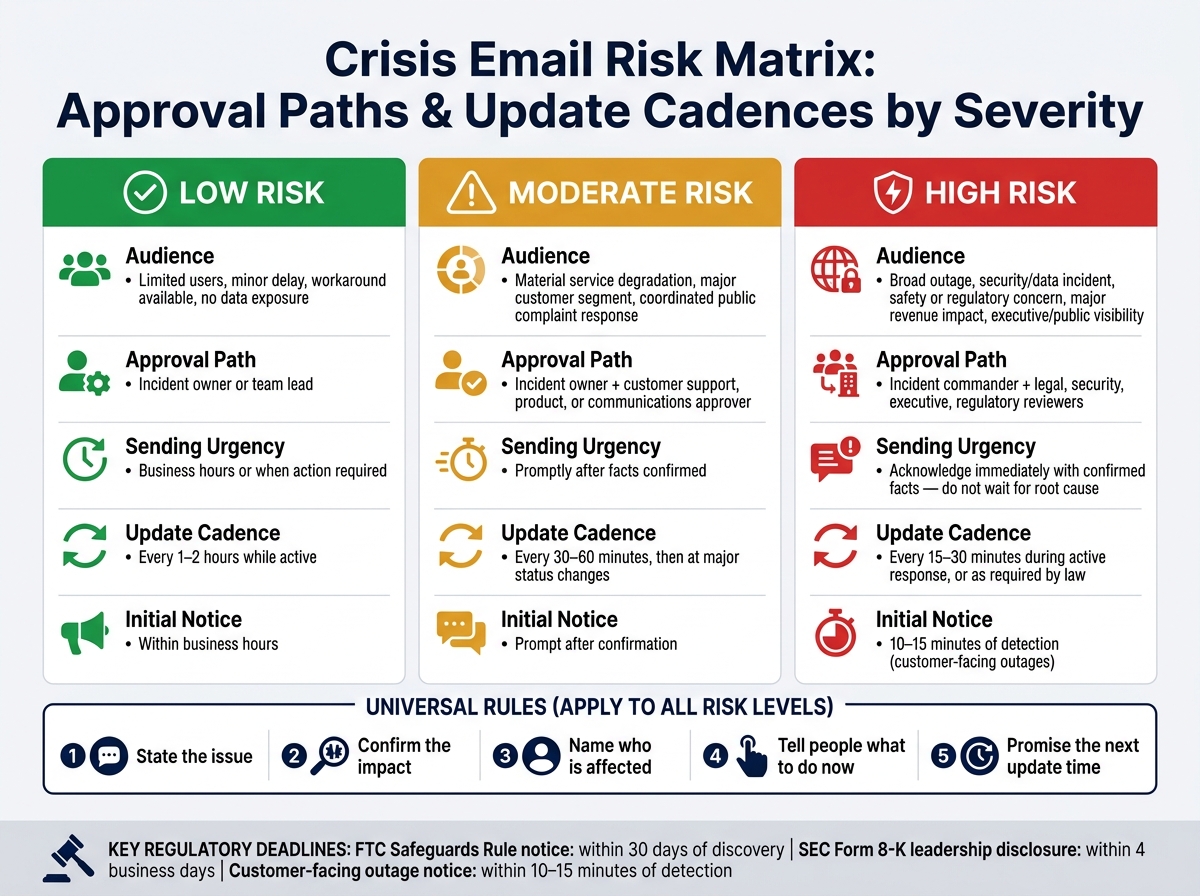
Crisis Email Risk Matrix: Approval Paths & Update Cadences by Severity
227: How to Write the Crisis Communication Plan You Need Right Now
sbb-itb-6e7333f
Outage and service delay email templates
Start with outages first, because when service is down, speed and steady updates matter most.
Use these templates once the issue is confirmed and the message needs to go out fast. Each note should spell out what the outage means and what the recipient should do next. Customers, employees, partners, and executives all need the same facts, but not the same emphasis.
Service outage email template
Start with the user impact, not the root cause. PagerDuty says to acknowledge a customer-facing issue within 10 to 15 minutes of detection and use a 30-minute baseline for updates during major outages. Atlassian also says not to go more than one hour without an update while customers are still affected. Share only facts you’ve confirmed.
Subject: Service disruption affecting [service] - next update by [time] [time zone]
Hello [customer/team/partner name],
We're investigating an outage affecting [service or feature] that began at approximately [time and date, time zone]. [Describe the user impact in one sentence.]
Our response team is [investigating / working on mitigation / monitoring recovery]. [Include a verified workaround here, or write: No verified workaround is available yet. Do not keep retrying.]
We will send the next update by [time and date, time zone], even if there is no material change. Follow current status at [official status page URL]. For urgent help, contact [support channel].
We're sorry for the disruption, [Name] [Role/team]
Don’t promise a fix time. Use status labels like Investigating, Identified, or Monitoring recovery. Keep the same incident name or reference ID in every update so people can follow the thread without guessing whether it’s a new issue.
Use the same incident facts for everyone, then adjust the message by audience.
| Audience | Primary information | Suggested cadence | Owner |
|---|---|---|---|
| Affected customers | User impact, workaround, support route, next update | Initial notice; every 30–60 minutes while active | Customer communications or incident lead |
| Employees | Talking points, operational impact, escalation instructions | At detection and when material facts change | Incident commander or internal communications lead |
| Partners and integrators | Affected APIs, transaction impact, coordination contact | Immediate for shared systems; aligned with incident changes | Partner operations or technical account owner |
| Executives or investors | Business exposure, mitigation status, decision needs | At detection, after material developments, at agreed intervals | Incident commander or executive communications |
The update rhythm should match the risk.
For low-risk issues - limited scope, a known workaround, no contractual impact - notify affected users and send another update when the status changes. For moderate-risk disruptions, notify customers, support staff, and relevant leaders every 30 to 60 minutes. For high-risk incidents - full outages, revenue-critical failures, or anything with legal or regulatory consequences - coordinate communication across all affected groups, update at least every 30 minutes, and get legal, security, and executive review before making any claims about cause or liability.
If the problem is timing rather than availability, switch to a delay message.
Service delay email template
Use this version when the service still exists, but delivery or completion is slipping.
A delay email should explain the timing impact in plain English. Give a confirmed revised date or a clear date range.
Subject: Update on [order / project / delivery / service]
Hello [name],
The [order / project / delivery / service] originally expected by [original date or time] is delayed. This means [specific consequence].
We now expect [revised date or time]. If timing is not yet confirmed, write: We are still confirming the revised timing and will update you by [date and time, time zone].
Your options are [continue with the revised timing / choose alternative A / cancel for a refund or credit / contact support]. Next update: [date and time, time zone].
We apologize for the disruption, [Name] [Role/team]
Use U.S. date and time formatting throughout, and include the time zone for audiences across more than one region.
Here too, match the update level to the size of the delay and the business impact.
| Delay level | Typical example | Message content | Owner |
|---|---|---|---|
| Low risk | A shipment or routine milestone slips one business day with little downstream impact | Confirmed new timing, brief explanation, and support contact | Operational owner |
| Material delay | A delivery or implementation milestone slips several days and may affect staffing or service-level expectations | Notify all affected stakeholders; explain the immediate consequence; offer alternatives; state the next update time | Operations, account management, legal or contract owner as appropriate |
| High risk | Delay creates contractual penalties, safety concerns, financial exposure, or regulatory consequences | Notify affected parties promptly; avoid unsupported estimates; document options, approvals, and decision deadlines | Executive incident lead plus legal, compliance, safety, or finance teams as applicable |
Data issue and public complaint email templates
When the issue is legal or reputational - not day-to-day operations - keep the message short and lock down approvals. Data issues and public complaints carry the most legal and reputational risk, so they need tighter review before anything goes out.
Data issue email template
Before you draft, confirm the detection time, affected systems, data categories, scope, containment, current risk, and next update. Then mark every statement as confirmed, suspected, or unknown:
- Detection time: When was the issue identified?
- Affected systems: Which systems or services are involved?
- Data categories: What type of information may be affected?
- Impact scope: How many people, in which locations?
- Containment: What steps have been taken?
- Current risk: What is the risk to affected individuals right now?
- Next update: When is the next scheduled update?
Send the draft through incident, security, privacy, legal, and communications approvers. Add compliance or executive review if needed.
Use the subject line Important update regarding [account or service] until the incident state is fully confirmed. Keep it neutral. Then change only the factual status language based on where the review stands:
| Incident state | Permitted certainty | Required review | Recipient action | Update cadence |
|---|---|---|---|---|
| Suspected issue | Use language such as: We identified activity that may have affected…; do not call it a breach or exposure | Security, privacy, and legal review before external distribution | No action unless specifically requested; direct recipients to a verified support channel | Next update by a specific date and time, such as October 2, 2026, by 3:00 p.m. ET |
| Contained incident | Use language such as: We contained the activity and are investigating whether information was accessed or acquired | Incident lead, security, privacy, and legal review | Require only validated protective steps, such as changing a password if risk supports it | Update at a stated interval, such as every 24 hours |
| Confirmed exposure | State what information was involved, who may be affected, when exposure occurred if known, and what the organization is doing | Privacy counsel, legal, security, compliance, and relevant regulators or customers | Give clear steps, support contacts, monitoring or credit-protection details, and deadlines | Update when material facts change and at the promised cadence |
| Resolved incident | State that remediation is complete only if the responsible technical and legal owners confirm it | Final security, privacy, legal, and communications approval | Explain remaining precautions, support availability, and where to obtain the post-incident update | Provide a final notice plus a route for later questions |
Say "we have found no evidence of unauthorized access as of [date and time]" only if that statement is true.
Subject: Important update regarding [account or service]
We are investigating [brief, verified description of the issue] identified on [Month Day, Year].
At this time, we have [contained the activity / not yet confirmed whether information was accessed]. Our investigation is assessing [systems, records, or information categories, if verified]. We will not speculate while that review is underway.
Please [specific recipient action]. We will provide our next update by [date and time, including time zone] at [approved support channel or incident-information page].
Questions can be directed to [dedicated contact]. Please do not send passwords, payment details, or other sensitive information by email.
[Name] [Role/team]
Use the same core message, but shape it for the audience. Affected individuals need personal impact, information categories, and protective steps. Employees need approved talking points, escalation routes, and confidentiality instructions. Partners need coordination contacts and scope details. Executives, investors, or regulators need the validated timeline, affected populations, legal duties, controls, decisions needed, and confidence level.
For regulated incidents, the email should point people to the approved notice process, not stand in for it. Put details on a controlled incident page. Keep any legally required notice in the right channel and timeline. The FTC Safeguards Rule requires covered financial institutions to notify the FTC as soon as possible and no later than 30 days after discovery of certain notification events involving unauthorized acquisition of unencrypted customer information affecting at least 500 consumers. That deadline does not replace other federal, state, sector-specific, or contractual requirements.
Public complaint email template
If the issue is already public but still unverified, use a holding reply instead of a disclosure notice.
A public complaint reply has one job: acknowledge the concern without confirming facts you have not verified. Move the case into a private channel.
Subject: We're reviewing your concern about [issue]
Thank you for raising this concern. We are reviewing the details and want to understand what happened. We cannot investigate account-specific information in a public forum. Please contact [verified private channel] with your case number, approximate date and time, and a description of the issue.
We will acknowledge your private message within [time period] and provide an initial response by [specific date and time]. Please do not include passwords, payment-card numbers, Social Security numbers, or other sensitive information.
[Name] [Role/team]
If the complaint is already public, do not repeat personal information, argue with the complainant, guess at the cause, or promise an outcome before review. Route the case based on its actual risk level:
| Format | When to use | Who approves |
|---|---|---|
| Private reply | Individual or account-specific complaint | Customer support; escalate when risk indicators appear |
| Public holding statement | Complaint is visible but facts are incomplete | Communications plus the relevant operational owner; legal review for high-risk allegations |
| Formal stakeholder update | Confirmed or potentially material issue affecting customers, partners, regulators, or investors | Incident leadership, security, privacy, legal, compliance, and executive approval as applicable |
Keep one approved fact record across support, social, communications, and leadership. A holding statement is not a substitute for a legally required notice. If notice duties exist, they run on their own timeline no matter what has been said in public.
Leadership change email template and stakeholder mapping
Leadership changes create reputation and governance risk, not day-to-day operating risk. So the email should stay factual, brief, and centered on continuity.
Leadership change email template
Before you send anything, verify the change. Check that the effective date is right, the successor or interim leader has formally accepted the stated authority, and the wording has approval from the board, legal, HR, and communications.
For public companies, SEC Form 8-K Item 5.02 generally requires disclosure of certain covered executive departures or appointments within four business days. That filing should line up with the stakeholder email.
If the crisis is about who is in charge, tighten the message even more. Focus on authority, continuity, and the official source of truth.
Use "Leadership update at [Company]" as the subject line. Avoid "urgent" unless people need to act right away.
Subject: Leadership update at [Company]
Hello [audience],
We're sharing a leadership update at [Company]. Effective [Month Day, Year], [departing leader] will [step down from / leave] the role of [title]. [Successor or interim leader], currently [approved role description], will serve as [title] effective [date].
Our operations, customer commitments, and priorities continue as planned. During this transition, [person or team] will own decisions regarding [specific functions]. Please direct questions to [approved contact or team] and rely on [company newsroom, investor-relations page, or designated email address] for official updates.
Next update by [date or milestone].
Thank you, [Authorized sender] [Title]
If the reason for departure is confidential, use this language: [Name] is leaving the role effective [date]. We appreciate [Name]'s contributions and will not comment on personnel matters. Do not use cause language unless legal and the departing leader approve it.
The message changes in a meaningful way based on the situation. Match the wording to the type of leadership change.
| Scenario | Announcement timing | Continuity information | Main stakeholder risk |
|---|---|---|---|
| Routine succession | Coordinate with the effective date, internal briefing, and any required public filing | Planned transition, successor's authority, unchanged priorities | Premature disclosure before employees, customers, or investors are briefed |
| Unexpected departure | Send only after facts, authority, and interim ownership are confirmed | Interim decision-maker, escalation route, next update time | Rumors, perceived instability, inconsistent explanations across channels |
| Leadership change during an active crisis | Coordinate with the incident-communications cadence; send only when it clarifies accountability | Confirm incident commander, service-restoration ownership, and update channel | Stakeholders may interpret the change as evidence that response ownership is unclear |
Use the same facts in every version. Change only the ownership line and contact path for each audience.
If the change happens during an active incident, lead with incident ownership: The service-restoration team remains led by [incident commander]. [Interim executive] will oversee executive decisions, while technical updates will continue at [official channel]. Do not mix unverified leadership speculation with outage, security, or data-issue details.
A note on email delivery tools and platform selection
These messages only work if the send process is controlled just as tightly as the wording.
Crisis sends require segmentation, approval controls, audit trails, and deliverability monitoring. Email Service Business Directory lists platforms, tools, and agencies that support those needs.
Conclusion: A reusable checklist for risk-based send decisions
Use the templates above with this final send check. Across every crisis email in this guide, the rule stays the same: keep it short, verified, audience-specific, action-oriented, and time-bound.
Severity matrix for send decisions
As risk goes up, the audience should get smaller and approvals should get tighter. Make the send decision based on impact, urgency, scope, and the action people need to take - not the incident label. Then adjust the threshold for SLAs, contracts, regulatory duties, and operational dependencies. Send updates only to the people who need the information or need to act.
| Risk level | Typical audience and scope | Approval path | Sending urgency | Update cadence |
|---|---|---|---|---|
| Low | Limited users or a minor delay; workaround available; no evidence of data exposure | Incident owner or team lead | Send during business hours or when action is required | Every 1-2 hours while active, or at agreed intervals |
| Moderate | Material service degradation, a major customer segment, or a public complaint that needs a coordinated response | Incident owner plus customer-support, product, or communications approver | Send promptly after facts are confirmed | Every 30-60 minutes, then at major status changes |
| High | Broad outage, suspected security or data incident, safety or regulatory concern, major revenue impact, or executive/public visibility | Incident commander plus legal, security, executive, or regulatory reviewers as needed | Acknowledge at once with confirmed facts; do not wait for root cause | Every 15-30 minutes during active response, or as required by law and operations |
Key points to carry into every incident
Before you send anything, confirm the impact, audience, approved facts, required action, owner, cadence, source of truth, and backup channel.
After the incident is resolved, save the approved versions, segments, send times, approvals, source links, delivery results, and any channel changes. Then review a few basics: did the right audiences get contacted, were the facts and timestamps correct, did you keep the next-update promise, and did stakeholders take the intended action? NIST recommends preparing an after-action report that documents the incident, response and recovery actions, and lessons learned. Use that review to update templates, routing rules, approval paths, and tabletop exercises.
FAQs
Who should approve a crisis email before it goes out?
Assign a single point of contact for all external communication so the company speaks with one voice and avoids mixed messages.
Before any email goes out, have the incident response team review it. That should include the communications or PR lead, legal counsel, and the right executives. Legal checks liability and compliance. Communications shapes and coordinates the message.
For high-impact or sensitive operations, use multi-user authorization so a second user must approve the email before it’s sent.
How often should we send updates during an outage or data issue?
Update frequency should match the severity of the incident.
For SEV-1 issues - like a full service outage - send updates every 15 to 30 minutes. For SEV-2 issues - like major performance problems - send updates every 30 to 60 minutes. Lower-priority issues only need updates when there’s something new to share or when stakeholders need a check-in.
It also helps to assign one point of contact to handle communications. That keeps messaging clear, steady, and consistent for everyone involved.
How do we change the same message for customers, employees, and executives?
Tailor the same crisis message so each group gets what they need - no more, no less.
- Executives: focus on business impact, risk exposure, and expected recovery timeline
- Employees: give direct instructions, explain process changes, and spell out how daily work will change
- Customers: offer a clear, honest explanation, show empathy, and outline support or fix steps
Use engagement data to shape the level of detail. For more advanced audiences, include deeper technical context. For general audiences, keep the language simple and easy to scan.