Email is the top entry point for cyberattacks, with 94% of breaches starting there. Default protections from Microsoft 365 or Google Workspace often fall short, leaving enterprises vulnerable to threats like phishing, spoofing, and data breaches. This guide breaks down how to build stronger email defenses tailored to enterprise needs.
Key Takeaways:
- Authentication Protocols: Use SPF, DKIM, and DMARC to prevent spoofing and phishing.
- Encryption: Combine TLS and S/MIME for secure communication.
- AI Threat Detection: Leverage AI to spot anomalies and stop advanced phishing.
- Data Loss Prevention (DLP): Monitor outbound emails to protect sensitive data.
- Employee Training: Teach staff to recognize phishing and social engineering.
A 16-week roadmap is provided to implement these strategies step-by-step, covering everything from quick fixes like enabling MFA to advanced measures like AI-powered threat detection. Start by assessing your current security setup, then follow the outlined phases to strengthen your defenses. These practices help mitigate risks, reduce costs, and ensure compliance with regulations like GDPR and HIPAA.
Is Your Business Email ACTUALLY Secure in 2025?
Email Authentication Protocols
Email authentication protocols are essential in combating domain spoofing and phishing attacks. With over 90% of email attacks involving some form of spoofing, these protocols are a must-have for any organization's security strategy. The three key protocols - SPF, DKIM, and DMARC - work in tandem to provide a layered defense. As Microsoft explains:
Anything less than all of the email authentication methods results in substandard protection.
Setting Up SPF, DKIM, and DMARC
SPF (Sender Policy Framework) is a DNS-based tool that specifies which IP addresses and servers are authorized to send emails on behalf of a domain. While it validates the envelope sender (the Return-Path used for routing), it doesn’t verify the visible "From" address shown in the recipient’s inbox, making it an incomplete solution on its own.
DKIM (DomainKeys Identified Mail) adds a digital signature to email headers using public-key cryptography. This ensures that the message content hasn’t been tampered with during transit and confirms that it originates from the claimed domain.
DMARC (Domain-based Message Authentication, Reporting, and Conformance) builds on SPF and DKIM by enforcing domain alignment. It ensures that the domain in the visible "From" address matches the domain authenticated by SPF or DKIM. DMARC policies include three options:
- p=none: Monitoring only
- p=quarantine: Sends failed messages to the spam folder
- p=reject: Blocks failed messages entirely
| Feature | SPF | DKIM | DMARC |
|---|---|---|---|
| Primary Function | Authorizes sending servers/IPs | Verifies message integrity | Enforces domain policies and alignment |
| Verification Method | IP address check against DNS | Cryptographic digital signature | Checks alignment between headers and SPF/DKIM |
| Forwarding Compatibility | Poor (often breaks during relay) | Excellent (signature remains valid) | N/A (relies on SPF/DKIM results) |
| Reporting | None | None | Comprehensive (aggregate and forensic reports) |
| Policy Enforcement | Limited | None | Robust (None, Quarantine, Reject) |
SPF and DKIM complement each other. For example, if SPF fails due to email forwarding, DKIM can step in to validate the message for DMARC. Adopting a strict DMARC policy (e.g., p=reject) can improve email deliverability by more than 10% with major providers like Gmail.
To ensure a smooth rollout, configure SPF and DKIM at least 48 hours before publishing a DMARC record to allow for DNS propagation. Make sure all third-party services are included in your SPF record and have their own DKIM selectors configured. Keep in mind that SPF records are limited to 10 DNS lookups; exceeding this limit will result in SPF failures.
Additionally, protect all domains under your control, including subdomains and parked domains that don’t actively send emails. Attackers often exploit these unused domains for spoofing purposes.
These protocols are the foundation of your email security, paving the way for enhanced monitoring and incident response.
DMARC Monitoring and Reporting
DMARC’s reporting features provide valuable insights for organizations. Start with a monitoring policy, such as:
v=DMARC1; p=none; rua=mailto:dmarc@yourdomain.com
This configuration allows you to gather aggregate reports without affecting legitimate email delivery. As noted by DMARCLY, sending emails without monitoring authentication is like "shooting in the dark".
Set up a dedicated mailbox to receive aggregate (rua) and forensic (ruf) reports. While forensic reports offer detailed insights into specific message failures, some providers, like Gmail, do not support them for privacy reasons.
Use these reports to verify and authenticate all legitimate email sources. Once all sources are confirmed, gradually increase enforcement using the pct (percentage) tag. For example, you can start with "p=quarantine; pct=10" to apply the policy to 10% of your traffic and then move toward full enforcement.
As of February 2024, Google requires DMARC (at least p=none) for senders who send more than 5,000 emails daily to Gmail addresses. This policy has reinforced DMARC’s importance in ensuring email security and deliverability. After implementing these stricter rules, Google reported a 75% reduction in unauthenticated messages in 2024.
For parked domains that don’t send emails, set a p=reject policy to prevent spoofing. Additionally, rotate DKIM keys annually to maintain cryptographic security, and conduct regular audits of your email infrastructure to identify and fix any potential misconfigurations before they impact delivery.
Encryption and Access Control
Authentication protocols determine who can send emails on your behalf, but encryption ensures what can and cannot be seen if those emails are intercepted. Without encryption, emails sent through standard SMTP are vulnerable during transmission, leaving your messages exposed. To tackle this issue, two encryption methods come into play: TLS, which secures the transmission channel, and S/MIME, which encrypts the content of the email itself.
S/MIME and TLS Encryption
TLS (Transport Layer Security) encrypts the communication channel between mail servers, keeping data safe while it’s being transmitted. Picture it as having a private conversation over a secure phone line. However, TLS has its limitations - it only works if every server involved in the email's journey supports encryption. If even one server along the path doesn’t support TLS, the message could default to plaintext.
S/MIME (Secure/Multipurpose Internet Mail Extensions), on the other hand, encrypts the actual content of the email, including attachments, ensuring security even when the message is stored on servers. As the KeyTalk Team explains:
S/MIME ensures that the outgoing email is encrypted at rest on both the outgoing and incoming side. Also called end-to-end encryption. No one can read the attachments and body text of the email unless they have the recipient's private key
. Additionally, S/MIME offers digital signatures, which verify the sender’s identity and confirm the message hasn’t been altered.
However, S/MIME comes with a trade-off: complexity. While TLS operates seamlessly at the server level, S/MIME requires users to manage digital certificates issued by a Certificate Authority (CA). Before secure communication can occur, both parties need to exchange public keys. Certificates typically expire after a year, and if one is lost, any messages encrypted with that key become permanently inaccessible.
| Feature | TLS (Transport Layer Security) | S/MIME (Secure MIME) |
|---|---|---|
| Primary Goal | Secure the communication tunnel | Secure the message content |
| Data State | Protects data in motion | Protects data at rest and in motion |
| User Effort | Low (Transparent to user) | High (Requires certificate management) |
| Non-Repudiation | No | Yes (via digital signatures) |
| Metadata Protection | Encrypts headers and subject lines | Does not encrypt headers or subject |
To bolster security, enforce TLS for all outbound emails as a baseline measure. For departments handling sensitive information - like intellectual property, legal matters, or financial data - use S/MIME for end-to-end encryption and sender verification. For maximum protection, combine both protocols: S/MIME secures the message content, while TLS encrypts metadata, headers, and login credentials during transit.
If external recipients cannot support S/MIME, consider alternatives like secure web portals where recipients can log in to view encrypted messages. This approach avoids the need for certificate management on their end, making it a practical solution for compliance-heavy communications.
Finally, complement encryption strategies with stringent access controls to prevent unauthorized account access.
Multi-Factor Authentication and Access Management
Encryption protects the content of your emails, but access controls are essential for safeguarding your accounts. Multi-factor authentication (MFA) provides an extra layer of security by requiring multiple forms of verification - typically a combination of something you know (like a password), something you have (like a phone or security key), and sometimes something you are (like a fingerprint).
Start by disabling outdated authentication protocols such as Exchange ActiveSync, which rely on basic authentication and can bypass MFA altogether. Implement Conditional Access policies to enforce MFA for specific applications like Office 365 Exchange Online, particularly when users access email from unmanaged devices or guest accounts. You can also use mailbox policies to restrict actions like downloading or printing email attachments in Outlook on the web.
To further tighten security, require users to access email through approved mobile apps like Microsoft Outlook for iOS and Android, which support modern authentication and app protection policies. For guest users accessing shared files or team channels, apply Conditional Access policies to ensure they meet your security criteria before granting access. Additionally, configure outbound spam policies to disable automatic email forwarding to external addresses, reducing the risk of data leaks from compromised accounts.
These access controls work in tandem with encryption. Even if attackers manage to intercept encrypted emails, they can’t decrypt them without the proper credentials. MFA adds another hurdle, making it significantly harder for unauthorized users to take over accounts. Together, encryption and access management create a robust defense against email security threats.
AI-Driven Threat Detection
Encryption and access controls are essential for securing your messages and accounts, but they fall short when threats come through legitimate channels. Attackers are now leveraging AI to create sophisticated phishing emails that can slip past traditional filters. In fact, rules-based filters miss nearly 50% of these targeted attacks because they lack the ability to understand the intent behind them. AI-driven security methods step in to address these gaps, tackling threats that evade conventional defenses.
Behavioral AI and Anomaly Detection
AI-powered security systems go beyond scanning for known threats - they learn what "normal" looks like for your organization. When something strays from this baseline, the system flags it immediately [32,36].
Take this scenario: your CEO sends a wire transfer request at 2:00 AM. Even if the email appears legitimate, behavioral AI would pick up on the unusual timing and flag it as suspicious based on prior communication patterns. Using Natural Language Processing (NLP), these systems analyze tone, sentiment, and urgency cues to detect social engineering tactics. For example, phrases like "Wire this payment within the hour" or greetings that don’t match the sender’s usual style can raise red flags [32,33].
In August 2025, Microsoft Threat Intelligence discovered a phishing campaign using AI-generated code hidden in SVG files. The malicious JavaScript was cloaked with business-related terms, prompting Microsoft Security Copilot to identify the code as synthetic due to its unnecessary complexity.
Between September 2024 and February 2025, 82.6% of analyzed phishing emails contained AI-generated content, with these emails achieving a click-through rate of 54% - significantly higher than the 12% rate for human-crafted versions [34,35]. Attackers also save up to 95% on campaign costs by using Large Language Models to automate reconnaissance and craft messages. Behavioral AI counters this by focusing on whether a message aligns with a sender’s typical behavior, rather than relying solely on detecting known malicious signatures.
Secure Email Gateways and Sandboxing
While behavioral AI excels at identifying contextual anomalies, technical tools like Secure Email Gateways (SEGs) and sandboxing add another layer of defense. SEGs filter incoming emails by checking sender IP reputation, geolocation patterns, and authentication protocols like SPF, DKIM, and DMARC. However, modern threats often bypass SEGs because they don’t contain obvious red flags.
That’s where sandboxing comes in. When an email includes an attachment or link that can’t be immediately verified, sandboxing runs it in a virtual environment to observe its behavior. Whether it’s executing macros, harvesting credentials, or communicating with external command-and-control servers, any malicious activity triggers quarantine before the email reaches the user [32,33].
AI further enhances sandboxing through technologies like computer vision and Optical Character Recognition (OCR). These tools scan images and PDFs for hidden threats, such as malicious QR codes embedded in invoices or text concealed within images designed to evade text-based scanners [32,34]. This capability is especially critical given the staggering 1,265% increase in phishing attacks linked to generative AI since 2023.
| Feature | Traditional SEG | AI-Driven Email Security |
|---|---|---|
| Detection Method | Static rules, regex, and signatures | Machine learning, behavior analysis, and NLP |
| Adaptability | Reactive; requires manual updates | Proactive; learns from new data in real time |
| Context Awareness | Limited; treats emails in isolation | High; understands sender/recipient relationships |
| Zero-Day Threats | Often misses novel malware | Detects unknown threats using heuristics |
AI systems can take immediate action, such as quarantining messages, stripping macros, rewriting URLs with time-of-click protection, or locking compromised accounts. These processes are typically executed in just 3.92 seconds. For instance, Meridian Cooperative used AI-driven email security to identify and mitigate 474 indicators of suspicious activity over three months, saving 500 analyst hours in just 13 working days.
Data Loss Prevention Strategies
While AI strengthens inbound defenses, keeping your outbound data secure requires strong Data Loss Prevention (DLP) strategies. Just as encryption and advanced authentication safeguard communications, DLP ensures sensitive information doesn’t slip through legitimate channels. Why is this critical? Nearly 50% of data breaches involve customer personally identifiable information (PII), and approximately 35% involve "shadow data" - information your IT team might not even know exists. DLP strategies bridge this gap by monitoring outbound emails for sensitive content before it leaves your network.
Content Scanning for Sensitive Data
Modern DLP systems use a variety of scanning techniques to detect sensitive data in multiple formats. Exact Data Matching (EDM) creates unique fingerprints of databases like customer records or employee files, flagging unauthorized transfers with precision. Regular expressions (regex) help spot patterns such as Social Security numbers, credit card details, and state-specific driver's license formats. Meanwhile, Optical Character Recognition (OCR) scans text embedded in images or PDFs, catching attempts to hide sensitive information in screenshots or scanned documents.
For example, on May 7, 2025, Palo Alto Networks upgraded its Enterprise DLP infrastructure, enhancing performance with new Evidence Storage and Syslog Forwarding service IP addresses. Their system now detects sensitive data leaks in chat apps and AI tools, addressing modern corporate security challenges.
When rolling out DLP policies, start in audit mode. This lets administrators monitor potential data leaks without unintentionally blocking legitimate communications. Use matched content logging to review flagged items and fine-tune rules, reducing false positives. To streamline operations, create separate policy quarantines for different violations, like PCI-DSS versus HIPAA, ensuring your security team can efficiently manage alerts. These scanning methods lay the foundation for automated responses that further enhance data security.
Policy Enforcement and Automatic Encryption
When sensitive data is identified, DLP systems trigger primary actions - such as delivering, dropping, or quarantining a message - and secondary actions like adding encryption, modifying subject lines, appending disclaimers, or BCC’ing an administrator to ensure compliance. Automatic encryption, using TLS, S/MIME, or proprietary symmetric key solutions, activates when specific patterns of sensitive data are detected.
The stakes for neglecting DLP are high. In 2025, the global average cost of a data breach hit $4.88 million, a 10% rise from the previous year. Malicious insider attacks proved even more costly, averaging $4.99 million per incident. Consider the 2015 breach at health insurer Anthem, which started with a spear-phishing email and resulted in a $115 million class-action settlement - a situation that robust DLP enforcement could have helped prevent.
"Data loss prevention is a security solution that identifies and helps prevent unsafe or inappropriate sharing, transfer, or use of sensitive data." - Microsoft Security
To balance security with usability, configure tiered encryption profiles (e.g., High Security, Medium Security, Low Security). For example, Cisco's Email Security Appliance typically sets the maximum encrypted message size at 10MB. For highly sensitive communications sent through secure portals, consider adding expiration dates or locking features to restrict recipient access after a specified period.
| Scanning Method | Description | Use Case |
|---|---|---|
| Exact Data Matching (EDM) | Matches content against a hashed database of sensitive records. | Protecting customer PII or account numbers. |
| Regex / Patterns | Searches for specific alphanumeric sequences. | Detecting credit card numbers or SSNs. |
| OCR | Scans text within image files (e.g., JPG, PNG, PDF). | Preventing leaks via screenshots or scanned IDs. |
| Data Dictionaries | Uses predefined lists of sensitive terms or keywords. | Identifying internal project names or legal terminology. |
sbb-itb-6e7333f
Employee Training and Awareness
While technical safeguards are critical, they’re not enough on their own to protect against email-based threats. Employee training plays a crucial role in any email security strategy. This is especially important when you consider that over 90% of cyber-attacks start with a phishing email. The FBI's 2024 Internet Crime Report highlights this alarming trend, with phishing topping the list of reported cybercrimes, accounting for 193,407 complaints. Employees can either be a weak link or a strong line of defense, which makes educating them about potential threats an absolute necessity.
Identifying Phishing and Social Engineering
Teaching employees how to identify phishing attempts begins with understanding the warning signs: unexpected requests, urgent or threatening language, overly generic greetings like "Dear Customer", and poor grammar or spelling. Attackers are becoming more sophisticated - modern phishing emails often avoid links altogether, relying on plain-text messages to evade detection by traditional scanners. Some even exploit trusted domains, delivering seemingly harmless emails and swapping in malicious content hours after delivery. In fact, most phishing domains are active for less than 36 hours.
Employees should be trained to hover over links to check their actual destination before clicking. A "verify, don't reply" policy is also essential: if a message feels suspicious, they should confirm the sender's details using a trusted contact method rather than replying directly. If someone suspects they’ve clicked on a malicious link, immediate action - like changing passwords and reporting the incident - is critical.
"Threats evolve constantly, so once-a-year training isn't enough. Set the tone by reinforcing secure online practices regularly." - CISA
Interactive learning, like tabletop exercises, can be highly effective. These simulations help employees understand their roles during a security incident. Assigning an IT lead or provider to monitor new threats and share updates ensures employees stay informed between formal training sessions. Additionally, security tools that alert users when they interact with suspicious links can serve as real-time learning opportunities, improving their ability to assess risks in the future.
By mastering these skills, employees become active participants in protecting the organization, rather than passive bystanders.
Building a Security-First Culture
Spotting threats is just the first step. To truly strengthen defenses, organizations need to embed security awareness into their culture. This means ongoing, hands-on training that goes beyond the basics. For example, providing a clear "Report Phishing" option - whether it’s a button or a dedicated email address - empowers employees to act quickly and confidently when they encounter suspicious messages. When reporting becomes second nature, the workforce transforms into a proactive layer of security.
Security policies should align with your company’s specific risks and be practical enough to enforce. Clearly define roles and responsibilities, tailoring them to each employee’s position and duties. For sensitive transactions, require phone verification using verified contact details. One notable case involved a compromised vendor account, leading to a loss of $753,000 - a sobering reminder of the stakes.
"A well-trained workforce can stop attacks before they cause harm." - CISA
Don’t overlook the importance of robust off-boarding practices. Remove accounts and collect devices immediately when an employee leaves the company. Even IT staff aren’t immune to errors - studies show they are sometimes among the most frequent clickers of malicious links, underscoring the need for training at all levels. Considering that less than half of IT executives believe their organizations are effective at blocking phishing attempts, it’s clear that human vigilance must complement technological defenses.
Implementation Roadmap
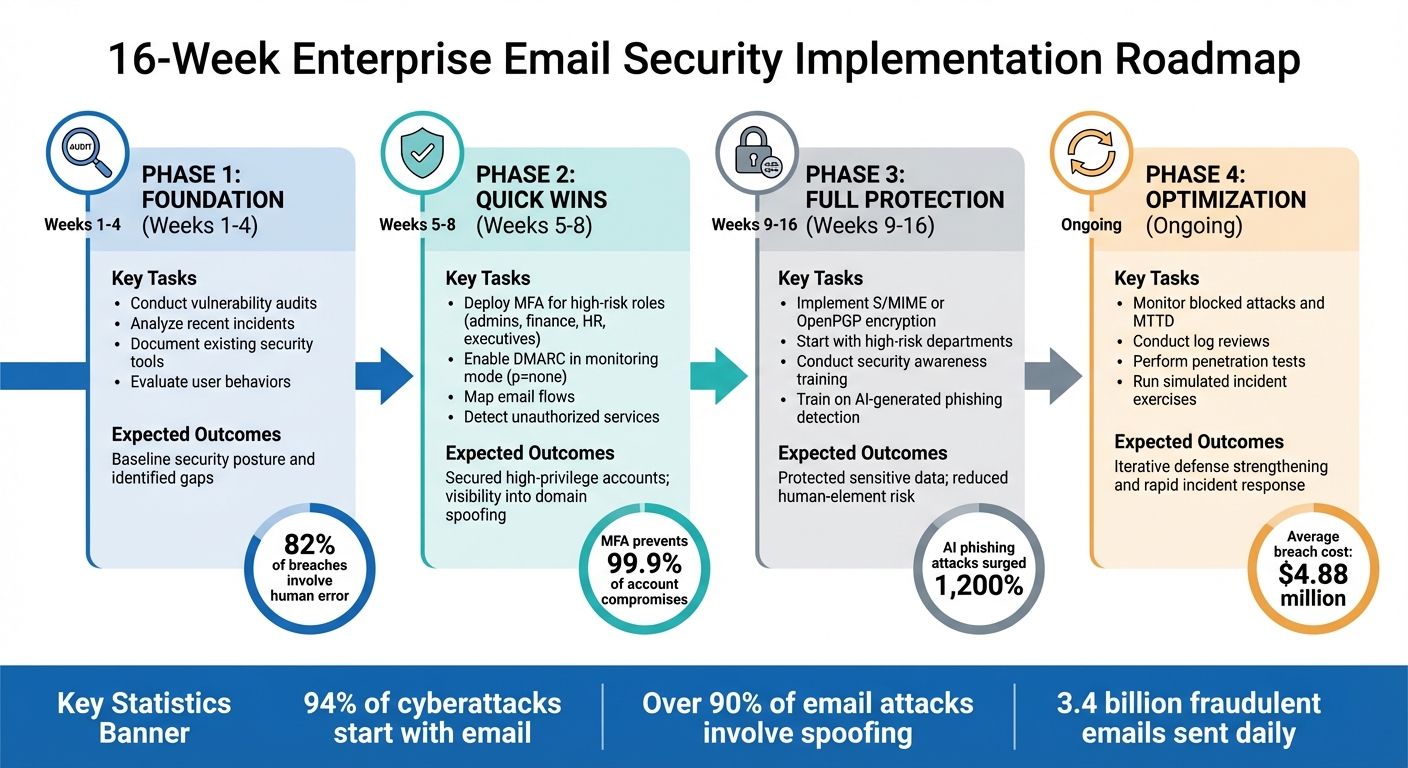
16-Week Enterprise Email Security Implementation Roadmap
Rolling out enterprise email security demands careful planning, step-by-step execution, and ongoing adjustments. A structured approach helps reduce disruptions to daily operations while effectively addressing security vulnerabilities. The goal is to implement quick, impactful fixes early on while working toward a stronger, more comprehensive defense over time. Using the best practices discussed earlier, this roadmap outlines a phased plan for deploying custom email security.
16-Week Implementation Plan
This 16-week phased approach introduces custom email security measures without overwhelming IT teams or interrupting day-to-day operations. The plan starts with high-priority actions for immediate impact and gradually incorporates more advanced protections. It aligns seamlessly with the authentication, encryption, and AI-driven tools mentioned earlier.
Phase 1: Foundation (Weeks 1–4)
Begin by assessing your current security landscape. Conduct vulnerability audits and analyze recent incidents to understand why past breaches occurred. Document existing security tools and evaluate user behaviors, such as password practices and permission settings. This assessment helps identify where to focus resources first. Notably, 82% of breaches involve human error.
Phase 2: Quick Wins (Weeks 5–8)
Focus on securing the most vulnerable accounts. Deploy Multi-Factor Authentication (MFA) for high-risk roles like administrators, finance teams, HR staff, and executives. MFA prevents over 99.9% of account compromises, making it a critical first step. During this phase, enable DMARC in monitoring mode (p=none) to map email flows and detect unauthorized services. Once high-risk accounts are secured, expand protections to the rest of the organization.
Phase 3: Full Protection (Weeks 9–16)
Extend security measures across all teams. Implement S/MIME or OpenPGP encryption, starting with high-risk departments and gradually covering the entire organization. Conduct security awareness training to help employees spot AI-generated phishing attempts, which have surged by 1,200%. Considering the average cost of an enterprise email breach is $4.88 million, this phase combines technical protections with employee education to significantly reduce risk.
Phase 4: Optimization (Ongoing)
Treat security as an evolving process. Regularly monitor metrics like blocked attacks and mean time to detect (MTTD). Conduct log reviews, penetration tests, and simulated incident exercises to uncover new vulnerabilities. As Patrick De Schutter, Co-founder of Mailfence, points out:
Email remains the primary attack vector because it directly targets human psychology. The sophistication of modern attacks means technical defenses alone aren't enough – you need a culture of security awareness combined with robust encryption and authentication.
| Phase | Timeline | Key Tasks | Expected Outcomes |
|---|---|---|---|
| 1: Foundation | Weeks 1–4 | Vulnerability audits, incident review, user behavior analysis | Baseline security posture and identified gaps |
| 2: Quick Wins | Weeks 5–8 | MFA deployment for admins/execs, DMARC monitoring setup | Secured high-privilege accounts; visibility into domain spoofing |
| 3: Full Protection | Weeks 9–16 | Encryption rollout (S/MIME or PGP), AI-phishing awareness training | Protected sensitive data; reduced human-element risk |
| 4: Optimization | Ongoing | Log reviews, penetration testing, tabletop exercises | Iterative defense strengthening and rapid incident response |
To streamline the process, automate wherever possible. For example, integrate email and HR systems to revoke access immediately when an employee's status changes. Automate certificate lifecycle management to cut down on manual tasks. For DMARC, begin in monitoring mode to map email flows, then gradually transition to "p=reject" after verifying all legitimate senders. This step-by-step approach minimizes disruptions while addressing the over 90% of cyberattacks that originate through email.
Monitoring and Incident Response
Building on earlier security measures, effective monitoring and incident response are essential to defending against ongoing threats. Once systems are deployed, staying vigilant is non-negotiable. With 3.4 billion fraudulent emails sent daily and 94% of organizations impacted by email security incidents in 2023, the stakes are high. This makes systematic log analysis and automated response plans critical for quickly containing threats. Continuous monitoring strengthens existing security layers and ensures swift detection.
Log Reviews and Anomaly Monitoring
Consistently reviewing logs can help identify threats before they escalate. For example, analyzing SMTP header metadata can uncover mismatched "From" and "Return-Path" domains, failures in SPF/DKIM/DMARC authentication, and unusual routing behaviors. Set up content filters to create baseline activity reports, which can help flag deviations.
Pay close attention to mailbox rule changes - unauthorized auto-forwarding or redirection rules often indicate a breach. Alerts should be configured to flag these changes, as well as login attempts from unfamiliar locations using IP geolocation data. If your organization has no operations or employees in certain regions, block those login attempts by default. Additionally, watch for phrases designed to create urgency, like "immediate action required", which appear 8.3 times more often in phishing emails compared to legitimate ones. Be cautious of links directing to domains registered within the last 30 days, as they are 68% more likely to be malicious.
| Anomaly Type | Log Indicator to Monitor | Recommended Initial Action |
|---|---|---|
| Spoofing | SPF/DKIM Hardfail from known domains | Quarantine original message |
| Data Exfiltration | Outbound matches for SSN or bank routing data | Quarantine copy for review |
| Phishing | URL Reputation scores between -10.0 and -6.0 | Block or Quarantine original |
| Policy Bypass | Password-protected inbound attachments | Tag and monitor or Quarantine copy |
Incident Response Best Practices
Proactive monitoring is just the first step. A quick and structured response is critical to minimizing damage. With the average cost of a phishing attack exceeding $4.9 million per incident in 2023 and forensic investigations taking an average of 287 hours, having a clear plan is essential. A well-defined incident response playbook ensures your team operates efficiently under pressure. As highlighted by NIST:
An incident response capability is necessary for rapidly detecting incidents, minimizing loss and destruction, mitigating the weaknesses that were exploited, and restoring computing services.
Your playbook should outline triggers, containment procedures, recovery steps, communication protocols, end goals, and compliance requirements. Assign specific roles to team members, such as Incident Manager, Security Analyst, Communications Officer, and Legal Advisor. Implement Security Orchestration, Automation, and Response (SOAR) tools to automate these processes, allowing for fast containment with minimal manual effort.
For incidents involving unauthorized access, revoke session tokens immediately and require an MFA reset for all impacted accounts. Isolate compromised devices and quarantine suspicious emails across affected inboxes. Create a triage system to prioritize incidents: critical cases (like executive account compromises or large-scale data theft) require immediate isolation and notification of leadership, while medium-level issues (e.g., phishing emails without clicked links) can be resolved through quarantine and user education. After resolving incidents, conduct blameless postmortems to pinpoint root causes and update threat intelligence databases. This approach helps prevent future incidents while encouraging open communication.
Conclusion
Summary of Best Practices
Protecting enterprise email systems requires a multi-layered approach. At its core, authentication protocols like SPF, DKIM, and DMARC play a crucial role in stopping domain spoofing and ensuring sender legitimacy. Encryption methods such as TLS and S/MIME safeguard data during transit and when stored, while multi-factor authentication (MFA) drastically reduces the risk of account compromise - blocking over 99.9% of such attacks.
However, technical measures alone aren't enough. With human error contributing to 82% of breaches, consistent and thorough staff training is essential to help employees identify and manage emerging threats like AI-generated phishing and quishing scams. Data Loss Prevention (DLP) policies add an extra layer of protection for sensitive information, including Social Security numbers and financial data. Meanwhile, AI-driven threat detection systems analyze your organization's communication patterns to identify suspicious activities that traditional tools might overlook.
Together, these strategies create a solid foundation for improving email security, with actionable steps to follow.
Next Steps for Your Enterprise
Start by evaluating your current email security measures against the recommendations in this guide. Focus on implementing SPF with a hard fail policy, monitoring DMARC records, and enabling MFA. Determine if your current security setup is sufficient or if third-party tools are needed to address gaps.
For organizations handling sensitive or regulated data, consider implementing DLP in audit mode first. This approach allows you to monitor data flows and uncover risks without interfering with legitimate business activities. Additionally, align your security framework with compliance standards like FISMA and other relevant industry guidelines.
Email security requires ongoing vigilance. Regular monitoring, updated training programs, and periodic reviews are essential, especially as AI-driven phishing attacks have surged by 1,265%. Use the 16-week implementation roadmap to guide your efforts. For help choosing the right tools, visit the Email Service Business Directory (https://emailservicebusiness.com), which offers a curated list of platforms and solutions to strengthen your enterprise’s defenses.
FAQs
How does AI enhance email security for enterprises?
AI is transforming email security by leveraging machine learning to process and analyze massive amounts of data in real time. Unlike traditional rule-based systems, which rely on predefined patterns, AI evaluates email content, attachments, sender behavior, and metadata to spot phishing attempts, malware, and other threats - even those designed to slip past conventional defenses. What sets AI apart is its ability to keep up with evolving attack strategies, enabling it to detect zero-day threats while keeping false alarms to a minimum.
AI-driven email security tools integrate effortlessly with existing email platforms. They can automatically quarantine suspicious messages, notify security teams, and even take proactive steps like initiating password resets or sending user alerts. These tools can also be tailored to align with specific enterprise policies, helping organizations maintain compliance while reducing manual effort. By incorporating AI, businesses can identify threats more quickly, lighten the load on security teams, and stay ahead of increasingly advanced cyber threats.
What’s the difference between SPF, DKIM, and DMARC in email security?
Email authentication relies heavily on three protocols: SPF, DKIM, and DMARC, each playing a distinct role in bolstering email security.
- SPF (Sender Policy Framework): This protocol checks that emails are sent from authorized servers by verifying the sender's IP address. It acts as a gatekeeper, ensuring only approved sources can send emails on behalf of a domain.
- DKIM (DomainKeys Identified Mail): DKIM adds an extra layer of protection by attaching a cryptographic signature to emails. This signature ensures the email content remains intact during transit, safeguarding against tampering.
- DMARC (Domain-based Message Authentication, Reporting, and Conformance): Building on SPF and DKIM, DMARC allows domain owners to define how unauthorized emails should be handled. It also provides detailed reports, offering insights into authentication attempts and potential threats.
When combined, these protocols form a robust defense against email spoofing, phishing, and other malicious activities, making them indispensable for securing enterprise email systems.
Why is employee training important for email security?
Employee training plays a key role in preventing email-based attacks because most threats target human behavior rather than technical loopholes. Phishing, for example, is a leading cause of security breaches. It often begins with a deceptive email designed to trick recipients into revealing sensitive details or approving fraudulent actions. Teaching employees to spot warning signs - like suspicious links, urgent requests, or fake sender addresses - can help stop these attacks before they cause harm.
Interactive training programs, such as phishing simulations and lessons on using multi-factor authentication, help employees build security-conscious habits. This human layer of defense works hand-in-hand with technical tools like DMARC, SPF, and encryption to strengthen the overall security system. By combining advanced technology with ongoing employee education, organizations can maintain a proactive, layered approach to defending against email threats.