Double opt-in is a two-step process that ensures only genuinely interested individuals join your email list. For B2B marketers, this approach improves email engagement, verifies email ownership, and ensures compliance with GDPR and CAN-SPAM regulations. While it may reduce initial signups by 20–30%, it leads to higher-quality subscribers who are more likely to engage with your content.
Key Takeaways:
- How It Works: After signing up, users confirm their email via a verification link.
- Benefits: Filters invalid emails, reduces spam complaints, and keeps your sender reputation intact.
- Compliance: Provides timestamped consent records for legal protection.
- Engagement: Confirmed subscribers are more likely to open, click, and convert.
Quick Tips:
- Use clear, simple signup forms with minimal fields.
- Send confirmation emails immediately with actionable subject lines like "Confirm Your Subscription."
- Follow up with automated reminders for non-confirmed users.
- Regularly clean your email list to maintain high deliverability.
By implementing double opt-in, you create a reliable, engaged email list that supports long-term B2B marketing success.
Double Opt In Email: Why It's Better For Your Business (Build A Better List)
sbb-itb-6e7333f
Design User-Friendly Signup Forms
Signup forms are your gateway to building a secure and verified email list. They’re often the first interaction potential subscribers have with your email program, so making a strong first impression is essential. A cluttered or confusing form can discourage users before they even start the double opt-in process. The goal? Keep it simple and make expectations clear.
Here’s how to create forms that encourage signups and set the stage for successful email verification.
Keep Forms Clear and Simple
Simplicity is key. Stick to just three fields: name, email, and one optional detail like industry or job role. Research shows that using buttons with clear calls-to-action (CTAs) rather than plain text links can boost conversions by over 20%. Even better, adding the word "my" to your button text - for example, "Start My Free Trial" - can increase click-through rates by a whopping 90%.
To maximize visibility, place your form in high-traffic areas like:
- Your website header
- Below blog posts
- The sidebar
Make sure the button stands out by using a contrasting color that grabs attention.
"People will always respond better to something uncomplicated, intuitive, and easy to do." – Emma Email
Also, remember that roughly 20% of users who start signing up won’t complete the second step of the double opt-in process. To combat this, reduce friction at the form stage and test everything on mobile devices. Ensure buttons are functional and text is easy to read on smaller screens.
Explain What Users Are Signing Up For
Clarity builds trust, and trust leads to conversions. Be upfront about what subscribers can expect. Spell out how often you’ll email them and what kind of content they’ll receive - whether it’s weekly insights, monthly updates, or quarterly reports. Highlight the perks of signing up, like access to a whitepaper, discount codes, or insider tips. Adding a touch of social proof can also reinforce credibility.
To prepare users for the next step, include a brief note on the form, such as: "Please check your inbox to confirm your subscription." This helps set expectations and minimizes confusion when the confirmation email arrives.
Connect Forms with Email Tools
For a seamless experience, use professional form builders found in the Email Service Business Directory (https://emailservicebusiness.com). These tools ensure that subscriber data flows directly into your email marketing platform. Many platforms even offer built-in form builders that automatically send confirmation emails as soon as someone signs up.
To keep your list clean and free from spam, integrate CAPTCHA or reCAPTCHA to block bots. Also, configure your automation tools to send the confirmation email right away - while the user’s interest is still fresh. Timing is everything when it comes to engagement.
Write Effective Confirmation Emails
When someone fills out your signup form, the confirmation email becomes a pivotal touchpoint. Its main goal? Getting the recipient to click. For instance, in January 2023, the Oracle Digital Experience Agency achieved an impressive 96% confirmation rate by staying laser-focused on this single action. A key part of this process is crafting subject lines that inspire action.
Use Clear and Direct Subject Lines
Your subject line should clearly guide subscribers on what to do next. Think of it as setting the stage for a smooth, straightforward experience. Actionable phrases like "Activate My Subscription" or "Please Confirm Your Subscription" work well because they're familiar and to the point. Adding a personal touch, such as the recipient's first name, can further increase engagement. Pair this with preview text like "Click the link in this email to complete your subscription" to reinforce the next step.
"The subject line and preview text of your opt-in confirmation request email should make it clear that action must be taken in the email."
– Chad S. White, Head of Research, Oracle Digital Experience Agency
Design Mobile-Friendly Emails
Make sure your confirmation button stands out and is easy to tap on any device. Keep the design clean and consistent by incorporating your brand’s logo, colors, and fonts. This creates a seamless experience from the signup form to the inbox. Test your email on different devices to ensure it looks good and functions properly. A visually clear layout, combined with a high-contrast CTA button, directs the subscriber’s focus exactly where it needs to be - on the action you want them to take.
"It's critical to be clear and concise with confirmation statements. With today's short attention spans, you want to compel that lead to take the next action quickly and avoid them abandoning the process midstream."
– Brian Sullivan, Strategy Director of Email Deliverability Services, Oracle Digital Experience Agency
Remind Subscribers of the Benefits
Highlighting the benefits of confirming their subscription can encourage action while building trust. Briefly remind subscribers of the value they’ll receive, such as exclusive content, weekly insights from top consultants, or access to specialized whitepapers and reports. Reinforce that this extra step ensures their data is protected. Keep it short and focused - enough to reassure them without overwhelming the message.
Create Effective Confirmation Pages
When a subscriber clicks the confirmation link in their email, they are directed to a page designed to validate their choice and strengthen the connection established during the signup and email confirmation process. This involves two key pages: the signup confirmation page (shown immediately after form submission) and the opt-in confirmation page (displayed after clicking the email link). These pages not only confirm their action but also provide an opportunity to encourage further interaction.
Show a Clear Success Message
Clarity is key here. Use direct, confident messaging like "You're in!", "That's it! You're confirmed", or "Subscription Confirmed" to reassure subscribers that their action was successful.
Follow up with specifics about what they can expect next. Let them know how often they'll hear from you - whether it's weekly updates, monthly insights, or quarterly reports - and outline the type of content they'll receive. For instance, B2B subscribers might look forward to industry analysis, exclusive research, or detailed case studies. This transparency not only builds trust but also helps manage expectations, reducing the chances of future unsubscribes. After confirmation, guide them toward more valuable content to keep the momentum going.
Link to Additional Resources
Capitalize on their engagement by offering links to additional resources. Direct them to high-value B2B materials such as your most popular case studies, whitepapers, lead nurturing guides, or recent industry reports.
This is also a great time to encourage subscribers to connect with your brand on other platforms. Since they've just interacted via email, invite them to follow your company on LinkedIn, Twitter, or even opt in for SMS updates. If you're still choosing an email marketing platform, consider how these integrations work together. By offering multiple ways to stay in touch, you create a stronger, more versatile connection from the outset.
Send Reminder Emails to Non-Confirmed Subscribers
After setting up effective signup forms and confirmation emails, the next step is to follow up with timely reminders. This ensures you don’t lose potential subscribers who might have missed or overlooked your initial email.
A significant number of subscribers fail to complete the double opt-in process - some simply forget, while others may never see the confirmation email. Reminder emails offer a second opportunity to secure their subscription without losing their interest.
Attrition rates for double opt-in processes typically fall between 25% and 40%. By sending well-timed reminders, you can push your confirmation rates closer to the 60%–80% range.
Set Up Automated Follow-Up Emails
The first confirmation email should go out immediately after signup. If the subscriber doesn’t click the confirmation link, schedule an automated reminder to go out 24–48 hours later, while the link is still valid.
For example, in January 2023, the Oracle Digital Experience Agency achieved a 96% opt-in confirmation rate for its twice-monthly newsletter. Their strategy included sending automated reminders to non-responders within one to two weeks.
In your reminder emails, highlight the main benefit of confirming their subscription. Whether it’s access to exclusive whitepapers, industry insights, or case studies, make the value clear. Keep the email simple and distraction-free - avoid adding navigation bars, social links, or promotional content. Instead, focus on a single call-to-action. Use a bold, high-contrast button with straightforward text like "Confirm Your Subscription".
"Sending one opt-in confirmation request may be enough... Others may need to send a 'reminder' and then perhaps even a 'last chance' confirmation request email to get their rates up. Sending those to non-responders within one or two weeks could be effective, and not too risky." - Daniel Deneweth, Head of Email Deliverability Services, Oracle Digital Experience Agency
If a subscriber doesn’t respond after the second reminder, it’s best to remove them from your list within 30–60 days. This helps maintain your email deliverability rates.
Test Different Timing and Messages
Automation is just the start - refining your approach is key. Since B2B audiences vary, testing is essential. Experiment with different reminder intervals and subject lines to see what resonates most. For instance, action-oriented subject lines like "Action Required: Confirm your subscription" or personalized options such as "[Name], one last step to join [Company]'s network" can help increase open rates. For final reminders, a "last chance" tone can create urgency and encourage action.
Use the data from these tests to fine-tune your automated workflows and improve overall performance.
Track and Improve Double Opt-In Performance
Once you've set up reminder emails to drive initial confirmations, the next step is to measure how well your double opt-in process is working and make adjustments to improve it. By keeping an eye on key metrics and experimenting with different strategies, you can identify problem areas and increase your confirmation rates.
Monitor Key Metrics
The confirmation rate is the most important metric to track. This shows the percentage of users who complete the second step of the opt-in process. If your rate is around 80% or higher, you're doing well. If it's much lower, it may signal issues that need fixing.
Other metrics to watch include hard bounce rates and spam complaints, as these can affect your sender reputation. A strong double opt-in process can reduce invalid email addresses by as much as 40% and boost engagement rates by 25%. Pay attention to click-through rates on confirmation emails, as clicks are a clear sign of engagement. Chad S. White, Head of Research at Oracle Digital Experience Agency, emphasizes:
"Clicks are twice as powerful signals of engagement as opens. That means that a subscriber who clicks is qualified as safe to mail for twice as long as a subscriber who only opens".
Also, track how users interact with your confirmation landing page. If they leave quickly, it could mean your messaging isn’t clear or the form is too complicated.
Run A/B Tests on Email Components
Once you’ve identified areas for improvement through metrics, testing can help refine your process. Start with subject lines - compare action-oriented phrases like "Activate My Subscription" with simpler options such as "Confirm Your Account". You can also test different call-to-action button designs, experimenting with colors, text, and placement to see what resonates most with your audience.
Timing is another factor worth testing. If your first reminder email currently goes out 48 hours after signup, try sending it after 24 hours instead. Some audiences might respond better to a final "last chance" email sent a week later, while others may only need one follow-up. Additionally, test whether including your lead magnet or discount code directly in the confirmation email increases clicks, or if it’s more effective to offer it in the welcome email that follows.
To get meaningful results, test one variable at a time. Use the data you gather to fine-tune your workflows and steadily improve your confirmation rates.
Maintain Compliance and List Hygiene
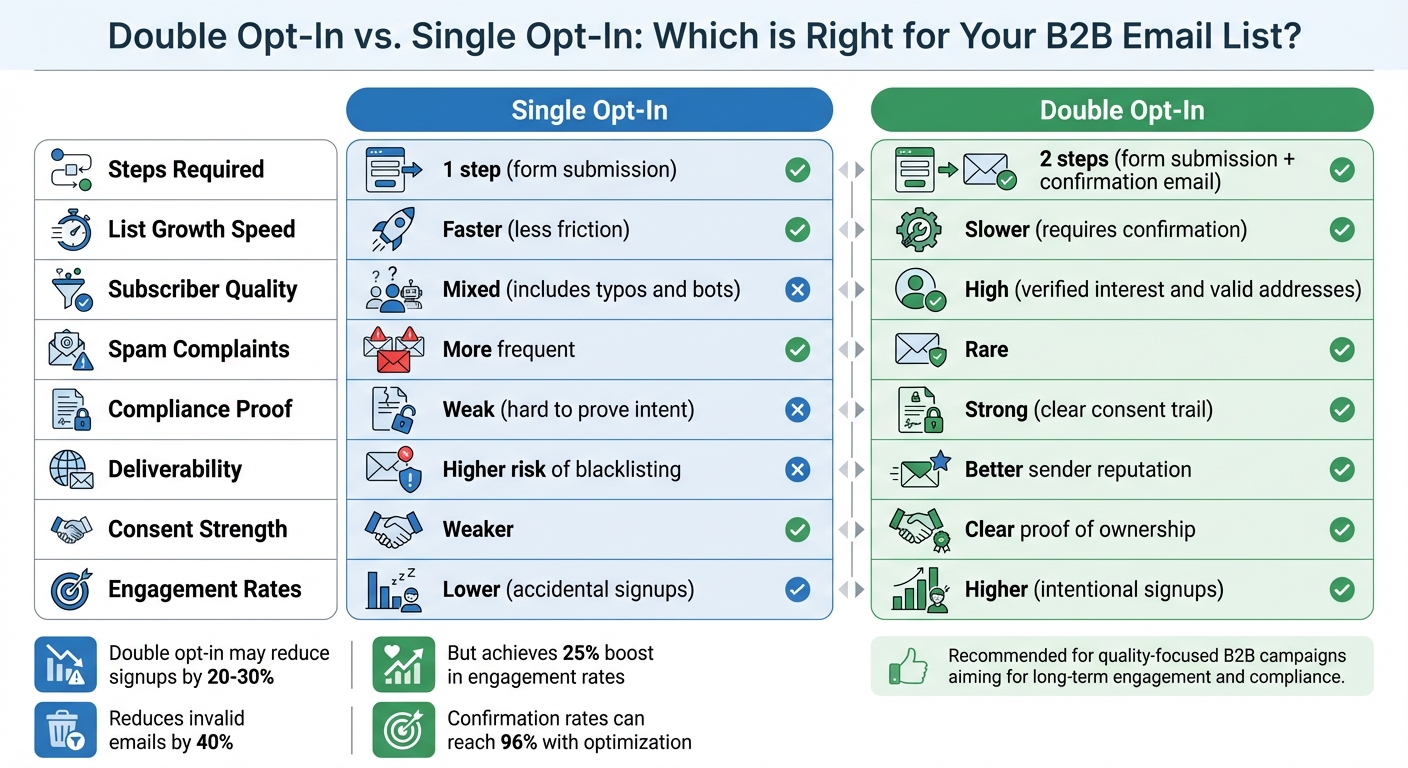
Double Opt-In vs Single Opt-In Email Marketing Comparison
Once you've optimized your confirmation rates through testing, it's equally important to ensure your double opt-in process aligns with legal standards and keeps your email list in good shape. Keeping strong consent records not only protects you legally but also helps maintain your sender reputation by ensuring your list stays clean.
Follow GDPR and CAN-SPAM Requirements
Using double opt-in makes it easier to meet GDPR's strict consent rules. The confirmation email acts as proof that the subscriber actively agreed to receive your emails by taking an extra step beyond just filling out a form. Your consent records should include details like the timestamp, date, opt-in method, and the exact wording used during signup. GDPR also makes it clear that consent must be active - silence, inactivity, or pre-checked boxes don’t count. Subscribers must click the verification link to confirm their consent.
For CAN-SPAM compliance, every marketing email needs to clearly identify your business and include a valid physical postal address. Both GDPR and CAN-SPAM also require a simple and functional unsubscribe option in every email. Although CAN-SPAM allows up to 10 business days to process opt-outs, it’s better to handle them within 48 hours [28, 29]. Consent should always be freely given, specific, informed, and clear. This means you can't bundle marketing opt-ins with account creation or purchase agreements - they must be separate choices.
Double opt-in is legally required in countries like Austria, Germany, Greece, Switzerland, Luxembourg, and Norway [5, 21]. Even in places where it’s not mandatory, it offers stronger legal protection. Violating GDPR can lead to fines as high as €20 million or 4% of your annual global turnover, whichever is greater.
Beyond legal compliance, keeping your email list clean is vital for maintaining a strong sender reputation.
Clean Your Email List Regularly
Even with double opt-in, email lists naturally lose about 25%–30% of contacts each year due to factors like job changes or abandoned email accounts.
Define what "unengaged" means for your list - such as no opens in the last 60 to 180 days - and remove those contacts from active campaigns [31, 32]. Before deleting inactive subscribers, try a win-back campaign with two to four emails offering incentives or asking them to update their preferences [31, 32]. Keep an eye on key metrics like hard bounce rates (should stay below 1%), spam complaints (aim for less than 0.1%), and any significant drops in open or reply rates. For example, email providers like Gmail and Yahoo enforce a spam complaint threshold of about 0.3%; going over this limit could land your emails in spam folders.
Deep-clean your database at least every six months or whenever bounce rates exceed 2% [31, 32]. Use real-time API checks on your signup forms to block disposable addresses, role-based emails (like info@), and obvious typos [30, 34]. Regularly review your domain reputation using tools like Google Postmaster Tools, and make sure your SPF, DKIM, and DMARC records are correctly set up [33, 34].
By maintaining list hygiene, you can maximize the benefits of your double opt-in process, ensuring your emails reach engaged and valid subscribers.
Comparison Table: Double Opt-In vs. Single Opt-In
Here’s a quick look at how single opt-in and double opt-in stack up against each other:
| Feature | Single Opt-In (SOI) | Double Opt-In (DOI) |
|---|---|---|
| Steps Required | 1 step (form submission) | 2 steps (form submission + confirmation email) |
| List Growth Speed | Faster (less friction) | Slower (requires confirmation) |
| Subscriber Quality | Mixed (includes typos and bots) | High (verified interest and valid addresses) |
| Spam Complaints | More frequent | Rare |
| Compliance Proof | Weak (hard to prove intent) | Strong (clear consent trail) |
| Deliverability | Higher risk of blacklisting | Better sender reputation |
| Consent Strength | Weaker | Clear proof of ownership |
| Engagement Rates | Lower (accidental signups) | Higher (intentional signups) |
This table highlights why double opt-in is often the better choice for building a high-quality, engaged email list.
Use Tools for Automation and Optimization
After establishing strategies for tracking and improving double opt-in metrics, the next logical step is to incorporate advanced tools for automation and optimization. Automation ensures confirmation emails are sent within seconds of a signup, keeping your brand at the forefront of subscribers' minds and reducing the risk of abandonment. For example, in January 2023, the Oracle Digital Experience Agency achieved an impressive 96% confirmation rate by implementing a streamlined automated workflow.
When choosing a platform, look for features like instant automated triggers, customizable workflows (including automated reminders for non-confirmers within 48 hours), segmentation capabilities, link expiration management, and mobile-friendly templates. Additionally, real-time analytics are essential for tracking confirmation rates and quickly addressing any friction points in the process.
"Double opt-in verifies that your contact wants your marketing emails before you officially add the contact to your list. This ensures that your list has highly engaged contacts who are excited to receive your emails."
- Julie Griffin, Contributor, SendGrid
Browse the Email Service Business Directory
For a more efficient double opt-in process, consider exploring specialized platforms through the Email Service Business Directory. This resource is tailored for B2B marketers, helping them pinpoint platforms that support advanced double opt-in workflows while offering the scalability needed for managing professional audiences. The directory highlights top email marketing platforms and service providers, allowing you to compare features like automation triggers, CRM integration, and compliance tools that log time-stamped consent records for GDPR and CASL compliance. By filtering options based on your specific needs - such as automated reminder sequences, AI-powered send time optimization, or branching workflows - you can save valuable time and effort.
Select Plans Based on Business Size
The directory also categorizes plans into three tiers designed for businesses at different stages:
- Boost Plan ($299): Ideal for small businesses starting with double opt-in automation. It includes core email features, basic signup forms, and supports up to 1,000 contacts.
- Advanced Plan ($999): Suited for growing B2B companies, this plan supports up to 10,000 contacts and offers more sophisticated workflows, including CRM integration.
- All In Plan ($2,999): Designed for large enterprises, this plan removes contact limits and provides full-scale automation, omnichannel support (SMS and email), and advanced deliverability monitoring, along with priority support.
Given that dropout rates in double opt-in processes can range from 25% to 40%, investing in a plan with strong automation features can significantly improve your confirmation rates and enhance the overall quality of your email list.
Wrapping It Up
Double opt-in isn’t just a nice-to-have - it’s a powerful way to verify email ownership and shield your B2B campaigns from compliance risks and reputation issues. Yes, 25–40% of signups might not confirm their email subscriptions, but those who do are far more engaged. They’re the ones opening, clicking, and ultimately converting into meaningful business connections.
This process also acts as a gatekeeper, filtering out bots, fake signups, and typos. Plus, it’s a critical safeguard under regulations like GDPR and CAN-SPAM. By documenting consent with timestamps, you create a reliable audit trail to defend against potential complaints. In places like Germany and Austria, courts have even deemed single opt-in insufficient, making double opt-in the safer choice.
To make things easier, automation tools can streamline the double opt-in process. Platforms listed in the Email Service Business Directory offer features like instant triggered confirmations, automated reminders, and CRM integrations to keep consent records organized. Whether you’re handling a small list or managing enterprise-scale campaigns, choosing the right tools can help boost confirmation rates and build a clean, high-performing email list.
The key to success lies in your setup. Send confirmation emails immediately, include one clear call-to-action, and follow up within 48 hours. With these strategies - and the right tools - you could achieve confirmation rates as high as 96%. That’s how you maintain compliance, protect your sender reputation, and create an email list that delivers real results for your B2B marketing efforts.
FAQs
What are the key advantages of using double opt-in for B2B email marketing?
Using double opt-in for B2B email marketing comes with several advantages that can make a big difference in your campaigns. First, it ensures that your email list is filled with people who are genuinely interested in your content. This can lead to better email deliverability and fewer complaints about spam, which is a win for your overall strategy.
Another perk? It strengthens your sender reputation. When your emails are welcomed by recipients, they’re far more likely to land in their inboxes rather than being flagged as spam.
Double opt-in also has a positive impact on engagement and conversion rates. By confirming that subscribers truly want to hear from you, you’re building a stronger, more trusting relationship with your audience. Plus, it helps you stay aligned with industry regulations, offering an added layer of protection for your business over time.
What are the best ways to increase confirmation rates in a double opt-in process?
To improve confirmation rates in a double opt-in process, focus on creating a confirmation email and landing page that are straightforward, engaging, and user-friendly. Start with an attention-grabbing subject line that encourages the recipient to open the email. Inside, clearly explain the benefits of confirming their subscription to make the decision easy.
Make sure the verification link is impossible to miss by using a bold, clear call-to-action like "Confirm Your Subscription." Avoid clutter and distractions, keeping the process smooth and focused. Highlight the value of completing the opt-in to motivate users to take action quickly.
How does double opt-in help with GDPR and CAN-SPAM compliance?
Double opt-in plays a crucial role in staying compliant with GDPR and CAN-SPAM regulations. It ensures that recipients actively confirm their agreement to receive emails, reducing the chances of sending unwanted messages. This step aligns with CAN-SPAM's focus on preventing unsolicited emails and meets GDPR's rigorous consent requirements.
Using double opt-in not only helps businesses steer clear of legal troubles and potential penalties but also strengthens trust with their audience. By verifying that only genuinely interested individuals join email lists, companies can maintain a more engaged and receptive subscriber base.