If you send 5,000+ emails a day, SPF, DKIM, and DMARC are no longer optional. Gmail and Yahoo started enforcing that in February 2024, and Microsoft followed on May 5, 2025. When senders missed these rules, 22% to 34% of email volume landed in spam.
I’d sum up the market like this: SendGrid is the strongest pick for high-volume domain control, HubSpot is a solid middle ground for B2B teams that want CRM tie-in, and Salesforce Marketing Cloud, Marketo, and Braze fit large teams that can handle more setup and admin work. On the lighter end, Mailchimp, Campaign Monitor, and in some cases Klaviyo work better for simpler programs with fewer domains and less reporting demand.
Here’s what this comparison covers:
- 8 vendors: Mailchimp, HubSpot, Klaviyo, Salesforce Marketing Cloud, Adobe Marketo Engage, Campaign Monitor, SendGrid, and Braze
- 4 checks: protocol support, setup work, reporting depth, and B2B scale fit
- 1 core issue: not just whether SPF, DKIM, and DMARC exist, but whether your platform helps you get alignment right
A few takeaways stand out right away:
- DKIM often does most of the DMARC work
- SPF alignment still breaks on some platforms by default
- BIMI is still extra work, even when the ESP supports the setup path
- More enterprise control usually means more DNS work and slower rollout
Mastering Email Authentication: SPF, DKIM, DMARC, and ARC Explained!
sbb-itb-6e7333f
Quick Comparison
| Vendor | Protocol Support | Setup Effort | Reporting Depth | B2B Scale Fit |
|---|---|---|---|---|
| SendGrid | Advanced | Moderate | Advanced | Strong |
| Salesforce Marketing Cloud | Advanced | High | Strong | Advanced |
| Adobe Marketo Engage | Advanced | High | Strong | Advanced |
| HubSpot | Strong | Moderate | Basic | Advanced |
| Braze | Strong | Moderate | Moderate | Strong |
| Klaviyo | Basic | Moderate | Moderate | Moderate |
| Campaign Monitor | Basic | Low | Basic | Moderate |
| Mailchimp | Basic | Low | Basic | Moderate |
If I were choosing fast, I’d think about it this way:
- Pick SendGrid if you need multi-domain control and event-level reporting
- Pick HubSpot if you want email tied closely to sales and CRM data
- Pick SFMC, Marketo, or Braze if you run a large B2B program across brands, teams, or regions
- Pick Mailchimp or Campaign Monitor if your setup is small and simple
The rest of the article breaks down where each vendor helps, where each one falls short, and what that means for inbox placement at scale.
1. Mailchimp
Mailchimp covers SPF, DKIM, and DMARC. It also gives BIMI guidance once DMARC is enforced.
Protocol Support: SPF, DKIM, DMARC, BIMI, and Related DNS Guidance
Mailchimp sets up DKIM with two CNAME records instead of TXT records. That means Mailchimp handles key rotation on its side. There’s a catch, though: Mailchimp currently uses 1,024-bit RSA keys, which is below the 2,048-bit key length some enterprise mailbox providers prefer.
DMARC is required at at least p=none before you can send from a verified domain. BIMI isn’t handled inside Mailchimp itself. Instead, Mailchimp shows the outside setup path once your DMARC policy reaches p=quarantine or p=reject.
By default, Mailchimp uses mail.mailchimp.com as the Return-Path. So SPF can pass, but it won’t align with your domain. That’s a big deal. A message can pass authentication checks and still miss DMARC alignment, which can hurt inbox placement. To fix that, you need a custom Return-Path on a dedicated subdomain, set up with CNAME records.
The main tradeoff is simple: Mailchimp’s base authentication setup doesn’t do the whole job until custom domain authentication is complete.
Setup Effort: DNS Work, Subdomains, and Admin Involvement
In Mailchimp, verification and authentication are two different steps. Verification shows you own the domain. Authentication adds the DNS records for DKIM and Return-Path alignment.
Mailchimp does make this easier with an in-app wizard and a DNS test tool, so you can check whether the records are live. Still, this isn’t a one-click setup. You’ll need DNS access, and in many companies that means pulling in an IT admin or whoever manages the domain.
Reporting Depth: Authentication Status, Bounce Data, and Complaint Visibility
Mailchimp tracks campaign-level bounces and complaints, which helps at the campaign view. But it doesn’t pull authentication and sender reputation data into one place for day-to-day deliverability control.
That gap shows up pretty clearly. Mailchimp does not offer a central deliverability dashboard or built-in DMARC reporting, and that helped drive its 3.0 out of 5.0 deliverability feature score in 2025 reviews.
For a small team, that may be fine. For a B2B team that wants one place to monitor domain health, complaint trends, and auth status, it can feel like flying with part of the instrument panel missing.
B2B Scale Fit: Multi-Domain Control, Stream Separation, and Enterprise Governance
Mailchimp supports multiple sending domains, but each one needs its own DNS setup. There’s no bulk domain management, so the work can pile up fast if you manage several brands, business units, or regions.
Mandrill adds another layer. It uses separate SPF includes and DKIM selectors, which means transactional mail DNS has to be managed apart from marketing mail DNS. That separation can be useful, but it also adds admin work.
A few points stand out for bigger senders:
- Dedicated IPs cost $29.95/month and are suggested for senders sending 100,000+ emails per month.
- Mailchimp’s
include:servers.mcsv.netrecord uses one of your 10 allowed SPF DNS lookups. - Each domain needs its own setup, so scaling across many domains takes planning.
HubSpot takes a more integrated path for domain management, but it still comes with DNS work.
2. HubSpot

HubSpot gives you more hand-holding than Mailchimp, but your team still owns the DNS side.
It supports SPF, DKIM, and DMARC, and it also offers guidance for BIMI logo display.
Protocol Support: SPF, DKIM, DMARC, BIMI, and Related DNS Guidance
HubSpot uses two CNAME records for DKIM, adds include:hubspot.com to SPF, and blocks custom-domain sending until DMARC is set up. It documents BIMI, but it doesn't issue Verified Mark Certificates or handle BIMI DNS records for you. So if you want BIMI, you'll still need a third-party service.
Setup Effort: DNS Work, Subdomains, and Admin Involvement
HubSpot's Connect sending domain wizard lays out the exact host and value for each record you need, including DKIM, SPF, DMARC, and MX. Some DNS providers even let you sign in directly so updates can happen automatically. Validation usually takes 10 to 70 minutes, though full propagation can take up to 48 hours.
Your IT team still has to make the DNS changes. HubSpot support can't edit those records on your behalf. HubSpot also recommends using a separate subdomain, like news.example.com, to protect the root domain's reputation and avoid DNS conflicts with hosted content. If you're using Cloudflare, you'll need to turn off CNAME flattening and proxying.
Reporting Depth: Authentication Status, Bounce Data, and Complaint Visibility
HubSpot shows authentication status in three levels inside the UI:
- Not authenticated
- Partially authenticated
- Authenticated
Its Email Health dashboard tracks bounces, deferrals, and spam complaint rates over a rolling 30-day window. That's handy for day-to-day checks, but it doesn't give you full DMARC oversight.
There isn't a built-in DMARC parser, so DMARC reports need to go to an outside rua or ruf address. There's another catch here too: Sales Hub Sequences send through connected Gmail or Outlook inboxes, which means the Email Health dashboard doesn't cover them.
B2B Scale Fit: Multi-Domain Control, Stream Separation, and Enterprise Governance
That split between marketing email and rep-sent sequences becomes a big deal once volume grows.
HubSpot supports up to 2,000 email sending domains per account. It also supports relaxed DMARC alignment across subdomains, which helps when you're sending from several subdomains.
The platform has two separate sending paths, and it's worth being clear on that. Marketing Hub email goes through HubSpot's SMTP setup, so DNS authentication rules apply there. Sales Hub Sequences go through each rep's connected inbox, so authentication is handled by Gmail, Outlook, or whatever inbox provider that rep uses.
HubSpot recommends dedicated IPs only for accounts sending more than 250,000 emails per month. And when you get a new dedicated IP, HubSpot puts it through an automated 40-day warm-up period.
3. Klaviyo
Klaviyo cuts down the DNS setup work, but your team still handles domain alignment. Out of the box, it sends through klaviyomail.com, which means DMARC alignment for your own brand domain won't pass until you set up a branded sending domain.
Protocol Support: SPF, DKIM, DMARC, BIMI, and Related DNS Guidance
Klaviyo supports SPF, DKIM, and DMARC, but you still have to publish the DNS records with your own DNS provider. It gives you two routing options:
- Static routing with CNAME and TXT records
- Dynamic routing with NS delegation, which lets Klaviyo manage DKIM keys
Klaviyo also splits traffic by stream type, using dedicated DKIM selectors like km, kt, and ks. It does not natively support BIMI.
Setup Effort: DNS Work, Subdomains, and Admin Involvement
Your IT team still needs to publish the DNS records. In most cases, Klaviyo setup needs 3–4 records, and the UI shows the exact host, type, and value fields so you can copy and paste them straight into DNS. It also checks DNS records on its own every 15 minutes.
If you're using Cloudflare, turn off proxying for the Klaviyo records. If you don't, verification can stall.
Reporting Depth: Authentication Status, Bounce Data, and Complaint Visibility
Klaviyo's Deliverability Hub shows an account-level health score and detailed bounce categories. At the campaign level, you can track bounces, spam complaints, and unsubscribe rates. For deeper spam monitoring, Klaviyo sends users to Google Postmaster Tools.
One catch: Klaviyo does not natively parse DMARC aggregate (RUA) reports. So if you want to read that XML data without a headache, it recommends third-party tools like Valimail or EasyDMARC.
It's also worth noting that dashboard checkmarks only confirm Klaviyo-side setup. They do not confirm brand-domain alignment.
B2B Scale Fit: Multi-Domain Control, Stream Separation, and Enterprise Governance
Klaviyo supports multiple branded sending domains and stream separation. It also offers dedicated IPs for higher-volume senders, usually suggested for teams sending more than 1,000,000 emails per month.
That makes Klaviyo a workable option for teams managing more than one domain. But for strict enterprise governance, it can feel a bit less tight. Salesforce Marketing Cloud takes a more controlled approach on both fronts.
4. Salesforce Marketing Cloud
Salesforce Marketing Cloud (SFMC) leans toward managed, enterprise-grade authentication instead of a simple self-serve setup. That makes a big difference when you need tight control over brand domains, regional teams, and separate mail streams.
Without the Sender Authentication Package (SAP), SFMC sends email using Salesforce-owned domains for DKIM signing, return-paths, and link wrapping. In plain terms, DMARC alignment fails by default. If you want branded authentication and alignment, you’ll need SAP or the separate Private Domain product.
Protocol Support: SPF, DKIM, DMARC, BIMI, and Related DNS Guidance
SFMC supports SPF, DKIM, and DMARC. In most cases, SPF and DKIM are set up through SAP, while DMARC is added separately as a DNS TXT record.
For SPF alignment, SFMC uses a branded bounce domain like bounce.brand.com as the Return-Path. That bounce subdomain needs to match the organizational domain of the visible From address for DMARC to pass. SFMC can also support the DMARC, SPF, and DKIM conditions that BIMI requires.
Salesforce presents authentication as a trust signal that can improve mailbox provider confidence and downstream engagement.
Setup Effort: DNS Work, Subdomains, and Admin Involvement
This level of control comes with more moving parts. Marketing, IT, and the Salesforce admin usually all need to be involved.
SFMC setup requires a chosen sending subdomain, DNS updates from IT, and admin work to configure Authenticated Domains and Authenticated From Addresses. DNS changes can take up to 48 hours to propagate, and the full authentication and warmup process often takes 2 to 4 weeks.
Dedicated IPs add one more layer of control, and they usually need a warmup period too.
SAP bundles a private domain, dedicated IP, and Reply Mail Management (RMM). It can also host DNS records if the subdomain is delegated to Salesforce. RMM helps route replies and filter auto-responses, which takes some day-to-day load off the team.
Reporting Depth: Authentication Status, Bounce Data, and Complaint Visibility
Once authentication is in place, the next issue is visibility.
Email Studio Reports include standard delivery and bounce metrics. If you need granular SMTP error codes, Salesforce Support can enable the Bounce Event Extract File. SFMC does not natively collect or report DMARC aggregate (RUA) failure data, so you’ll need an external monitoring tool to see that layer.
B2B Scale Fit: Multi-Domain Control, Stream Separation, and Enterprise Governance
For large B2B teams, SFMC fits a tightly managed operating model. Separate Business Units can isolate mail streams, which helps keep transactional reputation apart from bulk campaign sending. SFMC also supports multi-domain control through Private Domains and a multi-bounce domain feature, although Salesforce Support must enable the latter.
That setup makes sense for large, structured sending programs. It’s less suited to teams that want a fast, lightweight rollout.
5. Adobe Marketo Engage

Adobe Marketo Engage puts more of the email authentication work on your team than the platforms above. This is one of the most hands-on setups in the group. You’ll need DNS updates, back-and-forth with Adobe Support, and input from Marketing Ops, IT, Security, and Legal.
Protocol Support: SPF, DKIM, DMARC, BIMI, and Related DNS Guidance
Marketo supports SPF, DKIM, and DMARC. It also supports BIMI in an indirect way, once DMARC reaches p=quarantine or p=reject and you’ve secured a VMC.
For SPF, each domain needs include:mktomail.com in its TXT record. For DKIM, Marketo creates a selector, and IT then publishes the needed CNAME records. If you want SPF alignment, use a branded return-path. That setup needs MX and CNAME records, plus Adobe activation. If you skip the branded return-path, SPF can still pass, but it may fail DMARC alignment. You should also add branded tracking and landing-page CNAMEs so links and hosted pages stay on your own domain.
So yes, Marketo covers the main protocols. But it asks for a lot of DNS work to get there.
Setup Effort: DNS Work, Subdomains, and Admin Involvement
A normal setup calls for at least six DNS records: SPF, DKIM CNAMEs, branded return-path MX and CNAME, DMARC TXT, and an optional BIMI TXT. Adobe Support handles SSL certificate provisioning for landing pages, and that usually takes up to 3 business days.
The bigger issue is coordination. Marketing Ops, IT, Security, and Legal all tend to be part of the process, and that can slow things down. A full DMARC and BIMI rollout often takes 6 to 12 months. It also helps to use a dedicated subdomain, which can keep you away from SPF lookup limits on the main domain.
Once those records are in place, the next step is watching performance and alignment.
Reporting Depth: Authentication Status, Bounce Data, and Complaint Visibility
Marketo gives you delivery and bounce data, but it doesn’t include native DMARC aggregate or forensic reporting. Its delivery rate tells you whether a server accepted the message, not whether the email landed in the inbox.
For DMARC visibility, you’ll need outside tools like Google Postmaster Tools or Microsoft SNDS. Marketo does automatically process ISP feedback loop unsubscribes. You can also set up Smart Campaigns to mark an address invalid after three soft bounces within 60 days.
B2B Scale Fit: Multi-Domain Control, Stream Separation, and Enterprise Governance
Marketo supports multiple domains, but each one needs its own SPF and DKIM setup and verification inside the Marketo Admin console. If you want to split email streams by purpose, you can use separate DKIM selectors for different send types, like retention versus acquisition sends.
Dedicated IPs are a better fit for senders above 100,000 emails per month, and they require manual warmup. Trusted IP works better for lower-volume senders with strong engagement. Branded Return-Path is included for Dedicated and Trusted IP customers.
That setup makes Marketo a good match for enterprise teams with tight controls and clear ownership across departments. For teams that want fast, self-serve authentication, it’s likely to feel slow and heavy.
6. Campaign Monitor
Campaign Monitor keeps email authentication pretty simple. The tradeoff is that its fixed bounce domains limit DMARC alignment. So it works best for teams that want a low-friction setup, not tight control over every sending domain.
Protocol Support: SPF, DKIM, DMARC, BIMI, and Related DNS Guidance
Campaign Monitor uses fixed bounce domains (cmail1.com or cmail2.com), which means SPF can’t align. In practice, DMARC passes only through DKIM. The platform signs mail with the cm selector, so the DNS lookup goes to cm._domainkey.yourdomain.com.
There’s also an optional SPF include. But it still uses up SPF lookups without helping alignment, so it doesn’t solve the core issue.
Setup Effort: DNS Work, Subdomains, and Admin Involvement
Setup starts with DKIM. You add each domain in Account Settings, publish the generated TXT record, and then verify it after 24–48 hours. Once the record is live, Campaign Monitor shows an in-app authentication check to confirm things are working.
The main pain point is often DNS formatting. Some DNS providers strip semicolons or underscores from Campaign Monitor’s DKIM TXT values. If your DNS interface supports it, putting the value in quotes can help avoid that issue.
Reporting Depth: Authentication Status, Bounce Data, and Complaint Visibility
Deliverability by Domain breaks out performance by mailbox provider. That makes it easier to spot whether Gmail, Outlook, or another inbox is filtering your mail in a different way.
Understanding email bounce types is straightforward with Campaign Monitor:
- Hard bounces are removed automatically
- Soft bounces are tracked on their own
Campaign Monitor says it has a 99% average delivery rate. But it doesn’t include native DMARC aggregate reporting, so outside monitoring still makes sense. And if SPF looks misaligned, that’s expected here because SPF alignment isn’t possible with this setup.
Teams that need tighter control across many domains will likely hit limits pretty fast.
B2B Scale Fit: Multi-Domain Control, Stream Separation, and Enterprise Governance
Every sending domain needs its own DKIM setup. There’s no account-level authentication setting that covers many domains at once. That adds more work and usually means more back-and-forth with IT as the domain count grows.
Campaign Monitor does support high-volume sending for accounts with 50,001+ subscribers, and both Essentials and Premier come with unlimited sends. It also offers Deliverability Services for teams that want one-on-one help with domain changes or sudden drops in open rates.
For a small set of domains, that setup is manageable. Once you start scaling, per-domain setup can get tedious. SendGrid takes a more controlled path for stream separation and large-scale domain management.
7. SendGrid
SendGrid leans on its default Automated Security setup to cut down on DNS upkeep while keeping authentication organized. And where simpler tools stop at the basics, SendGrid adds delegated DNS and subuser controls for bigger sending teams.
Protocol Support: SPF, DKIM, DMARC, BIMI, and Related DNS Guidance
SendGrid creates three CNAME records so it can handle SPF and DKIM for you, including DKIM rotation and SPF updates when you add a dedicated IP. For new setups, it uses 2048-bit DKIM keys.
For DMARC alignment, SPF passes through a custom return-path like bounces.example.com, which lines up the bounce domain with your "From" address. It supports both relaxed and strict alignment modes. SendGrid also documents BIMI, but you still need to host the record yourself.
There’s one small gotcha with DNS. Some providers, including GoDaddy, Route 53, and Namecheap, auto-append the root domain. So instead of entering the full domain, use only the host prefix, such as em123, or you can end up with duplicate records.
Setup Effort: DNS Work, Subdomains, and Admin Involvement
The first setup usually takes 5–7 steps, including account creation, two-factor authentication, sender identity verification, DNS record publication, and API key generation. DNS propagation can hold up live sending for as long as 48 hours, so it’s smart to plan for that delay.
Each subdomain needs its own CNAME records. If your DNS provider doesn’t support underscores in CNAMEs, you can switch to the manual TXT-record option instead. The tradeoff is simple: you’ll need to update those records by hand any time the setup changes. In most cases, IT or your DNS admin will need to publish the records.
Once the DNS side is done, the next thing to look at is how much detail you get back from the platform.
Reporting Depth: Authentication Status, Bounce Data, and Complaint Visibility
Deliverability Insights includes a Bounced & Blocked tab, and the Event Webhook streams real-time data for bounces, blocks, spam reports, clicks, and opens.
SendGrid also gives all customers the SendGrid Engagement Quality Score (SEQ) by default. That means you get a combined view of sender reputation without paying for a higher-tier plan.
B2B Scale Fit: Multi-Domain Control, Stream Separation, and Enterprise Governance
SendGrid supports up to 3,000 authenticated domains and 3,000 link brandings per user or subuser. Pro and Premier subusers keep stats, suppressions, templates, and authentication separate, which helps when you need to split marketing, transactional, and business-unit traffic.
That split matters. If marketing email and product email share the same reputation path, one side can drag down the other. SendGrid gives teams more control here with subusers, IP Pools, and teammate permissions for routing and access control.
For B2B teams with multiple streams, multiple domains, and a lot of hands in the account, SendGrid fits that setup well.
Braze shifts the emphasis from DNS control to managed sending.
8. Braze
Braze is built for enterprise teams. Its email setup runs on SparkPost, and that shapes how authentication works. In practice, DNS alignment is more managed than self-serve.
Protocol Support: SPF, DKIM, DMARC, BIMI, and Related DNS Guidance
Braze supports SPF through an include record, DKIM through CNAME selectors, and DMARC. In this setup, DKIM carries most of the load for DMARC alignment. On older accounts, the return-path defaults to sparkpostmail.com, which can block SPF alignment with your domain.
Braze also gives guidance for BIMI. But it doesn't issue Verified Mark Certificates (VMC) or publish BIMI records for you. That part has to be handled at the domain level outside the platform.
Setup Effort: DNS Work, Subdomains, and Admin Involvement
The initial setup needs three DNS record types:
- An SPF include
- Multiple CNAME records for DKIM selectors
- A DMARC policy record
If your DNS is clean, basic email setup can go live in 1–3 days.
Most enterprise B2B teams use dedicated IPs. That adds more work. Dedicated IPs need a 4–6 week warmup, usually starting at around 5,000 messages on day one.
Before you add Braze's SPF include, audit your current DNS records. Large enterprise domains often run into the 10-lookup SPF limit, which can cause an SPF permerror.
Once DNS is live, the next thing to watch is reporting.
Reporting Depth: Authentication Status, Bounce Data, and Complaint Visibility
Braze includes standard reporting for delivery, opens, clicks, and bounces. It also shows domain verification status, and Braze requires domain verification before any sending can happen.
If you need more detail, Currents can stream real-time engagement and deliverability events into data warehouses like Snowflake, BigQuery, or Redshift.
One gap matters here: Braze does not alert you when your sending domain lands on a blacklist. So during IP warming - and after that too - external tools like Google Postmaster Tools and Microsoft SNDS matter a lot.
B2B Scale Fit: Multi-Domain Control, Stream Separation, and Enterprise Governance
Braze supports custom sending domains and subaccounts, with up to 5 sub-accounts on the Pro tier. Canvas Flow, the platform's journey builder, manages cross-channel orchestration with branching logic, including waterfall fallbacks across email, push, and SMS.
For B2B teams running large, multi-domain programs, Braze can be a strong fit. But the cost and complexity are hard to ignore. Annual contracts usually land between $50,000 and $500,000+, and year-one implementation often adds another $30,000 to $100,000+.
Teams without marketing ops and IT support will have a hard time running it well at scale.
Those tradeoffs show up clearly in the vendor comparison below.
How the Vendors Compare Across Key Criteria
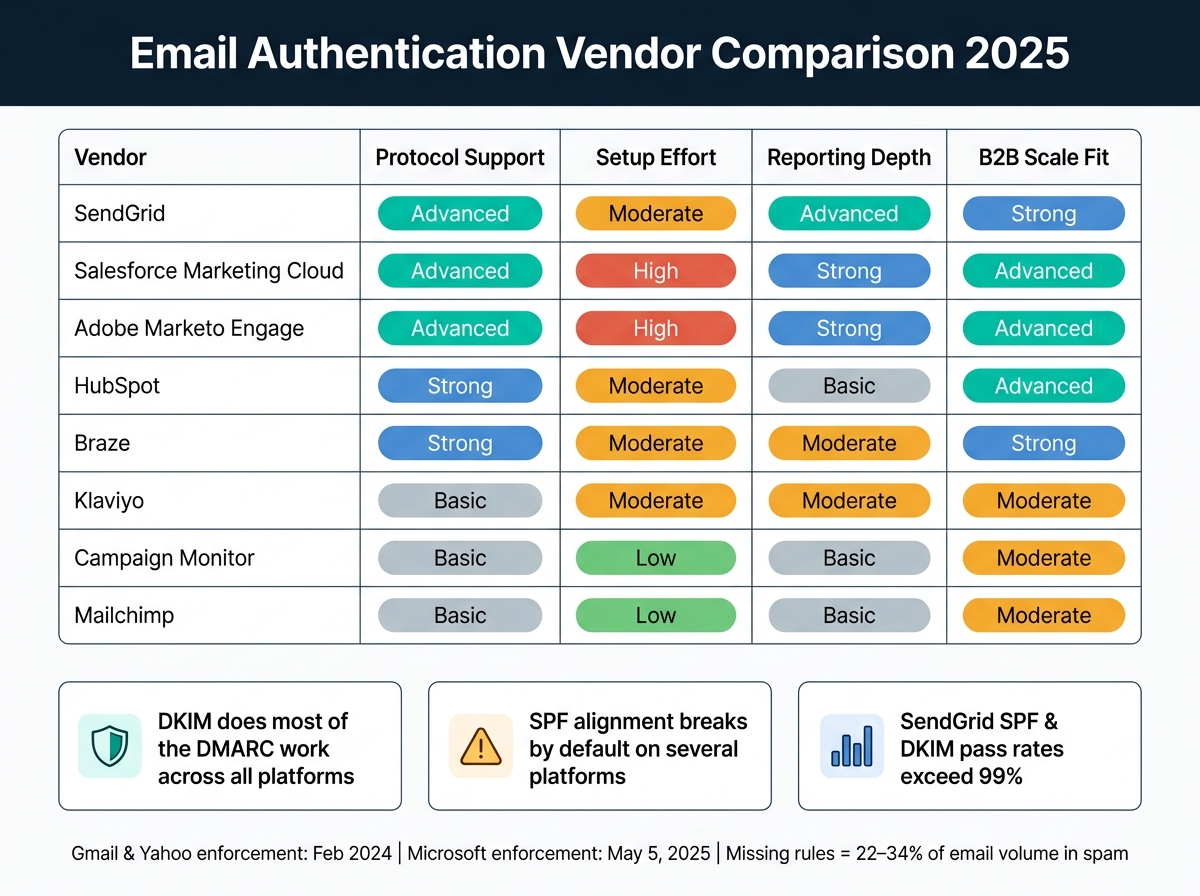
Email Authentication Vendor Comparison: SPF, DKIM & DMARC Support 2025
The biggest gaps show up when you’re sending at scale. On paper, many of these platforms support the same email standards. In practice, the split comes down to four things: automation, reporting, alignment, and scale. More specifically, how much of the alignment and reporting work the platform handles for you, and how much DNS work still lands on your team.
| Vendor | Protocol Support | Setup Effort | Reporting Depth | B2B Scale Fit |
|---|---|---|---|---|
| SendGrid | Advanced | Moderate | Advanced | Strong |
| Salesforce Marketing Cloud | Advanced | High | Strong | Advanced |
| Adobe Marketo Engage | Advanced | High | Strong | Advanced |
| HubSpot | Strong | Moderate | Basic | Advanced |
| Braze | Strong | Moderate | Moderate | Strong |
| Klaviyo | Basic | Moderate | Moderate | Moderate |
| Campaign Monitor | Basic | Low | Basic | Moderate |
| Mailchimp | Basic | Low | Basic | Moderate |
Here, basic means the protocols are there, but the platform gives you less help with automation and less visibility in reporting. That’s where the rankings start to separate.
Protocol Support: SPF, DKIM, DMARC, BIMI, and Related DNS Guidance
Across these eight platforms, the main question isn’t whether they support SPF, DKIM, and DMARC. Most do. The bigger issue is how cleanly they support alignment.
SendGrid stands out here because both SPF and DKIM pass rates are above 99%. Mailchimp tells a different story. It can still show an SPF fail rate of 89.2%, even while overall DMARC compliance stays high because DKIM alignment does most of the heavy lifting.
That pattern shows up across the market. Most vendors rely on DKIM as the steadier path for DMARC alignment, while SPF gets harder to manage as DNS lookups pile up. And when it comes to BIMI, none of these platforms handles the whole process for you. VMC and BIMI DNS setup still happen outside the ESP.
Setup Effort: DNS Work, Subdomains, and Admin Involvement
Setup effort varies more than many teams expect.
Mailchimp, HubSpot, Klaviyo, and SendGrid are mostly self-serve, which makes them easier to get moving with. Salesforce Marketing Cloud and Adobe Marketo Engage sit at the other end and need the most admin coordination. Campaign Monitor is on the lighter side for setup, but its fixed bounce domains mean DMARC alignment depends on DKIM only.
Braze lands somewhere in the middle. The DNS setup is manageable, but dedicated IP warmup can add weeks of lead time. So even if the initial config doesn’t look too bad, the ramp-up period can slow things down.
Reporting Depth: Authentication Status, Bounce Data, and Complaint Visibility
Reporting is where the day-to-day differences get more obvious.
SendGrid gives the deepest event-level visibility through Event Webhooks, which stream delivery events, bounce categories, and spam complaints in real time. That kind of detail matters when your team wants to spot problems fast instead of digging through summary dashboards after the fact.
Salesforce Marketing Cloud and Adobe Marketo Engage also provide strong enterprise logs, but they tend to work best when an ops team is in place to manage and interpret them. HubSpot and Braze sit in the middle. They offer campaign-level dashboards and domain verification status, but they don’t include native DMARC aggregate parsing.
Mailchimp and Campaign Monitor give you the least depth in this group. They cover bounces and complaints at the campaign level, but they don’t provide centralized authentication reporting.
B2B Scale Fit: Multi-Domain Control, Stream Separation, and Enterprise Governance
Once a program gets bigger, the key issue stops being setup speed and starts being control. Can you separate domains cleanly? Can you manage different brands or business units without creating a mess?
Salesforce Marketing Cloud and Adobe Marketo Engage are the strongest fits for B2B teams handling multiple brands or business units. Features like Business Unit isolation and per-domain DKIM controls are built for enterprise governance.
SendGrid also scales well, but in a lighter way. With subusers, IP Pools, and support for up to 3,000 authenticated domains, it makes domain-level control possible without the weight of full enterprise software overhead.
Braze supports custom sending domains and subaccounts, so it can work well for large multi-channel programs. The tradeoff is cost and setup complexity. HubSpot fits well when CRM context is a big part of the picture, though it’s lighter on reporting depth.
Campaign Monitor, Klaviyo, and Mailchimp make more sense for simpler programs that don’t need deep stream separation or heavy multi-domain control.
Pros and Cons by Vendor
Each platform has a clear strength. But once you’re sending at scale, the tradeoffs get harder to ignore.
The table below cuts the earlier vendor reviews down to what matters most for large B2B senders: alignment, setup effort, reporting, and domain control.
| Vendor | Pros | Cons | Best Fit |
|---|---|---|---|
| Mailchimp | Easy DNS setup with CNAME-based authentication | Weak SPF alignment and limited complaint visibility | Small B2B teams with one domain |
| HubSpot | Guided DNS setup with clear domain status labels; built-in CRM context | Support won't manage DNS directly; dedicated IPs only on Enterprise plans | B2B teams needing unified sales and marketing data |
| Klaviyo | CNAME-based verification with stream-level DKIM selectors | Limited B2B governance depth; better suited to e-commerce lifecycle programs than B2B governance | Lightweight teams with simple lifecycle programs |
| Salesforce Marketing Cloud | Full domain delegation via SAP covering SPF, DKIM, and Return-Path | Heavy admin overhead; separate authentication needed for Marketing Cloud vs. Core | Large enterprise B2B teams with complex governance |
| Adobe Marketo Engage | Branded sending domains with strong governance, but heavier DNS and admin coordination | Complex DKIM key rotation and multi-team setup process | Large-scale B2B marketing automation teams |
| SendGrid | Subusers and domain-level separation for multi-brand programs | Advanced features require manual setup; support quality has been inconsistent | High-volume transactional and multi-brand programs |
| Campaign Monitor | Low-friction DKIM setup with per-domain verification | Fixed bounce domains block SPF alignment; DMARC passes through DKIM only | Small B2B teams with simple, single-domain programs |
| Braze | Managed sending infrastructure with real-time data streaming via Currents | No native blacklist alerts; dedicated IP warmup adds 4–6 weeks of lead time | Large enterprise B2B teams running multi-channel programs |
Read the table as a fit check. The best platform isn’t always the one with the most control. It’s the one that lines up with your domain setup, reporting needs, and the ops support you have in-house.
There’s a clear split here. Vendors like Mailchimp, HubSpot, and Campaign Monitor keep DNS work lighter, which makes setup easier. The tradeoff is less depth around governance. On the other side, SendGrid, Salesforce Marketing Cloud, and Adobe Marketo Engage give you tighter multi-domain control and stronger reporting, but they ask for more admin effort if you want things to run cleanly at scale.
Conclusion
After looking at protocol support, setup work, reporting, and governance, the choice comes down to three things: DNS work, how deep your reporting needs to go, and how complex your domains or sending streams are. In plain English, the best platform is the one that keeps SPF, DKIM, DMARC, and alignment under control for your team and your sending setup.
For smaller B2B teams, Mailchimp or Campaign Monitor usually make sense.
As sending volume grows and domain setups get more complicated, the decision becomes less about convenience and more about control. Mid-market teams that need CRM-linked reporting or tighter domain control are often a better fit for HubSpot or SendGrid.
At the enterprise level, B2B teams usually need Salesforce Marketing Cloud, Adobe Marketo Engage, or Braze to handle multi-brand governance and high-volume sending with less friction.
For platform comparisons and provider research, use the Email Service Business Directory.
FAQs
Why does DMARC alignment matter so much?
DMARC alignment matters because it checks whether the domain in the visible From header matches the domain verified by SPF or DKIM.
That distinction matters more than it might seem at first. SPF or DKIM can pass on their own, but DMARC still fails if they don't align. So an email can look fine from an authentication standpoint and still miss the DMARC check.
This is especially important for major inbox providers and bulk senders. In practice, DKIM alignment is often more reliable because it can still be verified when emails are forwarded. SPF, on the other hand, often breaks in transit.
When do I need a dedicated IP?
A dedicated IP is usually the best fit for high-volume senders, especially those sending more than 250,000 emails per month, who want full control over their sending reputation.
Unlike a shared IP pool, a dedicated IP keeps your reputation separate from other senders. That means your deliverability isn't tied to someone else's behavior. It also gives you direct control over IP warmup and your deliverability metrics.
Which platform is best for multiple domains?
For teams juggling multiple domains, tools with multi-workspace architecture or tight control over sending setup usually make the most sense.
EmailSendX is built with agencies and multi-domain management in mind. Amazon SES works well for high-volume sending and multi-domain authentication, with granular control over the sending pipeline. The Email Service Business Directory can help you compare these options.