Email encryption is now a must-have for protecting sensitive data in marketing campaigns. With regulations like HIPAA making encryption mandatory and data breaches on the rise, choosing the right tool is critical. Here's what you need to know:
- Why It Matters: 65% of data loss happens via email, and 40% of employees admit to sending emails to the wrong person annually.
- Regulatory Compliance: Laws like HIPAA, PCI-DSS, and CCPA demand encryption for sensitive data, with penalties reaching millions for violations.
- Key Features to Look For: End-to-end encryption, AES-256 for data at rest, TLS 1.2 or 1.3 for data in transit, and user-friendly access for recipients.
- Integration: Ensure compatibility with tools like Microsoft 365, Google Workspace, and email marketing platforms.
- Cost vs. Risk: A $50/month encryption tool can prevent fines exceeding $1.5 million.
This guide simplifies the process of selecting email encryption software, covering compliance, security, usability, and pricing.
Complete Guide: Email Encryption in Outlook / Microsoft 365
sbb-itb-6e7333f
Step 1: Define Your Security and Compliance Requirements
Before diving into tool evaluation, it’s crucial to establish what you’re protecting and why. Skipping this step can lead to choosing software that doesn’t address your security risks or compliance obligations. This groundwork ensures that your chosen features align with your specific needs.
Identify Sensitive Data and Use Cases
Marketing teams often work with sensitive information like personally identifiable information (PII), which includes names, email addresses, phone numbers, and IP addresses. In healthcare campaigns, protected health information (PHI) might be involved, such as lab results or appointment reminders. Similarly, payment-related campaigns may include billing details or financial records. Even something as routine as an abandoned cart email might contain PII or behavioral tracking data, which could fall under state privacy laws.
Map Your Regulatory and Industry Obligations
Once you’ve identified the data you’re handling, the next step is understanding the regulations that apply. The table below outlines some common U.S. frameworks, their encryption requirements, and potential penalties for non-compliance:
| Regulation | Applies To | Core Email Encryption Requirement | Max Penalty |
|---|---|---|---|
| HIPAA | Healthcare (US) | PHI encryption at rest and in transit; BAA required | $2.13M per violation category/year |
| PCI-DSS | Payments/Fintech | No plaintext cardholder data in email payloads | $100K/month non-compliance fines |
| CAN-SPAM | Marketing (US) | Opt-out mechanism, physical address | $51,744 per email |
| CCPA/CPRA | California consumers | "Reasonable security" to prevent breaches | Varies by violation |
It’s also essential to consider where your subscribers are located. By 2026, 19 U.S. states will have comprehensive privacy laws, with some, like Connecticut and Texas, requiring affirmative opt-ins for specific communications.
"Compliance is not a legal checkbox. It is a technical architecture problem that you solve with the right email API infrastructure."
- Hans Dekker, Instantly
Set Encryption Standards and Risk Tolerance
Establishing encryption standards is key to protecting your data while meeting regulatory obligations. Two widely recognized encryption methods are AES-256 for data at rest and TLS 1.2 or 1.3 for data in transit, both of which align with NIST guidelines . For highly sensitive data like PHI or financial records, end-to-end encryption (E2EE) is often the best option, as it ensures that even your email provider cannot access the message content .
Your organization’s risk tolerance will also play a role in selecting the right encryption model. For example, portal-based encryption offers maximum control, including the ability to revoke sent messages, but requires recipients to log in to access the content. While this method provides robust security, it may frustrate users who prefer a simpler process. In such cases, a seamless TLS-based solution might be more practical, as long as it meets compliance requirements.
"Encryption that is hard to use simply will not be used. User adoption remains the single biggest failure point for most security deployments."
Step 2: Evaluate Core Encryption Features
Once you've outlined your compliance needs, it's time to dive into the core encryption features of the software you're considering. Encryption tools vary in their technical implementations, and these differences can significantly impact both data security and the user experience. Here's a closer look at the key aspects you need to assess.
Verify End-to-End Encryption and Key Management
True end-to-end encryption (E2EE) ensures that data is encrypted on the sender's device and only decrypted on the recipient's device. This means that even the service provider cannot access the plaintext content. When evaluating encryption tools, pay close attention to how they handle encryption keys:
- Hosted keys: These are easier to deploy but may expose data to potential provider access.
- Customer-managed keys: Offer greater control but require more effort to manage.
- Standard protocols (S/MIME, OpenPGP): Provide compatibility with Public Key Infrastructure (PKI) systems.
For the highest level of privacy, look for tools with a zero-knowledge architecture. In these systems, the provider stores encrypted data but does not have access to decryption keys, which are generated locally from your password.
Check Encryption in Transit and at Rest
Encryption standards are critical for protecting data both during transmission and while stored. For data in transit, TLS 1.2 or 1.3 is the baseline standard, while AES-256 is the go-to for data at rest. Tools that support MTA-STS protocols can also help enforce TLS and protect against downgrade attacks.
To further reduce risks, implement policy-based encryption. This feature automatically applies encryption based on predefined triggers, such as specific keywords (e.g., "secure") or patterns that match sensitive information like Social Security or credit card numbers. This automation minimizes the chance of human error.
Review the Recipient and User Experience
Encryption is only effective if recipients can easily access the protected content. A smooth user experience is essential, especially for external communication. Encryption solutions generally offer two main approaches for recipients:
- Portal-based access: Recipients receive a secure link via email, and authentication is handled through a one-time passcode sent to their email. This eliminates the need for account creation, password setup, or software installation.
"Recipients receive a secure notification with a protected link and authenticate using a one-time passcode delivered to their email. There is no account creation, no password setup, and no software to install." - IRONSCALES
- Certificate-based access: Methods like S/MIME or PGP require recipients to exchange digital certificates or public keys beforehand. While secure, this can make the initial setup more complex.
Zivver highlights the importance of a seamless user experience, reporting an email open rate exceeding 90% on its secure communication platform. Additionally, ensure the recipient portal allows secure replies and works well on mobile devices to accommodate a wider audience.
Step 3: Check Integration with Marketing Tools
Once you've assessed the core encryption features, the next step is to ensure the solution works smoothly with your marketing tools. This ensures that your encryption setup not only boosts security but also aligns with your marketing operations, keeping everything running efficiently.
Confirm Compatibility with Your Current Infrastructure
Your encryption solution should work well with platforms like Microsoft 365, Google Workspace, or any SMTP/IMAP mail system.
However, keep in mind that certain encryption methods might disrupt key features, such as multi-send mode or smart layouts. It's crucial to test your workflows thoroughly before rolling out the solution. Make sure the integration doesn’t interfere with your marketing automation processes.
Support for Marketing Automation and Segmentation
Choose an encryption solution that complements your marketing automation tools. For example, SMTP gateway encryption is a great option for marketing teams. Tools like Retarus and Barracuda encrypt emails after your CRM or automation platform has applied personalization and segmentation, ensuring there are no conflicts with dynamic content.
For automated campaigns, you can set up predefined encryption triggers. These triggers can automatically apply encryption based on specific rules, such as detecting sensitive PII or keywords in the subject line. Retarus highlights this with their User Synchronization for Encryption (USE) feature:
"The innovative USE function enables you to automate the management of users, groups, certificates and organization-specific encryption policies. This keeps your encryption processes always up to date." - Retarus
You can also use keywords like "[secure]" in subject lines to activate encryption rules for specific email segments. This allows your automation platform to handle encryption without requiring manual input.
Logging, Monitoring, and Analytics
Encryption shouldn’t hinder your ability to track and analyze data. Look for software that offers real-time delivery tracking and proof of delivery for compliance and analytics purposes. Proof of delivery is especially important for regulated industries like finance or healthcare, as it confirms that a recipient accessed the message.
Another must-have feature is instant revocation, which allows you to cancel an email after it’s sent. This is a critical safety measure, especially considering that 40% of workers reported emailing the wrong person in the past year. Instant revocation helps minimize compliance risks and operational errors.
Step 4: Review Compliance and Governance Features
Once you've nailed down your integration requirements, it's time to shift focus to how well the software manages legal and regulatory responsibilities. This is crucial whether you're sending promotional emails to California residents or handling sensitive health-related communications. After confirming integration capabilities, make sure the software aligns with all governance and compliance standards.
Confirm Regulatory Compliance Support
Every industry has its own set of rules, and failing to meet them can lead to hefty penalties. The table below outlines key compliance considerations, particularly for encryption tools that must align with governance requirements:
| Regulation | Primary Industry | Core Email Requirement | Max Penalty |
|---|---|---|---|
| GDPR | Any EU recipients | Consent-gated sending, data residency, erasure rights | €20M or 4% global revenue |
Ensure the software includes DLP (Data Loss Prevention) scanning to detect and protect sensitive information like Social Security numbers, account details, or medical codes. Advanced platforms also create immutable audit logs that track every action - such as delivery, opening, or deletion - along with the specific regulatory framework in place at the time .
For healthcare organizations, one requirement stands out: the software provider must sign a Business Associate Agreement (BAA). Steve Alder, Editor-in-Chief of The HIPAA Journal, explains:
"The HIPAA email rules only apply to HIPAA covered entities and business associates when PHI is created, received, stored, or transmitted by email."
Free email services typically lack BAAs, so it's essential to verify this early in the selection process. Confirming compliance features like these lays the groundwork for a secure and regulation-compliant email marketing environment.
Review Access Controls and Authentication
While encryption safeguards data during transmission, access controls determine who can actually view it. Look for software that supports multi-factor authentication (MFA), one-time passcodes (OTP), and Single Sign-On (SSO) to integrate seamlessly with your identity management system .
For marketing campaigns, prioritize tools that allow recipients to authenticate without requiring account creation or software installation. This approach protects sensitive content while maintaining user engagement. Additionally, ensure admin controls let you set expiration dates, revoke permissions, and manage encryption keys from a centralized dashboard .
Strong access controls are critical for maintaining compliance and ensuring only authorized individuals can interact with sensitive campaign materials.
Check Data Retention and Privacy Policies
Retention policies often go unnoticed until an audit happens. For example, HIPAA mandates that audit logs and documentation be stored for at least six years. On the other hand, GDPR focuses on data minimization, which can sometimes conflict with extended retention requirements.
Choose software with a rules engine capable of resolving these retention conflicts automatically. Verify that the platform supports features like message expiration dates to ensure sensitive emails don't remain accessible indefinitely. Additionally, ensure audit logs can be exported to third-party governance, risk, and compliance (GRC) tools.
Zivver provides an example of how this can be done securely:
"Zivver uses zero-knowledge, AES-256-bit encryption to secure emails both in transit and at rest, meaning only you and the intended recipient can access the message content. Not even Zivver can decrypt your data."
This type of architecture is especially useful in regulated industries, where even the service provider's access to data could pose compliance risks. Using software that enforces these policies ensures your email campaigns remain secure and audit-ready.
Step 5: Compare Usability, Support, and Pricing
Email Encryption Software Comparison: Features, Pricing & Compliance
Once you've confirmed compliance and governance features, the next step is to ensure the software fits seamlessly into your team’s daily workflow and aligns with your budget.
Assess User Experience and Training Needs
A straightforward user interface is crucial to prevent workarounds that might compromise security. Since 22% of data breaches result from human error, overly complex tools can push users to bypass security measures entirely. Prioritize solutions that integrate directly with platforms like Gmail or Outlook using a simple add-in. For example, some tools let users trigger encryption by adding a keyword like [secure] to the subject line - no extra training needed. Similarly, recipients should be able to open encrypted messages with ease, without needing to create accounts or download software.
"Zivver stood out to us because of its ease of use for everyone – colleagues and employees." - Steve Turner, GA Solicitors
For smaller teams without dedicated IT staff, avoid solutions requiring S/MIME certificate management or intricate key access systems. Such setups can demand ongoing technical maintenance, which might be impractical for your team. Ultimately, the software should enhance security and compliance without creating unnecessary hurdles.
Review Support Options and Service Levels
Reliable customer support is vital, especially during the initial setup or in the event of a compliance issue. Look for reviews or testimonials highlighting fast response times and effective assistance.
"We were impressed by the short response times and the commitment of the Retarus technicians to troubleshooting." - Philipp Haag, Project Lead, SRH IT Solutions
Check if vendors offer priority support as part of the package or as an optional add-on. Some providers include dedicated onboarding teams for business accounts, while others rely on community forums and documentation. During a free trial, consider submitting a test support request to evaluate responsiveness and the quality of their assistance. Once you’ve confirmed usability and support, focus on pricing to determine overall value.
Compare Pricing Models and Total Cost
The right tool should not only secure your emails but also fit your budget. When evaluating costs, factor in user requirements, billing cycles, and IT labor. For instance, a seemingly affordable $5 per user per month solution might involve hidden costs like MX record changes or ongoing certificate management. By contrast, a plug-and-play option at $24 per user per month could save time and resources in the long run.
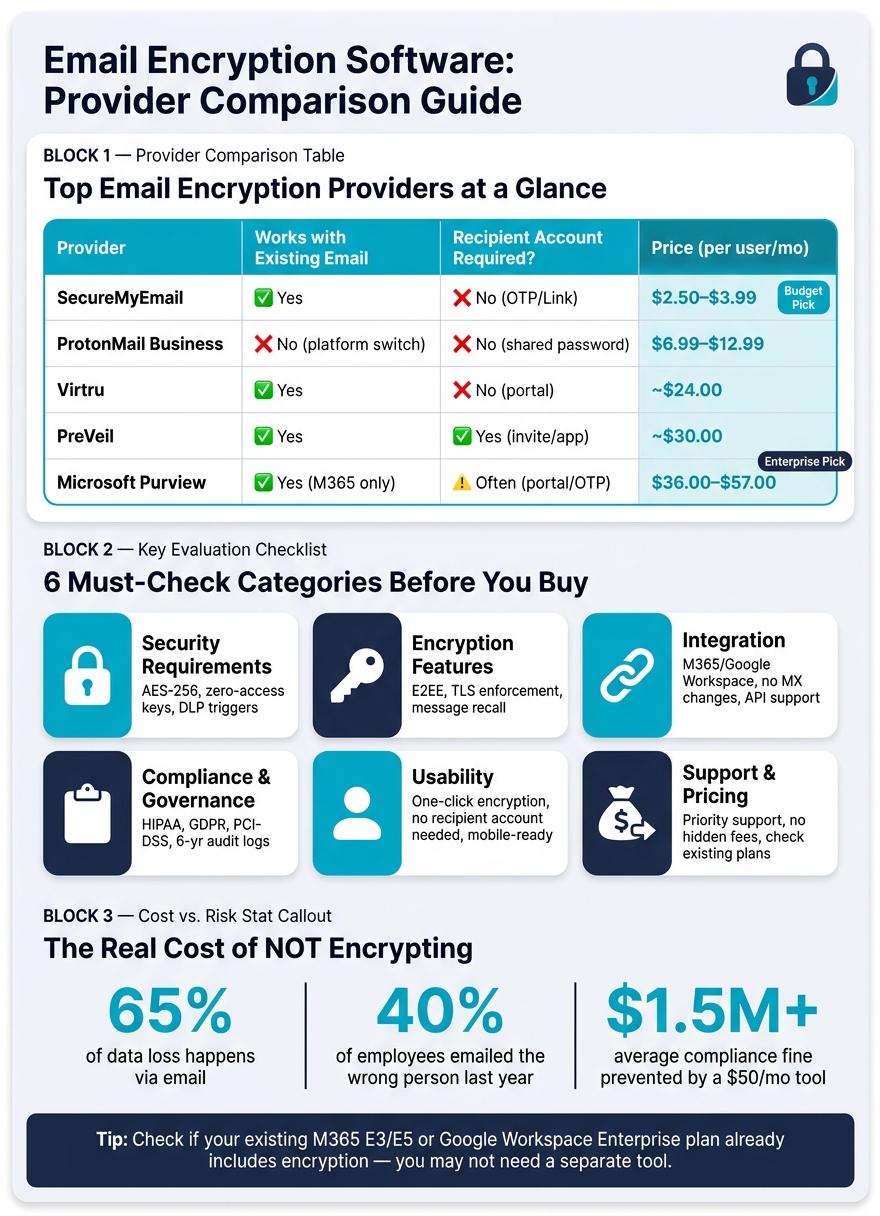
Here’s a comparison of providers based on compatibility, recipient requirements, and pricing:
| Provider | Works with Existing Email | Recipient Account Required? | Approx. Price (per user/mo) |
|---|---|---|---|
| SecureMyEmail | Yes | No (OTP/Link) | $2.50–$3.99 |
| ProtonMail Business | No (platform switch) | No (shared password) | $6.99–$12.99 |
| Virtru | Yes | No (portal possible) | ~$24.00 |
| PreVeil | Yes | Yes (invite/app) | ~$30.00 |
| Microsoft Purview | Yes (M365 only) | Often (portal/OTP) | $36.00–$57.00 |
Also, check if your existing Microsoft 365 E3/E5 or Google Workspace Enterprise plan includes encryption features. If it does, you might not need a separate tool. As one senior security analyst wisely pointed out:
"A $50/month encryption tool can prevent a $1.5 million compliance fine." - Adebisi Oluwasoya, Senior Security Analyst
This perspective underscores the importance of balancing costs with risk management, especially if your work involves sensitive or regulated data.
Final Checklist Summary
Here's a quick checklist to ensure you've covered all the critical areas during your evaluation:
| Category | What to Verify |
|---|---|
| Security Requirements | AES-256 content encryption (beyond just TLS); zero-access key architecture; automated DLP triggers for sensitive data like SSNs, PHI, and PANs |
| Encryption Features | End-to-end encryption for both data at rest and in transit; enforced TLS using MTA-STS or DANE; controls for message recall, expiration, and "do not forward" functionality |
| Integration | Native compatibility with M365 or Google Workspace; no need for MX record changes; API support for marketing automation tools |
| Compliance & Governance | Coverage for HIPAA, GDPR, PCI-DSS, or CMMC as needed; BAA availability upon request; 6-year audit log retention for HIPAA compliance; proper SPF, DKIM, and DMARC configurations |
| Usability | Encryption triggered by one-click or keyword; recipients can access messages without account creation; mobile accessibility included |
| Support & Pricing | Priority support included or optional as an add-on; no hidden fees for archiving or certificate management; verify if your existing M365 E3/E5 or Google Workspace Enterprise plan includes encryption features |
Before making your final decision, double-check these key aspects. Two critical steps to remember:
- Verify "fail loud" behavior: Ensure the system blocks sending and alerts users when a secure connection isn't possible.
- Test recipient experience: Send a sample encrypted message to a personal account. A confusing access process or forced account creation can discourage adoption and compromise security.
This review ensures your encryption tool delivers strong security without disrupting your operations.
"A security tool that your employees actively work around will not protect your business, nor will it satisfy external auditors." - Trustifi
For a detailed provider comparison, visit the Email Service Business Directory.
FAQs
Do I need end-to-end encryption or is TLS enough?
TLS ensures that emails are encrypted while traveling between servers, offering a layer of security during transit. However, it does not safeguard messages once they arrive at their destination. For handling sensitive information or meeting strict regulations like HIPAA or GDPR, end-to-end encryption becomes crucial. This approach ensures that only the intended recipient can access the content, keeping it safe from intermediaries or email providers. To explore your options, check the Email Service Business Directory and find the right tool for your requirements.
How can I encrypt emails without hurting open and reply rates?
Securing emails doesn’t have to come at the cost of user experience. The key is to use encryption methods that are simple for recipients to navigate. For instance, secure links or portals are much easier to handle compared to more technical approaches like PGP or S/MIME, which can feel overwhelming for many users.
It's also critical to have strong authentication protocols in place - SPF, DKIM, and DMARC. These help ensure your emails aren't flagged as spam, keeping your communication trustworthy and reliable.
Another effective method is policy-based encryption. By setting up automated triggers, you can ensure sensitive data is protected without requiring extra steps from the user. This keeps the process both secure and seamless.
If you're unsure where to start, check out tools listed in the Email Service Business Directory. It’s a great resource for finding the right solution tailored to your needs.
What should I test in a free trial before buying?
When using the free trial, take the opportunity to explore how easy the platform is to navigate. Start by creating and scheduling a basic email campaign to see if the process feels straightforward. Dive into essential features like automation and reporting to ensure they meet your expectations. Don’t forget to verify key requirements, such as the platform's security measures or available integrations with your existing tools.
As a final step, submit a pre-sales question to test how quickly and effectively their support team responds. If you need additional guidance in comparing tools, check out the Email Service Business Directory, which provides curated resources to help you choose the right solution.