I budget an ESP switch around the work, not just the subscription. Migration work can cost $15,000+, with complex moves exceeding $50,000 before the top email marketing platforms fees. Before signing, I price these 9 line items:
- Setup and planning - audits, scope, and project ownership.
- IP warmup and deliverability - sending ramp, monitoring, and support.
- Data migration - exports, cleanup, consent, and suppression records.
- Template rebuilds - layouts, personalization, and content.
- Integrations and APIs - CRM sync, webhooks, and event feeds.
- Automation rebuilds - triggers, branches, delays, and exit rules.
- QA and compliance - rendering, links, tracking, and opt-out tests.
- Cutover and rollback - dual-platform fees, missed sends, and recovery.
- Outside and internal support - vendor fees and staff hours.
For each item, I separate one-time work from monthly costs and assign an owner, hours, fees, and timing. Then I check <u>payback and launch readiness</u>: will savings cover the move, have revenue-critical paths passed testing, and can we roll back if needed?
Omnisend vs Klaviyo: Which Email Marketing App Is Actually Worth It?
sbb-itb-6e7333f
What Counts as an ESP Switching Cost
An ESP switching cost is the full one-time and transition spend tied to moving from one platform to another. It is not just the price of the new subscription. You need to account for vendor charges, outside help, internal labor, and disruption risk. The nine line items below turn those broad buckets into work you can actually price.
Direct vendor charges usually cover implementation fees, overage charges, dedicated IP addresses, premium support tiers, data storage, and the overlap period when you're paying both ESPs at the same time. Agency and consultant fees cover strategy, migration, technical execution, and cutover support. Internal labor counts too, even if no one sends you an invoice.
The fourth bucket is risk exposure. That means revenue at risk from inbox-placement loss, message delays, downtime, and rollback work. Think of it as exposure - not a locked-in expense. The same logic applies to deliverability during migration: treat changes as risk, not as a guaranteed cost.
Before you compare platforms, build a forecast for the next 12 to 24 months. Look at subscriber counts, send volume, transactional volume, API calls, and retention needs. Transactional email - password resets, receipts, invoices, and shipping notices - often has a different business impact than promotional email, so it should have its own line in the model. Those inputs help you size each cost bucket before you price the move.
Assign an owner and a dollar estimate to each bucket before you start vendor reviews. The table below shows how the four cost buckets map to owners before you price the nine line items.
| Cost category | What it includes | Estimate owner |
|---|---|---|
| Direct vendor charges | Subscription, implementation fees, tiers, overage charges, dedicated IP addresses, add-ons, data storage, overlap period | Finance / Marketing Ops |
| Agency & consultant fees | Strategy, migration, technical execution, and cutover support | Procurement / Marketing |
| Internal labor | Engineering, Marketing Ops, QA, analytics, legal or compliance, and support hours | Department leads |
| Risk exposure | Revenue at risk from inbox-placement loss, message delays, downtime, and rollback work | Revenue / Finance |
1. Setup, Discovery, and Migration Planning
Start by pricing the assessing email platform compatibility. Every later migration cost depends on it.
Use the current ESP inventory to scope each later cost line item. That inventory should cover lists and consent data, templates and campaigns, automations, integrations, domains, IPs, and permissions. Build a migration register that shows each asset's owner, destination, complexity, priority, and acceptance criteria.
One-Time vs. Recurring Cost
Discovery and planning are one-time costs. They include discovery workshops, technical audits, field mapping, project management, and the migration plan.
Recurring costs are different. They include overlap, extra seats, monitoring, retainers, training, and post-launch optimization. The overlap period is the item teams miss most often, so get approval for it before you sign the new contract.
Primary Cost Drivers
Contact count matters less than most teams think. Cost usually comes from integration depth, automation complexity, data quality, compliance, and cleanup.
Once the scope is clear, assign one owner before work starts. If too many people own the move, no one does.
Owner and Internal Labor
Assign a single migration owner.
Supporting workstreams should include:
- marketing or lifecycle operations
- IT or engineering
- data or analytics
- privacy or compliance
- finance or procurement
Internal labor often ends up costing more than vendor setup fees, especially when custom integrations or historical data preservation are in scope. If documentation is weak - or the ESP includes automations that aren't fully documented - add a 15% to 25% planning reserve.
Business Risk If Underestimated
Thin discovery work creates expensive problems later. It can lead to broken mapping, lost suppression data, failed triggers, and reporting gaps.
It can also break revenue-driving journeys like abandoned-cart, onboarding, and renewal sequences. Before configuration begins, assign every asset one treatment: migrate, rebuild, simplify, retire, or reconfigure.
With the migration scope defined, the next cost is deliverability warmup on the new platform.
2. IP Warmup and Deliverability Monitoring
A new IP has no reputation. That means mailbox providers may throttle your mail or send it to spam until they see a steady, predictable pattern. So this part of an ESP migration needs time, staff time, and budget from the start.
One-Time vs. Recurring Cost
One-time costs usually cover IP setup, authentication, DNS, tracking domains, suppression-list prep, seed lists, and the warmup plan itself. If you send at high volume, run more than one brand, or have a damaged sender reputation, it also makes sense to add a deliverability audit. That usually runs about $1,000-$4,000, and blocklist work is often billed separately.
Recurring costs are the tools and support you need to watch performance as mail starts flowing. That can include monitoring tools, inbox-placement testing, blocklist alerts, DMARC reporting, IP fees, analytics, and outside consultant help. Seed-list monitoring is often around $200-$600 per month for high-volume senders. Deliverability retainers may start near $1,500 per month and go up with volume and setup difficulty. These are planning ranges, not fixed market rates.
Primary Cost Drivers
Warmup can take anywhere from two to eight weeks. The timeline usually depends on send volume, engagement, list quality, and what mailbox providers are signaling back. In practice, it's safer to budget for the slower end.
A common rule of thumb is to increase volume by about 5%-10% per day. But that pace should not run on autopilot. Complaints, bounces, and provider feedback should decide whether you keep moving or slow down.
Dedicated IPs come with extra provisioning and reputation work. Shared IPs can cut setup work, but they also come with shared reputation risk.
Owner and Internal Labor
The deliverability lead should own the plan. They usually need help from marketing ops, IT, data engineering, analytics, and the ESP implementation team. This isn't a one-person job, and treating it like one tends to cause trouble later.
Business Risk If Underestimated
If warmup gets skipped or rushed, the bill often shows up somewhere else. You may see throttling, spam-folder placement, blocked mail, delayed transactional messages, lower campaign revenue, and last-minute remediation fees. In plain English: trying to save time here can get expensive fast.
Google warns that declining reputation, increased spam rates, and rate limiting require senders to adapt quickly through regular monitoring.
It's also smart to keep the old ESP live during the ramp. A working rollback option can limit damage if throttling starts.
Next, budget for the data work needed to move contacts, suppressions, and history into the new ESP.
3. Data Export, Cleansing, and Import
After warmup, data migration usually becomes the next big cost center. And this part is almost never simple.
Subscriber data migration includes more than a contact list. You’re moving consent, suppression, preferences, and engagement history too. In practice, that data usually falls into five groups: identity, consent, suppression, preferences, and engagement history. Export global suppression records and campaign-level suppression records separately when the old and new platforms use different import paths. Keep campaign reports and engagement history as well, since they matter for segmentation, benchmarking, and audit work.
One-Time vs. Recurring Cost
One-time costs cover the heavy lifting. That includes data-model discovery, field mapping, exports, deduplication, cleansing, file transformation, suppression handling, test imports, and post-import reconciliation.
Recurring costs are smaller, but they stick around. These often include data-validation credits, list-hygiene work, CRM sync, and bounce and complaint monitoring. One detail can catch teams off guard: some ESPs charge based on total stored contacts, not just marketable subscribers. So if you import your entire historical database without segmenting it first, your monthly bill can climb quietly.
Primary Cost Drivers
The main cost drivers are pretty direct:
- List size
- Number of source systems
- Data quality
- Number of custom fields
- Consent and preference-rule complexity
A clean 50,000-contact export from one CRM is one kind of job. A 500,000-contact migration pulling from a CRM, an ecommerce platform, an event tool, and a legacy ESP is a different animal. Duplicate records, large suppression files, messy field formats, and the migration method - native connector, API, or manual CSV - all add hours.
Before import, normalize the file. Standardize column names, date formats, capitalization, country and state values, phone-number formats, and Boolean fields. Deduplicate using a defined matching rule, usually a normalized email address plus a review of customer ID or account ID. At the same time, keep compliance records intact, including unsubscribes, complaints, consent, and suppression history.
You should also remove invalid addresses and stale contacts, or place them in a separate class. Then segment contacts into engagement cohorts before import:
- Active in the last 30, 60, and 90 days
- Inactive for more than 180 days
- Blocked or unsubscribed users
That makes it much easier to decide what should be migrated now, what should go into a later re-engagement effort, and what should stay out of initial sends. Clean inputs mean less rework, fewer QA misses, and fewer suppression problems later.
Owner and Internal Labor
Put one person in charge of the migration. Without a clear owner, things slip fast.
That owner should be backed by four workstreams: data engineering, lifecycle marketing, legal/compliance, and QA. Data engineering handles exports, transformations, and API work. Legal checks consent and suppression records. The email team validates segments and profile fields. QA confirms that the imported data is accurate.
For budgeting, estimate labor by workstream instead of by contact count alone. A plan built around discovery, export, transformation, suppression handling, test import, reconciliation, stakeholder review, and post-cutover monitoring will usually be more reliable. A pilot import of 5,000 to 10,000 representative records can surface most problems early, while they’re still cheap to fix.
Business Risk If Underestimated
If a team cuts corners here, the damage tends to show up later - and fixing it is rarely cheap. Common outcomes include lost consent evidence, accidental sends to unsubscribed contacts, and broken personalization.
There’s also a deliverability issue. Salesforce recommends keeping bounce rates below 2%, and stale data is a common reason bounce rates start to climb. The biggest risks are regulatory exposure and sender-reputation damage. Those problems lead to rework, weaker deliverability, and added compliance cost, which pushes total switching spend higher.
Keep the old ESP in place until suppression and bounce history are fully synced. If the data goes in clean, the rebuild work in the next cost line gets a lot lighter.
4. Template and Content Rebuilds
Once the data is in place, the next cost check is template portability. Clean data helps, but it does not make templates portable on its own. In many migrations, template rebuilds become the next major expense after import.
That rebuild work usually includes responsive HTML/CSS, dark mode, accessibility, personalization and dynamic content, tracking, and inbox rendering tests. Templates built inside a visual editor can be a headache. They often produce ESP-specific code, and some lose editability when you move them to a new platform.
One-Time vs. Recurring Cost
Template rebuilds come with both launch work and long-term upkeep.
One-time work includes auditing the current template library, exporting or recreating HTML, rebuilding master layouts, moving images and other assets, translating personalization tokens, setting up reusable content blocks, and writing documentation.
Recurring work includes template maintenance, brand and legal updates, image library management, rendering fixes, and periodic accessibility and responsiveness reviews. In plain terms, rebuild cost is just the first pass. The upkeep keeps going after launch.
Primary Cost Drivers
The main drivers are template volume, design complexity, number of content variations, and fit with the new ESP's editor and templating language. Costs can climb fast when templates rely on nested tables, responsive breakpoints, dynamic modules, conditional content, personalization tokens, product feeds, localization rules, or custom tracking parameters.
Industry estimates put a library of 10-20 active templates at about 2-4 weeks of design and QA work. A set of 50 or more templates may take about 6-8 weeks. Those figures are directional, not fixed. Scope, complexity, and approval cycles can change the timeline a lot.
Owner and Internal Labor
Set one clear owner, then split the work by role. Email marketing or lifecycle ops should own the inventory and acceptance criteria. Email developers should handle HTML, responsive behavior, and fallback handling. Brand or creative teams should approve visual fidelity. Legal should review disclosures, consent language, unsubscribe mechanisms, and preference-center links. Analytics or revenue ops should validate tracking parameters.
Keep ownership with email ops, but run technical and legal reviews at the same time. That parallel path helps avoid launch delays.
For labor estimates, price work by asset and by role - not as one flat migration percentage. For each template, label the work as reuse, adaptation, partial rebuild, or full rebuild. Then multiply the estimated hours by fully loaded internal cost. Include review cycles and meeting time, not just the first build.
Business Risk If Underestimated
When this line item gets underestimated, the problems usually show up fast: delayed campaign launches, broken layouts, missing personalization, dead links, or unsubscribe controls that don't work. None of those are small issues. They can slow launches, hurt engagement, and create compliance risk.
Broken templates can hold back campaigns and suppress revenue until fixes go live. Accessibility failures also add legal risk in places where those rules apply. It makes sense to budget a contingency reserve for unknown legacy dependencies, extra rendering defects, and stakeholder revision cycles - not just the first build.
Next comes the integrations that make these templates send, track, and sync correctly.
5. Integrations and API Reconfiguration
Templates only matter if the integrations, webhooks, and event feeds still work.
That’s why credential changes alone usually aren’t enough. A solid integration inventory should cover CRM/CDP, ecommerce/billing, analytics, consent management, webhooks, and internal apps. Those connections don’t just move data - they also carry consent, suppression, and transaction events. And if payloads, retries, or identifiers change, treat webhooks as their own rebuilds.
One-Time vs. Recurring Cost
One-time work usually includes discovery, architecture mapping, credential creation, endpoint and SDK changes, field mapping, webhook replacement, environment setup, testing, monitoring setup, and cutover support.
One migration estimate puts API reintegration and SMTP reconfiguration at 40-120 engineering hours and $3,000-$12,000 in labor. Use that as a reference point, then check it against your own rates and setup complexity.
Recurring costs can include:
- API-call or connector fees
- Event-stream fees
- Monitoring and alerting
- Credential rotation
- Webhook maintenance
- Software updates when the ESP changes its API or SDK
Primary Cost Drivers
The main cost drivers are pretty straightforward: the number of integrations, the number of data flows inside each one, bidirectional sync, real-time versus batch needs, custom code, undocumented legacy dependencies, data volume, authentication complexity, and differences between the old and new ESP data models.
A one-way newsletter sync might only need a credential update. But a two-way CRM integration that sends profile updates, purchase events, engagement events, suppression data, and custom attributes can take a lot more engineering time and QA.
Costs also go up when you have multiple environments - dev, staging, and production - plus strict uptime targets.
Owner and Internal Labor
This isn’t just email-team work.
Engineering or marketing operations usually owns API changes, webhook handlers, secrets management, and deployment. Data or analytics owns warehouse feeds, event schemas, attribution, and reporting continuity. CRM or customer-data teams own identity resolution, profile synchronization, consent, subscription status, and preference-center behavior. Security and legal review credentials and personal-data movement. Email or lifecycle marketing sets business requirements and acceptance criteria.
Price internal oversight on purpose. Migration management is not free.
Business Risk If Underestimated
Integration failures often stay hidden until something downstream stops working.
A forgotten webhook can quietly stop passing unsubscribe or suppression events. A field-mapping mistake can write consent data to the wrong attribute. A broken purchase-event feed can stop an abandoned-cart or onboarding sequence from firing.
The downstream impact can be tougher to spot - and tougher to fix - than a broken template:
- Compliance exposure
- Stale segmentation
- Missed revenue triggers
- Attribution gaps
Don’t decommission old credentials or webhooks until monitoring shows stable data flow in production. Keep old endpoints live until production monitoring confirms stable data flow.
After integrations are stable, move to QA, rendering, and compliance testing.
6. Automation and Journey Recreation
Automation and journey recreation is the sixth switching-cost line item. By default, this work does not move over cleanly. ESP logic rarely maps one-to-one, so triggers, delays, branch rules, suppression logic, and event mappings usually need to be rebuilt in the new platform’s format. That’s why journey inventory is the first budgeting step.
For every live or recently retired workflow - welcome, onboarding, abandoned cart, post-purchase, re-engagement, renewal, and transactional journeys - document the entry trigger, branch logic, exit rules, and any dependencies. Track each journey in the migration register with its owner, trigger, and rebuild status. Once that map is done, you can price the rebuild work with a lot more confidence.
One-Time vs. Recurring Cost
One-time costs include discovery, rebuilds, testing, training, and cutover. Recurring costs include maintenance, monitoring, and future updates.
Primary Cost Drivers
The main cost drivers are the number of workflows, the number of messages and branches inside each workflow, custom events, personalization, and multilingual variants. Those factors shape who needs to do the work and how many hours it will take.
If the old and new platforms use different data models, merge fields, or dynamic-content rules, rebuild journeys natively instead of trying to force a direct transfer. That usually saves time and avoids cleanup later.
Owner and Internal Labor
Marketing ops handles journey documentation and rebuilds. Engineering checks event payloads. Compliance reviews consent rules. Analytics verifies attribution. Business owners approve the customer experience.
Each role should be priced on its own. Even if someone is “just reviewing,” those hours still count.
Business Risk If Underestimated
If this work is underbudgeted, the result can be missed sends, duplicate sends, the wrong audience entering a flow, broken personalization, and attribution gaps. And big journey libraries can take weeks - not days.
Once journeys are rebuilt, testing is what catches failures before cutover.
7. QA, Rendering, and Compliance Testing
QA, rendering, and compliance testing is the seventh switching-cost line item. At this stage, the job is simple: check rebuilt templates and journeys inside the live ESP and across the mailbox clients that matter most. This step protects the work already put into templates, automations, and integrations. It’s the last gate before launch.
One-Time vs. Recurring Cost
One-time costs usually cover test-matrix setup, seed-list rebuilds, rendering tools, and validation in the live environment. Recurring costs show up in per-seat or platform fees, accessibility reviews, compliance checks, and QA time each time a campaign or journey gets updated. In plain terms, you need to budget for both the tools and the people using them.
Primary Cost Drivers
The biggest cost drivers are template variants, client coverage, and dynamic content. A practical starting point is to test campaigns in your top 3-5 email clients, with Gmail, Outlook, and Apple Mail as the minimum.
It also pays to check for:
- Dark mode
- Blocked images
- Small screens
Those three conditions often expose layout and contrast problems that a standard preview won’t catch.
Owner and Internal Labor
Marketing ops owns the test plan and the acceptance criteria. Email developers handle HTML fixes and responsive-layout issues. Data or CRM owners check personalization, suppression logic, and preference-center behavior. Analytics verifies links, UTMs, and event tracking. Legal or compliance reviews required disclosures and opt-out behavior.
Business Risk If Underestimated
If rendering breaks, the damage can be immediate. Calls to action may disappear, purchase links may fail, or the message may become hard to use on mobile.
Under CAN-SPAM, opt-out requests must be honored within 10 business days, and the opt-out mechanism must stay functional for at least 30 days after the message is sent.
This is where migrations can cause problems even if the creative looks unchanged. A missing mailing address, a broken unsubscribe link, or a lost suppression list can turn a normal send into a compliance issue. Build in one extra test-and-fix cycle before cutover.
Once QA passes, the next budget line is cutover risk.
8. Downtime, Parallel Sending, and Rollback Risk
Once QA is done, cutover becomes the last big area of risk. And it’s a different kind of risk. At this stage, the main cost buckets are downtime, parallel sending, and rollback. Each one ties back to either lost revenue from missed sends or extra labor to get things back to normal.
One-Time vs. Recurring Cost
One-time costs usually cover routing changes, test sends, cutover prep, and rollback setup.
Recurring costs show up during the overlap period. These can include overlapping ESP fees, duplicate IP or send-volume charges, deliverability checks, and short-term incident-response labor. A simple way to size that window is:
Overlap cost = combined monthly fees × overlap months.
Primary Cost Drivers
The biggest source of exposure is a missed-send window - any stretch where campaigns fail to go out on schedule. A practical way to estimate that risk is:
Send-gap exposure = expected revenue per send day × days affected × recoverable share.
Use separate estimates for promotional, transactional, and lifecycle sends. They don’t carry the same revenue impact, and they don’t create the same customer fallout.
During cutover, run a staged 80/20 to 20/80 rollout, then move fully once you’ve had 7 stable days at 80%+ traffic. That gives the team room to compare delivery and complaint data before flipping everything at once. It also keeps the blast radius smaller if something goes sideways.
One more thing matters here: suppression lists, unsubscribes, and late bounce events need to stay synced across both ESPs during the overlap. If they don’t, you can end up with duplicate sends or emails going to people who already opted out.
Owner and Internal Labor
The migration lead makes the go/no-go call, but this isn’t a one-person job.
- Marketing or lifecycle teams keep campaigns moving
- Engineering handles routing, API updates, and rollback controls
- Deliverability watches inbox placement and complaint rates
- Data teams manage suppression exports
Price internal labor using each role’s fully loaded hourly rate. Then track planned vs. actual hours across prep, live cutover, monitoring, and incident response.
Business Risk If Underestimated
If this line item is too low, teams often compensate in risky ways - rushing cutover, shrinking the monitoring window, or shutting down the old ESP too early. That’s where a small deliverability problem can turn into a long outage.
One migration guide suggests keeping the old platform available for about 30 days after cutover as a planned backup. The logic is simple: delayed authentication, automation, or feedback-loop issues often show up after the first clean send, not before.
Build the rollback runbook before launch. It should clearly name the decision owner, spell out the thresholds that trigger a pause, and show exactly how routing, DNS, and suppression settings get reverted.
Once cutover risk is priced, the next step is to budget the agency, consultant, and internal support needed to carry it out.
9. Agency, Consultant, and Internal Support
After cutover risk, budget for the people doing the migration work and steadying the new stack. This cost is easy to miss because it gets spread across teams, vendors, and support hours. But on projects with complex automations or custom integrations, it can take up a large share of the total migration budget.
One-Time vs. Recurring Cost
Keep these buckets separate.
One-time costs include discovery, migration planning, data transfer, template and workflow rebuilds, integration setup, QA, and launch support.
Recurring costs include campaign production, deliverability monitoring, reporting, optimization, troubleshooting, and day-to-day platform administration after go-live.
If you mix these together, the budget can get blurry fast. A one-off rebuild is not the same as monthly platform support.
Primary Cost Drivers
Typical migration engagements run $1,000-$15,000, with specialist work at $50-$299/hour and dedicated IP warming at $500-$2,500.
The right provider depends on the job:
- Use ESP professional services for native setup
- Use an independent consultant for strategy
- Use a specialized agency for complex lifecycle, deliverability, or integration work
That choice shapes the scope. In plain terms, you’re deciding whether you need strategy help, technical build support, or full-service execution.
Owner and Internal Labor
Internal time counts too. Treat it as a budgeted cost, not “free” help from the team.
Price the work by role, then add 10%-20% for rework, meetings, and launch support. That buffer matters because support work doesn’t end at go-live. Someone still has to handle fixes, answer questions, and clean up loose ends once the new platform is live.
Business Risk If Underestimated
When this line item is too low, teams usually feel it right away: rushed cutover, weaker QA, slower fixes, and a longer stretch of relying on outside help.
Once the budget is clear, the next move is finding the right migration support. Use Email Service Business Directory to find email platforms, agencies, deliverability specialists, and lifecycle support. Before hiring, verify platform-specific experience, security practices, and cutover availability.
Integration Priority Snapshot
Rank integrations by failure impact before cutover. If analytics breaks, reporting takes a hit. If your e-commerce event feed breaks, abandoned-cart, post-purchase, and renewal flows can stop cold. That's the difference that matters.
Use that ranking to decide what must pass before launch and what can wait until after cutover.
The table below ranks six migration-critical integrations. Swap the revenue risk column with your own estimate based on event volume, conversion rate, and average order or subscription value.
| Integration | One-time effort | Criticality | Required tests | Owner | Revenue risk |
|---|---|---|---|---|---|
| CRM sync | High | Critical | Field mapping, consent, two-way sync, duplicates, latency | Marketing Ops / RevOps | High |
| E-commerce or subscription data | High | Critical | Purchase, renewal, cancellation, refund, failed payment, product change, identity matching | Commerce / Product Engineering | Very High |
| Website forms | Low to medium per form | High | Every form variant: submission, consent, routing, confirmation, mobile | Web / Growth | High |
| Analytics and attribution | Medium to high | Medium to high | UTMs, campaign IDs, revenue values, attribution windows, dashboards | Analytics / Data Team | Medium to high |
| Webhooks | Medium to high | High to critical | Authentication, payload schema, retries, duplicate and out-of-order events, alerting | Engineering / DevOps | High |
| Event tracking | Medium to high | Critical for behavioral journeys | Event schema, trigger, segment membership, journey, reporting | Product / Lifecycle Marketing | High |
One thing trips teams up all the time: a successful authentication check doesn't mean the integration works in practice. It only means the systems can talk. Fields may still map to the wrong place. Events may show up late. Downstream automations may never fire. A connected integration can fail quietly and leave you with hidden switching cost.
For launch readiness, test the highest-risk paths first:
- consent and suppression
- CRM and commerce data
- forms and acquisition events
- webhooks and event tracking
- analytics last
And don't stop at a basic ping. Test with real records and end-to-end events.
Any critical integration without an end-to-end test pass is a launch blocker.
Cutover Strategy: Big-Bang vs. Phased vs. Parallel Run
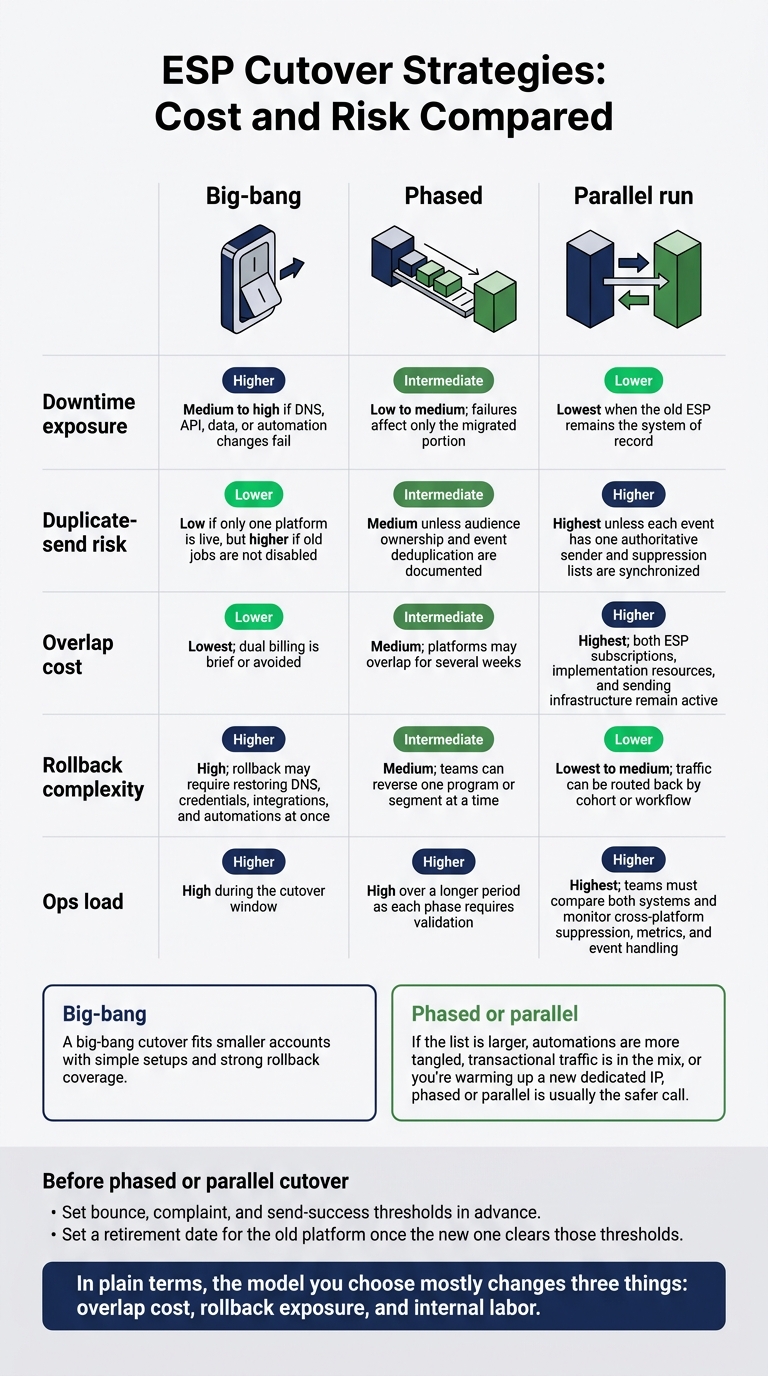
ESP Cutover Strategies: Cost and Risk Compared
Once you've priced downtime risk, the next call is the cutover plan. And this isn't a side detail. The cutover method can matter just as much as the new ESP itself.
| Approach | Downtime exposure | Duplicate-send risk | Overlap cost | Rollback complexity | Ops load |
|---|---|---|---|---|---|
| Big-bang | Medium to high if DNS, API, data, or automation changes fail | Low if only one platform is live, but higher if old jobs are not disabled | Lowest; dual billing is brief or avoided | High; rollback may require restoring DNS, credentials, integrations, and automations at once | High during the cutover window |
| Phased | Low to medium; failures affect only the migrated portion | Medium unless audience ownership and event deduplication are documented | Medium; platforms may overlap for several weeks | Medium; teams can reverse one program or segment at a time | High over a longer period as each phase requires validation |
| Parallel run | Lowest when the old ESP remains the system of record | Highest unless each event has one authoritative sender and suppression lists are synchronized | Highest; both ESP subscriptions, implementation resources, and sending infrastructure remain active | Lowest to medium; traffic can be routed back by cohort or workflow | Highest; teams must compare both systems and monitor cross-platform suppression, metrics, and event handling |
In plain terms, the model you choose mostly changes three things: overlap cost, rollback exposure, and internal labor.
A big-bang cutover fits smaller accounts with simple setups and strong rollback coverage. If the list is larger, automations are more tangled, transactional traffic is in the mix, or you're warming up a new dedicated IP, phased or parallel is usually the safer call.
Phased and parallel ramps need guardrails before anything goes live. Set bounce, complaint, and send-success thresholds in advance. Then set a retirement date for the old platform once the new one clears those thresholds. If you don't, it's easy to drift into a messy overlap - paying for both systems while audience data starts to split apart.
That decision sets the break-even point for the migration.
Switching Economics and Break-Even Review
Estimate payback using the cutover plan above. The overlap period affects when the move breaks even.
Net switching cost = one-time migration costs + overlap costs + risk allowance + termination charges − credits and waived fees.
Build the model from the nine line items above. Calculate risk as probability × impact for delayed sends, deliverability dips, conversion loss, and rework.
Contract terms set the cost floor you can't avoid. Check notice deadlines, auto-renewal dates, minimum commitments, prepaid balances, export fees, and termination charges. Ask for a migration credit or support concession, but count credits and waived fees only after written confirmation.
Then compare that cost floor with recurring savings. Compare platform performance using the fully loaded cost of both ESPs, including usage, IPs, support, tools, and internal labor. Run the model again at projected 12- to 24-month volume.
Measure upside as incremental gross profit, not revenue. Compare equivalent audiences, offers, send times, and attribution windows. Exclude untested gains and account for warmup losses. SMTP acceptance does not prove inbox placement.
Break-even months = net switching cost ÷ monthly net benefit.
Monthly net benefit equals recurring savings plus validated gross-profit gains minus additional operating costs. Show base, downside, and upside cases. If benefits build gradually, use a monthly cash-flow forecast. Set a payback target of 12, 18, or 24 months before approval.
If monthly net benefit is zero or negative, the move has no payback under this model. Justify it separately for functionality or compliance. Use the payback result to approve, defer, or reject the move.
Where to Find Vendor and Migration Support
If the break-even review still supports the move, start shortlisting migration help. Use Email Service Business Directory to find ESPs, tools, and agencies for deliverability, automation, campaign management, analytics, segmentation, and integration. Check references, security controls, scope, pricing, and exit terms directly with each provider to reduce migration uncertainty and vendor lock-in risk.
Match each provider to the work:
- ESP: Account setup, authentication, and implementation.
- Migration agency: Rebuilding templates, data, automations, integrations, and forms.
- Deliverability specialist: Sender reputation and IP risk.
- Internal owners: Business rules, consent, approvals, and launch operations.
Send every candidate the same brief so you can compare bids on equal terms. Include data sources, consent fields, suppression lists, segments, templates, forms, automations, transactional and promotional streams, domains, IPs, integrations, webhooks, and reporting. Also include recent deliverability metrics, send volume, peak periods, revenue-critical journeys, and known defects. Require a named migration lead, itemized fees in USD, a written ownership matrix, acceptance criteria, escalation contacts, and a post-cutover support period.
Require a live demo using your data model and 1 critical journey. Candidates should show consent and suppression handling, SPF/DKIM/DMARC setup, CRM or product-event integration, responsive template testing, rollback steps, and how promptly support responds.
For mid-market and PE-backed teams, use the directory’s lifecycle and retention coverage to check support for retention, expansion, net revenue retention, behavioral segmentation, experimentation, attribution, renewal reporting, and multi-brand governance.
Conclusion
The lowest ESP quote rarely means the lowest-cost switch. Integration work, rebuilds, warmup, testing, and disruption can wipe out the savings.
Before approval, price all nine line items separately. Assign each an owner, hours, fees, timing, and contingency. Include dual-platform fees, overlap labor, and the risk of migration downtime or lost revenue.
With the full budget mapped, check payback: compare monthly savings against the full implementation cost and risk reserve, then set a break-even date. Approve only when the nine-line-item model works and the rollback plan is ready - not just because the subscription costs less.
FAQs
How can I reduce migration costs without increasing risk?
Clean your data before migration to save $0.02-$0.05 per record. Move historical data that isn't needed for the main cutover ahead of time to shorten the migration window by 60-70%. Schedule migrations during off-peak periods, such as Q1, for discounts of up to 20%.
Test the migration with sample mailboxes to catch issues early. Use automated data validation and real-time monitoring to prevent downtime. Set aside a 20% contingency fund for unexpected challenges.
How do I avoid double-counting migration expenses?
Build a spreadsheet budget with fixed, variable, and internal line items, and track expenses by quarter. Keep one-time setup and data migration costs separate from recurring subscriptions and maintenance.
Regularly remove unsubscribed or inactive contacts that can push you into a higher billing tier.
For complex transitions, use the Email Service Business Directory to compare platform pricing structures and check for hidden fees before finalizing your budget.
What if my ESP switch exceeds its budget?
Audit usage now for overage fees, charges for inactive contacts, and excessive API calls. Check what triggers charges under your contract, and archive non-subscribed contacts. Experts recommend setting aside a 20% contingency fund for unexpected data formatting or integration issues.
Plan future adjustments around fiscal year-end or quarterly promotions when possible. For complex transitions, consult a specialized firm like DevriX to optimize your setup.