When it comes to high-volume email sending, Mailgun and SendGrid are two of the most popular platforms. Both cater to businesses that need to send millions of emails monthly, but their strengths lie in different areas. Here's what you need to know:
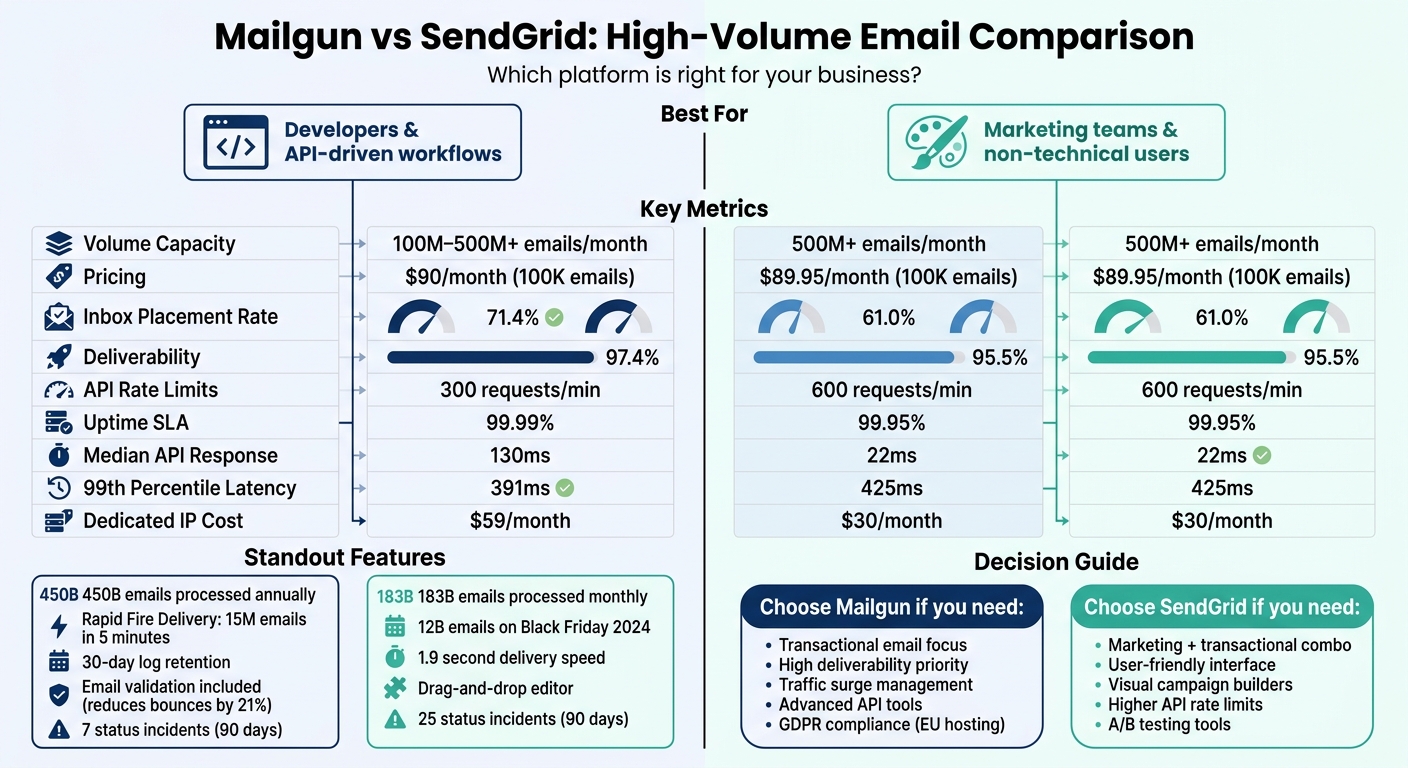
- Mailgun is developer-focused, offering advanced API tools, high deliverability (97.4%), and robust handling of traffic spikes. It's ideal for transactional emails and real-time adjustments.
- SendGrid, part of Twilio, combines email marketing and transactional email capabilities. It’s user-friendly, with features like drag-and-drop editors and advanced analytics, making it suitable for marketing teams.
Quick Comparison
| Feature | Mailgun | SendGrid |
|---|---|---|
| Monthly Volume Capacity | 100M–500M+ | 500M+ |
| Base Price | $90/month (100K emails) | $89.95/month (100K emails) |
| Inbox Placement Rate | 71.4% | 61.0% |
| API Rate Limits | 300 requests/min | 600 requests/min |
| Uptime SLA | 99.99% | 99.95% |
| Dedicated IP | $59/month | $30/month |
Choose Mailgun for API-driven workflows, high deliverability, and real-time traffic management.
Choose SendGrid for a combined marketing and transactional email solution with tools for non-technical users.
Mailgun vs SendGrid High-Volume Email Comparison: Features, Pricing & Performance
Mailgun's High-Volume Email Capabilities
Scalability Features
Mailgun, hosted on Google Cloud, processes an astounding 450 billion emails annually and can handle bursts of up to 72 million messages per hour. Its Rapid Fire Delivery SLA guarantees that 99% of as many as 15 million messages are attempted within just five minutes.
Here's a real-world example: the Quantum Response Network managed to slash delivery times from 29 hours to less than 2 hours by leveraging Mailgun's API.
To further enhance high-volume campaigns, Mailgun includes built-in email validation, which helps cut bounce rates by as much as 21%. These features make it a reliable choice for businesses selecting an email marketing platform to scale quickly and handle real-time traffic surges without a hitch.
Handling Traffic Surges
Mailgun is designed to handle sudden spikes in email traffic with ease. The platform boasts a 99.99% uptime SLA and supports 300 API requests per minute, allowing for real-time adjustments during peak usage. For businesses sending over 50,000 emails monthly, using dedicated IPs can help safeguard your sender reputation by keeping it separate from shared IP pools.
Additionally, Mailgun offers real-time webhooks that provide instant updates on email delivery, opens, and clicks. This is a critical step when assessing email platform compatibility with your existing tech stack. This allows teams to monitor performance and tweak campaigns on the fly during high-traffic events, ensuring maximum impact.
sbb-itb-6e7333f
SendGrid's High-Volume Email Capabilities
Scalability Features
SendGrid manages an incredible volume of email traffic, processing 183 billion emails every month and surpassing 1 trillion emails sent since its inception. It’s built to handle massive spikes, like during Black Friday 2024, when it processed 12 billion emails in a single day, and Cyber Monday that same year, with 11.7 billion emails sent.
The platform supports both a Web API (REST) and an SMTP relay, offering flexibility for integrating email functionality into different applications. It also includes features like gzip compression for payloads up to 30MB and the ability to schedule email sends during off-peak hours to minimize deferral rates.
With a 99.95% uptime SLA and the ability to handle 600 API requests per minute, SendGrid ensures reliability. Its Mail Send API supports up to 1,000 recipients per request, with emails typically delivered in just 1.9 seconds. Businesses sending large volumes of emails can benefit from dedicated IP addresses available on Pro and Premier plans. Additionally, IP pool management allows you to separate traffic types - like transactional and marketing emails - protecting your sender reputation.
SendGrid doesn’t just focus on performance; it also simplifies email list management and segmentation, making it easier for businesses to adapt their email strategies as they grow.
Supporting Growing Email Lists
For businesses managing expanding email lists, SendGrid’s subuser management feature, available on Pro and Premier plans, isolates sender reputations across applications. This prevents disruptions in one area from affecting others.
The Marketing Campaigns platform is designed with ease of use in mind, making it accessible even for non-technical users. As Jeff Born, CEO of Mealonthefly, shares:
It's easy to communicate with our customers with the user-friendly Marketing Campaigns platform. I can create and send a campaign within a few minutes and watch our analytics numbers spike as they are opened.
For developers, the v3 API uses RESTful architecture with JSON payloads and standard API keys, enabling seamless integration. The platform also supports Handlebars syntax for dynamic templates, ensuring personalized communication even at scale.
In 2024, Cinc, a real estate technology company, worked with SendGrid’s Email Professional Services to improve their email program. This effort resulted in Gmail inbox placement rates of 97% to 99%. For Premier plan customers sending over 2.5 million emails monthly, SendGrid offers a 3-month onboarding process and dedicated account management to help optimize performance.
SendGrid vs Mailgun (2026) - Which One Is BETTER?
Scalability Comparison: Mailgun vs. SendGrid
When it comes to handling high-volume email sending, Mailgun and SendGrid take distinct approaches, shaped by their underlying architectures. Mailgun is a dedicated email platform under Sinch, while SendGrid integrates email services as part of Twilio's larger communication suite. This difference affects everything from traffic management to sender reputation protection.
Reputation management is one area where these platforms diverge significantly. Mailgun ties reputation to specific domains, offering better isolation for high-volume senders. In contrast, SendGrid uses shared IP pools at lower pricing tiers, which can expose users to risks from other senders' poor practices. This can be a critical factor for businesses evaluating the best email marketing platforms on entry-level plans.
Performance metrics also highlight key differences. SendGrid boasts a faster median API response time of 22ms compared to Mailgun's 130ms, making it quicker for routine message hand-offs. However, Mailgun outperforms at the 99th percentile, with lower latency (391ms vs. SendGrid's 425ms). During periods of heavy congestion, SendGrid's worst-case response time can stretch to 4,783ms, whereas Mailgun caps at 501ms.
Mailgun's scalability centers on API-driven workflows and extensive logging capabilities (up to 30 days). On the other hand, SendGrid emphasizes tools for non-technical users, such as visual builders and marketing automation. The table below provides a side-by-side look at these scalability metrics for easy comparison.
Scalability Metrics Table
| Metric | Mailgun | SendGrid |
|---|---|---|
| Monthly Volume Capacity | 100M–500M+ | 500M+ (148B+ total) |
| Pricing Tiers (Starting) | $15 (10K), $35 (50K), $90 (100K) | $19.95 (50K), $89.95 (2.5M) |
| Dedicated IP Options | Available on Scale ($35+) and up | Available on Pro ($89.95+) and up |
| API Rate Limits | 300 requests per minute | 600 requests per minute |
| Inbox Placement Rate | 97.4% (Deliverability Service avg) | ~91% (Shared infrastructure avg) |
| Log Retention | 5 to 30 days | 1 to 7 days (Pro), up to 30 days (Premier) |
| Delivery SLA | 99.99% Uptime | 99.95% Uptime |
| Median Response Time (p50) | 130ms | 22ms |
| 99th Percentile Latency (p99) | 391ms | 425ms |
| High-Volume Feature | Rapid Fire Delivery SLA (15M emails in 5 min) | Mail Body Compression (Gzip, up to 30MB) |
This breakdown highlights the strengths and trade-offs of each platform, helping you decide which aligns better with your specific scalability needs.
Pricing for High-Volume Campaigns
Plan Costs and Overage Fees
When sending 100,000 emails per month, Mailgun and SendGrid have nearly identical base prices - $90/month for Mailgun and $89.95/month for SendGrid. However, the real differences emerge in how they handle overage fees and additional features.
Mailgun keeps things simple with its overage charges: if you exceed your monthly limit on the Scale plan, you’ll pay $0.80 for every 1,000 additional emails. On the other hand, SendGrid uses a tiered overage pricing system, which can lead to higher costs during unexpected spikes in email volume.
For smaller campaigns, SendGrid’s Essentials plan is more affordable, costing $19.95/month for 50,000 emails compared to Mailgun’s $35/month Foundation plan. But as the volume grows, Mailgun becomes more competitive. For example, at 300,000 emails per month, Mailgun’s Scale plan costs $215, while SendGrid’s Pro plan comes in at $249.
Both platforms include a dedicated IP address with their ~$90/month plans. If you need extra IP addresses, Mailgun charges $59/month per IP, while SendGrid offers them at $30/month. Another key difference? Mailgun includes 5,000 email validations per month on its Scale plan, while SendGrid reserves this feature for its Pro tier and higher.
For businesses sending over 1.5 million emails (SendGrid) or 2.5 million emails (Mailgun), custom enterprise pricing becomes available, which can help reduce the cost per email at such high volumes.
High-Volume Pricing Table
Here’s a quick comparison of the two platforms' pricing and features:
| Feature | Mailgun Scale Plan | SendGrid Pro Plan |
|---|---|---|
| Base Price | $90/month | $89.95/month |
| Included Volume | 100,000 emails | 100,000 emails |
| Overage Rate | $0.80 per 1,000 emails | Varies by volume tier |
| Dedicated IP | 1 included | 1 included |
| Additional IPs | $59/month each | $30/month each |
| Email Validation | 5,000/month included | Available on Pro+ tier |
| Log Retention | 30 days | 30 days (paid add-on) |
| Support Channels | Phone, chat, ticket | Phone, chat, ticket |
Deliverability and Reliability Metrics
Inbox Placement Rates
When it comes to inbox placement, Mailgun takes the lead over SendGrid, achieving a 71.4% inbox placement rate, compared to SendGrid's 61.0%. This 10% gap can make a noticeable difference, especially for large-scale campaigns.
Looking closer at emails that fail to reach their destination, Mailgun records a 23.8% spam rate and 1.0% missing rate, while SendGrid shows a 17.1% spam rate but a much higher 20.9% missing rate. Essentially, SendGrid's emails are more prone to vanishing entirely rather than landing in spam - a major concern for businesses needing insight into delivery issues. For companies managing high email volumes, these metrics highlight the importance of understanding where emails go when they don't land in inboxes.
Both platforms boast strong overall deliverability. Mailgun reports 97.4% deliverability, slightly surpassing SendGrid's 95.5%. This difference ties back to their infrastructure. Mailgun assigns sending reputation to specific domains, which helps limit the fallout if another sender on a shared IP faces issues. In contrast, SendGrid relies on larger shared IP pools, which can increase the risk of reputation problems for users on lower-tier plans.
For businesses sending high volumes of emails, using dedicated IPs is a smart move. Dedicated IPs isolate sender reputation, protecting it from the potential risks of shared pools. Just keep in mind, transitioning to a dedicated IP requires 4–6 weeks of IP warming to establish a solid reputation.
Performance Under High Volume
Both platforms promise high uptime, but there’s a slight difference. Mailgun guarantees 99.99% uptime, while SendGrid typically offers 99.95%, though some sources also cite 99.99% for SendGrid. However, uptime alone doesn’t tell the full story - API performance under heavy traffic is equally important.
SendGrid processes massive volumes, handling billions of emails monthly and exceeding 4 billion during peak times like Black Friday and Cyber Monday. Mailgun counters with its Rapid Fire Delivery SLA, offering 99% attempted delivery for up to 15 million emails within five minutes. This feature is particularly valuable for urgent transactional emails.
When it comes to API performance, the platforms show different strengths. SendGrid has a faster median response time of 22ms, compared to Mailgun’s 130ms. But during high-stress conditions (99th percentile latency), Mailgun outperforms with 391ms, while SendGrid reaches 425ms. This suggests Mailgun maintains steadier performance during traffic spikes. Over a 90-day period, Mailgun reported 7 status incidents, far fewer than SendGrid’s 25, hinting at more reliable day-to-day operations.
| Metric | Mailgun | SendGrid |
|---|---|---|
| Inbox Placement | 71.4% | 61.0% |
| Missing Rate | 1.0% | 20.9% |
| Median API Latency | 130ms | 22ms |
| 99th Percentile Latency | 391ms | 425ms |
| Uptime SLA | 99.99% | 99.95% |
| Status Incidents (90 days) | 7 | 25 |
Best Platform for High-Volume Email Sending
Comparison Summary
Mailgun is a top choice for developers who need precise control and the ability to handle sudden spikes in email traffic. Its burst capacity and reliable deliverability make it a great fit for urgent campaigns like flash sales or breaking news alerts. Plus, Mailgun includes email validation in all paid plans, which can reduce bounce rates by 21%, helping maintain a strong sender reputation.
SendGrid stands out for businesses that want to manage both marketing and transactional emails on one platform. At $89.95/month for the Pro plan, it supports up to 2.5 million emails, offering a cost-efficient solution for high-volume campaigns. Its drag-and-drop editor and built-in A/B testing tools make it particularly appealing to non-technical teams. Processing over 148 billion emails each month with a median delivery speed of 1.9 seconds, SendGrid showcases its ability to handle large-scale email needs with ease.
The choice between the two comes down to priorities: Mailgun provides advanced developer tools and excellent performance for transactional emails, while SendGrid is tailored for businesses needing a mix of high-volume email processing and marketing features.
Platform Recommendation
Both platforms offer the scalability required for high-volume email campaigns, but the best fit depends on your specific needs.
Choose Mailgun if your focus is on transactional emails, handling unpredictable traffic surges, or ensuring GDPR compliance with EU-hosted infrastructure. Its granular API logs, debugging tools, and built-in email validation make it a strong option for technical teams.
Choose SendGrid if you’re sending more than 100,000 emails monthly and need a combined marketing and transactional email solution. The Pro plan is well-priced for campaigns ranging from 100,000 to 2.5 million emails, and its intuitive interface is ideal for non-technical users.
For businesses sending over 1 million emails each month, consider negotiating custom enterprise pricing with both providers, as rates often become more flexible at that scale. Additionally, investing in a dedicated IP on either platform can help protect your sender reputation. Keep in mind, though, that 4–6 weeks of IP warming will be necessary to achieve optimal deliverability.
FAQs
When should I use a dedicated IP?
Using a dedicated IP can help boost email deliverability, maintain a consistent sender reputation, and ensure reliable delivery of high email volumes. Both Mailgun and SendGrid provide dedicated IP options, which are especially useful for high-volume campaigns or transactional emails where managing your reputation is key. With a dedicated IP, your sending reputation is entirely in your control, preventing it from being affected by other senders. This can lead to better inbox placement, particularly for large-scale or sensitive email sends.
How do I warm up a new dedicated IP?
Warming up a new dedicated IP means gradually increasing your email sending volume to establish a good reputation with Internet Service Providers (ISPs). Start by sending small batches of emails and then slowly increase the volume over time. For step-by-step guidance, check your email service provider’s resources - they often offer platform-specific recommendations to help you through the process.
What causes emails to go missing instead of landing in spam?
Emails can sometimes vanish for reasons like deliverability issues, bounces, or getting caught by spam filters. To tackle these problems, tools like inbox placement testing, blocklist monitoring, and spam trap detection can be incredibly helpful. These tools work to pinpoint the underlying causes, making it easier to address and fix the issues behind missing emails.