Email APIs connect email services with CRM systems to automate tasks like syncing customer interactions, tracking email performance, and managing campaigns. This eliminates manual data entry, improves communication efficiency, and boosts email personalization. With over 306 billion emails sent daily, businesses need these integrations to manage high communication volumes effectively.
Key benefits include:
- Real-time data syncing: Automatically logs email interactions into CRM records.
- Improved personalization: Tailors emails using CRM data, increasing revenue by up to 760%.
- Streamlined campaigns: Tracks metrics and automates workflows, leading to a 451% increase in qualified leads.
- Time savings: Pre-built APIs reduce development time by at least two months.
To integrate, follow these steps:
- Define goals (e.g., syncing email metrics, automating workflows).
- Set up secure API authentication (e.g., OAuth 2.0).
- Map and sync data fields (e.g., email statuses, timestamps).
- Test thoroughly in a staging environment.
Choose a CRM platform based on features like bidirectional sync, webhook support, and API limits. Popular options include HubSpot, Salesforce, and ActiveCampaign, each offering unique tools for email API integration. Proper setup ensures accurate data, better customer engagement, and smoother operations.
How Does An API Link Email To CRM Automatically? - TheEmailToolbox.com
sbb-itb-6e7333f
Benefits of Connecting Email APIs with CRM Systems
Integrating email APIs with your CRM can completely reshape how you engage customers and manage campaigns. It’s not just about convenience - it’s about boosting efficiency and driving results.
For example, businesses using CRM API integrations have reported impressive outcomes: sales close rates increasing by nearly 60% and customer churn dropping by approximately the same percentage. These aren’t minor improvements - they’re game-changers for how organizations operate.
Better Customer Communication
When email APIs sync with your CRM, every email interaction gets logged in real-time. This means your sales, marketing, and support teams can respond faster and avoid overlapping communications. It’s all about having a unified view of the customer.
But it doesn’t stop there. By tapping into CRM data like purchase history, demographics, and engagement levels, you can craft highly personalized emails. And personalization works. Marketers who leverage detailed subscriber data have seen a staggering 760% increase in email revenue. Personalized emails also achieve 14% higher click-through rates compared to generic ones. Plus, about 75% of customers say they only engage with marketing messages tailored to their interests. It’s clear: personalization isn’t optional - it’s essential.
Easier Campaign Management
Connecting email APIs to your CRM simplifies campaign management in a big way. Key metrics are tracked right alongside customer profiles, making it easier to analyze content performance and adjust campaigns on the fly.
Behavior-triggered automation is another standout feature. Whether it’s a welcome series for new subscribers, abandoned cart reminders, or post-purchase follow-ups, these automated touchpoints run seamlessly based on customer actions. The results speak for themselves: businesses implementing automated customer journeys have reported a 451% increase in marketing-qualified leads (MQLs). In fact, in 2020, 80% of companies saw a boost in total leads after adopting these strategies.
Nora Ignatius, Product Manager at Salesloft, summed it up perfectly:
"At a fast-moving product organization, there are always more features to build and problems to solve. We need to prioritize ruthlessly, which is why we invested in an email API solution that would alleviate the work of building and maintaining an integration".
Automatic Data Synchronization
Manual data entry? Forget about it. With automatic data synchronization, every email action gets logged into your CRM instantly. This ensures your customer records are always up-to-date and accurate.
This bi-directional synchronization doesn’t just save time - it improves data integrity. It automatically updates contact details, manages unsubscribes, and flags bounced addresses. Jetpack CRM put it best:
"Automating data synchronization between CRM systems and other tools is not just about technology, but about fostering better business decisions and more reliable customer relationships".
How to Connect Email APIs with CRMs
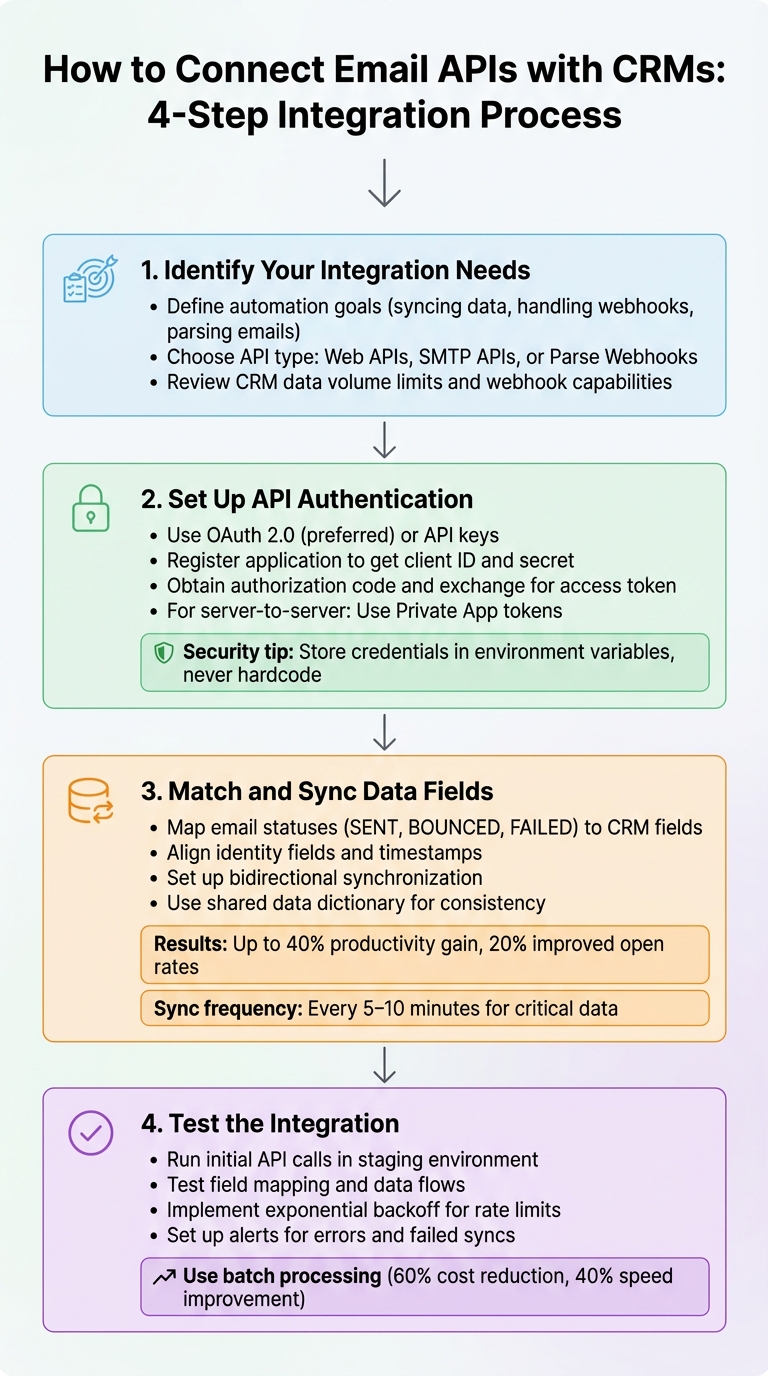
4-Step Process to Integrate Email APIs with CRM Systems
Integrating your email API with a CRM system can streamline communication and ensure data consistency across platforms. Here's a step-by-step guide to help you get started.
Step 1: Identify Your Integration Needs
Start by figuring out what you want to automate. Are you syncing marketing and sales data? Handling event webhooks for unsubscribes, bounces, or spam reports? Or maybe parsing and logging incoming emails? Your goals will dictate whether you should use Web APIs, SMTP APIs, or Parse Webhooks.
Don’t forget to review your CRM’s data volume limits and webhook capabilities before diving in. Once you've defined your integration needs, it's time to secure the connection through API authentication.
Step 2: Set Up API Authentication
To secure your integration, you’ll need to configure API authentication. Most platforms offer two main options: OAuth 2.0 or API keys. OAuth 2.0 is generally the preferred choice because it’s token-based and offers better security compared to traditional API keys.
Here’s how OAuth 2.0 works:
- Register your application with the CRM to get a client ID and client secret.
- Redirect users to the CRM’s authorization page, where they can grant permissions.
- Once permissions are granted, the CRM provides an authorization code.
- Exchange this code for an access token via a POST request.
For server-to-server integrations, platforms like HubSpot provide Private App tokens, which you include in the Authorization header as a Bearer token.
Mailchimp’s developer documentation highlights, “We strongly discourage asking your users to copy and paste their API key into your application or integration. Not only is it less secure than using OAuth 2, it’s also prone to errors.”
Important security tip: Never hardcode credentials directly into your code. Instead, store API keys, client secrets, and access tokens in environment variables or use tools like AWS Secrets Manager to keep them secure.
Once authentication is in place, move on to mapping and syncing your data.
Step 3: Match and Sync Data Fields
To ensure data flows smoothly, map email metrics to the correct CRM fields. For instance, email statuses like SENT, BOUNCED, or FAILED should align with corresponding CRM properties. Similarly, map identity fields (such as sender and recipient) and timestamps to ensure accurate record matching.
Using a shared data dictionary can help avoid errors caused by inconsistent terminology. For example, one system might use "CEO" while another uses "Chief Executive Officer". Set up bidirectional synchronization so email interactions update CRM records, and any changes in the CRM can trigger or stop email sequences.
Properly integrated systems can lead to significant productivity gains - up to 40%, according to studies. Additionally, real-time synchronization has been shown to improve email open rates by as much as 20%. To keep your sales team responsive, configure critical engagement data to sync every 5–10 minutes.
Once mapping is complete, it’s time to test everything.
Step 4: Test the Integration
Before deploying your integration, test it thoroughly. Start by running initial API calls to confirm that data is being delivered correctly. Log responses and monitor for any errors. Use a sandbox or staging environment to test field mapping and data flows before moving to your live CRM.
To handle issues like failed requests or rate limits (HTTP 429 errors), implement exponential backoff strategies. Set up alerts for missing properties or failed syncs, and consider using circuit breaker patterns to pause API calls if a service begins failing consistently. This gives the system time to recover without overwhelming it.
For better performance, batch processing can be a game-changer. Batch endpoints allow you to process multiple records in a single call, which can reduce API costs by 60% and improve processing speed by 40%. Once testing is complete and everything is running smoothly, you’re ready to deploy the integration.
Best Practices for Email API-CRM Integration
Once your integration is up and running, keeping it stable and efficient involves following a few essential practices to ensure smooth system synchronization.
Use Consistent Data Formats
Standardizing data formats is crucial to avoid sync errors and data corruption. For instance, always use UTC or Unix timestamps in milliseconds to maintain chronological accuracy. HubSpot, for example, uses hs_timestamp in the format 2019-10-30T03:30:17.883Z. When working with record IDs like hs_object_id, treat them as strings instead of integers to prevent truncation issues.
For percentages, store them as decimals (e.g., 75% becomes 0.75) to ensure accurate reporting. Normalize phone numbers by including country codes, and always prepend URLs with https://.
Pay attention to character limits, as single-line text properties in many CRMs are capped at 65,536 characters. Exceeding this limit can cause API request failures. When linking emails to CRM records, ensure you're using the correct objectTypeId mapping. For example, use 0-1 for contacts and 0-2 for companies to route emails properly.
Once your data is standardized, monitoring its flow and usage becomes essential to avoid system overload.
Track API Usage and Limits
After standardizing your data, actively monitoring API usage is key to maintaining smooth operations, especially during peak periods. Keep an eye on API call volumes and adhere to platform-specific rate limits by using real-time dashboards.
Platforms like HubSpot provide dashboards that show call volumes and display HTTP header details, such as daily limits, remaining calls, and burst window capacity (often measured in 10-second intervals). If you hit a rate limit, the API will return a 429 error code, signaling the overage.
To minimize traffic, group API calls into batches to process multiple records in a single request. Cache static data locally instead of repeatedly querying unchanged properties. Webhooks are another efficient option - they push updates automatically and typically don’t count toward standard API limits. Additionally, maintaining HubSpot App Marketplace certification requires keeping error responses below 5% of total daily requests.
Set Up Automatic Error Handling
Proactive error management is essential for maintaining system integrity alongside API monitoring. Set up event webhooks to receive notifications for issues like bounces, spam reports, and delivery failures, allowing your CRM to respond immediately. Log all API interactions to capture errors in production environments.
Implement alerts for issues such as missing schema properties, spikes in bounce rates, or authentication failures. As James Walker from Merge advises:
"Errors returned by the API should be logged so you can detect issues and make changes when required. Integration monitoring complements your regular tests by letting you know as soon as faults occur in production".
Use exponential backoff retry logic to handle rate limits, and prepare schema fallbacks to address unexpected API changes. Periodic automated testing is also critical for catching silent breaks caused by provider-side updates, even if your code hasn’t been changed. Companies that automate CRM-email integration often report a 30% reduction in manual data entry time.
CRM Platforms and Email API Compatibility
CRM platforms differ in how they handle email API integrations, and the one you choose will impact how efficiently data flows between your email system and customer records. Here's a closer look at some popular CRM platforms and their email API integration features.
HubSpot leads the marketing automation space with a market share of about 31.61%. Its REST API uses Object Type IDs (like 0-1 for Contacts and 0-3 for Deals) to simplify data mapping. With robust webhook support and bidirectional sync, HubSpot is a strong option for businesses looking for advanced automation. Pricing starts with a free tier, while the Sales Hub Starter begins at $20/month and the Professional plan at $100/month.
ActiveCampaign integrates transactional email APIs natively through Postmark. This feature enables users to trigger transactional messages directly from CRM workflows. Known for its advanced automation capabilities, the platform has a 4.4/5 rating but does require a steeper learning curve. Pricing for the Pipelines add-on starts at $50/month.
For businesses with large email volumes, Brevo supports sending up to 120,000 emails per minute. It offers a free Sales CRM add-on, while its Marketing Platform starts at $9/month. Pipedrive requires the $16/month "Campaigns" add-on to enable email marketing integration, leveraging data from CRM deal stages. Meanwhile, Zoho CRM provides 2,500 workflow rules on its free plan (limited to three users), with paid tiers starting at $20/user/month.
Comparison Table: CRM Email API Features
Below is a comparison of key email API features across leading CRM platforms:
| CRM Platform | API Support | Webhook Availability | Bidirectional Sync | Rate Limits | Key Integration Feature |
|---|---|---|---|---|---|
| HubSpot | REST (v3) | Yes | Yes | Varies by account | Email Engagement API links emails to Deals/Tickets |
| Salesforce | REST/SOAP | Yes | Yes | Standard limits | Enterprise-grade API connectivity |
| ActiveCampaign | REST (v3) | Yes | Yes | Standard limits | Postmark integration for transactional emails |
| Pipedrive | RESTful | Yes | Yes (with add-on) | Standard limits | "Campaigns" add-on segments by deal stage |
| Brevo | RESTful | Yes | Yes | High-volume (120k/min) | High-speed email sending infrastructure |
| Zoho CRM | RESTful | Yes | Yes | Standard limits | 2,500 workflow rules on free plan |
When choosing a platform, RESTful APIs are generally easier to integrate with modern web applications. For businesses that manage high email volumes, platforms like Brevo (handling up to 120,000 emails per minute) or SendGrid (supporting up to 10,000 requests per second) can help avoid bottlenecks during large campaigns. Selecting the right CRM is essential for ensuring smooth email API integration and optimal campaign performance.
Conclusion
Integrating an Email API with your CRM simplifies customer management and makes campaign execution much more efficient. With bi-directional synchronization, both systems stay updated in real time, ensuring conversation histories are always current. Personalized emails can increase open rates by over 25%, while automated workflows handle triggered emails without requiring manual effort. Plus, real-time analytics allow teams to quickly identify issues and fine-tune their strategies.
When it comes to implementation, selecting the right integration approach is key. Deciding between custom-built or pre-built APIs can have a big impact. For example, MySocialPulse was able to hit the market two months earlier, and Now.Site achieved almost perfect email deliverability after opting for a pre-built API.
It's also essential to choose providers that comply with regulations like SOC 2, GDPR, CCPA, and HIPAA. Depending on your needs, you might opt for a transactional API to handle bulk notifications or a contextual API for deeper CRM integration with bi-directional syncing. Strong security measures are a must for any reliable integration.
Start by identifying your specific integration requirements. Then, compare API features, pricing, and compliance certifications. Tools like the Email Service Business Directory (https://emailservicebusiness.com) can help you make informed decisions. The right integration doesn’t just streamline your operations - it also gives you a competitive edge by enhancing customer engagement and optimizing campaign management.
FAQs
How can email APIs enhance personalization in CRM systems?
Email APIs make it easy to connect email platforms with CRM systems, ensuring real-time updates for contact details and interaction history. This connection allows marketers to craft personalized, data-informed messages that align with each recipient's preferences and actions.
With automation and data insights at their fingertips, businesses can send targeted emails that resonate on a deeper level. The result? Communications that feel more relevant, strengthen customer relationships, and boost the success of marketing campaigns.
What security measures should you consider when integrating email APIs with CRM systems?
Integrating email APIs with CRM systems can improve communication and make workflows more efficient, but safeguarding sensitive data is crucial. To start, use authentication methods such as OAuth 2.0 or API keys to ensure only authorized applications can access your email service. Strengthen security by regularly rotating credentials and restricting permissions to the minimum required.
Encryption plays a key role in protecting data. Secure data in transit with TLS (Transport Layer Security) and encrypt stored email content and metadata to guard against unauthorized access. Additional measures like webhook verification and IP whitelisting can ensure that incoming requests originate from trusted sources.
To detect potential threats early, implement tools like rate limiting and anomaly detection to monitor for unusual activity. Opting for a provider with certifications such as SOC 2 or ISO 27001 can further demonstrate adherence to security standards. For U.S.-based businesses, the Email Service Business Directory is a useful resource for finding providers that emphasize security and compliance.
What should businesses consider when choosing a CRM for email API integration?
When choosing a CRM to integrate with your email API, it's crucial to assess how well the platform supports your email workflows. Look for features like object-level endpoints (such as contacts and deals) and associations that connect email activities directly to relevant records. A reliable API should let you create, update, and track emails programmatically, while also providing event-driven notifications for actions like delivery, opens, bounces, and unsubscribes. Features like bi-directional sync - which allows you to send emails and track replies within the CRM - can simplify communication and cut down on manual data entry.
Don’t overlook the developer experience either. CRMs with detailed documentation, SDKs packed with examples, and sandbox environments make the integration process much easier and help minimize errors. Pay attention to features like granular permission controls, secure authentication methods (like OAuth), and scalability, ensuring the platform can handle increasing email volumes without compromising data security.
Lastly, make sure the CRM’s pricing, integration capabilities, and support options align with your business requirements. The Email Service Business Directory is a valuable tool for comparing CRM platforms based on their email API features, pricing structures, and customer support, helping you identify the best option for your needs.