Securing SAP email systems is critical to protecting sensitive business data. Two popular methods - Single Sign-On (SSO) and Multi-Factor Authentication (MFA) - offer distinct approaches to safeguarding access. Here's what you need to know:
- SSO: Simplifies access by allowing users to log in once and access multiple systems. It reduces password fatigue and IT support demands but can pose risks if credentials are compromised.
- MFA: Adds a second layer of security by requiring additional verification (e.g., a passcode or fingerprint). It's effective against phishing and credential theft but can slow down workflows.
Quick Comparison
| Factor | Single Sign-On (SSO) | Multi-Factor Authentication (MFA) |
|---|---|---|
| Purpose | Simplify access | Strengthen security |
| User Experience | Convenient, single login | Requires extra steps |
| Security Level | Moderate | High |
| Best Use Case | Routine tasks | High-risk or sensitive systems |
For optimal security, use MFA for initial logins and SSO for ongoing access. Tailor authentication methods based on system sensitivity and risk levels.
SSO vs MFA (Single Sign-On vs Multi-Factor Authentication) | What's the Difference?
Single Sign-On (SSO): How It Works
Single Sign-On (SSO) simplifies user access across SAP systems by eliminating the need for multiple logins. Instead of entering credentials for each application, users log in once and gain access to all connected systems. This is achieved by replacing traditional passwords with secure tokens that authenticate users across the network.
SSO Technical Process in SAP Email Security
SSO relies on a central Identity Provider (IdP), such as SAP Cloud Identity Services or Microsoft Entra ID, to handle the initial authentication. After the user logs in, the IdP issues a security token - like a SAML 2.0 assertion, X.509 certificate, or Kerberos ticket. These tokens are then used to authenticate the user across SAP email platforms and other integrated systems.
For web-based email access (e.g., SAP Fiori), protocols like SAML 2.0 or OpenID Connect are used to share user identity across domains through XML-based assertions. For desktop applications using SAP GUI, Secure Network Communications (SNC) is paired with X.509 certificates issued by a Secure Login Server.
"Single Sign On is not about using the same password in every system!"
– Joe Goerlich, Active Contributor, SAP Community
Authentication data is transmitted over encrypted channels, ensuring tokens cannot be intercepted. To maintain consistency, identifiers such as Federation Identifiers remain unchanged even when user details are updated.
| SSO Mechanism | Protocol/Standard | Best Use Case |
|---|---|---|
| SAML 2.0 | XML-based Assertions | Cross-domain access, cloud integration, web apps |
| Kerberos/SPNEGO | GSS-API / Active Directory | Internal networks and Windows-integrated environments |
| X.509 Certificates | Public Key Infrastructure | Mobile devices, kiosk PCs, high-security environments |
| OAuth 2.0 | HTTP/Tokens | Third-party access to SAP resources without passwords |
These protocols enhance security while boosting productivity and reducing IT support demands.
Benefits of SSO for Email Security
SSO not only secures access but also simplifies user management. It reduces password fatigue - where users create weak or repetitive passwords due to managing multiple credentials - and significantly cuts down on IT service desk calls for password resets. Considering that about 65% of people reuse passwords across sites, this is a critical advantage. By requiring only one set of credentials, SSO minimizes risks tied to password reuse.
"SSO is quick and convenient for the end user and as a result, there are fewer calls to the service desk for password resets, reducing IT support costs."
– Colt, Active Contributor, SAP Community
The time saved is another major benefit. Users avoid repeated login prompts throughout the day, improving workflow efficiency. Modern SAP SSO solutions, such as Secure Login Service, offer a consistent experience across both web and desktop environments, ensuring seamless access regardless of the device or platform.
For administrators, tools like the SNCWizard in ABAP systems simplify Secure Network Communications configuration, reducing manual errors and streamlining deployment.
Limitations of SSO
While SSO offers many advantages, it also introduces risks that need careful management. A key concern is the single point of failure - if the central Identity Provider goes down, users lose access to all connected systems. Additionally, if an attacker compromises a user’s primary credentials, they gain access to all integrated applications.
Older SSO methods, like logon tickets, come with their own issues. These tokens operate within a single DNS domain and are transferred as browser cookies, which limits their flexibility. SAP advises transitioning to standardized protocols like SAML 2.0, Kerberos, and X.509 certificates. These modern methods enhance security with features like shorter token validity and improved user mapping.
"The standardized authentication methods Kerberos, X.509 certificates, and SAML 2.0 provide additional security and flexibility features compared to proprietary logon tickets."
– SAP Help Portal
SSO also creates a dependency on the Identity Provider’s availability and performance. To avoid disruptions, organizations must ensure their IdP infrastructure is robust and well-maintained.
To address these challenges, many organizations pair SSO with Multi-Factor Authentication (MFA) for an added layer of security.
Multi-Factor Authentication (MFA): Extra Security Layers
MFA adds an extra layer of protection that complements SSO. While SSO simplifies access, MFA ensures that even if a password is compromised, unauthorized access is blocked. It requires users to verify their identity using two distinct factors: something they know (like a password), something they have (such as a smartphone), or something they are (like a fingerprint).
"The simple combination of a user ID and password is no longer good enough to protect our most vulnerable information... That is when we start talking about multi-factor authentication (MFA)."
– Colt, Active Contributor, SAP Community
This approach is particularly effective against threats like social engineering, malware, and credential theft. Even if one factor is breached, the additional layer provides an essential safeguard.
How MFA Works in SAP Email Systems
SAP incorporates MFA into its systems using SAP Single Sign-On 3.0, which employs the One-Time Password (TOTP) login module for NetWeaver solutions. After entering a username and password, users must supply a second factor, often a passcode that refreshes every 30 seconds.
The system supports multiple methods for delivering passcodes, including authenticator apps, SMS, and email. For users who cannot install authenticator apps, alternative methods like SMS or email-based passcodes can be configured by administrators.
SAP also offers risk-based authentication, which activates MFA only under certain conditions. For example, MFA might be required when users log in from outside the corporate network, belong to high-risk groups like managers, or access the system during non-standard hours.
| Authentication Factor Category | Examples in SAP Systems | Delivery/Verification Method |
|---|---|---|
| Something You Know | Password, PIN, Security Questions | Manual entry on login screen |
| Something You Have | Smartphone, USB Key, Security Token | TOTP Apps, SMS, Email, Hardware tokens |
| Something You Are | Fingerprint, Facial Recognition, Voice | Biometric sensors on mobile/PC |
For web-based systems like Fiori or WebGui, SAP uses the SAML 2.0 protocol to transfer authentication tokens between identity providers (e.g., Azure AD or SAP BTP) and the application. To enhance security, SAP recommends using 8-digit passcodes, setting secret keys to expire every 365 days, and employing the SHA-512 algorithm for password generation.
Benefits of MFA for SAP Email Security
MFA goes beyond what SSO alone can achieve, offering a stronger defense for SAP email systems. By requiring multiple verification steps, it significantly reduces the risk of unauthorized access, even if passwords are compromised. This makes MFA a cornerstone of Zero Trust security, especially in remote or hybrid work settings where device vulnerabilities are more common.
"MFA is a component of application access process management that requires users to confirm their identity using at least two different verification factors... If one of the factors is compromised... then the attacker will have at least one more barrier to overcome."
– Artur Pająk, All for One Poland
MFA also helps businesses comply with data protection regulations. Many industries now mandate multi-factor authentication for accessing sensitive data, making it essential for organizations handling financial or customer information. Modern MFA solutions are flexible, allowing administrators to apply stricter security measures only in high-risk scenarios or for specific user groups.
Challenges of MFA Implementation
Despite its benefits, implementing MFA comes with challenges. For example, standard SAP NetWeaver ABAP and Java solutions do not include built-in MFA, requiring additional licensing. SMS-based passcodes often demand separate contracts for SAP Messaging Service or custom scripts to integrate with third-party SMS gateways.
Legacy systems like SAPGui complicate matters further, as they lack direct MFA support. Businesses often need to use indirect configurations, such as OTP login modules paired with X.509 certificates and Secure Network Communications (SNC).
Another issue arises when employees switch devices. They must manually disable MFA on the old device before enabling it on the new one, adding to administrative overhead. Additionally, not all employees can install authenticator apps, making fallback options like SMS or email passcodes critical.
"The popularization of remote and hybrid work has forced institutions and companies to increase expenditures on the security of IT systems. However, the weakest link is still the human being."
– Artur Pająk, All-for-One
To address these challenges, organizations can take several steps. Configuring account locking after a set number of failed attempts can thwart brute-force attacks and reduce help desk calls. Ensuring all MFA-protected systems use HTTPS safeguards authentication data during transmission. For complex environments, risk-based triggers - like enforcing MFA only for high-risk scenarios - can balance security needs with user convenience.
sbb-itb-6e7333f
SSO vs. MFA: Direct Comparison
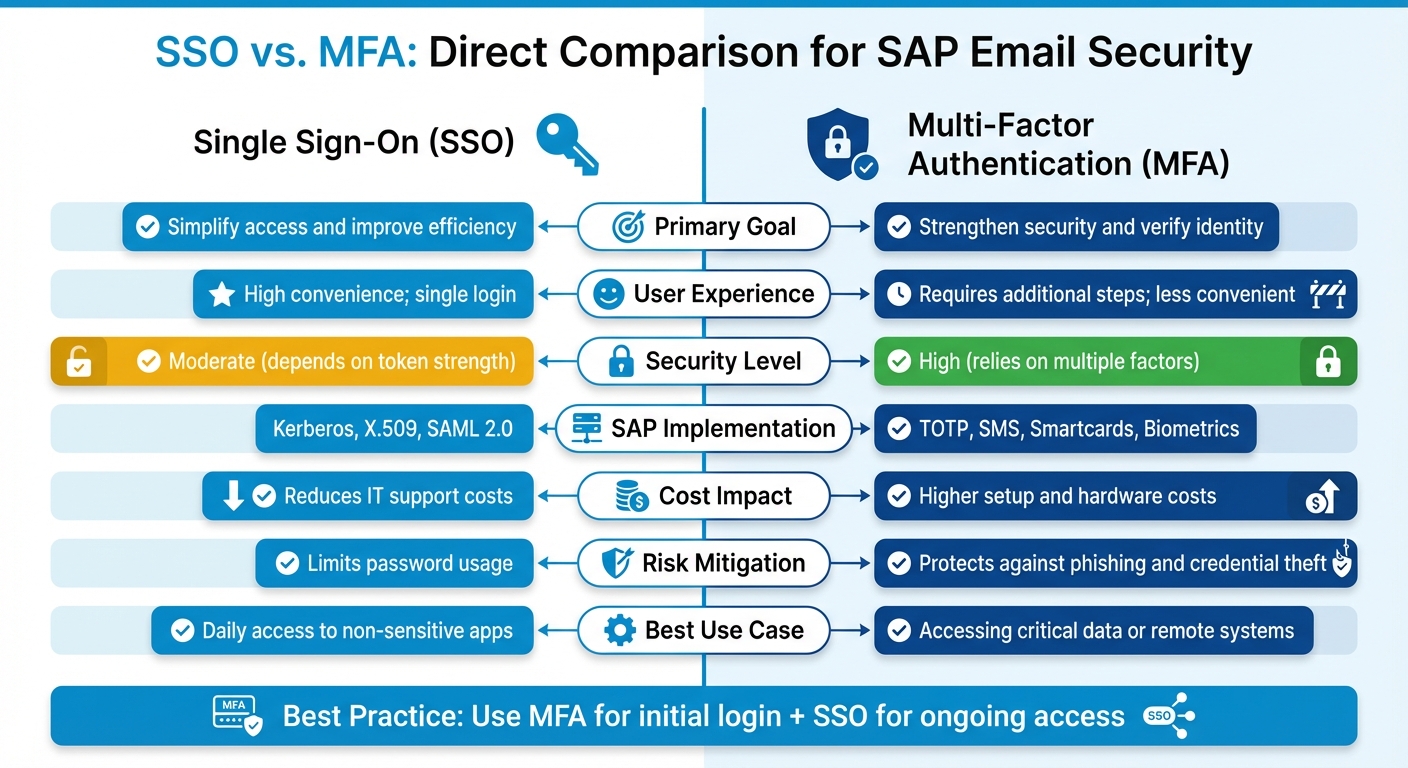
SSO vs MFA for SAP Email Security: Complete Feature Comparison
Let's dive into a direct comparison of Single Sign-On (SSO) and Multi-Factor Authentication (MFA) within the context of SAP email security.
Main Differences Between SSO and MFA
SSO and MFA serve very different purposes. SSO focuses on simplifying access by allowing users to log in once and gain access to multiple systems. This is achieved using security tokens like Kerberos, X.509 certificates, or SAML 2.0. On the other hand, MFA prioritizes security, requiring multiple layers of verification, such as a password combined with a code sent to a mobile device.
When it comes to risk, SSO poses a unique challenge: if credentials are compromised, they can potentially provide access to all connected systems. MFA helps address this issue by requiring an additional verification step, making it harder for attackers to gain access even if one factor is stolen.
"SSO provides access to many resources once the user is initially authenticated ('keys to the castle'), which increases the negative impact in case the credentials are available to other people and misused."
– Colt, Active Contributor, SAP Community
From a user perspective, SSO is seamless and quick, reducing the need for password resets and lowering help desk calls. MFA, while more secure, requires extra steps for each login, which can slow down workflows. This trade-off is a key consideration for organizations balancing security and user experience.
When to Use SSO, MFA, or Both
The choice between SSO and MFA ultimately depends on your organization's security needs and risk appetite. SSO works well for low-risk internal systems, while MFA should be employed for high-security areas.
For large SAP environments, a hybrid approach often works best: use MFA for the initial login and SSO for subsequent access. This strategy ensures strong security at the start while maintaining efficiency for everyday tasks.
To optimize security, organizations should classify their SAP systems based on sensitivity. Use SSO for routine tasks like email and collaboration, but enforce MFA for remote access or logins during unusual hours. Risk-based triggers - such as logins from unfamiliar IP addresses - can further enhance security by prompting MFA only when necessary.
"SSO and MFA both deal with authentication. While the first is easy to use and mostly transparent to the user, the latter is certainly uncomfortable but more secure."
– Colt, Active Contributor, SAP Community
Comparison Table: SSO vs. MFA
Here’s a quick side-by-side breakdown of SSO and MFA:
| Factor | Single Sign-On (SSO) | Multi-Factor Authentication (MFA) |
|---|---|---|
| Primary Goal | Simplify access and improve efficiency | Strengthen security and verify identity |
| User Experience | High convenience; single login | Requires additional steps; less convenient |
| Security Level | Moderate (depends on token strength) | High (relies on multiple factors) |
| SAP Implementation | Kerberos, X.509, SAML 2.0 | TOTP, SMS, Smartcards, Biometrics |
| Cost Impact | Reduces IT support costs | Higher setup and hardware costs |
| Risk Mitigation | Limits password usage | Protects against phishing and credential theft |
| Best Use Case | Daily access to non-sensitive apps | Accessing critical data or remote systems |
This comparison highlights the strengths and weaknesses of each method, helping organizations decide how to best secure their SAP systems.
Conclusion: Selecting the Right SAP Email Security Approach
Key Takeaways
Securing SAP email systems effectively involves combining multi-factor authentication (MFA) for initial access and single sign-on (SSO) for ongoing use. To enhance security, categorize your SAP systems into zones: use SSO for everyday email and collaboration tools, but require MFA for systems managing critical data, such as financial or HR information.
Consider implementing risk-based authentication to add an extra layer of protection. For instance, enforce MFA when logins originate from unfamiliar IPs or occur outside regular business hours. Striking a balance between security and user convenience is achievable. Use persistent "remember me" cookies with a 30-day validity to minimize MFA prompts while maintaining robust protection. Additionally, centralizing identity management through SAP Identity Authentication Service (IAS) simplifies integration by serving as a proxy for various identity providers, including Azure AD and Google.
Next Steps for Better Email Security
To strengthen your SAP email security, start by auditing your current email infrastructure. Identify systems that handle sensitive data and prioritize implementing MFA for these. Tailor your authentication policies to match the risk profile of each system instead of adopting a uniform approach.
Use MFA with 8-digit passcodes generated via the SHA-512 algorithm, and set secret keys to expire after 365 days. Enforce strict lock-screen policies across devices and provide ongoing user education about phishing risks. If you're considering email marketing platforms or service providers to complement your SAP security setup, check out the Email Service Business Directory (https://emailservicebusiness.com). It’s a helpful resource for comparing tools that integrate seamlessly with enterprise authentication systems.
FAQs
What are the advantages of combining Single Sign-On (SSO) and Multi-Factor Authentication (MFA) for SAP email security?
Combining Single Sign-On (SSO) with Multi-Factor Authentication (MFA) brings together convenience and security for SAP email systems. SSO streamlines the login process by letting users access multiple systems with just one set of credentials. This not only reduces the hassle of managing multiple passwords but also boosts efficiency.
On the other hand, MFA adds an extra layer of security by requiring a second form of verification - like a code sent to your phone or a fingerprint scan. This ensures that even if a password is compromised, unauthorized access is still blocked. Together, SSO and MFA create a well-rounded solution, offering ease of use while safeguarding against threats like phishing and credential theft.
What is Single Sign-On (SSO) in SAP email systems, and how does it ensure secure access?
Single Sign-On (SSO) in SAP email systems allows users to log in once and gain access to multiple systems without repeatedly entering credentials. This simplifies the login process while ensuring security by verifying user identities across all connected platforms.
SAP enables SSO using protocols like SAML 2.0 for browser-based applications, as well as X.509 certificates and Kerberos tokens for other environments. These protocols use secure cryptographic tokens to authenticate users, providing seamless access without sacrificing security. Solutions such as SAP Cloud Identity Services and SAP Secure Login Service integrate these methods to deliver both ease of use and strong data protection.
What are the common challenges of implementing MFA in SAP systems?
Implementing Multi-Factor Authentication (MFA) in SAP systems comes with its fair share of hurdles. One of the primary challenges lies in the setup and integration process. Configuring MFA often involves technical tweaks such as enabling Time-Based One-Time Passwords (TOTP), setting up authenticator apps, or integrating systems with SMS and email passcode mechanisms. These tasks can be intricate and may demand specialized technical skills.
Another obstacle is getting users on board. Many users may resist MFA due to unfamiliarity or find it difficult to use due to compatibility issues with their devices. On top of that, organizations must maintain the necessary infrastructure, like SMS gateways or email systems, which can introduce additional layers of complexity and potential vulnerabilities.
Although MFA offers a strong boost to security, its successful deployment requires careful planning, technical expertise, and proper user training to tackle these challenges head-on.