Finding the right email frequency can make or break your campaigns. Sending too many emails overwhelms subscribers, leading to spam complaints and unsubscribes. Sending too few? Your brand risks being forgotten. The key is balance - matching your email volume to subscriber behavior and industry norms.
- E-commerce brands: Typically send 3–7 emails per week to drive sales, but overdoing it can lead to 27% of users unsubscribing due to "too many emails."
- B2B companies: Stick to 1–2 emails per week, focusing on education and value rather than constant promotion.
- B2C services: 2–4 emails per week work best for maintaining relevance without overwhelming subscribers.
Key insights:
- 44% of users unsubscribe due to excessive frequency.
- Twice-weekly emails achieve the highest click-through rate at 5.8%.
- Automated, behavior-triggered emails make up only 9% of sends but drive 18% of orders.
Pro tips:
- Monitor metrics like open rates, click-through rates, and unsubscribe rates to adjust frequency.
- Use automation to tailor emails based on subscriber behavior.
- Offer preference centers so users can choose how often they hear from you.
The goal? Send emails that engage, not annoy, while protecting your sender reputation.
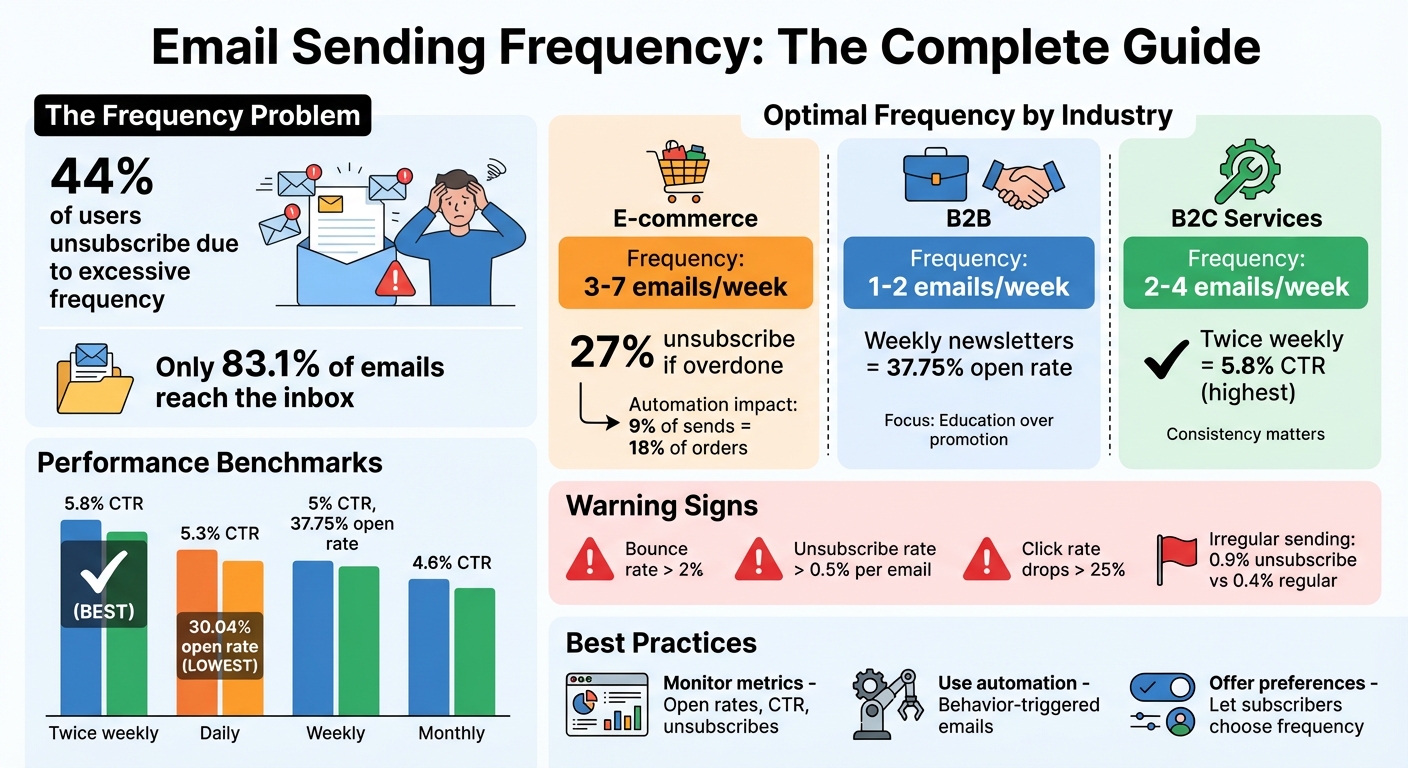
Email Sending Frequency Best Practices by Industry and Key Performance Metrics
How Many Emails Per Week Should You Send? (OPTIMAL)
sbb-itb-6e7333f
How Email Sending Frequency Affects Your Campaigns
Every email you send has a direct effect on your sender reputation. Providers like Gmail and Outlook keep a close eye on how recipients interact with your messages. If subscribers open and click your emails, it sends a positive signal. But if they ignore, delete, or mark them as spam, it tells Internet Service Providers (ISPs) that your content might not be welcome.
These behaviors have a big impact on whether your emails land in the inbox. Only 83.1% of emails actually make it to the inbox, meaning nearly one in six gets filtered out due to poor sending practices. If your bounce rate goes over 2%, it’s a clear sign you need to clean up your email list by understanding different email bounce types. Plus, 44% of recipients cite excessive email frequency as a reason for unsubscribing. These stats highlight why understanding email frequency is crucial for maintaining a good sender reputation.
The Connection Between Frequency and Sender Reputation
Consistency is the secret sauce. Sudden increases in email volume can trigger ISP filters, making your sending behavior appear suspicious or even automated. For example, when starting with a new mailbox, experts suggest beginning with just 20–30 emails per day and gradually increasing to avoid being flagged. For B2B cold outreach, platforms like Google Workspace or Microsoft 365 recommend staying under 100 emails per day per mailbox.
"Frequency should be viewed first as a deliverability strategy and only then as an engagement strategy." - MailReach
On the flip side, sending emails too infrequently can also hurt. Subscribers may forget about you, leading to higher spam reports. Irregular senders often see unsubscribe rates of 0.87%, which is more than double the 0.38% rate for those who send at least weekly.
"Reputation is much harder to rebuild than ruin." - The Spamhaus Team
Finding the Right Balance to Keep Subscribers Engaged
Sending too many emails can lead to "email exhaustion." When this happens, subscribers start ignoring your messages, deleting them, or even marking them as spam - all of which damage your deliverability. For instance, daily email campaigns tend to have the lowest average open rate at 30.04%, while sending twice a week leads to the highest click rate at 5.31%.
On the other hand, sending too few emails can leave opportunities untapped. Take Aviva, a UK-based insurance company, as an example. When they were only sending emails once a year, they were missing out. After increasing their email frequency, they saw 48% more insurance quotes, a 304% rise in unique clicks, and a 45% jump in email revenue. Meanwhile, fashion retailer Net-A-Porter reduced its email frequency from 10 per week to just two, which led to better conversion rates.
The sweet spot for email frequency depends on your audience, but the key is to establish a predictable rhythm that both your subscribers and ISPs recognize as consistent and trustworthy. Watch for warning signs like click rates dropping by more than 25% or unsubscribe rates climbing above 0.5% per email. These are indicators that you might need to adjust your strategy. A steady, data-driven approach will help you maintain your reputation and keep your audience engaged. Next, we’ll explore how these strategies differ across various industries.
Email Sending Frequency by Industry
Finding the right email schedule and choosing the best email marketing platforms means understanding your industry's buying habits and decision-making timelines. E-commerce thrives on urgency, often prompting impulse buys, while B2B relies on longer cycles, requiring patience and education. Sending too many emails in slower industries can feel pushy, while not sending enough in fast-moving markets risks missed opportunities.
As mentioned earlier, the right frequency not only engages your audience but also protects your sender reputation. Data reveals that 33% of marketers send weekly emails, and 26% send multiple times per month. Meanwhile, B2C brands are 30% more likely to send 4-5 emails monthly compared to B2B brands, which hover at 25%. Let’s break down how these patterns work in E-commerce, B2B, and B2C.
E-commerce: 3-7 Emails Per Week
E-commerce brands benefit from frequent emails due to their fast-paced buying cycles. Your audience expects updates on new arrivals, flash sales, or abandoned cart reminders. With short decision windows, staying on your customers' radar is crucial. Many fashion brands, for instance, have tested sending 3-7 emails per week to maintain relevance.
However, high frequency only works if the emails provide value. Automated campaigns, like cart recovery and post-purchase follow-ups, accounted for 18% of orders in 2024, even though they represented just 9% of total email sends. That said, overloading inboxes is risky - 27% of e-commerce users cite "too many emails" as their top reason for unsubscribing. To strike a balance, segment your list: send frequent promotions to VIP customers while keeping casual shoppers on a lighter schedule.
B2B: 1-2 Emails Per Week
B2B buyers operate on longer timelines, often needing more time and resources to evaluate options, compare features, and justify decisions internally. Most B2B marketers find that 1-2 emails per week hits the sweet spot. The focus here should be on providing value through educational content, case studies, and thought leadership, rather than pushing for immediate conversions.
Over-emailing in B2B can backfire, making your brand seem unprofessional or overly aggressive. Weekly newsletters perform especially well, with an average open rate of 37.75%, far surpassing those sent multiple times per week. When selling complex solutions, quality always wins over quantity.
B2C: 2-4 Emails Per Week
B2C service brands - like gyms, salons, or lifestyle businesses - need to find a middle ground. While they don’t face the urgency of a flash sale, they can’t afford to disappear from their customers’ inboxes for weeks. A cadence of 2-4 emails per week keeps your brand relevant without overwhelming subscribers. This frequency is ideal for seasonal updates, educational tips, and community-oriented messages.
Interestingly, twice-weekly campaigns deliver the highest click-through rate at 5.8%, outperforming daily (5.3%), weekly (5%), and monthly (4.6%) sends. Consistency is key - irregular schedules lead to higher unsubscribe rates, with 0.9% of users opting out, compared to just 0.4% for brands that maintain regularity. A predictable rhythm helps subscribers know when to expect your emails, and offering a preference center lets them adjust the frequency to their liking.
When to Send Your Emails
Timing your emails effectively can be the difference between grabbing attention or getting lost in a crowded inbox. Recent trends reveal that Friday is becoming a standout day for email performance, with an average open rate of 49.72% and a click rate of 8.09%. This could be due to subscribers clearing their inboxes before heading into the weekend.
The time of day also plays a critical role. Open rates peak between 8 A.M. and 11 A.M., as people kick off their workday and check emails. However, emails sent in the evening, particularly between 8 P.M. and 9 P.M., tend to get more clicks and conversions. This is when readers are more relaxed and have time to engage with content. As MailerLite explains:
"The optimal send time for opens isn't the best time for clicks".
Below, we break down the best days, times, and strategies for maximizing email engagement with different audience segments.
Best Days and Times for Email Delivery
The idea that Fridays are bad for email campaigns no longer holds true. Tuesday, Wednesday, and Thursday continue to deliver strong engagement across industries, with Thursday leading as the most reliable day overall. Monday also performs well for visibility, especially for announcements, with open rates reaching 22.0%. However, its strength lies more in getting noticed than in driving immediate action.
For B2B emails, sending between 8 P.M. and 11 P.M. results in a 6.52% reply rate - much higher than emails sent during typical business hours. This suggests professionals are more likely to engage with non-urgent emails during their downtime. Meanwhile, B2C brands thrive during leisure hours, with Thursday and Friday evenings or Sunday afternoons standing out as prime times for engagement due to reduced inbox competition.
Here’s a practical tip: schedule emails just after the hour, like 10:07 A.M. instead of 10:00 A.M.. This helps your message avoid the bulk of automated campaigns and land higher in your subscriber’s inbox. Also, keep in mind that click-through rates are more reliable than open rates, especially with Apple's Mail Privacy Protection inflating open data.
Customizing Timing for Different Audience Segments
While general "best times" are helpful, tailoring your email timing to your audience’s habits can make a bigger impact. For global lists, use automated tools to send emails at 10 A.M. local time for each subscriber, rather than your own time zone. This "follow the sun" strategy ensures your message doesn’t arrive at inconvenient hours, like 3 A.M., for part of your audience.
For B2B audiences, nearly 47.9% of marketers report the highest engagement between 9 A.M. and 12 P.M.. AI-powered tools can take this further by analyzing individual subscriber behavior and sending emails when they’re most likely to engage. This approach has been shown to boost open rates by 23% compared to static scheduling. Platforms like Klaviyo and MailerLite offer these features, and users have reported noticeable improvements. As Joseph Hsieh, a Klaviyo user, shared:
"Finding the right time to send was helpful and drove comparative higher engagements".
It’s also smart to adjust timing based on the type of content you’re sending. For example:
- Newsletters and educational content work well on Monday or Tuesday mornings, as people plan their week.
- Promotional emails perform better on Thursday or Friday afternoons, when subscribers are more inclined to browse and shop.
- Abandoned cart reminders should go out within 1-3 hours of the trigger to take advantage of the shopper’s recent activity.
Ultimately, the key is syncing your email timing with your audience’s intent - mornings for awareness and evenings for action.
Metrics to Monitor for Frequency Optimization
Balancing engagement with deliverability means keeping a close eye on key metrics. One important measure is Revenue Per Recipient (RPR), which helps determine whether increasing email frequency leads to higher profits per subscriber or just inflates total revenue while potentially damaging your list’s health.
It’s also essential to monitor open rates, click-through rates (CTR), and unsubscribe rates together. Open rates serve as an initial indicator of engagement, though they’ve become less reliable due to privacy features. CTR, on the other hand, is a stronger measure of relevance - if CTR declines while open rates stay steady, it could signal that your emails are becoming more of a nuisance. Meanwhile, unsubscribe rates act as an early warning system; a noticeable increase, especially after sending a third or fourth email in a week, suggests you may have crossed the line with your audience.
Spam complaints are another critical factor to track. Sending emails too frequently can lead to a spike in complaints, which hurts your sender reputation and could land your future emails in spam folders. On the flip side, if engagement remains high but your total email volume is low, you might be under-communicating and missing out on potential revenue.
| Metric | What It Indicates |
|---|---|
| Open Rate | A drop could signal list fatigue or spam folder issues. |
| Click-Through Rate | Declining CTR suggests your content or frequency is turning off subscribers. |
| Unsubscribe Rate | High rates indicate you’ve exceeded your audience’s tolerance for frequency. |
| Spam Complaints | Rising complaints show that your emails are viewed as intrusive. |
Tracking Open Rates, Click-Through Rates, and Unsubscribes
Together, these metrics provide a clear picture of email performance. For example, weekly newsletters tend to achieve an average open rate of 37.75%, while daily emails often see this drop to about 30.04%.
CTR offers deeper insight into engagement. Emails sent twice per week generally achieve a 5.8% CTR, compared to a lower 4.32% for monthly campaigns. If your CTR starts slipping while open rates hold steady, it’s a sign that subscribers may find your email frequency more annoying than helpful.
Unsubscribe rates are a straightforward measure of over-communication. Research shows that brands with inconsistent sending patterns can experience unsubscribe rates of around 0.9% - significantly higher than the 0.4% seen with regular daily or weekly schedules. These metrics provide the foundation for testing and refining your email strategy.
Testing Different Frequencies with A/B Tests
A/B testing is a practical way to fine-tune your email frequency. Start by documenting your baseline metrics - open rates, CTR, and RPR - before making any adjustments. Then, divide an engaged segment of your email list into groups. Keep one group as a control and adjust the email frequency for the test group. To ensure accurate results, keep all other variables, like content, offers, and send times, consistent across both groups.
Run these tests for 3–6 weeks to gather reliable data. For meaningful insights, aim for test groups of at least 1,000 recipients per variation, though some experts recommend segments of 2,000+ subscribers. Focus on specific segments, such as highly engaged subscribers (those who’ve clicked or opened an email in the last 30 days) or new subscribers, to get actionable results.
Watch for diminishing returns. While increasing frequency might boost revenue in the short term, it could lead to long-term list fatigue or burnout. As Needle points out:
"The goal is a system where frequency is a response to customer behavior, not a rigid schedule. It's a fundamental shift in how you think about email."
For disengaged subscribers - those who haven’t opened an email in 30–60 days - consider cutting their email frequency in half. This approach, often called a "sunset policy", helps reduce spam complaints while giving these subscribers a chance to re-engage with less pressure.
Using Automation to Personalize Email Frequency
Behavior-triggered automation replaces rigid email schedules with a smarter approach, tailoring frequency to what subscribers actually do. Tools like these adjust email timing in real time based on actions such as website visits or downloads. The idea is simple: not everyone wants the same number of emails, so why treat them all the same?
Here’s a stat that might surprise you: automated emails accounted for 18% of orders in 2024, even though they made up just 9% of total sends. Why? Because emails triggered by behavior are far more engaging. As Chaviva Gordon-Bennett, Content Strategist at monday campaigns, explains:
"Emails that respond to what subscribers actually do get significantly higher engagement than calendar-based sending".
Let’s break down how automation fine-tunes email frequency by responding to real-time subscriber behavior.
Adjusting Frequency Based on Subscriber Behavior
Engagement-based throttling allows you to tweak email frequency based on how active a subscriber is. For example, if someone regularly opens your emails, clicks links, or visits your site, you can increase how often you reach out. On the flip side, if someone hasn’t interacted in a while, the system automatically reduces email frequency to avoid annoying them - and to protect your sender reputation.
AI-powered Send Time Optimization (STO) takes this a step further by analyzing when each subscriber is most likely to engage. Compared to traditional batch sending, this method can boost open rates by 35% to 50%.
Here’s a quick guide to adjusting email frequency for inactive subscribers:
| Inactivity Period | Recommended Automation Action | Example |
|---|---|---|
| 30–60 days | Reduce frequency by half | Switch from weekly to biweekly |
| 60–90 days | Limit contact | Send one monthly check-in |
| 90+ days | Re-engage or remove | Offer a final opt-in or unsubscribe option |
This kind of tailored approach ensures subscribers only get the emails they’re likely to care about.
Automation also reacts to specific triggers like Engagement (e.g., site visits), Intent (e.g., viewing pricing pages), Relationship changes (e.g., role updates), and Inactivity (e.g., long periods of silence). For instance, if someone visits your pricing page multiple times in a week, automation can send them a targeted email series with case studies or product demos - no need to wait for your next newsletter.
For B2B campaigns, the 3-Round Rule is a helpful framework: limit email-only outreach to three attempts. If there’s no response, switch to another channel like LinkedIn or phone, or pause the sequence entirely. This avoids overwhelming your audience and reduces the chance of spam complaints.
In addition to these automated adjustments, giving subscribers control over how often they hear from you can make a big difference.
Empowering Subscribers with Email Preferences
While automation does a lot of the heavy lifting, preference centers let subscribers take control of their email frequency. Instead of just offering a "subscribe or unsubscribe" option, these pages allow users to choose how often they want to hear from you - daily, weekly, monthly, or only for major updates.
Jay Fuchs from HubSpot highlights why this matters:
"Giving [subscribers] this kind of autonomy can keep them from unsubscribing from your mailing list outright if your email frequency seems like a bit too much for them".
This is crucial because too many emails are the number one reason people unsubscribe.
Modern preference centers go further, letting subscribers pick specific types of content they’re interested in, such as "New Arrivals", "Sales Alerts", or "Educational Guides". Some even include a "snooze" feature, allowing users to pause emails for 30, 60, or 90 days without fully unsubscribing.
The best practice? Ask for frequency preferences upfront during signup. After that, include a link to the preference center in every email footer. This gives users an easy alternative to the "Unsubscribe" button, which helps maintain your sender reputation - frustrated users are more likely to adjust preferences than mark your emails as spam.
When combined with automated, behavior-triggered emails, preference centers can deliver impressive results: 350% higher open rates and 1,025% higher click rates compared to generic email blasts. By respecting subscriber choices, you not only improve engagement but also protect your standing as a trusted sender.
Conclusion
Determining the ideal email frequency isn’t about sticking to a one-size-fits-all formula - it’s about tailoring your schedule to meet your audience’s expectations while achieving your business goals. As discussed earlier, the data clearly shows that quality matters more than sheer volume. For instance, automated emails, which accounted for just 9% of total sends in 2024, were responsible for 18% of orders. This success stems from the fact that behavior-triggered emails consistently outperform standard calendar-based sends.
If you’re unsure where to start, use industry benchmarks as a guide: 2-4 emails per week for e-commerce and 1-2 for B2B. From there, fine-tune your approach by analyzing key performance metrics like open rates, click-through rates, and unsubscribes. A drop in engagement or a spike in spam complaints is a clear signal to scale back. Over-sending can lead to increased unsubscribes and hurt your inbox placement rates.
The most effective strategy combines automation with subscriber choice. Behavior-triggered sequences ensure your emails are timely and relevant, while a preference center allows subscribers to control how often they hear from you. This combination has been shown to drive better engagement - automated, behavior-based emails consistently outperform traditional approaches.
Don’t forget to implement a sunset policy to clean your list by removing subscribers who haven’t engaged in 90-120 days. Testing frequency variations through A/B splits with your most active segments can also provide valuable insights. By relying on data and leveraging automation, as highlighted earlier, you can maintain strong engagement and protect your sender reputation.
For tools to help manage email frequency, automation, and deliverability, check out the Email Service Business Directory. This resource offers a curated comparison of email marketing platforms, making it easier to find solutions that align with your strategy and goals.
FAQs
What’s the best way to figure out how often to send emails to my audience?
Finding the right email frequency is all about tuning in to your audience's preferences and delivering content they value. Think about how often your subscribers actually want to hear from you and the type of updates or information they’re expecting. The secret? Testing. Try out different sending schedules and keep an eye on metrics like open rates, click-through rates, and unsubscribe rates to figure out what resonates.
There’s no one-size-fits-all answer here. The best email cadence depends on factors like your industry, your audience’s habits, and the kind of content you provide. Keep a close watch on performance, and be ready to tweak your approach to strike the perfect balance - staying relevant without overwhelming your subscribers.
How does email sending frequency affect your sender reputation?
Email sending frequency is a key factor in keeping a solid sender reputation. When your email patterns are consistent and predictable, it builds trust with Internet Service Providers (ISPs), which can boost the likelihood of your emails landing in inboxes. However, sending too many emails or suddenly changing your sending habits can set off spam filters and hurt your deliverability.
To safeguard your reputation, stick to a steady, carefully planned email schedule that matches what your audience expects. Striking this balance helps ensure your emails are seen as valuable rather than getting flagged as spam.
How does automation help customize email sending frequency?
Automation fine-tunes email sending schedules by analyzing recipient data and behavior to adjust timing dynamically. It looks at factors like open rates, click activity, and overall engagement to determine the best intervals for each subscriber.
For instance, if a group of subscribers frequently interacts with emails, automation might increase the frequency of messages. On the flip side, less active users might receive fewer emails. It can also trigger personalized sequences based on actions like browsing a website or making a purchase. This approach keeps emails relevant and timely, boosting engagement while lowering the chances of unsubscribes or spam complaints. In short, automation helps marketers deliver a more tailored and impactful email experience.