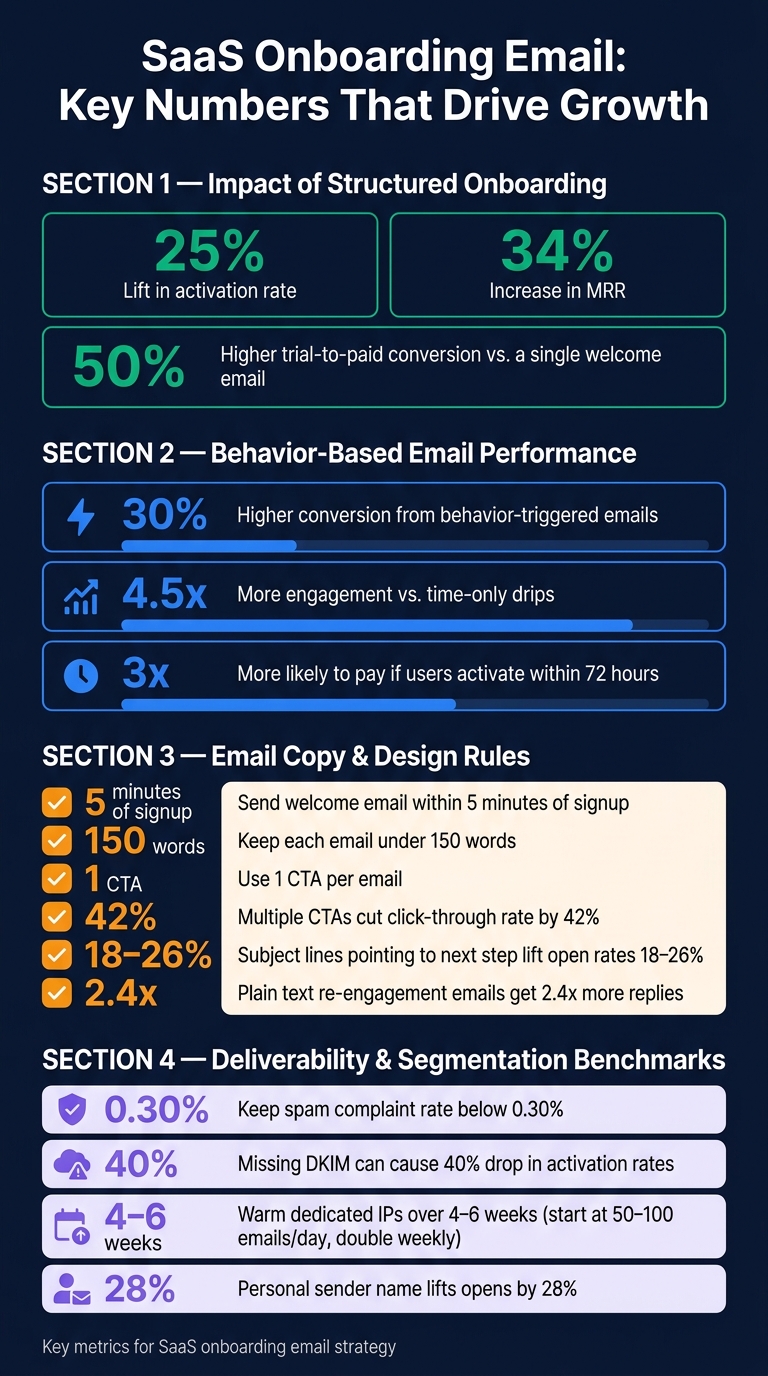
A SaaS onboarding email flow should move users to first value fast, not just say hello. In most cases, that means sending 3 to 7 emails, tying each one to product actions, and removing users from the flow the moment they activate. Done well, onboarding can lift activation by 25%, increase MRR by 34%, and improve trial-to-paid conversion.
Here’s the short version:
- I’d build onboarding around the user’s first result
- I’d send a welcome email within 5 minutes
- I’d use product-event triggers first, with time-based backups
- I’d split users into activated, stalled, and dormant
- I’d keep each email to one CTA and under 150 words
- I’d track activation rate, time to activation, and trial-to-paid conversion
- I’d watch deliverability using the best email marketing platforms, including SPF, DKIM, DMARC, and complaint rates under 0.30%
A few numbers stand out:
- Users who activate within 72 hours are 3x more likely to pay
- Structured onboarding can drive 50% higher trial-to-paid conversion than a single welcome email
- Behavior-based emails can get up to 30% higher conversion and 4.5x more engagement
- Multiple CTAs can cut click-through rate by 42%
The big idea is simple: each email should help the user take the next step inside the product. That means mapping the path from signup to activation, sending help when users stall, sending upgrade prompts near trial end, and checking whether email clicks lead to product use.
If I had to sum up the whole guide in one line, it would be this: send fewer emails, tie them to user behavior, and make every message push one action.
SaaS Onboarding Email Stats: Key Metrics & Benchmarks
SaaS Onboarding Emails: 5 Rules Every Team Needs to Know
sbb-itb-6e7333f
Plan Your Onboarding Email Strategy Before Writing Copy
Before you write a single email, plan the path users should take. Start with activation milestones, then pair each email with the next best action. In plain English: figure out how users get to first value, then write emails that help them get there.
Map the User Journey from Sign-Up to Activation and Upgrade
Start by finding the First Value Moment and mapping the steps that lead to it. Keep the journey tight. Every email should move users from sign-up to activation, then into product use and, later, upgrade.
Tie emails to actual product behavior, like setup_completed or first_report_exported, instead of sending generic advice on a fixed calendar.
Timing matters here. Your email cadence should match your product’s natural time to value. If you send upgrade prompts before users reach their First Value Moment, it can feel too early.
Once the path is mapped, decide who should get each message and what should trigger it.
Define Goals, Segments, and Trigger Rules
Each stage needs a measurable goal. Users who reach first value within seven days tend to have stronger retention later on.
This is also where segmentation earns its keep. A company admin setting up a workspace doesn’t need the same help as an individual user trying to finish one task. Segment by role, company size, use case, and behavior.
Three core segments usually cover the basics:
| Segment | Definition | Email Strategy |
|---|---|---|
| Activated | Reached FVM or is on track | Deepen usage and introduce advanced features |
| Stalled | Engaged but hit a friction point | Address the specific step missed and offer the easiest path forward |
| Dormant | No activity since signup | Re-engage with outcome-based messaging |
Your trigger rules should follow those segments. Behavior-triggered emails can drive up to 30% higher conversion and 4.5x more engagement than time-based drips. For most SaaS teams, a hybrid setup works well: trigger emails from product events, then add time-based fallbacks. For example, send a nudge if setup still isn’t done within 6 hours.
Suppression logic matters just as much. The second a user hits the activation milestone, they should leave the onboarding flow right away. Otherwise, they may keep getting irrelevant finish-your-setup emails, which is a bad look and an easy way to lose trust.
Choose Tools and Providers That Support SaaS Onboarding Workflows
Pick tools that can handle event tracking, lifecycle automation, suppression rules, CRM integration, and deliverability monitoring. You’ll also want support for event pipelines through a CDP, webhooks, or a direct API, plus idempotency keys to stop duplicate sends and exit rules that remove users from a flow once they hit a milestone.
For U.S. email programs, CAN-SPAM compliance and spam complaint monitoring are must-haves. Complaint rates should stay below 0.30%.
The Email Service Business Directory can help teams compare email marketing platforms, software, and agencies for onboarding workflows.
With the workflow mapped, the next step is to build the core email sequence around those events.
Build the Core SaaS Onboarding Email Sequence
Build each email around the next thing the user needs to do. The job of each message is simple: move that person one step closer to activation or expansion.
Welcome and First-Value Emails
Send your welcome email within 5 minutes of signup. That’s when intent is at its peak. Welcome emails often see open rates between 60% and 83%, which is about 4x higher than standard marketing emails.
Keep each welcome email focused on a single CTA: log in, finish setup, or connect a first data source. One email, one next step.
If that first action still isn’t done, send a nudge within 4 to 24 hours before interest drops off. Users who stay inactive for 3 days are much more likely to churn.
Once the first action is done, move into behavior-based education.
Education, Progress, and Milestone Emails
After that first action, send education based on what the user has already done and what they haven’t done yet. If users who adopt Feature X and Y tend to retain better, email Feature X-only users about Feature Y.
Milestone emails serve a different purpose. When a user hits a clear event - like inviting a first teammate or connecting an integration - send a short confirmation that says what they just did and points them to the next logical step. The point isn’t just to celebrate. It’s to build a habit.
Airtable did this in a very direct way. The company rebuilt onboarding around its activation milestone of "week-four multi-user collaboration" and segmented users by learning style. That led to a 20% lift in activation.
Use progress markers like "Step 3 of 5" to help users keep going.
Upgrade, Trial Expiry, and Reactivation Emails
Send upgrade prompts 48 hours before trial expiry. That timing gives users room to decide, but it also comes after they’ve had a fair shot at using the product. Lean on loss aversion by pointing to what they’ve already built. > "Don't lose your 14 campaigns"
That usually hits harder than a generic message like “Upgrade to Pro.” Make upgrading easy, and show pricing clearly in USD, such as "Plans start at $29/month".
If activation still isn’t done by the time the trial ends, offer a 7-day extension. For dormant users who haven’t logged in, send a stripped-down reactivation email that makes the return path easy. Also, send it from a real person’s name instead of a team alias. Personal sends lift opens by 28%.
From here, turn the sequence into short copy, automation rules, and tests.
Write, Automate, and Optimize Onboarding Emails
Write Clear Copy and Mobile-First Email Layouts
Once your sequence is mapped out, the next job is simple: write the email, shape the layout, and send it at the right moment.
Keep each email under 150 words. Give it one main CTA. When you pile on options, clicks tend to drop. In fact, multiple CTAs can cut click-through rates by an average of 42%.
Most onboarding emails get opened on mobile. So the layout needs to feel easy on a small screen:
- Use a single-column format
- Keep paragraphs short
- Make buttons and links easy to tap
Subject lines should point to the next step the user wants to finish. A line like "One step to your first report" can lift open rates by 18% to 26%.
For re-engagement emails, plain text often works better than polished design. Sending from a named founder also helps. That combo gets 2.4x more replies than polished HTML templates.
Use Behavior-Based Automation Instead of Time-Only Drips
Good copy helps, but timing matters just as much. If the trigger doesn't match what the user is doing, even a strong email can land flat.
Build the flow around four user states:
- Activated - exit right away
- On track - send the next step
- Stalled - send help tied to the blocker
- Dormant - move to win-back or suppress
Use event triggers like signup.completed or feature.activated as the main driver, then use time-based fallbacks only when someone stalls. For example: "If first_report_exported hasn't fired within 48 hours of signup, send nudge Y." This mixed setup keeps emails tied to what users have done, without turning the whole system into a manual mess.
Grammarly uses a 4-email flow that starts with a welcome message and moves to upgrade prompts only if the user has not converted.
Once your triggers are event-based, the next step is to check whether each email helps users hit the next milestone.
Measure Results, Run Tests, and Protect Deliverability
After launch, focus on clicks, activation, and whether your emails reach the inbox.
CTR and in-product completion should be your main metrics. Track which clicks lead to setup completion, first value, or upgrade. Open rates are less useful now because Apple Mail Privacy Protection can inflate that data.
For A/B tests, stick to a few high-impact variables: subject lines, CTA wording, and send times. Test by segment too. Developers often engage later in the day, while executives usually engage in the early morning. Change one variable at a time so the result is clean.
Before launch, publish SPF, DKIM, and DMARC. Keep spam complaints below 0.30%. A missing DKIM record can lead to a 40% drop in activation rates because of inbox placement problems.
If you're mailing tens of thousands of contacts from a dedicated IP, warm it up over 4 to 6 weeks. Start with 50–100 emails per day, then double volume each week. Also split setup and welcome emails from upgrade nudges. Treat setup and welcome messages as transactional, and upgrade nudges as marketing. That sends them through the right IP pools and helps you stay compliant with CAN-SPAM rules for U.S. audiences.
Conclusion: Build Onboarding Emails as a Measurable Lifecycle System
Think of onboarding email as part of your lifecycle system, not just a drip campaign. Map the path to activation, trigger the next step based on what the user does, and stop the sequence as soon as that user converts. After the flow is in place, measure whether it actually moves people toward activation and paid conversion.
Each email should push one user action. Find the single in-product step that best predicts long-term retention, then work backward from there. That gives every email a clear job and one main call to action.
Once the flow is live, connect every trigger to a real product event and every metric to a business result. Emails sent from actual product behavior, instead of a fixed schedule, can drive up to 30% higher conversion and about 4.5x more engagement than time-only drips. Add suppression logic so users leave the sequence the moment they hit their activation milestone.
Track metrics that tie back to growth:
- Activation rate
- Time to activation
- Trial-to-paid conversion
Open rates still matter, but mostly as a way to spot deliverability problems. If you improve new-user activation by 25%, that alone can drive a 34% increase in MRR.
Use the Email Service Business Directory to compare providers for SaaS onboarding workflows.
FAQs
What is a first value moment?
A first value moment is the point when a user first feels your product’s main benefit and gets why it matters.
It’s not when they create an account or finish a profile. It happens when they take a key action that proves the product works for them, like creating a project or sending a campaign.
That moment is a big deal. Once users get there, they’re often more likely to stick around and convert.
How do I know when a user is stalled?
A user is stalled when they stop moving through onboarding.
You’ll usually spot it when they:
- don’t finish a required step
- miss their activation milestone within a set time window
- go idle for a stretch, such as 48 hours
If your product tracks these actions, you can send targeted re-engagement emails at the right moment.
No behavioral data? Then look for something simpler: a lack of progress toward the defined first value moment.
Which metrics matter most for onboarding emails?
Prioritize activation rates and time to value instead of vanity metrics like opens or click-through rates. The metric that matters most is your First Value Moment (FVM) completion rate. Find it through retention correlation analysis.
You should also track setup completion, feature adoption, and trial-to-paid conversion rates. That way, you can see whether each email is pushing users closer to your product’s core value.