Behavioral email triggers are automated emails sent based on user actions (or inactions) like signing up, abandoning a cart, or going inactive. Unlike scheduled emails, these are highly personalized and sent at the most relevant moments. They deliver 70.5% higher open rates and 152% higher click-through rates, making them a powerful tool for boosting engagement and revenue. Key campaigns include:
- Welcome emails: Engage users right after sign-up.
- Cart abandonment emails: Recover lost sales with a 3-email sequence.
- Re-engagement emails: Win back inactive users after 60–90 days.
To implement these, you’ll need accurate data on user behavior (e.g., website activity, email engagement) and tools to connect this data to your email platform. Focus on timing, targeting, and exclusion rules to ensure relevance while avoiding email fatigue. Start with core campaigns and expand as you refine your strategy.
Email Trigger Campaigns: Send the Right Message on Time
Setting Up Behavioral Email Triggers
Setting up behavioral email triggers turns raw data into actionable steps, creating the foundation for effective email campaigns.
Data You Need for Trigger Automation
Before building workflows, you need to gather the right data. Behavioral triggers rely on accurate signals, so focus on these four key areas:
- Website behavior: Track page visits, time spent on site, and resource downloads.
- Email engagement: Monitor link clicks and open rates.
- Transactional history: Look at purchases, cart activity, and repeat buying patterns.
- Product usage: Capture data like feature adoption, login frequency, and onboarding progress.
Be mindful of bot filtering. For instance, Microsoft SafeLinks can auto-click links, making it tricky to differentiate real clicks. To counter this, only count clicks that happen at least 60 seconds after delivery.
With this data in hand, you can monitor user behavior accurately and in real time.
How to Track User Behavior
To capture real-time actions like page views and button clicks, add a JavaScript snippet to your website. For in-app actions, use event tracking APIs. Then, consolidate all these signals into unified user profiles using tools like Twilio Segment.
"Unified customer data transforms the strategy behind triggered email campaigns for any business. Combining real-time behavioral events and user attributes into a single profile enables marketers to react to user actions in the moment, not just send communications to static lists." - Tim Koeth, Director of Technology Partnerships, Twilio Segment
For high-intent triggers, such as visits to a pricing page, use multiple signals to ensure accuracy. For example, require both an email click and a 15–30 second on-site session before firing the trigger. This helps you filter out bot activity and focus on real users.
This tracking process sets the stage for integrating your data with an email platform.
Connecting Data to Email Platforms
To connect your behavioral data to your email platform, push custom events directly to your ESP’s API endpoint. Middleware tools like Zapier, Make, or n8n can streamline this process by receiving webhooks from your site or app and forwarding them to your ESP to trigger workflows.
Create a detailed trigger map to stay organized. This should include:
- The event name (e.g.,
cart_abandoned). - Qualifying conditions for the trigger.
- The corresponding email variant.
- Suppression rules (e.g., "don’t send if a purchase was completed in the last 24 hours").
Proper documentation prevents "trigger sprawl", where overlapping workflows send conflicting messages to users. Also, implement idempotency guards to avoid sending the same email multiple times if a webhook fires more than once due to technical issues.
| Failure Mode | What Happens | Fix |
|---|---|---|
| Double-Enrollment | User receives the same email repeatedly | Set a re-enrollment limit (e.g., once every 7 days). |
| Stale Event Data | Trigger fires on outdated behavior | Add conditions to ensure events are recent. |
| Trigger Sprawl | Overlapping workflows conflict | Use global frequency caps. |
| Token Failure | Personalization renders as blank | Set fallback values (e.g., 'Hi {{first_name}}') for personalization. |
Types of Behavioral Email Triggers
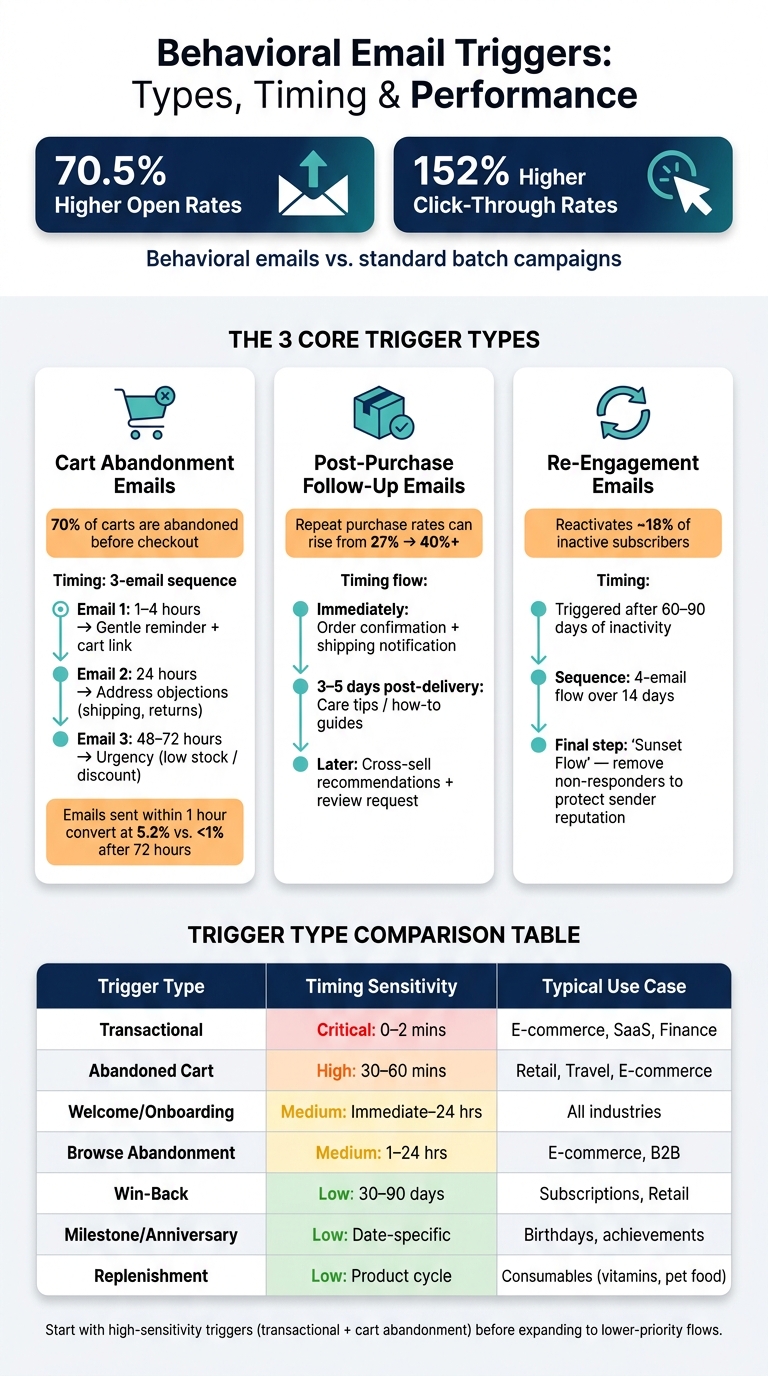
Behavioral Email Triggers: Types, Timing & Performance at a Glance
Building on earlier strategies, these email triggers are designed to engage customers at specific stages of their journey. While behavioral signals vary, three types of triggers consistently deliver strong results for revenue and engagement.
Cart Abandonment Emails
Cart abandonment emails are among the most effective tools for e-commerce businesses. With around 70% of shopping carts abandoned before checkout, these emails target high-intent shoppers who are just steps away from completing a purchase.
A single email won’t cut it. The gold standard is a 3-email sequence, which outperforms single emails in recovering lost revenue. Timing is key, as is the content of each email:
| Timing | Focus | |
|---|---|---|
| Email 1 | 1–4 hours after abandonment | Gentle reminder with a direct cart link |
| Email 2 | 24 hours after abandonment | Address objections like shipping costs or return policies |
| Email 3 | 48–72 hours after abandonment | Create urgency with low stock alerts or selective discounts |
Avoid offering discounts in the first email. Shoppers may start abandoning carts intentionally just to get a coupon. Save discounts for the final email if earlier ones don’t convert. Timing also matters - emails sent within one hour of abandonment convert at 5.2%, compared to less than 1% for emails sent after 72 hours.
"According to the Baymard Institute, the average large-scale e-commerce site can gain a 35.26% increase in conversion rate through better checkout design and recovery automation - representing an estimated $260 billion in recoverable orders annually for U.S. and EU e-commerce stores alone." - US Tech Automations
Make sure to remove customers who complete their purchase from the sequence immediately. Sending an abandonment email to someone who already bought can hurt trust.
While recovering abandoned carts is vital, following up after a purchase is equally important for building long-term customer relationships.
Post-Purchase Follow-Up Emails
A sale isn’t the end of the journey - it’s the beginning of retention. Post-purchase emails are designed to ease buyer's remorse, build trust, and encourage repeat purchases.
Effective post-purchase flows go beyond just sending a receipt. For example, a shipping notification can double as an opportunity to share a quick-start guide or usage tips. Then, 3–5 days after delivery, follow up with helpful content like care instructions or how-to guides. These practical emails help customers get the most out of their purchase and foster loyalty.
Top-performing brands also use this window to introduce cross-sell recommendations based on the customer’s purchase. Additionally, once the product has been in use for a while, requesting a review can strengthen engagement. Well-executed post-purchase flows can boost repeat purchase rates from an industry average of 27% to over 40% for top-performing brands.
At the same time, re-engagement emails are critical for bringing inactive customers back into the fold.
Re-Engagement Emails for Inactive Users
Re-engagement emails are aimed at subscribers who have gone silent - no opens, clicks, or purchases for a set period. Most businesses trigger these campaigns after 60–90 days of inactivity.
The goal is twofold: reawaken interest from dormant subscribers and clean up your list by removing those who remain unresponsive. Keeping inactive contacts hurts your sender reputation and skews engagement metrics. On average, re-engagement campaigns reactivate about 18% of inactive subscribers.
These emails often use emotional appeals or exclusive offers. Phrases like “We miss you,” special discounts for returning customers, or a simple preference update (“Still want to hear from us?”) tend to perform better than generic promotions. If a subscriber remains unresponsive after a 4-email sequence over 14 days, it’s time to remove them from your active list. This final step, sometimes called a “sunset flow”, isn’t a failure - it’s a healthy practice for maintaining list quality.
sbb-itb-6e7333f
Designing Trigger Email Workflows
To create workflows that resonate with subscribers while avoiding fatigue, focus on three key aspects: timing, targeting, and exclusions. These elements ensure your emails land when they're needed, reach the right audience, and avoid unnecessary overlap.
Timing and Frequency Controls
Timing is everything when it comes to trigger emails. For transactional emails like order confirmations or password resets, speed is critical - they should be sent instantly. On the other hand, marketing triggers often benefit from an "inaction window", which refers to the period when a user is most likely to respond after taking (or not taking) a specific action. For example, with cart abandonment, this window typically falls 30–60 minutes after the user leaves the site.
When planning follow-ups, space them out thoughtfully. A gap of at least 24 hours between non-urgent messages helps prevent fatigue. To avoid overwhelming users, set a global frequency cap - such as limiting emails to no more than four per week. If a user triggers multiple workflows at once (e.g., both a browse abandonment and a win-back sequence), prioritize high-intent or transactional messages. For example, an email tied to a recent action should take precedence.
"The best email is not the one with the best subject line. It is the one that arrives at the exact moment the user needs it, because their behavior told you they needed it." - KISSmetrics Editorial
Leverage tools like the Best Time to Send feature to align delivery with peak user activity. For instance, sending emails during active hours like 9–10 AM can significantly improve engagement compared to off-peak times.
Once timing is optimized, the next step is ensuring your messages are relevant through proper segmentation and exclusion rules.
Audience Segmentation and Exclusions
After nailing the timing, it’s essential to target the right audience while excluding those who shouldn’t receive the message. Segmentation ensures your emails are relevant, while exclusions help maintain your brand’s credibility and avoid unnecessary clutter in users' inboxes.
For exclusions, think about specific scenarios: a customer in a billing dispute shouldn’t receive promotional offers, and a lead already in active discussions with your sales team doesn’t need automated nurture emails. In B2B workflows, this might mean checking for open opportunities or ongoing support tickets before sending emails. For e-commerce, users who complete a purchase should be immediately removed from related abandonment sequences. These exclusion rules not only preserve relevance but also protect your sender reputation.
On the inclusion side, group users based on specific behaviors. For example:
- Users who visit a pricing page or add items to their cart can be targeted with tailored follow-ups.
- Welcome flows can be customized by acquisition source: someone who downloads a guide might benefit from educational content, while a newsletter subscriber might expect updates that build trust and authority.
- Re-engagement campaigns should have clearly defined thresholds for inactivity, such as 30, 60, or 90 days, and stick to them consistently.
To filter out anomalies caused by security scanners like Microsoft SafeLinks, implement a 60-second time delay to identify genuine clicks.
Trigger Types and Use Cases: Comparison Table
Each type of trigger email has unique timing and segmentation requirements. The table below highlights their key features:
| Trigger Type | Purpose | Timing Sensitivity | Typical Business Use Case |
|---|---|---|---|
| Transactional | Confirm actions (orders, resets) | Critical: Immediate (0–2 mins) | E-commerce, SaaS, Finance |
| Abandoned Cart | Recover lost revenue | High: 30–60 mins | Retail, Travel, E-commerce |
| Welcome/Onboarding | Build trust & activate users | Medium: Immediate to 24 hours | All industries |
| Browse Abandonment | Re-engage high-intent visitors | Medium: 1–24 hours | E-commerce, B2B |
| Win-Back | Reactivate lapsed users | Low: 30–90 days | Subscription services, Retail |
| Milestone/Anniversary | Reward loyalty | Low: Date-specific | Birthdays, usage achievements |
| Replenishment | Drive repeat purchases | Low: Based on product cycle | Consumables (vitamins, pet food) |
Start by focusing on high-sensitivity triggers like transactional and cart abandonment emails, which directly impact revenue. Once these are in place, expand your strategy to include lower-priority workflows like milestone and replenishment emails. This gradual approach allows you to refine your processes and maximize engagement.
Improving and Scaling Trigger Campaigns
Once your workflows are up and running, the next step is to fine-tune and expand their effectiveness.
Testing and Personalization
Instead of just tweaking subject lines, dig deeper into the behavior driving the email to truly gauge its conversion potential. One effective method is holdout testing, where 10–20% of users are excluded from workflows to measure the actual impact on conversions.
The ultimate goal? Drive conversions - not just opens or clicks. Focus on whether users complete the intended action, like making a purchase, activating a feature, or logging in. Behavioral emails typically achieve 3–5% conversion rates, far outpacing the 0.1% seen in traditional batch campaigns. Add personalization to the mix, and the results can be even stronger - companies that excel here see 40% higher revenue compared to average performers.
A practical way to personalize is by using dynamic content blocks. Instead of creating separate email sequences for each segment, use a single template with adaptable content based on user behavior, location, or engagement. For hesitant buyers, adding social proof like reviews or ratings can help overcome doubts.
"A time-based sequence assumes a linear commitment curve. A behavioral sequence adapts to the actual curve each user is following." - Atticus Li, Experimentation and Growth Leader
Once personalization strategies are running smoothly, the challenge shifts to handling the complexities of automation as campaigns grow.
Managing Automation as Campaigns Grow
Adding more triggers can lead to "trigger sprawl", where overlapping workflows cause issues like collisions or reduced deliverability. The solution isn’t more automation - it’s better governance.
Start by improving your event taxonomy. Assign unique event names (e.g., pricing_page_return) tied to their source systems. This ensures triggers reflect current user behavior rather than outdated signals. Use idempotency gates and cross-workflow frequency caps to prevent duplicate sends and avoid overwhelming users. To keep things on track, plan a quarterly audit of active flows. This ensures offers, product links, and audience criteria remain aligned with current behavior.
"Triggered emails are powerful because they respond to what a buyer actually did. They are also dangerous because one misconfigured enrollment rule can spam an entire account." - FUBYTE
Optimization Strategies: Comparison Table
Here’s a quick breakdown of optimization techniques to further boost your campaign performance:
| Optimization Technique | Primary Benefit | Potential Limitation |
|---|---|---|
| A/B Testing | Helps identify the best-performing subject lines and CTAs | Needs a high volume of data for accurate results |
| Holdout Groups | Confirms true revenue impact vs. correlation | Reduces campaign reach temporarily |
| Frequency Caps | Protects deliverability and prevents user fatigue | May delay urgent, time-sensitive messages |
| Dynamic Personalization | Boosts relevance and engagement rates | Requires clean, well-integrated data |
| Revenue Attribution | Links email actions directly to ROI | Difficult to track across devices and channels |
| Predictive AI Triggers | Anticipates user needs before they act | Demands advanced tech and large datasets |
| Event Deduplication | Prevents double-sends caused by webhook retries | Adds technical complexity during setup |
If you’re just starting out, focus on holdout testing and frequency caps - they’re relatively easy to implement and deliver quick, measurable results. As your data systems mature, consider exploring predictive AI and revenue attribution for deeper insights and impact.
Conclusion
Key Points Recap
Triggered emails outperform routine newsletters with a 70.5% higher open rate and a 152% higher click-through rate (CTR), while potentially increasing email revenue by up to 400% within months. The concept is simple: track key user actions, recognize moments of intent or hesitation, and respond with timely, relevant messages. Whether it’s a welcome sequence, cart abandonment reminder, post-purchase follow-up, or re-engagement campaign, each type of email serves a unique purpose in the customer lifecycle. Together, they create a comprehensive approach to guide users through their journey. To keep these workflows efficient and scalable, strategies like frequency caps, suppression logic, and holdout testing are essential. Meanwhile, advancements like predictive triggers and multi-channel coordination emphasize the importance of having a solid data foundation.
These takeaways set the stage for actionable steps to start using behavioral email triggers effectively.
Next Steps for Implementing Behavioral Email Triggers
Begin with three core campaigns: a welcome series, a cart abandonment sequence, and a re-engagement campaign. These cover key stages of the customer journey while delivering noticeable results without requiring an overly complex setup. Choose a platform that supports real-time behavioral tracking, event-based enrollment, and cross-channel data integration. For a helpful comparison of platforms and agencies specializing in behavioral automation, check out the Email Service Business Directory. It’s a great resource to find a solution that meets your current needs and can adapt as your campaigns grow.
FAQs
What events should I track first for behavioral triggers?
Creating an effective behavioral email strategy starts with identifying key actions that signal user intent or progression through their journey. Focus on tracking high-impact events like:
- Welcome emails: Automatically send these after a user signs up to make a great first impression.
- Cart abandonment reminders: Re-engage users who left items in their cart without completing the purchase.
- Browse abandonment messages: Follow up with users who viewed products but didn’t take further action.
Additionally, keep an eye on important milestones such as:
- First purchases: Celebrate and nurture new customers to encourage repeat business.
- Lead magnet downloads: Engage users who downloaded resources like eBooks or guides.
- Successful use of a core feature: Recognize when users fully experience your product’s value to deepen their engagement.
By paying attention to these events, you can fine-tune your campaigns and create emails that feel timely and relevant to your audience.
How can I stop multiple triggers from emailing the same person?
To ensure your contacts aren't overwhelmed with multiple emails, use global frequency caps or smart sending to limit how many emails they receive within a specific timeframe. When setting up workflows, you can create mutual exclusions by checking if a contact is already active in another workflow before enrolling them.
Another helpful tactic is to use custom properties, such as an "In Email Flow" flag, to track and manage contacts within your workflows. To avoid duplicate triggers, make sure to deduplicate events by assigning unique identifiers like session IDs or order IDs. This ensures each event is processed only once.
How can I prove triggered emails increase revenue?
Automated, behavior-based emails pack a punch when it comes to boosting revenue. On average, these triggered emails make up just 2%–5% of total email volume but contribute a whopping 30%–41% of total email revenue. That’s some serious efficiency!
Key metrics back up their impact. For instance, triggered emails can lead to a 13x–22x increase in revenue per email and a 13x higher placed-order rate compared to standard email campaigns. These numbers highlight just how powerful targeted, behavior-driven messaging can be.
If you’re looking for tools to manage your campaigns effectively, check out the Email Service Business Directory. It’s a great resource for finding solutions that match your needs.