The best email programs send the right message at the right stage. When I map emails to lifecycle stages, I can lift opens, clicks, purchases, and repeat orders without relying on batch sends.
Here’s the short version:
- Awareness: send a welcome series after sign-up
- Consideration: send proof, guides, and demo or trial prompts after high-intent actions
- Conversion: send cart, checkout, or trial-expiry emails to drive the first sale
- Onboarding: send setup and first-use emails in the first 3 to 7 days
- Retention: send reorder, product-use, upsell, and cross-sell emails to keep buyers active
- Win-back: send reactivation emails after inactivity, then suppress non-responders
- Advocacy: ask for reviews, referrals, and VIP participation after a good customer moment
A few numbers show why this works. Automated lifecycle emails average 42.1% open rates and 5.4% click rates, and 1 in 3 clicks can lead to a purchase. Also, keeping a customer often costs far less than getting a new one, and even a 5% lift in retention can grow profit by 25% to 95%.
The core idea is simple: use behavior, not the calendar. A pricing-page visit, abandoned cart, first login, repeat purchase, or 90+ days of inactivity should trigger the next email. Then I track the KPI that fits that stage, like CTR, conversion rate, activation rate, repeat purchase rate, or reactivation rate.
To make this work, I need three things:
- Dynamic segments based on live behavior
- Stage-based KPIs instead of one dashboard for every flow
- Clean sending setup with SPF, DKIM, and DMARC in place
That’s the full playbook in one view: match one stage, one trigger, one goal, and one KPI to each email flow.
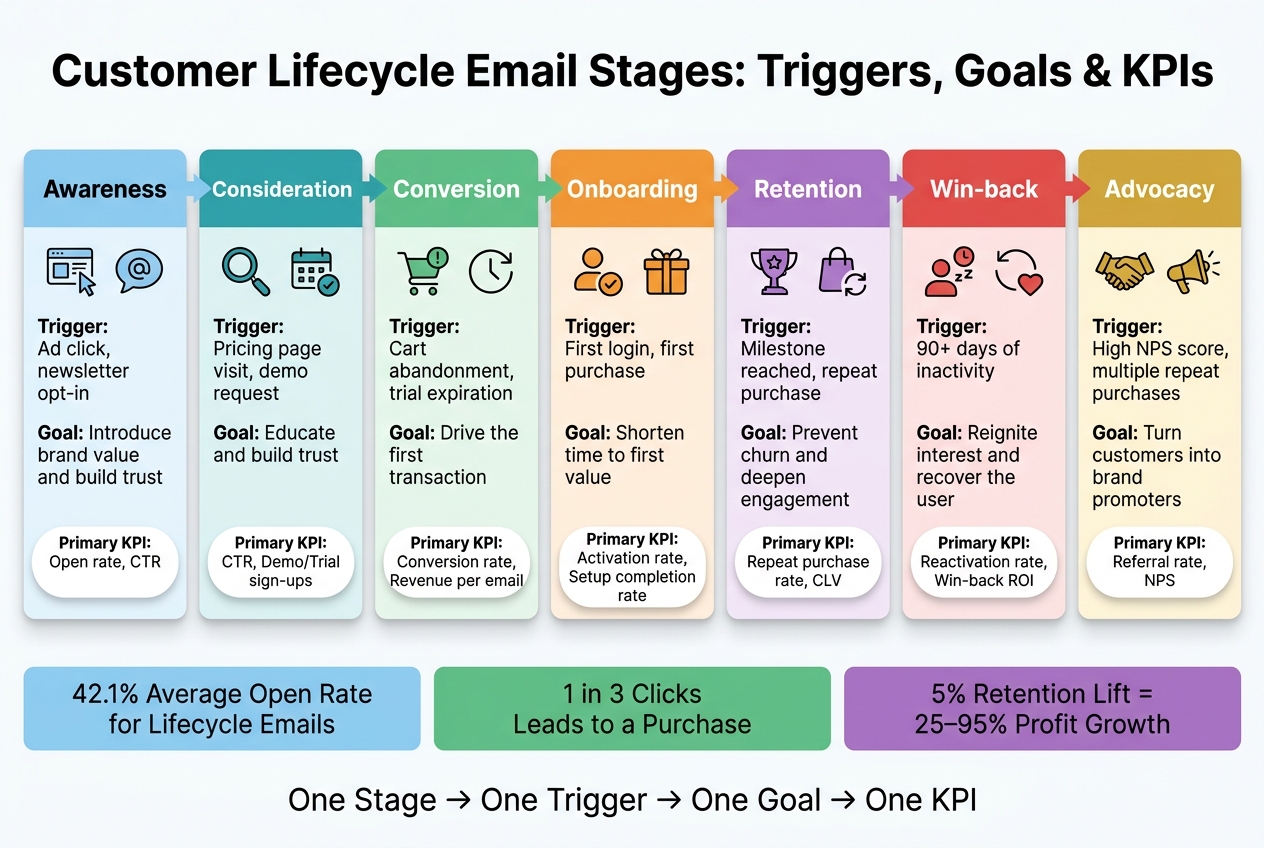
Customer Lifecycle Email Stages: Triggers, Goals & KPIs
Map Lifecycle Stages to Email Goals, Segments, and KPIs
Stage definitions and customer intent signals
Start by placing each contact into a stage based on what they do. Then tie that stage to one main goal and one main KPI.
A newsletter sign-up or lead magnet download usually points to early interest. A pricing page visit often means the person is comparing options and getting closer to a decision. A first login or account creation signals the start of onboarding. Those actions tell you what kind of email should come next and what result you should measure.
These seven operating stages build on the broader lifecycle model introduced above. The four broad lifecycle phases break down into these seven working stages. Each row connects a behavior to one core email job, which keeps the tactics section tight and easy to follow. Use this map to pick the next email flow in the tactics section that follows.
| Lifecycle Stage | Stage Definition | Triggers | Primary Goal | Primary KPIs |
|---|---|---|---|---|
| Awareness | New leads or visitors | Ad click, lead magnet download, newsletter opt-in | Introduce brand value and build trust | Open rate, CTR, Sign-up rate |
| Consideration | Prospects comparing options | Pricing page visit, demo request, webinar sign-up | Build trust and educate on product benefits | CTR, Demo/Trial sign-ups |
| Conversion | High-intent prospects near purchase | Cart abandonment, trial expiration, checkout visit | Drive the first transaction | Conversion rate, Revenue per email |
| Onboarding | New customers setting up | First login, account creation, first purchase | Shorten time to first value | Activation rate, Setup completion rate |
| Retention | Active customers | Milestone reached, renewal date, repeat purchase | Prevent churn and deepen engagement | Repeat purchase rate, Churn rate, CLV |
| Win-back | Inactive users | 90+ days of inactivity, stopped opening emails | Reignite interest and recover the user | Reactivation rate, win-back ROI |
| Advocacy | Loyal customers | Multiple repeat purchases, high NPS score, referral link click | Turn customers into brand promoters | Referral rate, Review submission rate, NPS |
How to connect triggers, messages, and automation logic
Automations should respond to behavior changes, not just fixed send dates.
A welcome email should follow an opt-in. A cart recovery flow should follow abandonment. A win-back flow should start after inactivity. That sounds obvious, but plenty of teams still rely too much on static segments and scheduled batch sends.
The problem is simple: static segments go stale. Dynamic segments update on their own based on real-time behavior, which helps you avoid sending clashing campaigns. If someone visits your pricing page several times, they should move into a consideration flow right away, not sit around until the next scheduled send. Each email should feel like the next logical step.
KPIs to track at each lifecycle stage
Not every stage should be judged the same way.
Awareness and consideration are mostly about engagement. Conversion, retention, and win-back are more about revenue or reactivation. In the early stages, metrics like open rate and CTR help you see whether people are paying attention. Later on, business results matter more. Conversion rate, repeat purchase rate, and customer lifetime value (CLV) show whether the relationship is moving forward or stalling out.
One metric that deserves extra attention in win-back flows is reactivation rate. It measures the share of inactive users who come back after a given sequence. That makes it a clean stage-level signal. If the number is low, your re-engagement copy, timing, or offer likely needs work. Stage-level reporting helps you spot where drop-off begins. Once the right KPI is attached to the stage, you can match it to the exact email tactic.
sbb-itb-6e7333f
Email Tactics for Awareness, Consideration, Conversion, and Onboarding
Awareness and consideration: welcome and nurture sequences
Use the lifecycle map to turn each stage into one clear email flow.
Start with a welcome email right away. Then send something educational on Day 2. By Day 5, add social proof or a light incentive. That welcome series should begin with your brand mission, move into helpful content, and end with one clear next step, like "Take the quiz", "Follow us on social media", or "Claim your discount".
For consideration-stage contacts, the goal changes. At this point, you're not just introducing the brand. You're helping people feel more sure about their choice. Case studies, customer testimonials, comparison guides, and webinar or demo invites can help prospects weigh their options. These emails should be triggered by behavior. For example, if someone visits a product page three times in one week, that should kick off a follow-up.
| Stage | Email Types | Cadence | Next Action |
|---|---|---|---|
| Awareness | Welcome series, brand intro, lead magnet delivery | Immediate, Day 2, Day 5 | Drive a single next step (quiz, follow, discount claim) |
| Consideration | Nurture sequences, case studies, comparison guides | Behavior-triggered | Move prospect toward demo, trial, or direct inquiry |
Quizzes fit well in both awareness and consideration flows. They collect zero-party data and make personalized product recommendations much easier to send.
As intent goes up, the email strategy should shift too. Move from education to friction removal.
Conversion: cart recovery, trial follow-up, and decision-stage emails
Conversion emails should respond to high-intent behavior and clear away the last thing stopping a purchase.
Send the first cart reminder within 1 hour. Then send a second reminder about 24 hours later. Trial follow-up emails tend to work best when they point to key features and remind users what they’ll lose access to when the trial ends. For purchases that take more thought, offering a direct reply-to option or a sales contact can remove that last bit of hesitation.
Nurture builds interest. Conversion asks for action. Remove doubt; do not add pressure.
After the sale, the focus shifts. Now the job is helping the customer get their first win.
Onboarding: first-value emails that reduce drop-off
Most churn happens within the first 3 to 7 days after sign-up. That’s why onboarding needs to start immediately after conversion. The aim is simple: get new customers to first value as fast as possible.
For SaaS and B2B, that usually means step-by-step setup guides, short tutorial videos, and activation nudges that help users complete key actions. For B2C and e-commerce, the focus is different. Support the first order with shipping updates and get-started guides.
Onboarding works best when it’s behavior-triggered. If a user creates an account but never finishes setup, one contextual reminder sent automatically when that gap appears can recover activation without manual work.
Match each flow to the user’s next step.
| Flow Type | Best Use | Email Count | Main Purpose | Core Metrics |
|---|---|---|---|---|
| SaaS Onboarding | Account created, setup incomplete | 3–5 | Drive feature adoption and setup completion | Activation rate, time to first value |
| E-commerce Onboarding | First purchase complete | 2–3 | Product education, care guides, and brand affinity | Repeat purchase rate, time to second order |
| Trial Follow-up | Free trial active | 3–4 | Convert trial users to paid subscribers | Trial-to-paid conversion rate |
| Activation Nudge | Critical step skipped | 1–2 | Remove friction from specific drop-off points | Step completion rate |
Automated onboarding sequences average a 42.1% open rate, a 5.4% click rate, and a 1.9% conversion rate. And one in three people who click an automated lifecycle message go on to make a purchase.
Email Tactics for Retention, Reengagement, and Advocacy
Retention and expansion: repeat purchase, upsell, and cross-sell emails
After onboarding, the job changes. Now the goal is to keep people using the product, buying again, and eventually talking about it.
Lifecycle emails can drive 20% of reorders. That makes this stage hard to ignore. Retention keeps customers active. Expansion grows revenue from the customers you already have.
Start by segmenting active customers based on clicks, browsing behavior, and purchase history. Then send emails that match what they’ve already done.
For retention, that usually means product tips, usage best practices, and loyalty offers that nudge people toward another purchase or continued use. In e-commerce, replenishment reminders can help bring customers back at the right time. In SaaS, feature-adoption emails can point users to tools they haven’t tried much yet and help keep them engaged.
Upsell and cross-sell emails tend to work better when they’re tied to purchase history instead of broad catalog browsing. That makes the offer feel more relevant and less like a random sales push. At this point, keep incentives in the middle range. Bundle discounts or exclusive early access usually fit better than heavy markdowns.
If engagement starts to dip, move that customer into a reengagement flow.
Reengagement and win-back: recover inactive subscribers without hurting deliverability
Inactive subscribers can hurt deliverability if you let them sit on the list too long. Falling open and click rates should trigger recovery flows early, before full inactivity sets in.
Predictive churn signals can also help identify at-risk subscribers before they disappear completely.
The path here is pretty direct: signal decline → reengagement → win-back → sunset. A reengagement series often starts with a lighter touch, like a preference center prompt or a "What's new" update, before moving to a more targeted incentive. For lapsed purchasers, win-back campaigns can use stronger offers, such as 15–20% off, once softer attempts have already been used. If a contact still doesn’t respond after the full win-back sequence, sunset them to protect sender reputation.
| Stage | Audience Definition | Email Approach | Incentive Level | KPIs |
|---|---|---|---|---|
| Retention | Active customers | Product tips, usage best practices, loyalty offers | Low (value-add) | Repeat purchase rate, CLV |
| Expansion | High-value customers | Upsell, cross-sell, feature adoption | Medium | AOV, revenue per email flow |
| Reengagement | Users with declining open/click rates | Preference center prompts, "What's new" | Low to medium | Click-through rate, reactivation rate |
| Win-back | Lapsed purchasers | "We miss you" series, targeted discounts | High | Win-back rate, ROI |
Advocacy and loyalty: reviews, referrals, and VIP communication
Once customers are happy, email can help turn that into reviews, referrals, and stronger loyalty.
Advocacy emails usually work best right after a good experience, not because the calendar says it’s time. Review requests make sense after a successful delivery or after a support issue has been resolved.
Referral emails often do well with a dual-sided reward, where both the referrer and the new customer get something. VIP programs should focus on high-CLV customers and lean into status and exclusivity, like early access to new products, members-only updates, or gifts.
| Program | Eligibility | Email Angle | Reward or Recognition | Metrics |
|---|---|---|---|---|
| Reviews | Post-purchase or after a positive support interaction | "Share your experience" | Recognition or small future discount | Review volume, average star rating |
| Referrals | Satisfied customers | "Give $X, Get $X" | Dual-sided credit or discount | Referral conversion rate, new customer acquisition |
| VIP Programs | High-CLV customers | Early access, exclusive updates | Status, VIP-only perks, gifts | CLV growth, retention rate |
Measure, Optimize, and Choose the Right Email Setup
Data and segmentation inputs for lifecycle campaigns
Once your lifecycle map is in place, the next move is simple: feed each flow the right signals. Lifecycle email at scale runs on data that powers automation.
The main inputs include behavioral data like clicks and browsing activity, transactional data like purchase history, average order value, and purchase frequency, product usage such as feature adoption and setup completion, plus CRM fields and RFM scoring - Recency, Frequency, and Monetary value.
RFM helps you spot high-value customers and flag accounts that may be drifting away. Instead of static lists, you get live segments that change as customer behavior changes.
For B2B programs, add firmographic data like industry, company size, and persona so the content fits the use case more closely. From there, go past broad demographic buckets and build smaller behavior-based segments. That can mean grouping subscribers by discount responsiveness, acquisition source, and product category interest.
These same inputs should guide both testing and reporting. If your segments are off, your results will be too.
Testing and reporting by lifecycle stage
Different stages call for different tests. Early on, in awareness and consideration, subject line and send-time tests tend to be useful. At conversion, the offer often has the biggest impact. Testing "10% off" against "free shipping" will usually beat a small subject line change. During onboarding, test sequence length and timing. In retention flows, test content and cadence to find what keeps people coming back.
Reporting needs a similar stage-by-stage approach. Open rates matter less than they used to. Since Apple's Mail Privacy Protection update, many opens are not human opens, which makes click-through rate and revenue-per-send stronger signals of actual performance.
Use KPIs that match the job of each flow. A win-back email and an onboarding series should not be judged by the same dashboard.
| Lifecycle Stage | Primary KPIs to Track |
|---|---|
| Awareness / Acquisition | Sign-up rate, lead magnet downloads |
| Onboarding | Completion rate, day-7 retention, feature activation rate |
| Conversion | Conversion rate, cart recovery rate, revenue per email flow |
| Retention | Repeat purchase rate, churn rate reduction, renewal rate |
| Win-Back | Reactivation rate, win-back conversion, unsubscribe rate |
| Loyalty / Advocacy | Customer Lifetime Value (CLV), referral rate, VIP program participation |
It also pays to watch the health metrics that keep deliverability in good shape: bounce rate, unsubscribe rate, and spam complaint rate. Since February 2024, Gmail and Yahoo require SPF, DKIM, and DMARC authentication for bulk senders, and missing those checks can hurt inbox placement. It also makes sense to suppress subscribers who haven't engaged in 180 days to protect sender reputation.
Conclusion: key email tactics at each lifecycle stage
The rule here is simple: match each stage to one goal, one trigger, and one KPI. Lifecycle emails tend to beat batch sends because the message, timing, and stage line up.
The Email Service Business Directory helps teams find providers with the automation, strong CRM and e-commerce integrations, and deliverability support needed for lifecycle programs.
Customer Lifecycle Stages and Why You Need Email Flows | Klaviyo Mastery 3.0 Course
FAQs
How do I know which lifecycle stage a contact is in?
Determine a contact's lifecycle stage by looking at how they behave and interact with your business. That can include signing up, browsing, making a purchase, or going inactive.
Those actions can then trigger automated emails matched to each stage.
Which email flows should I build first?
Start with welcome or onboarding emails. They help you make a good first impression, set clear expectations, and point new users toward the actions that matter most.
A solid place to begin is a 3–5 email welcome sequence sent during the first week after sign-up. After that, add post-purchase onboarding so new customers know what to do next and how to get value from what they bought.
Once those core flows are in place, move on to abandoned cart and retention emails.
What KPIs matter most at each stage?
Key KPIs change based on the stage you're measuring.
- Awareness: open rate, click rate
- Purchase: conversion rate, revenue per email
- Relationship building: repeat purchase rate, product review submission rate
- Retention: customer lifetime value, click rate
- Advocacy: referral activity, loyalty program enrollment