If email downtime costs you logins, support tickets, or SLA trouble, failover and redundancy are not the same fix. I’d put it this way: failover helps you recover after a break, while redundancy keeps one break from stopping email in the first place.
Here’s the short version:
- Failover = backup path after failure
- Redundancy = parallel paths before failure
- Failover has a gap because traffic must switch
- Redundancy cuts interruption because traffic is already spread out
- Failover often costs less
- Redundancy often costs more and takes more day-to-day upkeep
- Transactional email like password resets and one-time codes usually needs near-zero RTO and RPO
- Marketing email can often handle a short delay
If I were choosing between the two, I’d look at four things first:
- Downtime cost - what does 1 hour of email trouble cost in $USD?
- RTO - how fast do I need service back?
- RPO - how much message loss can I accept?
- Compliance - can every backup or parallel provider meet the same rules?
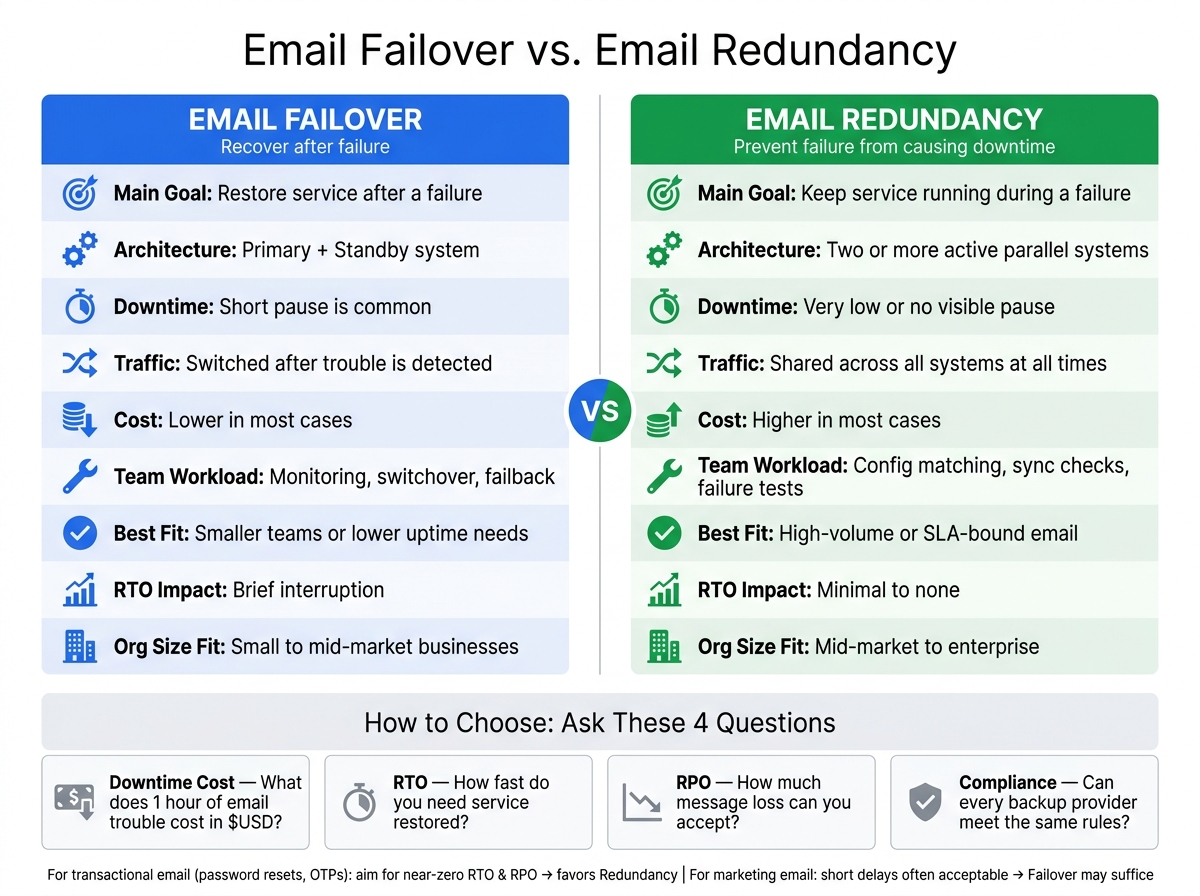
Email Failover vs. Redundancy: Side-by-Side Comparison
Failover & Redundancy: Backup Systems Explained
sbb-itb-6e7333f
Quick Comparison
| Criteria | Email Failover | Email Redundancy |
|---|---|---|
| Main job | Restore service after a failure | Keep service running during a failure |
| Setup | Primary system + standby system | Two or more active systems |
| Downtime | Short pause is common | Very low or no visible pause |
| Traffic handling | Switched after trouble is found | Shared all the time |
| Cost | Lower in many cases | Higher in many cases |
| Team workload | Monitoring, switchover, failback | Config matching, sync checks, failure tests |
| Best fit | Smaller teams or lower uptime needs | High-volume or SLA-bound email |
A few setup points matter no matter which model I choose:
- Use at least two MX records
- Keep SPF, DKIM, and DMARC aligned
- Use disk-backed queues
- Watch queue depth, 4xx/5xx rates, and TLS results
- Test backup paths before you need them
My takeaway is simple: don’t buy based on the label. Pick the model that matches your downtime risk, sending volume, and the cost of missed email.
Email failover vs. redundancy: key differences
The difference shows up in architecture, operations, and risk. For business-critical email, that gap can decide whether delivery pauses for a moment or keeps flowing.
Different goals: restoring service vs. preventing downtime
Failover is a recovery tool. If your main email system goes down, traffic moves to a standby system. The aim is fast recovery, but the switch still adds some delay. You don’t avoid the outage outright. You respond to it.
Redundancy works from the other direction. It’s built in before anything fails. Parallel systems handle traffic at the same time, so if one part breaks, delivery keeps going because other parts are already doing the work. That’s why redundancy leads to minimal RTO.
Different architectures: standby systems vs. parallel systems
Failover usually follows a primary-plus-standby setup. A common example is a secondary MX record with a higher priority number, such as primary MX 10 and backup MX 20. Secondary MX servers should return a temporary failure so sending servers retry instead of bouncing mail.
Redundancy relies on active-active or load-balanced setups. Multiple SMTP relays share traffic at the same time through equal-priority MX records or a dedicated load balancer. SMTP edge servers work well in active-active setups, while mailbox databases often need active-passive protection to avoid write conflicts.
That design choice has a direct effect on operations too. A standby setup often means more monitoring and a plan for moving traffic back later. Parallel systems cut downtime, but they ask more from the team every day.
Different operational demands
Failover depends on fast, dependable monitoring. It also needs a clear failback plan so traffic can return to the primary system once it’s stable.
Redundancy puts more pressure on configuration management. Teams need to keep settings aligned across every active system so behavior stays the same everywhere. Testing changes too. Failover testing looks at detection and switchover speed, while redundancy testing uses failure-injection tests to make sure the system can take a hit without users noticing .
| Feature | Email Failover | Email Redundancy |
|---|---|---|
| Primary Purpose | Restore service after failure | Prevents downtime |
| Activation Method | Manual or automatic switchover | Load balancing (always active) |
| RTO Impact | Brief | Minimal |
| Architecture | Primary-plus-standby | Parallel / active-active |
| Complexity | Moderate | High |
| Maintenance | Periodic standby testing, failback planning | Constant configuration matching across systems |
Those tradeoffs feed straight into cost, resilience, and maintenance choices.
Pros, cons, and tradeoffs for each approach
Knowing the architecture is one thing. Knowing how each setup behaves when something goes wrong is what helps you make a smart call.
Where failover works well and where it falls short
Secondary MX records and standby relays cost less to set up and can handle short outages just fine for email marketing platforms for small business. If your team can live with brief interruptions and needs to keep costs down, that level of coverage is often enough.
The weak spots are pretty specific, and they matter. If a secondary MX is set up the wrong way and returns a 5xx error instead of a 4xx, senders may drop the message instead of trying again. Standby systems can also look fine on paper and then stumble in practice. If a backup has never been tested under lifelike conditions, it may not respond the way you expect when the pressure is on. And failover only works if detection is fast and automatic. A manual response just takes too long.
So the tradeoff is pretty simple: lower cost and easier deployment, but more reliance on fast detection.
Where redundancy works well and where it gets expensive
Redundancy takes the opposite path. You spend more, and the setup gets more complex, but delivery keeps going without interruption.
Active-active redundancy works because traffic is already distributed across multiple nodes. If one node fails, mail keeps flowing. That makes it a strong fit for organizations sending more than 10 million emails per month or working under strict uptime requirements.
The day-to-day overhead is where the cost shows up. Configuration drift is the main risk. If SPF records don’t include every active relay IP, or DKIM keys aren’t synced across every sending path, legitimate mail can get flagged as spam. There’s another catch too: multiple relays in the same cloud can still go down together during a provider-wide outage. Parallel systems need constant checks to stop config drift before it turns into a live issue, not just the occasional test. Infrastructure as Code tools like Terraform or Ansible can help catch drift early.
How to choose the right model for your email environment
Now that the architecture tradeoffs are on the table, the next step is pretty simple: pick the setup that matches your tolerance for downtime and message loss.
Key decision factors: downtime cost, RTO, RPO, and compliance
Start with one question: what does one hour of email downtime cost your business?
That number isn't just about missed sales. It also includes SLA penalties, support ticket volume, and brand damage. Once you put a dollar figure on those hits, the gap between a lower-cost failover setup and a more expensive redundancy model gets a lot easier to judge.
Then define your RTO and RPO.
- RTO is how fast service needs to come back.
- RPO is how much message loss you can live with.
Transactional email usually needs near-zero RTO and RPO. That points to active redundancy. Marketing email, on the other hand, can often handle slower recovery and scripted failover.
Compliance adds one more layer. U.S. businesses in regulated sectors need to make sure any fallback provider can meet the same data-handling and continuity standards as the primary provider. That means fallback relays should be pre-approved under the same data-protection and processing agreements.
For regulated businesses and SLA-bound senders, resilience isn't a nice extra. It's a hard requirement.
Typical fit by organization size and email complexity
Use those thresholds to match your team with the simplest model that still does the job.
Small businesses often do well with a secondary API provider and app-level routing. One detail matters here: keep secondary routes warm with low-volume sends so sender reputation doesn't go cold.
Mid-market teams are usually a fit for an active-passive design with a local MTA and an SMTP-health-checked load balancer.
Enterprise environments often need multi-region active-active routing with automated failover.
| Organization Size | Recommended Approach | Key Consideration |
|---|---|---|
| Small business | Secondary API provider + app-level routing | Keep secondary routes warmed up with low-volume sends |
| Mid-market | Active-passive with local MTA + load balancer | Use short DNS TTLs (60–300 seconds) for faster re-prioritization |
| Enterprise | Active-active, multi-region, automated failover | Use idempotency keys to prevent duplicate sends after recovery |
Using Email Service Business Directory to evaluate providers
Once you've set your requirements, compare providers on continuity features, not just price.
The Email Service Business Directory helps businesses compare email platforms and providers for transactional email, automation, and high-volume sending.
When you review listings, focus on continuity details such as stated uptime SLAs, support for independent SPF, DKIM, and DMARC on fallback paths, and whether the provider can absorb queued-mail spikes without tripping spam filters. If a provider says it offers redundancy but can't explain how it handles a sudden message dump after an outage, that's a red flag.
Think of redundancy like insurance: a small recurring cost that helps cut the risk of a much bigger outage.
Use the directory to compare listings against your continuity requirements, not just feature checklists. The right choice comes down to sending volume, risk, and operational complexity.
Implementation basics and final takeaway
What to set up before relying on failover or redundancy
Once you pick a model, check the basics that keep it alive when something goes wrong. Neither failover nor redundancy will help much if DNS, authentication, queues, and monitoring are shaky.
Start with DNS. Use at least two MX records with different priorities, and make sure each MX hostname has a matching A record. MX records cannot point straight to an IP.
Authentication needs to match across every node. Keep SPF, DKIM, and DMARC aligned across every primary and fallback path.
Queues and monitoring round out the setup. Use disk-backed queues so a node restart doesn’t wipe out in-flight messages. Track queue depth, send success rates, response code distribution, and TLS handshake success rates. Your system should treat 4xx responses as temporary and 5xx responses as permanent. Also, write runbooks with commands, escalation steps, and validation checks.
Conclusion: choose based on continuity needs, not labels
Once DNS, authentication, and queuing are in place, the choice between failover and redundancy stops being a theory exercise. It becomes an ops decision.
Failover and redundancy deal with different parts of the problem. Failover is the switchover mechanism - it moves traffic to a working path when the primary fails. Redundancy is the capacity that makes that switchover possible - the parallel or standby capacity ready to take the load.
For most growing organizations, the best setup uses both: active parallel nodes for normal traffic, with failover logic and persistent queuing underneath as protection. The right mix depends on your RTO, your RPO, and what downtime actually costs your business, not on whatever label a vendor puts on the feature.
Start simple, test on a regular schedule, and build toward the model that fits your continuity needs.
FAQs
Do I need both failover and redundancy?
Generally, yes. Failover keeps email moving by switching to a backup provider or route when the main one goes down. Redundancy means having extra systems, servers, or regions in place so one failure doesn't bring everything to a stop.
When you use both, email delivery becomes more reliable and business continuity gets stronger. Failover handles the instant switchover. Redundancy is what gives you the backup layers behind it.
How do I know if failover is enough for my email?
Failover may be enough if your setup is tested on a regular basis and can bring service back fast with little disruption during an outage. Controlled drills help prove the process works. They also help you spot user-facing problems, like caching issues or slow endpoint switching.
You should review it all the time by tracking detection time, recovery time, and user impact. If testing shows gaps or delays, you may need more redundancy or changes to your process.
What can break email failover or redundancy in practice?
Common failure points include misconfigured secondary MX records, DNS issues, expired or outdated TLS certificates, and malformed SPF records. Any of these can stop failover from working, slow the switch, or lead remote servers to reject mail.
Failover can also break when there’s a single point of failure in the setup, like a non-redundant relay or queue. And if backup systems aren’t tested on a regular basis, watched closely, or set up with dependable retry logic, problems tend to show up at the worst time.