If your email decision takes too long, personalization stops matching what the user just did. I’d boil this article down to a simple rule: keep the send path short, read profile data from one fast place, cache what you use most, split urgent traffic from batch traffic, and set fallback rules before things fail.
Here’s the core idea in plain English:
-
Match latency to the job
- Milliseconds for transactional and tight trigger flows
- Seconds to minutes for lifecycle and recommendation flows
- Hours to days for batch campaigns
-
Trim the hot path
- Keep only what changes the current send
- Move scoring, enrichment, and feedback writes to async workers
- Avoid multi-step profile lookups across several systems
-
Speed up reads
- Use one unified read path
- Cache hot profile fragments in Redis
- Precompute model features so the decision engine can fetch them in one call
-
Protect urgent sends
- Put transactional, behavioral, batch, and analytics traffic in separate queues
- Don’t let promo volume block password resets or trigger emails
- Use DLQs for repeated failures
-
Plan for failure
- Set timeout budgets by campaign type
- For example, transactional email should fall back to a default template if a profile read misses its budget
- Watch p95 and p99, not just averages
A few numbers stand out. The article notes that 82% of read queries in email systems hit data newer than 16 days, which is why hot-data design matters. It also points to a case where online feature reads were served in single-digit milliseconds, and another where moving hot CDP data cut profile lookup p95 from 220 ms to 45 ms. The takeaway is simple: most latency comes from extra hops, slow reads, and mixed-priority traffic.
If I were putting this into practice, I’d start with three moves: cache hot attributes, offload scoring to async queues, and set hard timeout-plus-fallback rules for each campaign class.
Build the decision pipeline for speed
Use low-latency profile reads and reduce fan-out
Once the synchronous path is set, the next job is simple: make each decision do less work.
Start with profile reads. Use one unified read path, not a chain of lookups across several systems. Every extra hop adds delay, and in a live decision flow, those delays stack up fast.
Use user_id as the partition key so each user's data lives on a single shard. Then pair it with clustering keys like TIMEUUID to keep engagement events in chronological order. That way, pulling the latest interaction becomes a single range scan instead of a full table filter. That matters because 82% of read queries in email systems target data younger than 16 days.
Also, precompute the features your models use most. A feature store can serve pre-joined, model-ready attributes in single-digit milliseconds. In plain terms, your hot path gets what it needs in one read, without extra backend calls.
Add cache layers for profile fragments and decisions
After the single-read path is working, cache the parts that change most often.
Use Redis to cache hot profile fragments and recent decision outputs. You can also store final recommended content or decisions in a dedicated service for pull-based access. This gives downstream systems a simple place to fetch the answer without rerunning the full decision flow.
Keep cached fragments versioned. One version can serve traffic while the next one updates. That setup cuts cache churn and helps you avoid awkward moments where one request sees half-updated data.
Route triggers by behavior, priority, and campaign type
Fast reads help, but they won't save you if all traffic fights for the same workers.
Split traffic by urgency so batch jobs don't clog live triggers. A password reset and a batch promo send should never compete for the same processing lane. Dedicated priority queues fix that at the routing layer.
Route transactional, behavioral, and batch traffic into separate queues so high-priority sends don't sit behind low-priority work. Behavioral triggers can stay on a fast async path and pull enrichment from the feature store. Batch sends can use send-time optimization, where a separate service predicts the best send time from past engagement data.
| Queue Type | Priority | Processing Path | Example Use Case |
|---|---|---|---|
| Transactional | High | Minimal enrichment, direct delivery | Password reset, order confirmation |
| Behavioral | Medium | Feature-store enrichment, async scoring | User activity updates and triggers |
| Batch promotional | Low | Send-time optimization | Promotional campaigns |
| Analytics/webhooks | Low | Async, non-blocking | Open/click event processing |
The main rule is straightforward: high-priority flows should keep only the steps that affect delivery. Once routing is split, move enrichment and scoring into async workers, edge reads, and timeout-controlled fallbacks.
sbb-itb-6e7333f
Control latency with async jobs, edge reads, and timeout rules
Offload enrichment and scoring to async workers
Once you've routed by priority, trim the send path down to the calls that must happen right now. ML scoring, slower enrichment like tenure, locale, or demographic attributes, spam scanning, and engagement event processing shouldn't hold up the send. Push that work to async workers.
Set freshness targets by campaign class, then keep only the work needed to hit those targets on the send path. Headspace cut event-to-prediction latency to about 30 seconds by moving inference into streaming and serving features from online stores in single-digit milliseconds.
For jobs that may run past their timeout, set queue visibility timeouts to 10-15 seconds and send repeated failures to a dead letter queue.
Use edge calls only for the fastest read paths
For the smallest hot-path lookups, move the read closer to the decision point. Edge reads are for hot, compact, read-only data. That's it.
Keep heavy scoring, service orchestration, and writes in the central layer. If a call is slower than this, put it behind a timeout and fallback rule.
Set timeout budgets and fallback paths by campaign class
Different campaign classes fail in different ways, so define the behavior before traffic shows up.
| Campaign Class | Latency Goal | Fallback Path | Default Content Policy |
|---|---|---|---|
| Transactional | < 50 ms | Immediate fallback to default template | Use brand-standard defaults if profile read fails |
| Triggered Lifecycle | 100 ms-500 ms | Retry with cached profile snapshot | Last known profile fragment or segment default |
| Batch Promotional | 1 s-5 s | Retry asynchronously; send repeated failures to DLQ | Generic segment-level template |
For transactional sends, 50 ms is the ceiling, not the target. If the profile read doesn't come back in time, send the default template right away.
For triggered lifecycle email, a cached snapshot from the last known state is a sensible fallback. For batch sends, routing failures to a DLQ keeps the pipeline clean without dropping the message.
Reference architecture and tradeoffs
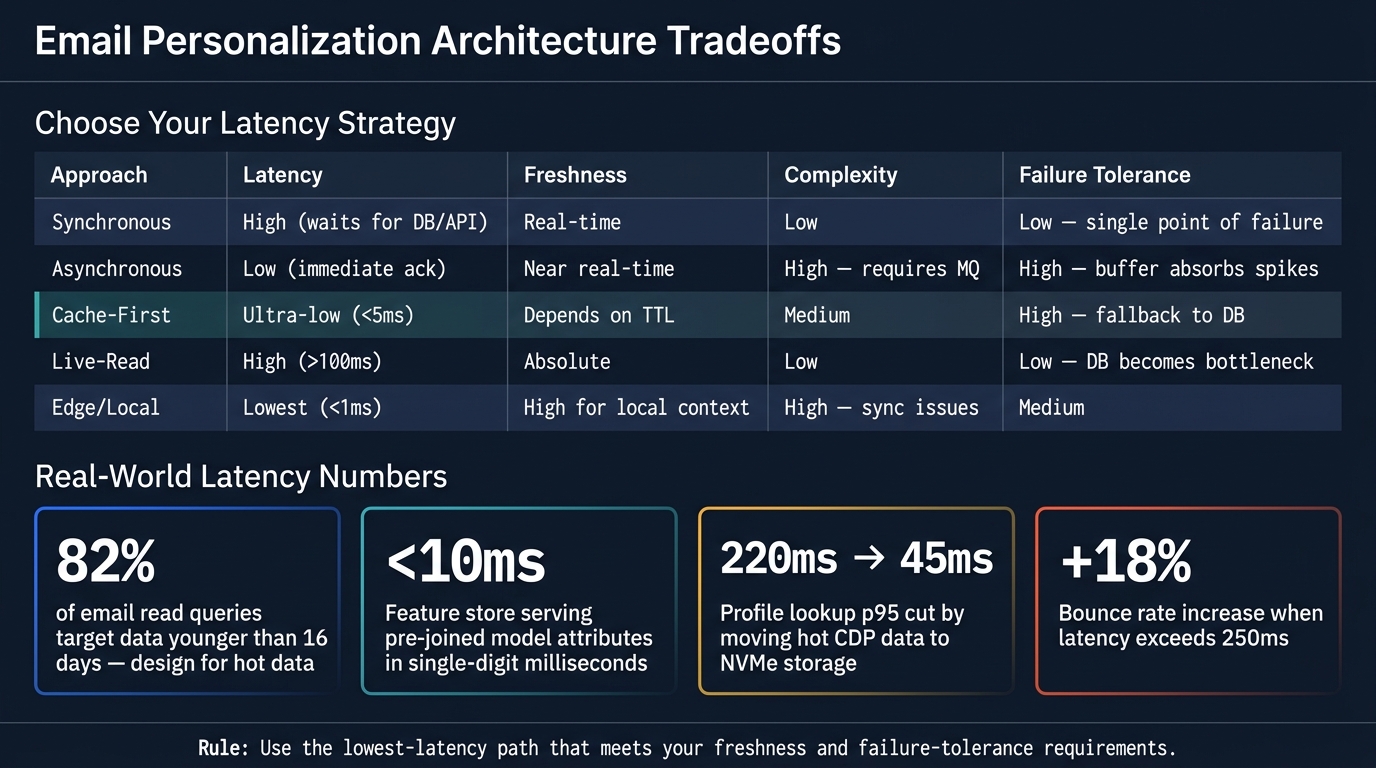
Email Personalization Latency: Architecture Tradeoffs at a Glance
With the hot path trimmed, the next step is making sure the full system still hangs together without sneaking delay back in.
Distributed flow from event stream to email activation
A user event moves through ingestion, identity, decisioning, and activation.
Event ingestion usually starts with a high-throughput message buffer like Kafka or Kinesis. That layer absorbs traffic spikes and separates event capture from downstream processing.
From there, an identity resolution layer matches the event to a known profile. The usual setup is layered caching:
That structure keeps most lookups off the slower data tier. Segment membership is also updated as events arrive and stored in a Redis set, so decisioning can use an O(1) lookup instead of hitting a live database query every time.
The decision engine then pulls from the cache layer and runs whatever real-time logic is left. A simple rule helps here: pre-render static blocks, and personalize only the dynamic fields at send time.
The activation layer should stay separate from trigger logic. Using a queue like SQS keeps delivery issues from backing up orchestration. If the provider hits rate limits or has a short-lived failure, the queue holds the work instead of stalling the whole system.
For observability, put checkpoints at profile lookup p99, queue depth, and ESP acceptance rate. Those three signals tend to show the main bottlenecks before delivery starts slipping.
Architecture tradeoffs: sync vs. async, edge vs. central, cache-first vs. live-read
There isn't one setup that wins on every axis. The right choice comes down to three things: how much latency you can live with, how current the data must be, and how much system overhead your team can carry.
| Approach | Latency | Freshness | Complexity | Failure Tolerance |
|---|---|---|---|---|
| Synchronous | High (waits for DB/API) | Real-time | Low | Low - single point of failure |
| Asynchronous | Low (immediate ack) | Near real-time | High - requires MQ | High - buffer absorbs spikes |
| Cache-First | Ultra-low (<5ms) | Depends on TTL | Medium | High - fallback to DB |
| Live-Read | High (>100ms) | Absolute | Low | Low - DB becomes bottleneck |
| Edge/Local | Lowest (<1ms) | High for local context | High - sync issues | Medium |
Moving hot CDP data to NVMe storage, for example, can cut profile lookup p95 from 220 ms to 45 ms.
Use the table to pick the lowest-latency path that still meets freshness and failure-tolerance needs. In practice, that often means one campaign class uses cache-first async delivery, while another keeps a live-read path because the data must be current to the moment.
How to evaluate tools and service partners
Once the architecture is set, test vendors against that same latency path.
Use the Email Service Business Directory to build a shortlist. Then pressure-test each option on data model fit, traffic separation, observability, pricing clarity, and exportability.
Implementation priorities and conclusion
Start with the highest-impact latency cuts
Once the architecture is set, go after the biggest bottlenecks first. In most systems, the hot path gets squeezed in three places: profile reads, scoring, and async handoff. And no - not every fix pays off the same way. The best gains usually come from taking work out of the send path.
| Priority | Action | Impact |
|---|---|---|
| 1. Immediate | Cache hot profile attributes in Redis | Cuts database I/O and speeds up hot reads |
| 2. High | Move scoring and enrichment to async queues | Removes blocking from the send path |
| 3. Medium | Right-size connection pools and timeouts | Prevents cascading failures from stale connections |
| 4. Strategic | Precompute only the segment outputs the send path reads | Speeds up complex personalization queries |
Start with caching hot profile attributes. That change strips a lot of database I/O from the hot path. Next, move heavy scoring jobs off the synchronous path. In practice, those two steps usually cut the most latency before it makes sense to tune narrower parts of the stack.
Set minimum operating thresholds before scaling
After trimming the hot path, set the thresholds that keep the system steady as volume grows. Treat them as guardrails for the same decision path: keep profile resolution under 100 ms p99, keep the Redis hit ratio above 85%, and make sure every async path has a DLQ for failed async jobs. Bounce rates rise 18% above 250 ms, so these are hard targets. Each campaign class also needs defined p95 and p99 targets - not just averages - because average latency hides the long-tail delays that do the damage.
Conclusion: Rules for keeping personalization fast and reliable
A few rules carry across every architecture in this guide. Define latency budgets before building, not after. Keep synchronous work limited to what has to happen right away, like basic validation and immediate acknowledgment. Use cache-first reads for profile data. Push enrichment, scoring, and CRM sync to async workers. Set separate latency budgets and fallback rules for each campaign class so slower paths don't block critical sends. And enforce timeout rules with predefined fallback content so a slow external call never stalls delivery.
As volume and personalization depth grow, revisit the tradeoffs in the architecture table from the previous section. What holds up at 100,000 sends per day may break at 10 million. Tune in small steps, and use p95 and p99 as the signal to retune.
FAQs
How do I choose latency targets by email type?
Group email tasks by how fast they need to feel and what users expect.
For real-time, user-facing tasks, aim for P95 under 200 ms and P99 under 1 second. If you're handling high-volume personalization, you may need sub-100 ms P99.
Use shorter timeouts for real-time engagement. Use longer ones for background jobs like analytics or campaign stats.
Also, track delivery time and server response time, and set targets for each provider instead of using one blanket goal.
What data should stay on the hot path?
Keep only the data needed for immediate decisions on the hot path: user sessions, active segmentation rules, and the subscriber profile fields required for real-time content selection.
Push non-critical data - like historical campaign stats and long-term engagement logs - into async flows or secondary storage. And for data you hit all the time, use in-memory caching to keep personalization fast and on point.
When should I use cache, async jobs, or edge reads?
Use caching for data people hit all the time. That includes session data, profile lookups, and static content. The goal is simple: cut response times by avoiding the same work over and over.
A couple of common patterns help here:
- Cache-aside: load data into the cache when the app needs it, then read from the cache on later requests
- Stale-while-revalidate: serve cached data right away, then refresh it in the background
That second pattern is especially handy when speed matters more than having the newest version on every single request. Users get a fast response, and your system updates the cache behind the scenes.
Use async jobs for heavy work that doesn't need to finish during the main request. If something can wait a few seconds, or even a few minutes, move it out of the request path. That keeps the app feeling fast instead of making people sit there while extra processing runs.
Edge reads or edge computing can also help when validation or filtering should happen closer to the user. Less distance means less network delay. Sometimes that small shift is the difference between an app that feels snappy and one that feels sluggish.