An Email ROI Calculator helps you measure how profitable your email campaigns are by comparing the revenue they generate to the costs involved. It simplifies calculations for metrics like ROI percentage, net profit, and customer acquisition cost (CAC). By entering data such as campaign expenses, conversion rates, and revenue, you can quickly see what’s working and what’s not in your email marketing strategy.
Key Highlights:
- Why It Matters: Email marketing can deliver $36 to $42 for every $1 spent, with top campaigns reaching up to 4,400% ROI.
- Inputs Needed: Costs (e.g., email marketing platform costs, labor, content creation) and revenue (e.g., total sales, conversions, lead value).
- Outputs Provided: ROI percentage, net profit, CAC, and revenue per email.
- Steps to Use:
- Gather accurate cost and revenue data.
- Input the data into the calculator.
- Analyze results to improve campaigns. Choosing the best email marketing platforms can further optimize these results.
These calculators save time, eliminate guesswork, and help you make better decisions by focusing on what drives revenue and cutting wasteful spending.
How Email ROI Calculators Work
Required Inputs for ROI Calculation
When using an email ROI calculator, you’ll need to provide data in two main categories: costs and revenue.
On the cost side, include expenses like your Email Service Provider (ESP) subscription fees - these typically range from $50 to $200 per month for small to mid-sized businesses. Add in labor costs, which you can calculate by multiplying the hours spent on a campaign by the hourly rate (determined by dividing an annual salary by 2,080 hours). Don’t forget content creation expenses, which might include copywriting, design, or other production-related costs.
For revenue inputs, eCommerce businesses should track total sales from a campaign by multiplying conversions by the average order value. If you’re not selling products directly, you can estimate revenue by multiplying the number of leads generated by your average lead value. Additionally, metrics like total emails sent, list size, open rates, click-through rates, and conversion rates provide a detailed view of your campaign’s performance.
Output Metrics and Insights
Once you’ve entered your data, the calculator generates several key metrics. One of the most important is ROI percentage, which measures how efficiently your investment paid off. For example, a 500% ROI means you earned $5 for every $1 spent. Other useful outputs include:
- Net profit: Total revenue minus all costs.
- Customer acquisition cost (CAC): Total costs divided by the number of sales.
- Revenue per email: Total revenue divided by the number of emails sent.
By 2026, many calculators offer more advanced insights, distinguishing between ROI as a measure of efficiency and net profit margin as a broader indicator of business health. These tools can also help diagnose campaign issues. For example, low open rates might point to deliverability problems, while high click-through rates paired with poor conversions could signal issues with your landing page.
Example Formula: Calculating Email ROI
Here’s the basic formula for calculating ROI:
(Revenue - Cost) / Cost × 100.
Let’s break it down with an example. Imagine a campaign generated $125 in revenue. If your ESP fee was $20 and you spent 2 hours on content creation at $15 per hour (totaling $30), your total cost would be $50. Plugging these numbers into the formula:
($125 – $50) / $50 × 100 = 150% ROI.
This means you earned $1.50 for every dollar invested.
Many calculators simplify this process by automating the math. They can even project ROI for future campaigns using expected conversion rates and average revenue per conversion.
sbb-itb-6e7333f
How to Calculate the ROI of Cold Email (Step-by-Step Guide)
Calculating ROI is easier when you compare platform performance to see how different tools impact your bottom line.
Step-by-Step Guide to Using an Email ROI Calculator
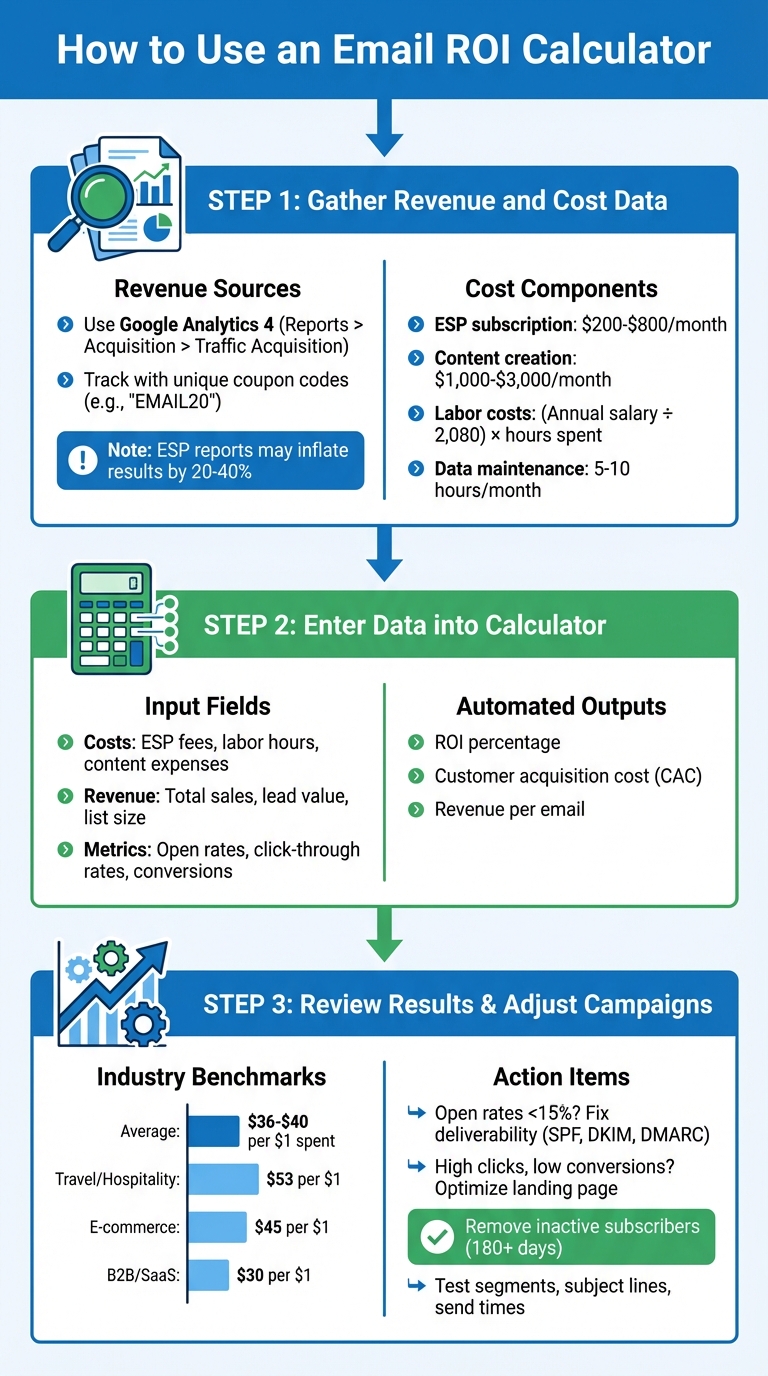
How to Calculate Email Marketing ROI in 3 Steps
Step 1: Gather Revenue and Cost Data
Before diving into calculations, make sure your revenue and cost data are accurate. This step is crucial for getting reliable results.
For revenue, use tools like Google Analytics 4 (navigate to Reports > Acquisition > Traffic Acquisition) to get a conservative estimate. Keep in mind that Email Service Providers (ESPs) often use attribution models that can inflate results by 20–40%.
On the cost side, account for your ESP subscription fees, which typically range from $200 to $800 per month for small to mid-sized businesses. Don’t forget to include content creation expenses, which can cost between $1,000 and $3,000 monthly for professional copywriting and design work. Additionally, factor in "silent costs" like data maintenance. Tasks such as fixing broken automation flows and cleaning up inactive leads can take 5–10 hours each month - calculate labor costs by dividing an employee's annual salary by 2,080 hours, then multiply by the hours spent on these tasks.
For more precise tracking, especially across devices, use unique coupon codes like "EMAIL20" to connect sales directly to your email campaigns.
"Your Email Service Provider (ESP) is lying to you. Not maliciously, but structurally... If you are just copying the 'Total Revenue' figure from your email tool and pasting it into an Excel sheet, you aren't calculating ROI. You are writing fiction".
Once all the relevant data is collected, you’re ready to move on to the next step.
Step 2: Enter Data into the Calculator
With your data in hand, input the figures into the ROI calculator. Enter costs like ESP fees, labor hours, and content creation expenses into one section. In another, add metrics like total sales or lead value, list size, open rates, and click-through rates.
The calculator will use this information to apply the ROI formula and generate results instantly. Many modern tools also provide additional insights, such as customer acquisition cost (total costs divided by the number of sales) and revenue per email (total revenue divided by emails sent). By automating these calculations, you save time and reduce the likelihood of manual errors.
Step 3: Review Results and Adjust Campaigns
Compare your results to industry benchmarks to see how your campaign stacks up. On average, email marketing delivers $36 to $40 for every $1 spent. However, benchmarks vary by industry: travel and hospitality often reach $53 per dollar, e-commerce averages $45, and B2B/SaaS typically sees around $30.
Use your ROI results to identify areas for improvement. For example:
- If your open rates are below 15%, you might have deliverability issues. Clean your email list and ensure your SPF, DKIM, and DMARC records are properly configured.
- If your click-through rates are high but conversions are low, the issue could lie with your landing page or offer.
To cut costs and improve performance, consider implementing a sunset policy to remove subscribers who haven’t engaged in the last 180 days. This can lower ESP fees and boost your domain reputation. Additionally, experiment with different audience segments, subject lines, and send times based on the data insights you’ve gathered.
Benefits of Using Email ROI Calculators
Email ROI calculators are more than just number-crunching tools - they’re practical assets that can transform how you manage and optimize your campaigns.
Better Campaign Performance Tracking
These calculators go beyond surface-level metrics like open rates, offering a deeper dive into your campaign's profitability. By showing exactly how much revenue each campaign generates, they help you identify which strategies are working and which need adjustment.
What’s more, they’re great for troubleshooting. If your ROI isn’t where it should be, the calculator can highlight whether the issue is tied to poor deliverability (low open rates), an unappealing offer (low conversion rates), or weak engagement. For instance, Booky, a deals platform in the Philippines, used performance tracking to uncover a 50% drop in open rates. By implementing A/B testing and offering personalized discounts, they managed to boost open rates by 36%.
Armed with these insights, you can fine-tune your campaigns and make smarter spending decisions.
Smarter Budget Allocation
ROI calculators also shine when it comes to managing your marketing budget. They reveal which campaigns are worth further investment and which ones aren’t pulling their weight. This kind of data makes it easier to shift funds toward high-performing channels. For example, companies that see strong ROI from email marketing often dedicate more than 20% of their total marketing budget to email efforts.
If your returns are lagging, it might be time to invest in tools like list segmentation or automation workflows, which are known to drive higher conversion rates.
Support for Data-Driven Decisions
On top of performance tracking and budget optimization, ROI calculators help you make decisions rooted in hard data rather than guesswork. As Zoho Campaigns puts it:
"The success of your marketing team and your business begins when you start tracking your ROI".
This data isn’t just useful for refining strategies - it’s also invaluable when justifying budgets to leadership or scaling successful efforts. Take Liam Austin, co-founder of Entrepreneurs HQ, as an example. By leveraging automated email sequences and engagement tracking, he grew his subscriber list to over 100,000, with a 33% average open rate since 2015. Plus, with email being 40 times more effective at acquiring customers than social media, these metrics make a strong case for prioritizing email marketing in your overall strategy.
Conclusion
Key Takeaways
Email ROI calculators are a powerful way to uncover which strategies boost revenue and which ones drain resources. By measuring how much revenue each dollar of investment generates, you can spot campaigns that deserve more attention and those that need refining. Considering email marketing often yields an average return of $36 to $40 for every $1 spent, tying campaign metrics directly to revenue helps you make smarter, data-driven decisions.
Armed with this data, you can confidently justify budget increases, scale high-performing campaigns, and tweak underperforming ones to focus on what truly drives profits. These insights can lead to immediate, impactful changes in your email marketing efforts.
Next Steps for Marketers
To act on these insights, start by auditing your tracking setup. Compare your ESP's revenue reports with your analytics data. If you notice discrepancies exceeding 20%, review and fix your tracking tags. Next, calculate your actual costs, including labor. Use this formula: (annual salary ÷ 2,080 working hours) × time spent on email tasks. This ensures you have a precise baseline for evaluating ROI improvements.
Once your tracking and costs are accurate, focus on strategies that directly impact ROI. Segment your lists for more precise targeting, experiment with different campaign elements to optimize performance, and remove inactive subscribers to enhance deliverability. If you're searching for tools to support these efforts, check out the Email Service Business Directory (https://emailservicebusiness.com), which offers a curated list of email marketing platforms and service providers to explore.
FAQs
What costs should I include in email ROI?
When you're figuring out email ROI, it's crucial to factor in all the costs involved. This includes software subscriptions, the time spent by your team (personnel hours), content creation expenses, and even less obvious costs like data maintenance. Including these elements gives you a clearer picture of how profitable your email campaigns really are.
How do I track email revenue accurately?
To get a clear picture of email revenue, it’s crucial to use methods that directly connect your email campaigns to sales data. Here are some effective techniques:
- Add UTM parameters: Include UTM tags in your email links to track where traffic and sales are coming from in analytics tools like Google Analytics.
- Use email-specific promo codes: Create unique discount codes for each email campaign. This makes it easy to attribute sales to specific emails.
- Integrate with your eCommerce or CRM platform: Syncing your email platform with tools like Shopify or Salesforce allows you to directly track revenue tied to your email campaigns.
By implementing these approaches, you can accurately measure how much revenue your emails generate and refine your ROI analysis.
What’s a “good” email ROI for my industry?
Email marketing is often celebrated for its impressive return on investment (ROI). While what qualifies as "good" can vary by industry, an ROI of $36 for every $1 spent is generally seen as outstanding. On average, email marketing boasts a staggering 3,500% ROI, solidifying its reputation as one of the most effective marketing tools available.