Most email teams do not need more segments - they need better ones. This guide shows me that ML-based segmentation works when I have clean data, one clear use case, tight consent and suppression rules, and a holdout test to prove lift.
Here’s the short version:
- Rule-based lists age fast. ML scores can shift as customer behavior changes.
- Data comes first. I need identity, behavior, transaction, engagement, and in some cases CRM data.
- Start simple. RFM is a smart first step before clustering, purchase-likelihood, or churn models.
- A segment must trigger action. If it does not change a send, offer, timing, or suppression rule, it does not matter.
- Measure business results. Focus on revenue per recipient, conversion lift, unsubscribe rate, churn, and LTV - not just opens.
- Pick email marketing platforms by data source and sync timing. The best platform is the one that can move segment updates into campaigns without delay.
- Run a 30-60 day pilot. One segment, one message, one KPI, one owner.
A few numbers stand out. Segmented campaigns can drive up to 760% more revenue than broad sends, while only 39% of e-commerce brands use behavioral data for segmentation. At the same time, about 14% of emails still miss the inbox. That means better targeting only helps if deliverability and suppression logic are in place too.
If I had to boil the article down to one point, it would be this: <u>ML segmentation is not about fancy models first - it is about sending fewer wrong emails and more timely ones.</u>
Data Foundations and Core Models
Minimum Customer Data Requirements for ML Segments
ML segments need unified, consent-linked customer data. Consent records and suppression lists - hard bounces, spam complaints, and unsubscribes - are not just compliance boxes to check. They are activation prerequisites. Pull them into your profile data before any modeling starts.
At a minimum, build segments from four data types:
- Identity and profile data: unique customer ID, email, phone, consent timestamp
- Behavioral data: page views, feature usage, cart additions
- Transactional data: order history, purchase value, subscription status
- Engagement data: open/click history from your ESP, last interaction date
For B2B teams, CRM fields like lifecycle stage, company size, and deal status also matter if you want segments people can actually use.
| Data Category | Key Data Points | Primary Source |
|---|---|---|
| Identity | Unique ID, email, phone, consent timestamp | CRM / database |
| Behavioral | Page views, feature usage, app logins, cart adds | Event stream |
| Transactional | Order value, SKU history, subscription status | Ecommerce platform |
| Engagement | Open/click history, last interaction date | ESP logs |
| Firmographic | Industry, company size, job role, lifecycle stage | CRM (e.g., HubSpot) |
These fields form the input layer for the models below.
Before you build any segment, document what each product event means, what order events should arrive in, and whether your event source is near real time. If not, the model may run on stale behavior. And if event definitions are fuzzy, the model can misread what people are doing and output segments that don't match reality.
Key Segmentation Models Marketers Should Know
RFM analysis - Recency, Frequency, Monetary - is a core segmentation method. It groups customers by how recently they bought, how often they buy, and how much they spend. If your team has basic purchase data, this is the right place to start.
Once RFM starts to feel too simple, clustering and propensity models can pick up patterns manual rules tend to miss. That includes future intent, not just past actions. Clustering models like K-means and DBSCAN can surface hidden groups by looking at several variables at once, such as browsing behavior alongside purchase history. Propensity models look for likely purchasers or likely churners using behavioral signals and engagement patterns in near real time. Churn models help you spot at-risk customers before they stop engaging.
| Approach | Best For | When to Use |
|---|---|---|
| RFM Analysis | Identifying current high-value customers | Starting point with basic purchase data |
| K-means Clustering | Discovering unknown audience groups | When manual segments feel too broad or brittle |
| Propensity Modeling | Predicting future purchase likelihood | To personalize offers and optimize timing |
| Churn Prediction | Identifying at-risk customers early | To trigger proactive retention flows |
The next job is simple in theory and often messy in practice: figure out whether those segments stay stable and drive action.
How to Check Whether a Segment Model Is Working
Check both model quality and business impact.
On the technical side, the silhouette score measures cluster cohesion, while the Davies-Bouldin index measures cluster separation. Segment stability matters just as much. If the same contacts keep bouncing in and out of a segment week after week, the model is likely reacting to noise instead of a real behavior shift.
Reliable models also need a named data owner, clear source identification, timestamps, and a documented identity key. During a pilot, test how the system handles missing, duplicate, late, or unsubscribed data. Those edge cases should fail safely, not break the automation. It also helps to keep a manual review path for event-to-message flows so the logic stays sound.
A model only matters if it changes a message, offer, timing, or suppression rule.
Exit rules are a common place where teams get tripped up. Make sure subscribers leave a segment when the reason for entry disappears. For example, a "likely to purchase" segment should remove someone as soon as they complete a purchase. If people stay in after the trigger is gone, they get irrelevant messages. That leads to unsubscribes and can hurt deliverability.
Judge the model against business outcomes - deliverability, engagement, conversions, retention, and margin - not open rates alone.
Once a segment clears that bar, connect it to a message, trigger, or suppression rule.
sbb-itb-6e7333f
Email Use Cases, Campaign Activation, and Measurement
Email Use Cases That Fit ML Segmentation
Once a segment is stable, the next step is to put it into live email flows. ML segmentation works best when the goal is to predict what someone is likely to do next, not just describe what they did before.
Welcome and onboarding are a strong fit. ML can improve onboarding timing by spotting inactive trials early, so the next message lands before momentum fades.
Replenishment and cross-sell flows also work well with predictive purchase modeling. These models can trigger replenishment and cross-sell emails based on purchase history and browsing intent, then serve relevant product recommendations inside dynamic blocks.
Win-back and retention are another clear fit. ML can flag likely churners and high-value segments by reading engagement patterns and intent signals that are hard to catch by hand, which gives you a chance to step in before a subscriber drops off for good.
After you choose the use case, connect the segment to your ESP as a trigger, tag, or suppression rule.
How to Activate Segments in Campaigns and Automated Flows
Sync segment membership into your ESP as tags or dynamic audiences. Once those labels are live, tie them to dynamic content blocks instead of building separate email templates for each segment.
Use the same segment in entry, suppression, and exit rules so membership updates as behavior changes. If a subscriber makes a purchase, they should leave the win-back flow right away - not during the next nightly sync.
How to Measure Lift and Prove Business Impact
Measure ML segmentation only after it changes a live campaign or automation.
Use a holdout group to prove lift. Keep a small group of subscribers on your standard, non-ML-optimized messaging and compare the gap. Without a holdout, you're comparing performance against an earlier period that may have had different seasonality, list size, or send frequency. That makes the numbers shaky.
Track RPR, conversion lift, unsubscribe rate, and, once the program settles, churn risk and LTV.
How to Build Customer Segments with AI (Real-World Use Case)
Tools, Vendor Selection, and Directory-Based Shortlisting
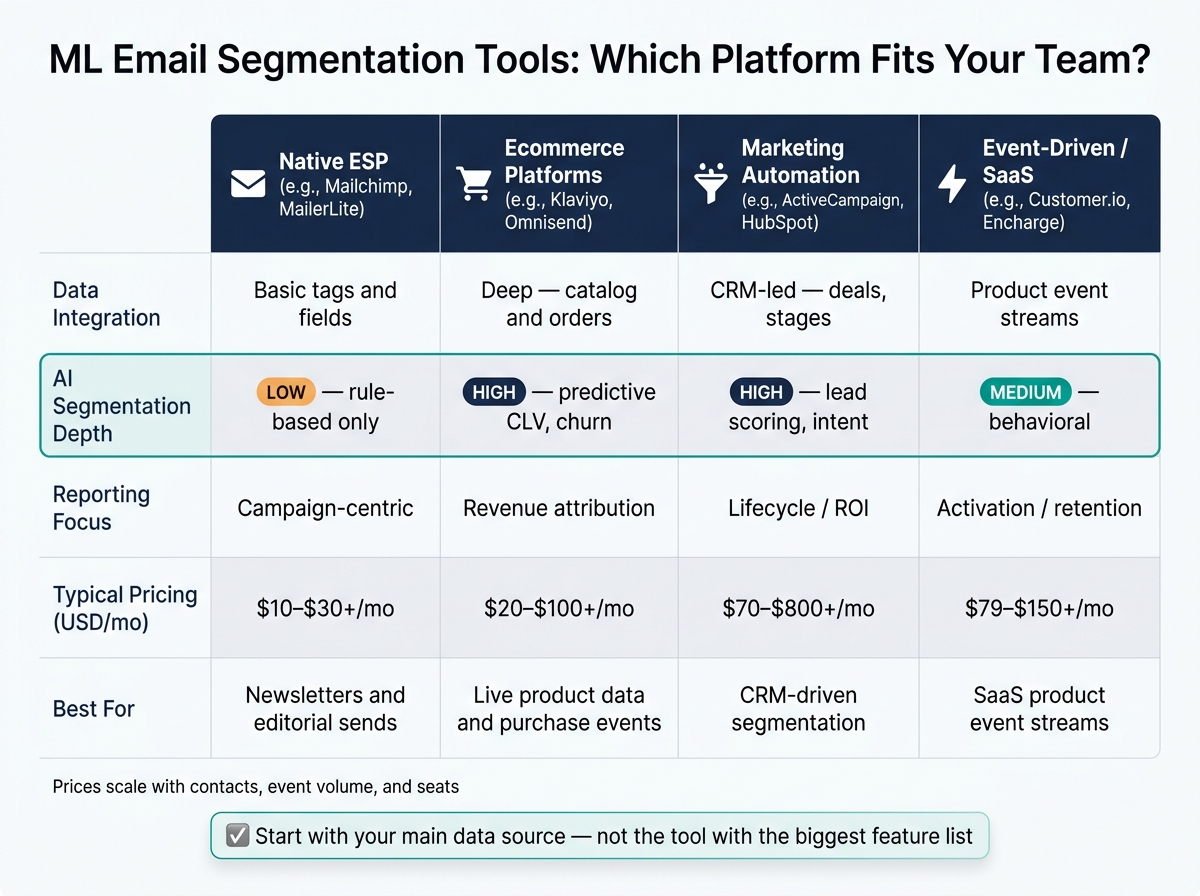
ML Email Segmentation Tools Compared: Features, AI Depth & Pricing
Segments only help if your stack can put them to work in the right channel, at the right time.
Which Tool Category Fits Your Team
Once your segments are set, the next step is picking the platform that can run them without friction. Start with your main data source - not the tool with the biggest feature list.
Native ESPs like Mailchimp are a good fit for newsletters and editorial sends, where segmentation stays close to audience fields and basic campaign rules.
Customer engagement platforms like Klaviyo fit better when segmentation relies on live product data, such as catalog syncs, purchase events, and trial activity .
Marketing automation platforms like HubSpot make sense when segmentation starts in the CRM - deals, lifecycle stage, and lead score.
Event-driven platforms like Customer.io are built for product event streams like trial_started and payment_failed.
What to Check During Vendor Evaluation
Once you've found the right category, focus on execution. Three things matter most: sync speed, explainability, and suppression controls.
Segment activation speed matters a lot for in-session automations. Ask whether segment updates happen in real time, hourly, or nightly. If a segment depends on a product event like "viewed pricing page", the message only works if it goes out while the user is still in that same session.
Model transparency is another key check. A tool should make it clear why a contact is in a segment and what action that status triggers.
You'll also want to check governance controls. Look for consent basis documentation, suppression rules that remove people when they no longer qualify, and the option to export consent and suppression states if you move to another vendor.
| Tool Category | Data Integration | AI Segmentation Depth | Reporting | Typical Pricing (USD) |
|---|---|---|---|---|
| Native ESP (Mailchimp, MailerLite) | Basic tags and fields | Low - rule-based | Campaign-centric | $10-$30+/mo |
| Ecommerce Platforms (Klaviyo, Omnisend) | Deep - catalog and orders | High - predictive CLV, churn | Revenue attribution | $20-$100+/mo |
| Marketing Automation (ActiveCampaign, HubSpot) | CRM-led - deals, stages | High - lead scoring, intent | Lifecycle/ROI | $70-$800+/mo |
| Event-Driven/SaaS (Customer.io, Encharge) | Product event streams | Medium - behavioral | Activation/retention | $79-$150+/mo |
Prices scale with contacts, event volume, and seats .
Using Email Service Business Directory to Build a Shortlist
If the market feels too broad, a directory can help you cut it down to two or three tools worth testing. Email Service Business Directory is a curated directory of email platforms, tools, and agencies. Its lifecycle and retention section helps mid-market teams narrow options fast.
Before you buy, test one live segment. Check data sync, segment updates, and trigger timing using real data .
Implementation Roadmap, Governance, and Next Steps
A 30–60 Day Pilot Plan for Mid-Market Teams
After you shortlist a tool, run a short pilot before you roll it out more broadly. The goal is simple: prove lift first. Pick one segment, one message, and one outcome. That keeps the test tight and makes the result easier to read.
| Phase | Days | Focus |
|---|---|---|
| Audit & Strategy | 1–15 | Map the next 90 days of campaigns, identify audience types such as prospects vs. churn-risk, and define one use case, one KPI, and one owner |
| Data & Governance | 16–30 | Document identity keys, consent records, and suppression rules |
| Pilot Execution | 31–50 | Run one segment and one intervention; test one segment against a holdout control |
| Review & Scale | 51–60 | Measure segment lift, manual time saved, and margin impact; scale only what works |
Keep the scope narrow at the start. Run one segment and one intervention, then wait for a clear result before adding more. If you expand too soon, it gets hard to tell what actually moved the number.
Email marketing platform costs and price modeling also need attention early. On contact-based plans, subscriber-count jumps can push costs up fast. And before launch, assign one owner across growth, analytics, and marketing. If no one owns the pilot end to end, things tend to drift.
Before launch, lock down consent, exit rules, and review ownership.
Privacy, Consent, and Human Oversight
Store consent at the channel level. Check opt-in status before each trigger. Export consent and suppression states so they can move with the data if needed.
Exit logic is just as important as entry logic. A contact who purchases should leave a win-back flow right away, not at the next batch sync. That sounds small, but it can be the difference between a helpful campaign and an annoying one.
Track spam complaints and opt-outs as guardrail metrics alongside conversion lift. If negative signals start to climb, pause the segment before you scale it.
Keep human review in place until the model is stable and explainable. A simple rule works here: if a reviewer cannot explain why a sample contact was included, stop the automation.
Conclusion: What to Prioritize First
If the pilot fails, fix the data or the rule before you expand.
Tie every segment to a clear campaign action and measure lift against a documented baseline. Use ML only when it changes a decision and improves a business metric.
Start with clean, consented data and one measurable use case. Scale only when the segment changes a decision and improves a business metric.
FAQs
How much data do I need to start ML segmentation?
You don’t need huge datasets to get started with machine learning-based segmentation.
A minimum viable dataset usually includes email engagement history, CRM contact and account data, and three to five product-event types like logins, feature activations, or usage milestones.
Start with clean, connected behavioral, transactional, and demographic data. If you want to move into more advanced prediction - like churn modeling or complex attribution - you’ll need a broader set of inputs, such as support tickets, billing events, and product analytics.
When should I use RFM instead of a predictive model?
Use RFM when you're just getting started and need a simple way to group customers based on what they've bought before. It's a good fit when your data is limited or you're still building out your email strategy.
Move to predictive models later, once your data and systems are more mature and you want to estimate things like churn, purchase likelihood, or lifetime value.
How do I prove an ML segment is actually improving revenue?
Move past vanity metrics like open rates and look at business lift you can measure. Start with a clear baseline. Then run A/B tests or use holdout groups to compare the ML-segmented audience against a control group.
Track metrics that tie straight to revenue:
- Conversion rate
- Revenue per email
- Customer lifetime value
- Repeat purchase rate
Your reporting should also include attribution and margin. That helps you see whether the segment is adding profit - not just moving around volume that would have happened anyway.