Marketing automation saves time and scales easily, while manual scaling offers a personal touch for smaller efforts.
If your email campaigns involve fewer than 50–100 contacts, manual scaling might work. But as your list grows, automation becomes critical for managing workflows, reducing errors, and improving results. Automated emails generate 70.5% higher open rates and 320% more revenue per email compared to manual ones.
Quick Overview:
- Manual Scaling: Best for small, personalized campaigns but time-intensive and error-prone at scale.
- Marketing Automation: Ideal for larger campaigns, offering efficiency, consistency, and better performance metrics.
Key Takeaway: Start small with manual efforts, test strategies, and automate proven workflows to grow effectively.
How Marketing Automation Supports Scalable Email Workflows
Key Features of Automation Tools
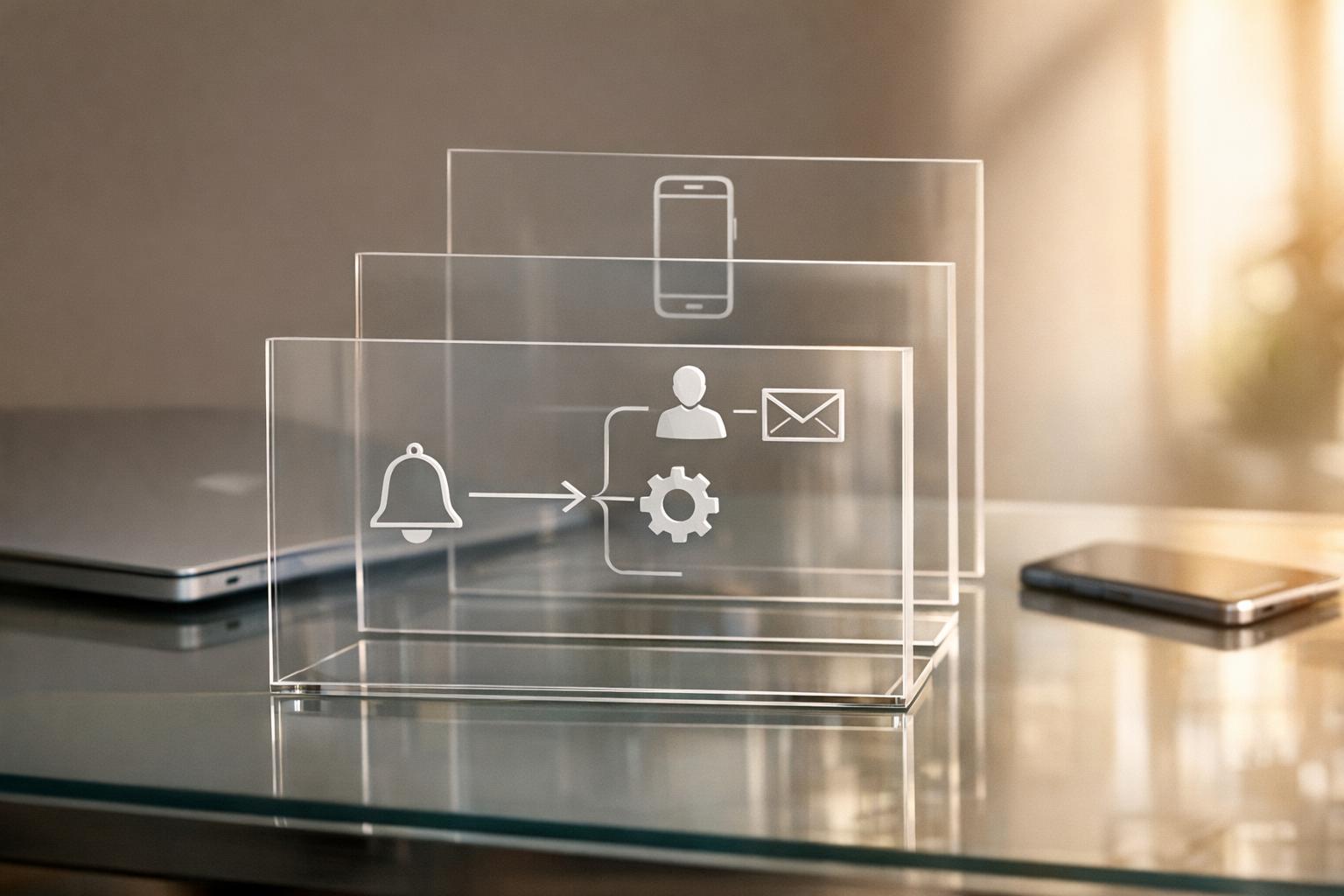
Automation platforms operate on a straightforward four-step framework: trigger, condition, action, and timing. Once configured, these workflows can handle 10 subscribers or 10,000 with the same level of efficiency.
Today’s tools come packed with features like visual workflow builders, behavioral tracking, and seamless CRM integration. With drag-and-drop interfaces, marketers can create complex, multi-step email sequences that adapt to customer behavior. For example, actions like visiting a pricing page or downloading a case study can automatically trigger highly relevant emails. Thanks to bidirectional CRM sync, data moves effortlessly between systems, eliminating the need for manual exports or reconciliations. These advanced capabilities make it easier to scale email campaigns while maintaining precision.
"Automation is a set of rules you design once, that respond to real customer behavior, across email and other channels, every time it happens." - Marija Bernatonyte & Skirmantas Venckus, Sender
Benefits for Scaling Email Campaigns
Automated emails consistently outperform standard broadcast emails. They achieve 70.5% higher open rates, 152% higher click-through rates, and generate 320% more revenue per email. Beyond performance, automation saves teams significant time - more than six hours per week on repetitive tasks. These time savings and increased efficiency are what make automation indispensable for scaling.
Take Wellington Brewery, for instance. By automating follow-up flows for abandoned carts and inactive customers, they generated $36,000 in annual revenue from these sequences alone. According to Marketing Director Brad McInerney, replicating such results manually at scale would be nearly impossible. On top of driving revenue, automation reduces human error - ensuring no missed follow-ups, forgotten segments, or inconsistent messaging across large contact lists.
Requirements and Costs
To work effectively, automation depends on clean, accurate data. Issues like duplicate entries, incorrect tags, or outdated lifecycle stages can harm your sender reputation. Additionally, technical elements such as SPF, DKIM, and DMARC authentication are critical for high-volume email campaigns. Major providers like Gmail and Yahoo enforce a strict 0.3% spam complaint threshold for bulk senders, and exceeding it can result in permanent rejections.
The cost of marketing automation varies widely. Subscriptions range from $9/month for tools like Brevo to over $1,000/month for enterprise solutions like Adobe Marketo. However, software costs are just one piece of the puzzle. Here’s a breakdown of typical expenses:
| Cost Category | Typical 2026 Range | Notes |
|---|---|---|
| Software License | $50–$4,400+/month | Depends on contacts, seats, and features |
| Professional Setup | $2,000–$10,000 (one-time) | Includes strategy, workflow design, training |
| Data Migration | $300–$1,500 (one-time) | Covers tags, history, and custom fields |
| Ongoing Operations | 10%–20% of license cost | Monthly QA, reporting, and content updates |
"Marketing automation cost is not just software pricing... Cleanup, integration work, content updates, admin time, and training are where costs often hide." - Team Anglara
The best approach? Start small. Focus on one impactful workflow - like a welcome series or cart recovery - perfect it, then gradually expand.
Manual Scaling: Strengths and Limitations
How Manual Scaling Works
Manual scaling involves handling every aspect of email campaigns by hand. This means managing contact lists in spreadsheets, manually adding email addresses into clients, and keeping track of replies directly from the inbox. There’s no automation - no triggers or behavioral logic. Every decision about who gets an email and when is made by a person. While this approach can work well for very small campaigns, it quickly becomes unwieldy as the audience size grows.
Short-Term Advantages
For small-scale campaigns, manual methods can feel refreshingly straightforward. There’s no need to wrestle with software setups or integrations. Plus, they allow complete creative control, enabling real-time tweaks. For example, you could adjust the tone of your messaging or respond to an industry update without having to reconfigure a workflow. As TrueSend highlights:
"Manual campaigns are not outdated; they have their strengths, especially when decisions about creative elements, timing, and strategy depend on human intuition and insight."
Another perk? There’s no subscription fee for fancy tools. However, the labor costs - though less obvious - can add up quickly. And as campaigns grow, the downsides of manual scaling start to outweigh its simplicity.
Challenges When Scaling Manually
Manual scaling demands a significant time investment. A senior marketer might spend 12–15 hours a week just segmenting lists, drafting emails, and tracking responses. This labor-intensive process becomes even more problematic as the risk of errors rises. Mistakes like sending emails to the wrong recipients, failing to use BCC fields, or missing follow-ups are all too common. A skilled marketer can realistically handle only 5–8 customer segments manually, whereas automation can manage hundreds.
Another major drawback is the lack of built-in tracking. Without automation, it’s nearly impossible to monitor metrics like open rates or click-through patterns. This reliance on guesswork often results in lower performance - manual campaigns average a 2.3% conversion rate, compared to 4.7%–6.2% for well-segmented automated campaigns.
Hans Dekker summed it up well:
"Manual outreach delivers relevance but collapses under volume."
Revenue leakage is another concern. Businesses using complex manual workflows can lose 8%–15% of potential revenue due to mistakes like late sends, missed segments, or targeting errors. These challenges highlight why many organizations turn to automation for scaling their email campaigns effectively.
Stop Sending Emails Manually, Do This Instead
sbb-itb-6e7333f
Marketing Automation vs. Manual Scaling: A Direct Comparison
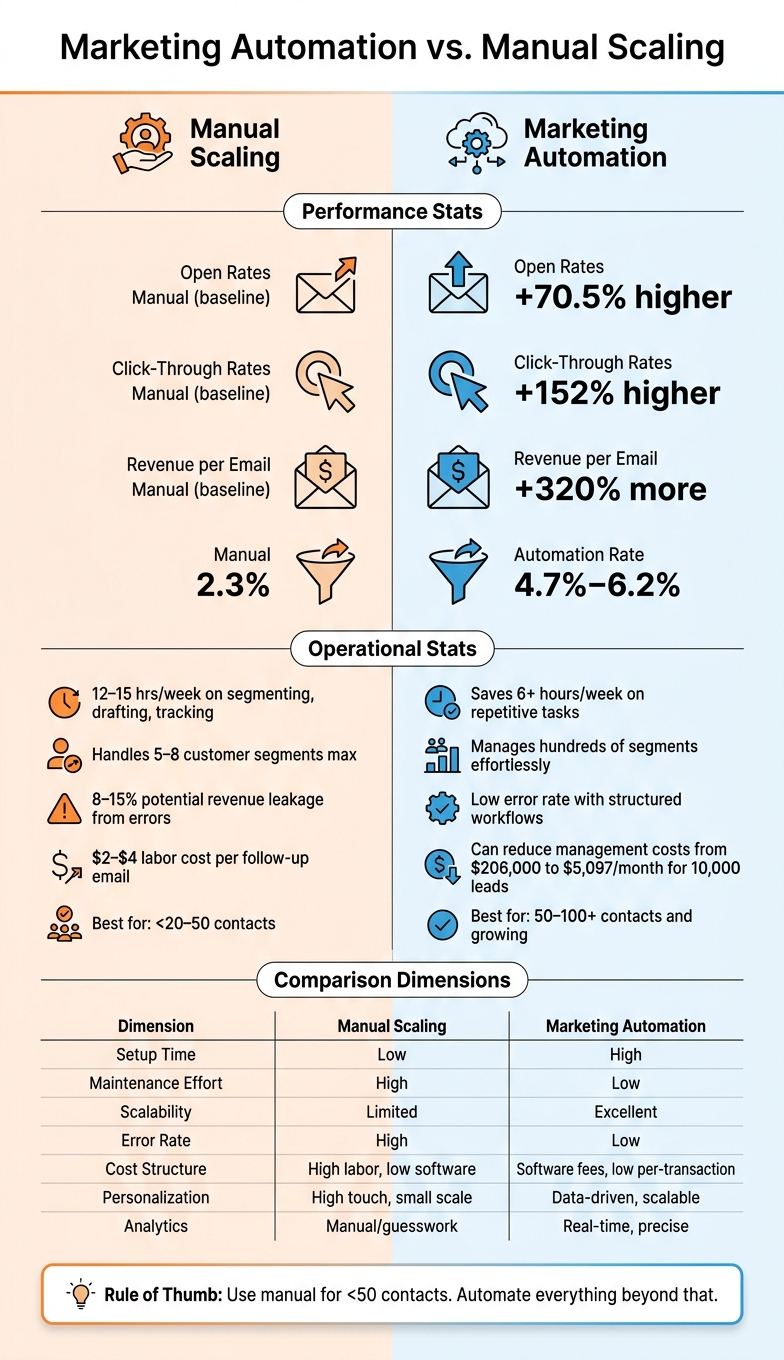
Marketing Automation vs. Manual Scaling: Key Stats & Differences
Comparison Table
Here's a quick breakdown of how manual scaling stacks up against marketing automation:
| Dimension | Manual Scaling | Marketing Automation |
|---|---|---|
| Setup Time | Low - just open an inbox and start sending | High - requires planning, logic mapping, and data integration |
| Maintenance Effort | High - every action needs human input | Low - only periodic reviews once workflows are set |
| Scalability | Limited - struggles as volume increases | Excellent - easily manages thousands of contacts |
| Error Rate | High - prone to missed follow-ups or incorrect recipients | Low - structured processes minimize mistakes |
| Cost Structure | High labor costs; minimal software expenses | Software subscription fees; lower per-transaction costs |
| Personalization | Highly tailored but limited to small groups | Scalable, data-driven personalization |
| Analytics | Manual tracking, often relying on guesswork | Precise, real-time reporting |
Analysis of Key Differences
The major divide between manual scaling and automation lies in how they handle growth. With manual processes, you can jump in quickly - there’s no need for setup or training. But as your contact list grows beyond 50 to 100 people, the workload for follow-ups and tracking skyrockets, making it nearly impossible to manage effectively.
Automation, on the other hand, takes time to set up. You’ll need to map out workflows and integrate your data. But once it’s running, it’s smooth sailing. As Poptin explains:
"Automation is the 'set-and-forget' side of email marketing."
While manual campaigns let you make quick adjustments, automation focuses on delivering consistent results over time. For instance, manual follow-ups can cost $2–$4 per email due to labor expenses. Automation, however, can reduce monthly management costs from $206,000 to just $5,097 for handling 10,000 leads.
These differences highlight the trade-off between personalized manual engagement and the efficiency of automation.
Which Approach Fits Which Use Case?
For small-scale efforts - like reaching fewer than 20 to 50 contacts or conducting direct one-on-one outreach - manual methods make sense. The time and effort required to set up automation may not pay off in these cases .
However, as your contact list grows or the customer journey becomes more intricate, automation becomes indispensable. It shines in scenarios like welcome sequences, cart abandonment reminders, and onboarding flows, where timely and consistent communication can directly boost conversions .
The choice is pretty clear: use manual methods for personalized conversations and turn to automation for scalable campaigns. If your goal is to elicit direct responses, manual outreach is ideal. But when you need consistent delivery to a larger audience, automation is the way to go.
Choosing the Right Approach for Your Email Workflow
Key Factors to Consider
When deciding on the best approach for your email workflow, four main factors come into play: list size, workflow complexity, team capacity, and data quality.
For smaller lists (under 50–100 contacts), manual workflows might suffice. However, as your list expands, manual efforts become impractical. Automation scales effortlessly, managing thousands of contacts without significantly increasing costs.
Your team’s technical expertise also influences your choice. If you’re a one-person operation, simple "set-and-forget" tools might be ideal. Larger teams, on the other hand, can handle platforms with advanced features like branching logic and CRM integrations. But beware of overly complicated tools - paying for features you’ll never use only adds unnecessary complexity.
To identify tasks ripe for automation, track your activities over a week. Then ask yourself: Does this task directly impact a buying decision? Tasks requiring empathy, negotiation, or nuanced judgment are better left manual. Routine, repeatable tasks, however, are perfect candidates for automation.
Lastly, data quality is crucial. Automation thrives on clean, accurate data, such as purchase history or site activity, to trigger timely and relevant messages. Without reliable data, automation can backfire, making manual campaigns a safer bet.
These factors guide a thoughtful transition from manual workflows to automation.
Moving from Manual to Automation in Phases
Transitioning to automation doesn’t have to be overwhelming. A phased approach helps minimize risks and ensures strategies are effective.
"Automation isn't about removing yourself from marketing - it's about focusing your time on the activities that actually drive revenue while systems handle the repetitive execution." - Dustin Cucciarre, COO of Clicks Geek
Here’s an example of a 90-day roadmap for shifting to automation:
- Days 1–21 (Foundation): Start by authenticating your domain (SPF, DKIM, DMARC), cleaning up your email list, and setting up a basic welcome series.
- Days 22–60 (Conversion): Introduce cart abandonment, browse abandonment, and lead nurture sequences.
- Days 61–90 (Optimization): Add advanced workflows like VIP reward programs, win-back campaigns, and A/B testing for subject lines and send times.
The idea is simple: test manually first. Use your first 50–100 interactions to experiment and identify what works. Once you’ve nailed down successful strategies, automate those processes to save time and scale with confidence.
Using the Email Service Business Directory to Find the Right Tools
Once you’re ready to automate, choosing the right platform is critical. With countless email marketing tools available, it’s easy to get overwhelmed by feature lists and jargon.
The Email Service Business Directory simplifies this process. It organizes platforms by their strengths - whether you’re looking for lifecycle automation for eCommerce, B2B outbound tools, or straightforward newsletter software for a small business. This helps you narrow your search to platforms that align with your needs before diving into specific vendor comparisons.
Before you start, map out your projected audience size, the types of emails you’ll send, and how much personalization you’ll need over the next 90 days. Use the directory to compare pricing tiers and ensure the platform you choose aligns with your budget as your list grows.
"The most expensive tool is the one you never fully use. Keep the stack lightweight until your list growth and content cadence are stable." - Sprout24
The directory also highlights essential compliance features like unsubscribe management and consent tracking - critical for staying on the right side of email regulations as your campaigns scale.
Conclusion: Key Takeaways
There’s no one-size-fits-all answer when it comes to choosing between marketing automation and manual scaling. Both have their strengths. Manual methods shine in personal, high-touch interactions - think early-stage outreach, delicate negotiations, or relationship building. On the flip side, automation is perfect for broader, repetitive tasks like lead nurturing, welcome emails, or cart abandonment sequences.
Looking back at the analysis, it’s evident that each approach fits specific scenarios. Once your efforts surpass a manageable scale, the unseen labor involved in writing emails, following up, and fixing errors can quickly overwhelm your team. Automation steps in here, turning repetitive work into streamlined, reusable processes.
As Emaan Ahmed, Founder & CEO of Sales Bouncer, puts it:
"Automation wins over time. Manual campaigns win in moments."
The most effective strategies combine both approaches. Use automation for routine tasks while relying on human input for strategic decisions and maintaining your brand’s voice. A good starting point? Experiment manually to figure out what works, then automate the proven strategies to scale efficiently. By choosing the right tools, keeping your data organized, and scaling step by step, you can create an email workflow that grows with your business - without burning out your team.
FAQs
What should I automate first?
Start by streamlining high-impact, repetitive tasks that eat up the most time. Focus on workflows that deliver results, such as welcome email series, lead magnet delivery, or abandoned cart sequences. Instead of trying to automate everything at once, pick one process that’s particularly time-consuming and start there.
Need help deciding on tools to manage these automations? The Email Service Business Directory can guide you toward top-notch email marketing platforms and providers.
How do I know my data is ready for automation?
Your data is ready for automation when it meets a 95% quality threshold and your CRM and email platforms sync without issues. To get there, start by auditing your data: check that contact details are complete, fields are standardized, and duplicates are eliminated.
Take it a step further by spot-checking about 20 records to ensure consistency and accuracy. Pay attention to key fields - if they’re frequently empty, they won’t be reliable for automation.
Finally, confirm that your system can handle automated data hygiene processes. This ensures your data stays clean and reliable over time.
What deliverability setup is needed before scaling emails?
Before increasing your email volume, it’s crucial to have a solid technical setup to ensure your messages land in inboxes. Start by configuring SPF, DKIM, and DMARC records to verify your email identity. To safeguard your sender reputation, use separate subdomains and IP addresses for transactional and marketing emails. Keep your email lists clean by regularly maintaining list hygiene and automating bounce handling. For help finding the right email marketing tools, check out the Email Service Business Directory.