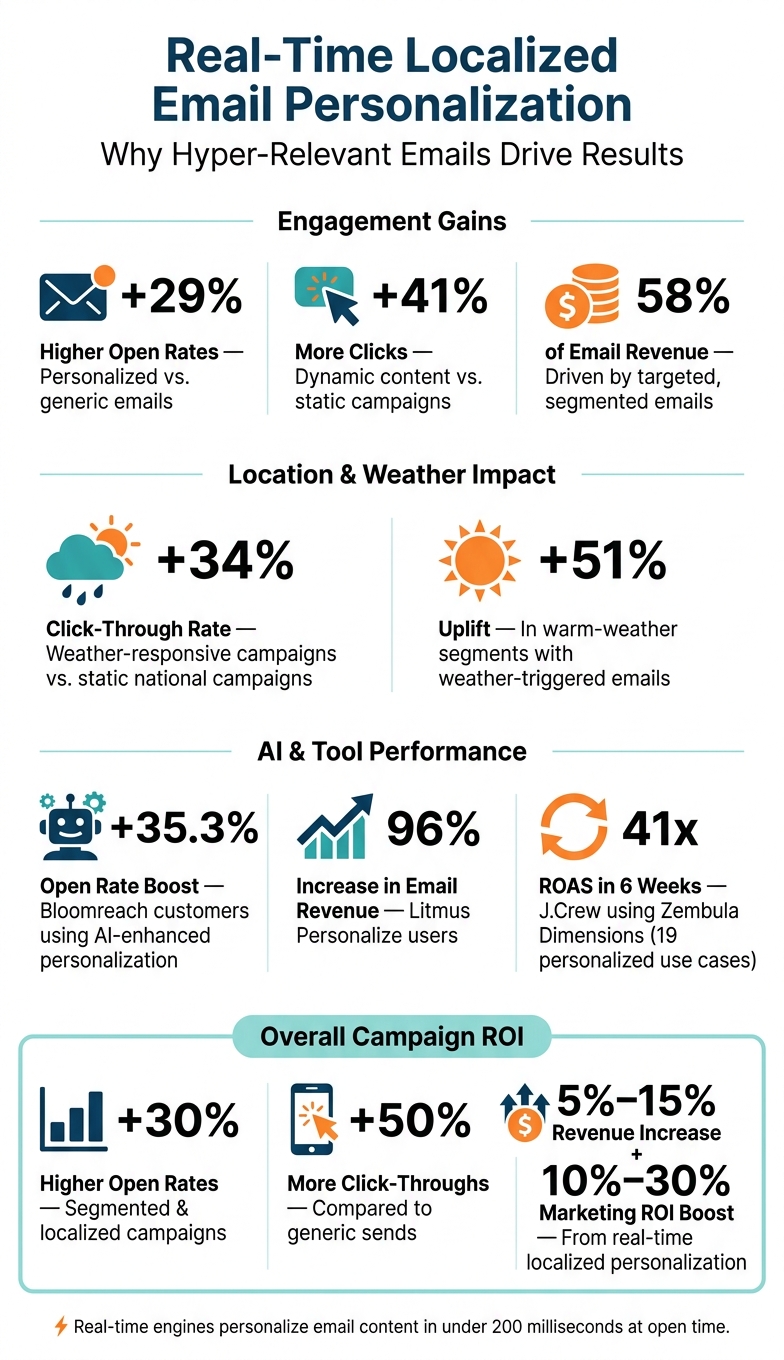
Real-time personalization transforms email marketing by tailoring content dynamically at the moment an email is opened. Instead of static, one-size-fits-all messages, this approach uses live data - like location, weather, and inventory - to deliver hyper-relevant offers. For example, a subscriber in Denver might see snow gear during a storm, while someone in Miami gets a sunny-day promotion. This strategy boosts engagement, with personalized emails achieving 29% higher open rates and 41% more clicks compared to generic campaigns.
Key Highlights:
- Dynamic Content: Updates at open-time using live data like weather, location, and inventory.
- Location-Based Targeting: Focuses on a subscriber’s current ZIP code or proximity to stores.
- Performance Benefits: Targeted emails drive 58% of email revenue and increase regional engagement by up to 20%.
- Data Integration: Combines CRM, geolocation, and behavioral data for precise targeting.
- Practical Examples: Weather-triggered campaigns and proximity-based store promotions.
By using tools like Movable Ink or LiveClicker, marketers can create dynamic, location-based offers that feel timely and relevant. This method not only improves click-through rates but also connects emails to local contexts, effectively driving both online and offline engagement.
Real-Time Localized Email Personalization: Key Stats & Benefits
Building Blocks of Real-Time, Location-Based Personalization
Data Sources That Power Location-Based Offers
Creating real-time, location-based personalization relies on combining data from several sources, including CRM profiles, behavioral signals, geolocation, and environmental APIs. These sources provide key details like:
- CRM and profile data: Names, ZIP codes, and home addresses.
- Behavioral signals: Browsing history, cart abandonment patterns, and past email interactions.
- Geolocation data: Derived from IP addresses using GeoIP intelligence or billing and shipping details.
- Environmental context: Real-time weather data from platforms like OpenWeatherMap.
For example, linking a customer's ZIP code with their recent browsing history can help craft offers that feel directly relevant to their needs. However, gathering data is just the first step - unifying these inputs is critical to delivering seamless personalization.
Customer Profile Unification and Identity Resolution
To ensure precision in targeting, fragmented data from multiple channels must be unified into a single, cohesive customer profile. Without this step, personalization efforts are incomplete. Imagine a scenario where your CRM, website, mobile app, and point-of-sale system each hold different pieces of information about the same person. A unified profile - or "golden record" - combines all these disparate data points into one reliable source.
A key part of this process is cross-device identity resolution, which connects customer activity across multiple devices. For instance, if a customer searches for "stores near me" on their phone in the morning, that location data should still inform their experience when they open your email on their laptop later in the day. This resolution combines deterministic matching (like using login emails) with probabilistic matching (inferred connections based on IP addresses or device behavior).
One practical tactic is mapping your store locations as GeoPoints within your automation platform. This allows the system to calculate the distance between a subscriber's home address and their nearest store, then seamlessly insert that store's address and hours into an email.
"With Algonomy's Active Content, we were able to take full control of our campaign execution. It's given us the speed, flexibility, and personalization scale we needed to elevate how we connect with millions of members every month." - Santiago Mozas Hernando, Jefe de área Digital de Fidelización, Consum
Once profiles are unified, real-time engines can dynamically customize email content based on live contextual data.
How Real-Time Engines Use Context to Personalize Content
When a subscriber opens an email, real-time engines analyze contextual signals like their IP address, local weather, time zone, and nearby inventory. This happens in under 200 milliseconds, ensuring the content feels immediate and relevant.
Here’s how different signals influence content decisions:
| Contextual Signal | What the Engine Does |
|---|---|
| Local weather (rainy, 45°F) | Updates the hero image to feature rain gear and adjusts messaging to include "stay dry" tips. |
| Nearest store GeoPoint | Adds the store's address, operating hours, and a live map with the distance from the subscriber. |
| Local inventory | Highlights products currently in stock at the closest store. |
| Time zone | Adjusts send times and deadline language (e.g., "Order by Thursday, 5:00 PM EST"). |
For example, weather-responsive campaigns have shown a 34% increase in click-through rates compared to static national campaigns. In warm-weather segments, the uplift has reached as high as 51%. These results show the power of tailoring emails to a subscriber’s immediate surroundings rather than relying on generic audience assumptions.
To ensure a seamless experience, always include fallback content for every dynamic block. If location data is unavailable or fails to load, the email should default to a national offer rather than showing incomplete or broken elements.
How to Build and Deploy Real-Time Localized Email Offers
Using Dynamic Content Blocks for Local Offers
Localized email offers rely on open-time rendering to tailor content dynamically when the email is opened. Tools like Movable Ink and LiveClicker make this possible by pulling data such as the recipient's IP address, local weather, and inventory levels before displaying images or offers.
To streamline the process, create a modular template with dynamic content blocks. These blocks use rules to determine which local offer to show. For example, if the recipient's city is Chicago, the email might highlight winter coats; for other locations, it could default to general outerwear. This approach allows you to manage thousands of localized audiences with a single template, eliminating the need for separate campaigns. Dynamic content can significantly improve performance, boosting open rates by up to 29% and generating over 40% more clicks compared to static emails.
To avoid issues, limit conditional logic to 3–5 rules per email and always include a fallback block. If location data is unavailable, the fallback should display a polished national offer rather than leaving an empty space. Additionally, keep the HTML file size under 102 KB to prevent Gmail from clipping the email, especially when using multiple dynamic blocks.
Next, let’s look at how automated location-based triggers can make your offers even more precise.
Setting Up Location-Based Triggers
Location-based triggers use environmental data to automatically adjust email content. A great starting point is integrating an API like OpenWeatherMap into your email platform. For instance, an HVAC company could send furnace tune-up reminders to subscribers in areas where temperatures drop below 40°F, while offering AC maintenance tips to customers in warmer climates.
These triggers work hand-in-hand with dynamic content, aligning offers with real-world conditions effortlessly.
Proximity triggers are another effective tool, especially for driving in-store traffic. By combining store geolocation data with subscriber ZIP codes, you can calculate proximity and display personalized local store details. Adding past purchase data further sharpens targeting and boosts relevance.
Magnolia Bakery provides a great example of this in action. Senior Marketing Manager Adam Davis explained how they use Shopify to tag customers based on seasonal purchases, like pies for Thanksgiving. The following year, these customers receive targeted emails timed to the same occasion:
"If a customer's ordering a pie for Thanksgiving, we want to make sure that Shopify is tagging that customer as such. Next Thanksgiving, we can import that list into our email database and send an email about pies to people we know who have purchased pies in the past." - Adam Davis, Senior Marketing Manager, Magnolia Bakery
Personalizing for Weather, Time Zones, and Local Events
Once location triggers are in place, you can refine your emails further by factoring in local weather, time zones, and events.
Given that the US spans six time zones with varying climates, tailoring emails to these differences is highly effective. For example, a campaign sent at 10:00 AM ET will arrive at 7:00 AM PT - a critical consideration for time-sensitive offers. Always adjust deadline language, like "Order by Thursday, 5:00 PM CT", to reflect the recipient's local time zone.
Weather-based personalization can go beyond swapping out images. AI-driven platforms now use biometeorology data to adjust email copy based on how specific weather conditions influence consumer behavior. Here's a quick breakdown:
| Weather Condition | Consumer Mindset | Content Strategy |
|---|---|---|
| Extreme Heat (>113°F) | Fatigue, seeking comfort | "Indoor Delivery", "Cooling Tech", "Instant Refreshment" |
| Clear/Pleasant (72°F) | High energy, social, outdoorsy | "Adventure", "Dining Out", "Social Gatherings" |
| Heavy Rain/Storms | Staying in, practical needs | "Home Delivery", "Cozy Essentials", "Storm Prep" |
Local events add another layer of relevance. Mentioning a city or neighborhood in the subject line can create a sense of urgency and boost open rates. By combining weather, time zones, and local events into a single contextual profile, you ensure that every subscriber receives content tailored to their world at the moment they open your email.
Marketing Cloud Personalization Open Time Email Ekaterina
sbb-itb-6e7333f
Selecting and Integrating Real-Time Personalization Tools
When it comes to delivering real-time, location-specific offers, having the right tools in place is non-negotiable. These tools are the backbone of executing effective, scalable personalization that adapts to user behavior in the moment.
Features to Look for in Personalization Tools
A solid personalization tool should dynamically update content at open time. This ensures that things like pricing, inventory, and localized offers remain accurate and relevant.
Here are some key features to prioritize:
| Feature | Why It’s Important for Localized Offers |
|---|---|
| Geolocation & Dynamic Maps | Helps users find the nearest store or event based on their IP or ZIP code. |
| Live Weather Data | Matches promotions to current weather conditions at the recipient's location. |
| Real-Time Inventory Sync | Avoids showing unavailable items to local audiences. |
| AI-Driven Recommendations | Suggests the most relevant offers based on user behavior and location. |
| Live Countdown Timers | Creates urgency for local events or time-sensitive deals. |
Tools powered by AI outperform static rule-based systems over time, especially for campaigns that span diverse regions and climates. For example, Bloomreach customers have achieved up to a 35.3% boost in open rates with AI-enhanced personalization.
How to Use the Email Service Business Directory to Find the Right Platform
The Email Service Business Directory simplifies the process of finding email marketing platforms tailored to your needs. It’s especially useful for identifying platforms that support features like open-time rendering, geolocation, and AI-driven content recommendations.
When using the directory, look for tools that can integrate seamlessly with your existing systems. Many platforms offer compatibility via simple code snippets or APIs, eliminating the need for a full system overhaul. You can also explore advanced modules like scratch-off reveals, real-time social proof, and interactive polls. These features go beyond basic dynamic content to engage users in unique ways. For instance, Litmus Personalize users have reported a 96% increase in email-driven revenue and a 76% rise in click-through rates. These metrics can serve as benchmarks to guide your expectations.
Connecting Personalization Tools to Your Existing Systems
Even the most advanced personalization tools need clean, connected data to perform well. A robust integration framework typically includes three layers:
- Data Layer: This is where unified customer profiles are stored, often in a CDP or CRM.
- Processing Layer: Real-time streaming tools update customer attributes as new data comes in.
- Decisioning Layer: APIs use this data to deliver the most relevant content in real time.
For retailers with physical locations, syncing your POS system through a server-side Events API allows the personalization engine to account for in-store purchases. Similarly, integrating your product catalog via XML or JSON feeds enables features like live inventory updates and region-specific recommendations.
The impact of tight integration is clear. In 2024, J.Crew adopted Zembula Dimensions to automate 19 personalized email use cases. Within just six weeks, the project - led by Daryn Foster, Director of Performance Marketing - delivered a 41x return on ad spend (ROAS).
"The level of revenue performance demonstrated in such a short time by Zembula was very impressive. Technical implementation was fast, and their support has been great." - Daryn Foster, Director of Performance Marketing, J.Crew
Before activating AI-driven personalization, audit your CRM to ensure all lifecycle fields are accurate. AI relies heavily on the quality of the data it receives, and incomplete or outdated information can lead to missed opportunities or poorly targeted offers.
Measuring and Improving Real-Time Localized Email Campaigns
Metrics That Matter for Localized Email Campaigns
Once your localized campaigns are live, tracking performance is the next critical step. Focus on metrics like open rates, click-through rates, and conversion rates, broken down by geographic segments. For example, compare how subscribers within a 5-mile radius of a store perform against those in a larger metro area. This data can help you gauge whether your proximity-based targeting is hitting the mark.
For businesses with brick-and-mortar locations, offline attribution is just as important as digital metrics. A great way to measure this is by issuing unique promo codes for each neighborhood or store. This approach helps identify which ZIP codes and offers are generating the best returns, directly linking your email efforts to in-store results.
One thing to keep in mind: Apple Mail Privacy Protection (MPP) impacts about 50% of recipients, making open rates less reliable as a key performance indicator. Instead, shift your focus to metrics like Revenue Per Recipient (RPR) and click-based data for a more accurate view of your campaign's success.
Once you've gathered these insights, it's time to fine-tune your strategy with testing.
A/B and Multivariate Testing for Localized Offers
Testing is essential to figure out what works best for your localized campaigns. Start with A/B or multivariate tests to refine your approach. For instance, go beyond testing subject lines and experiment with:
- Targeting radii: Compare ZIP code-level audiences to city-wide ones to see which drives more foot traffic.
- Language variations: Test the effectiveness of local slang versus standard copy.
- Offer types: Try percentage discounts versus dollar-off deals, as preferences can vary by region.
Start with small-scale A/B/n tests in select regions before rolling out changes nationwide. This lets you validate engagement and cultural fit without risking your entire email list. To track performance, add UTM parameters to every link. This way, you can see exactly which localized version led to clicks, purchases, or in-store visits.
"We've become a lot better in making sure that specific messages are tailored to the right audience so that we're not just distributing a marketing message to the full file of our audience every time we have a message." - Adam Davis, Senior Marketing Manager, Magnolia Bakery
Be mindful of technical details too. For instance, Gmail clips emails over 102 KB in size. If you're using multiple dynamic, localized content blocks, keep your HTML under this limit to avoid issues like cut-off content or disabled tracking pixels.
Privacy, Compliance, and Frequency Controls
After refining your campaigns, it's essential to ensure they comply with privacy standards and maintain a balanced frequency. These steps protect your audience's data while keeping your campaigns relevant.
Make sure to get explicit consent from subscribers, explaining what data - like ZIP codes or IP-based geolocation - is collected and why.
Preference centers are a powerful yet underutilized tool for staying compliant and boosting relevance. Allow subscribers to choose their location, content preferences, and email frequency. This reduces the risk of over-personalization, which can lead to unsubscribe spikes. Additionally, use frequency capping to avoid overwhelming your audience, especially during busy times like seasonal promotions or local events.
Transparency is key to building trust. If you're sending a location-specific offer, include a simple note such as, "You're receiving this because you visited our Austin location." This kind of message reassures subscribers about how their data is being used and can help ease any privacy concerns.
Conclusion
Real-time localized email personalization has become a game-changer for marketers in the US. Campaigns that are segmented and tailored see impressive results: 30% higher open rates, 50% more click-throughs, and revenue increases between 5% and 15%. This approach also enhances marketing ROI by 10%–30%.
When emails reflect a recipient's location, weather conditions, or local inventory, they feel more relevant and prompt action. These findings highlight the importance of precision and clean data in driving email campaign success.
Key Takeaways
Here are the essential points to remember:
- Real-time decision-making (in under 200 milliseconds) ensures accuracy at the moment an email is opened. Incorporating location-based details like weather, time zones, nearby inventory, and regional events helps reduce barriers between receiving an offer and taking action.
- Data quality is the foundation for successful campaigns. Verified contact records and unified customer profiles make the difference between campaigns that perform and those that don’t. With increasing privacy expectations, zero-party data and transparent consent practices are crucial for maintaining trust and compliance.
- The right tools can maximize campaign effectiveness. Platforms that support open-time rendering, multi-source data integration, and dynamic content blocks are essential for scaling real-time localized email campaigns. Resources like the Email Service Business Directory can help marketers find tools with these capabilities.
FAQs
How does real-time personalization work when an email is opened?
Real-time personalization leverages open-time rendering to ensure email content stays relevant and up-to-date when it's opened. Instead of relying on static elements, it uses dynamic placeholders or image links that pull data directly from a server. When the email is viewed, the server processes the request and provides updated information - like current weather, product availability, or pricing. This means features such as countdown timers or store locations reflect the most accurate details at the precise moment the recipient interacts with the email.
What data do I need to create localized email offers?
To craft localized email offers, having precise location data is key. This could include details like ZIP codes, city and state information, or even IP-based geolocation. Pair this with audience segmentation to align specific offers with their corresponding locations.
For more dynamic offers, you can incorporate real-time data such as local weather conditions, time zones, or nearby events. Just make sure that your data is current, track how the offers perform in different regions, and always secure explicit consent for using location-based information to honor privacy regulations.
How can I measure in-store sales from localized email campaigns?
Tracking in-store sales from localized email campaigns can be straightforward with the right tools and strategies. One effective method is using unique promo codes or RSVP links tailored to each location. This allows you to monitor redemptions and see which campaigns drive the most foot traffic.
To take it a step further, sync your point-of-sale (POS) system with your email platform. This integration helps you directly attribute purchases to specific campaigns, giving you a clear picture of their effectiveness.
For more advanced tracking, consider location-based attribution methods, like Mobile Ad IDs (MAIDs). These connect store visits to your email recipients, offering deeper insights into customer behavior. Additionally, tagging your links with UTM parameters can help you refine your campaigns and measure their performance more accurately.