If I had to boil this down to one point, it’s this: self-healing email systems fix deliverability issues by matching each failure signal to one automatic action. That means 4xx errors get retried, hard bounces get suppressed and synced to the CRM, and 5.7.x errors trigger infra checks instead of bad-contact suppression.
If you run lifecycle email, manual response is often too slow. A list can decay by 70.3% per year, complaint rates above 0.3% can trigger provider pressure, and queue delays past 15 minutes can mean DNS, TLS, or throttling trouble. I’d focus first on the fixes that stop repeat damage:
- Sync hard-bounce suppression back to the CRM within 24 hours
- Pause segments when hard bounces pass 2%
- Review SPF and DKIM when fail rates move above 0.5%
- Alert at 15 minutes of queue age and page at 30 minutes
- Retry 4xx errors with backoff and fail over to a second relay when needed
- Suppress contacts with no engagement after 180 days
Put simply, I see three problem groups here - bad data, provider or policy rejections, and stalled automations. The fix is not more dashboard watching. The fix is a rules layer that detects the signal, applies the right response, and checks whether metrics return to the prior 30-day baseline.
This section sums up the article in plain terms so you can see what to automate first and why it matters.
The email deliverability problems self-healing systems fix
Self-healing systems usually step in when email breaks in one of three places: bad data, provider blocks, and broken flows.
Bounce surges, spam traps, and list decay
Contact data decays at roughly 70.3% per year. That means lists go bad faster than most teams expect.
Hard bounces and spam trap hits should feed into suppression logic right away, and that suppression data should sync back to the CRM within 24 hours so bad contacts don’t slip back in on the next export. That part matters more than it sounds. If the CRM re-imports suppressed contacts into the ESP, every cleanup step taken inside the ESP gets wiped out.
The response should follow clear thresholds. A hard bounce rate above 1% calls for observation. Above 2%, the affected segment should pause by default, and the domain should move into lower sender-reputation tiers at major ISPs. Once list hygiene is back in line, the next problem tends to come from the mailbox providers themselves.
ISP blocks and blocklist incidents
Major inbox providers - Gmail, Yahoo, and Microsoft - now reject or throttle senders that miss authentication rules or go over complaint limits. A DKIM fail rate above 2% or an SPF fail rate above 1% needs immediate review. And a 5.7.x code usually points to an infrastructure or policy issue, not a dead address.
That distinction is easy to miss. If a team marks a 5.7.x rejection as a hard bounce, they suppress good contacts instead of fixing the system that caused the rejection in the first place.
When a block lands, the playbook is pretty direct:
- Pause the stream
- Audit authentication
- Reroute high-priority sends through a secondary relay, if one is set up
Broken automations that stop lifecycle email
Automation failures are quieter than bounce spikes or provider blocks, but they can do just as much damage. Welcome sequences, renewal reminders, and OTP flows can all stall without much warning.
The first thing to watch is queue time, not queue size. If messages sit for more than 15 minutes, that usually points to DNS trouble, reputation throttling, or TLS handshake failures. Once they sit for more than 30 minutes, the system should fire an automated alert or page the on-call team.
Durable queuing - with disk-backed queues or message brokers like RabbitMQ - separates application logic from SMTP delivery, so a provider outage doesn’t turn into message loss. Exponential backoff retries also help transient failures recover without making the traffic look spammy to the receiving server.
Those are the signals the repair layer has to catch before lifecycle revenue starts to stall.
sbb-itb-6e7333f
How self-healing systems detect and repair each problem
A self-healing repair layer should link each failure signal to one automatic response. When something breaks, the system shouldn't wait for a person to notice, diagnose, and react. It should already know what to do.
Bounce and reputation controls
For bounce surges and sender reputation, watch the earliest warning signs and fire the matching repair right away.
If latency starts climbing, the system should run route and load checks first, then fail over if the delay continues. A spike above 5 seconds is a warning. Above 10 seconds, it should be treated as critical.
Authentication drift should be handled like an automatic incident. That means checking selectors, sender IPs, and recent DNS changes. If DKIM or SPF fail rates go above 0.5%, the system should open a review before the issue hits ISP thresholds.
New domains and IPs should also stay inside automatic warm-up limits. That removes the guesswork and avoids relying on manual pacing.
Once live monitoring starts catching failures, the next job is keeping bad data from getting in at all.
List hygiene and spam trap prevention
For list decay and spam traps, prevention works better than cleanup.
Real-time verification APIs at web form capture points can stop typos and disposable addresses before they ever reach the CRM. Bulk cleaning costs between $0.003 and $0.008 per address. That's cheap compared with the reputation damage from a dirty list.
Entry-point verification alone isn't enough. The system also needs inactivity rules. Contacts with no engagement for 90-180 days should move into a re-engagement sequence on their own. If they pass 180 days with no response, they should be suppressed from regular sends.
Suppression data in the CRM needs hard guardrails too. Fields tied to records marked "Bounced (Hard)" should be read-only. Otherwise, imports and enrichment tools like Apollo or ZoomInfo can overwrite that status back to "Active", which is exactly how bad records sneak back in.
Sometimes the list isn't the problem. The mailbox provider is. In those cases, the system needs to switch paths fast.
Block recovery and automation failover
For ISP blocks and broken automations, the default move is simple: pause the affected stream and route by error class.
| Detection Signal | Automated Repair Action |
|---|---|
| SMTP 4xx / 421 | Retry with backoff; fail over to a secondary relay |
| Complaint rate > 0.3% | Pause affected flows; suppress low-engagement segments |
| SPF/DKIM/DMARC mismatch | Route via DMARC quarantine or reject; alert for DNS audit |
| Hard bounce | Auto-suppress in your email marketing platform; sync suppression back to CRM within 24 hours |
| Queue age > 30 minutes | Fail over to a secondary relay; check DNS, throttling, and TLS |
| No engagement > 180 days | Suppress from regular campaigns; protect sender reputation |
For broken lifecycle automations, getting the flow running again is only half the job. The system also needs to confirm that the fix worked. It should watch bounce and complaint trends and compare them with the 30-day historical baseline. If metrics return to that range within 15-30 minutes, recovery was successful.
Only then should it backfill missed events, and even then, at a throttled pace. Dumping everything back into the pipe at once is a good way to trip spam filters. The point isn't just to recover. It's to keep lifecycle sends on schedule without constant manual cleanup.
Operating model, tools, and vendor selection
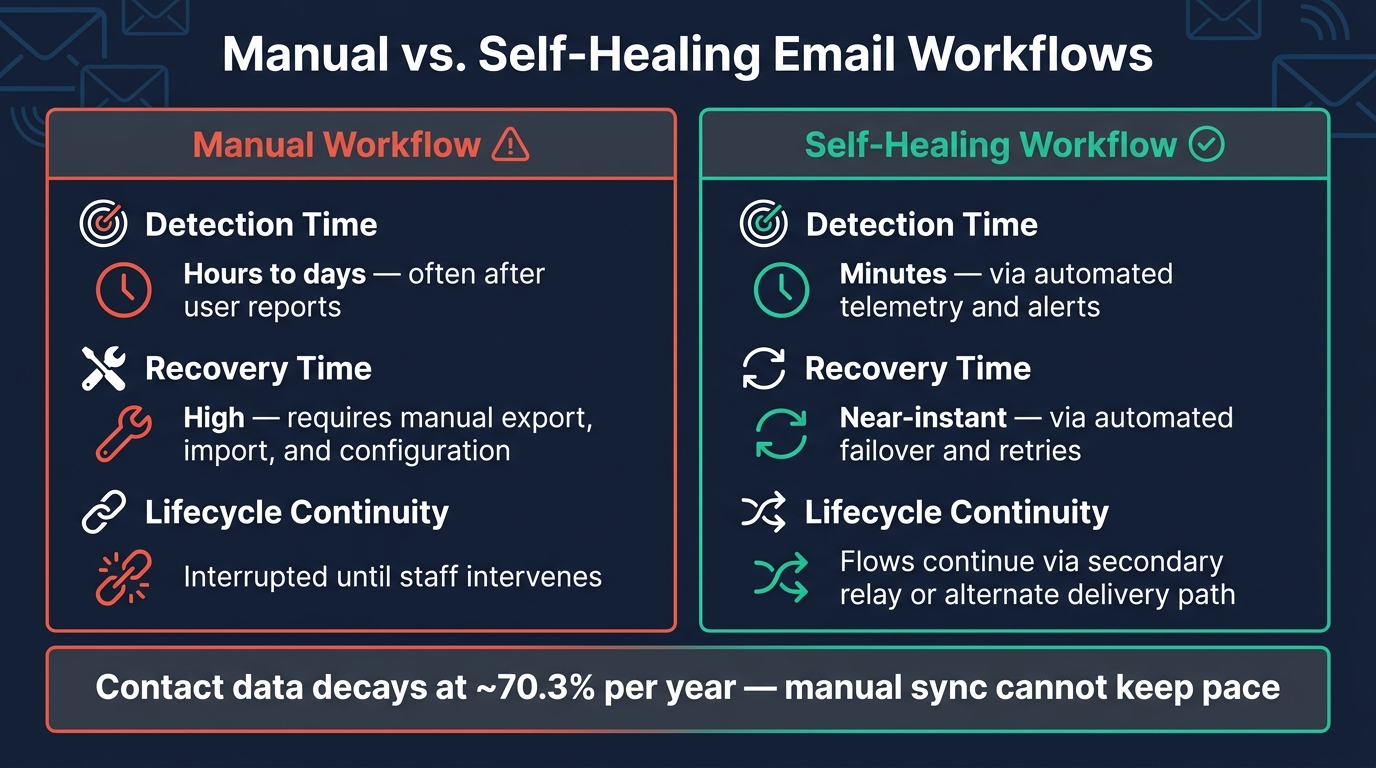
Manual vs. Self-Healing Email Workflows: Key Metrics Compared
Once the repair logic is set, the next step is the operating layer that makes the whole thing run on its own.
The minimum stack for self-healing email operations
You need to track queue age, bounce rates, authentication, DMARC alignment, DNS, and TLS health. Do this at the infrastructure layer - not only inside the ESP dashboard. That way, the monitoring setup can catch failures before they hit sends. Use a durable queue and a secondary SMTP relay so outages don't cause mail loss. That's what turns detection into repair.
The CRM also needs protected suppression fields. Dedicated fields - Email Status, Suppression Reason, and Last Verification Date - should have field-level protection on records marked "Bounced (Hard)" or "Invalid". That prevents imports and enrichment tools from turning suppressed contacts back on.
Set a severity model with clear escalation tiers. Warning means observe. Major means investigate during business hours. Critical means an immediate on-call response. Without that structure, alerts pile up fast and start blending into background noise.
How to evaluate tools and service partners
Vendor quality matters. Weak bounce parsing and poor failover lead to false suppressions and missed fixes.
Focus on three things:
- Bounce parsing
- Failover
- Suppression controls
The key question is whether the system parses raw RFC 3463 enhanced status codes. For example, 5.1.1 means suppress, while 5.7.1 points to an infrastructure issue that needs investigation. A platform that labels bounces only as generic "hard" or "soft" can send your team in the wrong direction and leave blind spots.
You should also check whether the platform supports exponential backoff retries for 4xx transient failures - for example, 1m, 5m, 30m, 2h, and 24h. And ask vendors directly whether "Bounced" records can be made read-only so imports can't reactivate them.
For lifecycle and retention programs, the Email Service Business Directory is a practical tool-discovery reference for platforms, deliverability tools, and agencies serving mid-market and PE-backed companies.
Manual workflows versus self-healing workflows
Manual handling slows recovery and breaks lifecycle revenue. You can see the gap most clearly in the three problem areas this article covers.
| Metric | Manual Workflow | Self-Healing Workflow |
|---|---|---|
| Detection time | Hours to days, often after user reports | Minutes, via automated telemetry and alerts |
| Recovery time | High - requires manual export, import, and configuration | Near-instant via automated failover and retries |
| Lifecycle continuity | Interrupted until staff intervenes | Flows continue via secondary relay or alternate delivery path |
Contact data decays at roughly 70.3% per year. A manual sync just can't keep pace with that, especially when provider policies and throttling behavior can shift fast. Start by automating suppression sync, protecting suppression fields, and alerting on 15-minute warning / 30-minute critical queue age.
Measuring impact and deciding what to automate first
Metrics that show the system is reducing deliverability risk
Once the repair layer is live, the goal is simple: prove that it’s cutting incidents, not just recording them.
Three metrics do most of the heavy lifting:
- Hard bounce rate
- Spam complaint rate
- Inbox placement
Of those three, inbox placement often shows trouble early - before revenue drops or a dashboard throws an alert.
The table below shows what to watch across deliverability risk, system resilience, and day-to-day impact. Use it to check whether the self-healing layer is doing its job, not merely running in the background.
| Metric Category | What to Track |
|---|---|
| Deliverability Risk | Hard bounce trend, complaint trend, inbox placement, authentication alignment |
| System Resilience | Queue depth by priority/age, send success rate, relay latency, TLS handshake success rate |
| Operational Impact | Time to detect policy-driven bounces, time to failover to secondary relay, share of lifecycle flows maintained during outages |
What to automate first in most email programs
Use those metrics to pick the first control to automate.
Start with CRM-synced hard-bounce suppression. If bad records keep getting back into the system, the rest of the controls won’t do much.
After that, add form-entry validation, authentication alarms, retry logic, and secondary SMTP failover. That order deals with list risk first, then reputation risk, then lost revenue.
Conclusion: lower risk and steadier lifecycle performance
Self-healing systems work when each problem has a direct automated response. Bounce surges should trigger suppression and CRM sync. Authentication failures should trigger infrastructure alerts. ISP blocks should trigger relay failover. Stalled automations should trigger retry or reroute logic.
Put together, those controls help keep lifecycle flows moving when deliverability problems hit.
FAQs
What makes an email system self-healing?
An email system is self-healing when it spots deliverability and automation issues early, figures out what's causing them, and fixes or contains them without manual work.
That usually means always-on monitoring, anomaly detection, alerts, bounce handling, DNS and authentication fixes, list hygiene, and lifecycle automation that pauses or suppresses risky sends while keeping core flows running.
How can I tell if a bounce is a bad contact or an infrastructure issue?
Don’t rely only on your email service provider’s hard/soft bounce labels. Check the RFC 3463 enhanced status code in the bounce message.
5.1.x usually means the recipient address is invalid and should be suppressed.
5.7.x often points to infrastructure issues like SPF, DKIM, or DMARC failures, blocklist hits, or spam filtering. In that case, fix the setup instead of suppressing the contact.
What should I automate first to improve deliverability?
Automate email validation at the point of entry first. That means every new signup, form submission, and CRM update gets checked before the address lands in your system.
The goal is simple: stop invalid, disposable, and risky addresses from getting into your lifecycle flows in the first place.
Then connect your ESP and CRM so suppression status, bounces, and complaint outcomes sync on their own. That way, if a contact is reactivated in one system, they're suppressed again in the other within about 24 hours.
This kind of upstream hygiene cuts bounce and spam-trap risk faster than trying to clean things up later.