Email platform pricing splits fast once you hit 25,000 contacts - and by 100,000 contacts, the gap can be well over $1,000 per month. If I were comparing vendors in 2026, I’d focus on just 4 things first: how you’re billed, how often you send, how much automation you need, and whether inactive contacts still count.
Here’s the short version:
- Send-volume tools like Brevo and Mailjet usually cost less for big lists with light send frequency
- Contact-based tools like Mailchimp, Constant Contact, Klaviyo, ActiveCampaign, GetResponse, and AWeber get more expensive as your list grows
- Automation-first platforms like Klaviyo, ActiveCampaign, and HubSpot charge more because you’re paying for flows, targeting, CRM links, and reporting
- List cleanup matters because some vendors still bill for unsubscribed, bounced, or inactive contacts
- At the high end, HubSpot sits near $1,500/month at 25,000 contacts and about $3,600/month at 100,000 contacts, before onboarding fees
- On the low end, Brevo can stay under $129/month for 100,000 emails/month on standard send-based pricing
If you want the fast takeaway, it’s this:
- Big list + low send frequency = look at Brevo or Mailjet
- Small team + basic newsletters = look at Mailchimp or Constant Contact
- Ecommerce or SaaS + revenue-driven flows = look at Klaviyo or ActiveCampaign
- Need email inside a full CRM stack = look at HubSpot
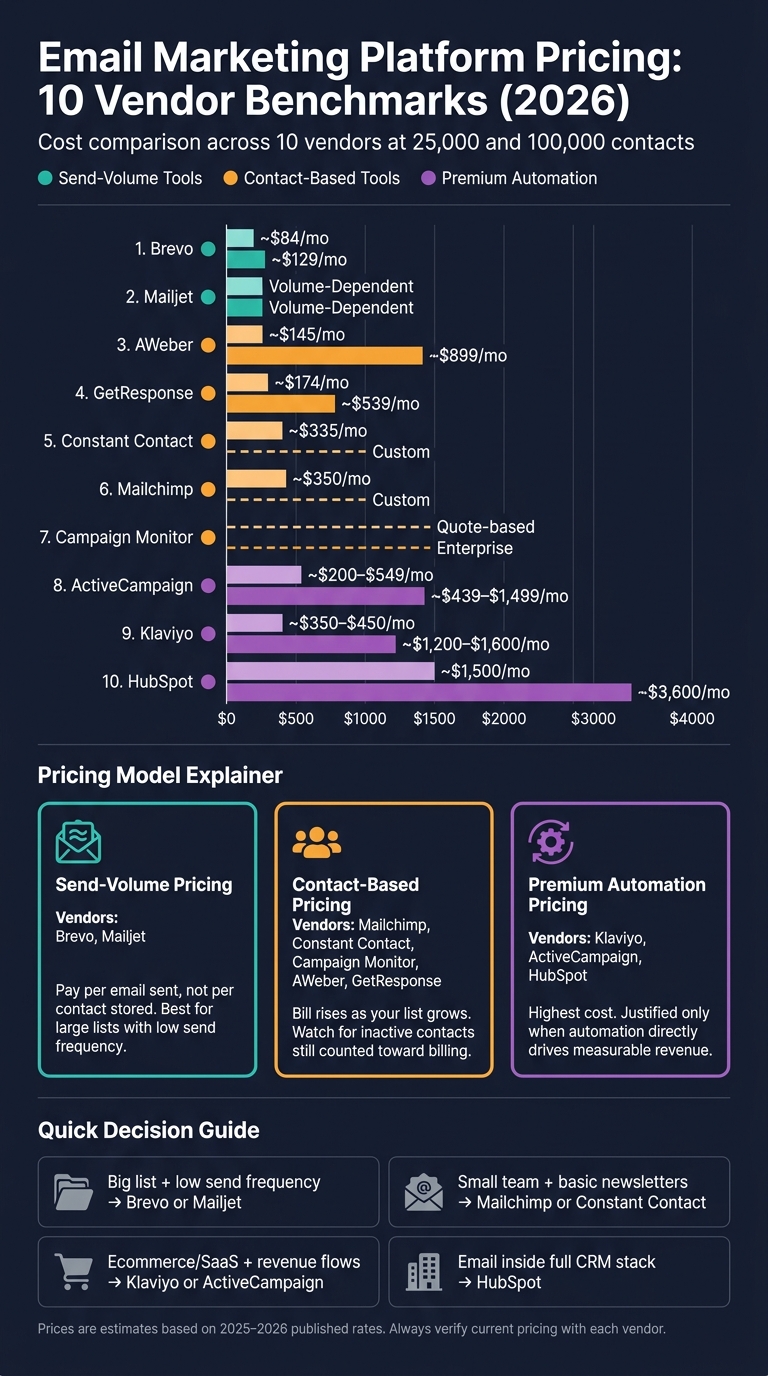
Email Marketing Platform Pricing Comparison 2026
Mailchimp vs Brevo 📧 Which Is The BEST EMAIL MARKETING Software For You❓
Quick Comparison
| Vendor | Pricing Model | Cost Signal at 25,000 Contacts | Cost Signal at 100,000 Contacts | Best Fit |
|---|---|---|---|---|
| Mailchimp | Contact-based | ~$350/month | Custom/quote-based | General marketing teams |
| Constant Contact | Contact-based | ~$335/month on Standard | Custom above 50,000 | Small businesses |
| Campaign Monitor | Contact-based | Quote-based at 25,000+ | Enterprise/custom | Mid-market email teams |
| Brevo | Send-volume | Depends on sends, not contacts | $129/month at 100,000 emails/month | Big lists, lighter sending |
| Mailjet | Send-volume | Depends on sends, not contacts | Pricing tied to send bands | Big lists, simple automation |
| Klaviyo | Contact-based | ~$350-$450/month | ~$1,200-$1,600/month | Ecommerce brands |
| ActiveCampaign | Contact-based | ~$200-$549/month depending on tier | ~$439-$1,499/month | Automation-heavy teams |
| GetResponse | Contact-based | $174-$249/month | $539-$690/month | Mid-range automation |
| AWeber | Contact-based | ~$145/month | $899/month | Simple email programs |
| HubSpot | Marketing contacts | ~$1,500/month | ~$3,600/month | Full CRM and marketing stack |
My read: the lowest sticker price is rarely the full story. Send caps, overage fees, onboarding, add-ons, and billed inactive contacts can change the math fast.
Below, I’d break each vendor into plain cost tradeoffs so you can see where the bill starts to climb - and why.
1. Mailchimp
Mailchimp charges based on active contacts. So as your list grows, your bill goes up - even if your email volume stays the same.
There’s another cost issue to watch for. Unsubscribed and non-subscribed contacts can still count toward billing until you archive them. That means you can end up paying for people you’re not even emailing.
At the 25,000-contact level, the price jump is hard to miss. Standard comes in at about $350/month, while Premium is about $350-$399/month. Once you hit 100,000 contacts, pricing usually moves to custom terms.
Mailchimp also puts a monthly send cap on each plan based on list size:
- Essentials: 10x your contact count
- Standard: 12x your contact count
- Premium: 15x your contact count
If you go past those limits, overage charges can apply.
Here's how Mailchimp prices at scale:
| Plan | 25,000 Contacts | Key Features |
|---|---|---|
| Standard | ~$350/month | Customer Journey Builder, send-time optimization, generative AI tools, 12x send limit |
| Premium | ~$350-$399/month | Multivariate testing, predictive segmentation, phone support, 15x send limit |
At similar list sizes, Mailchimp is often 2-3x more expensive than options like Brevo or MailerLite.
2. Constant Contact
Like Mailchimp, Constant Contact prices its plans by contact count. But at the low end, it starts cheaper. You pay for stored contacts, so your bill goes up as your list grows - not as you send more often. In June 2025, the company dropped its permanent free plan and switched to a 60-day free trial.
At 500 contacts, Lite starts at $12/month, Standard at $35/month, and Premium at $80/month. Standard climbs to about $335/month at 25,000 contacts. Once you get past 50,000 contacts, pricing usually moves to custom.
One detail matters if you lean hard on automation: triggered emails don't count toward the monthly send limit. That can make a big difference for teams that run lots of automated campaigns. The clearest difference between plans is automation access. Lite gives you one welcome email. Standard adds three preset automations. Premium opens up unlimited custom workflows.
| Plan | Starting Price (500 contacts) | Approx. Cost at 25,000 Contacts | Monthly Send Limit | Automation |
|---|---|---|---|---|
| Lite | $12/month | - | 10x contact count | 1 welcome template |
| Standard | $35/month | ~$335/month | 12x contact count | 3 pre-built flows |
| Premium | $80/month | - | 24x contact count | Unlimited custom flows |
For big lists that don't send very often, Constant Contact can end up costing more than send-volume tools like Brevo. It also charges $0.002 per email in overage fees once you go past your plan limit. So if your list has a lot of inactive contacts, cleanup isn't just good hygiene - it cuts cost. And again, pricing usually shifts to custom above 50,000 contacts.
Next, Campaign Monitor shows how another mainstream platform prices automation against list growth.
3. Campaign Monitor
Campaign Monitor has three contact-based plans: Lite, Essentials, and Premier. Lite limits monthly sends to about 5x your subscriber count, while Essentials and Premier come with unlimited campaign sends.
At 2,500 contacts, pricing starts at $39/month for Lite, $66/month for Essentials, and $162/month for Premier. At 10,000 contacts, that moves to $99/month, $162/month, and $258/month. At 50,000 contacts, pricing reaches $349/month, $577/month, and $962/month.
| Contact Count | Lite | Essentials | Premier |
|---|---|---|---|
| 2,500 | $39/mo | $66/mo | $162/mo |
| 10,000 | $99/mo | $162/mo | $258/mo |
| 50,000 | $349/mo | $577/mo | $962/mo |
Once you get to 25,000+ contacts, pricing becomes quote-based. And at 100,000+ contacts, most buyers are pushed toward Enterprise or custom plans.
In plain terms, Campaign Monitor sits above many basic mid-market email tools on price, but still below top-end automation platforms at similar list sizes.
The jump from Essentials to Premier is steep. At 2,500 contacts, Premier costs more than 2x Essentials. That gap lines up with extras like send-time optimization, advanced engagement segments, and phone support.
There are a couple of ways to trim the bill:
- Annual billing cuts pricing by 10%
- Nonprofits can get a 15% discount
Next, Brevo shows how send-volume pricing can cost less for teams that send less often.
4. Brevo
Brevo prices its plans by monthly send volume, not by how many contacts you store. So if your list grows but your monthly sends stay the same, your cost does not change.
At 40,000 emails per month, Brevo Starter runs about $39/month and Standard about $84/month. At 100,000 emails per month, those plans move to $69/month and $129/month. Professional starts at $499/month for 150,000+ monthly sends and adds AI segmentation, WhatsApp campaigns, landing pages, and 10 user seats.
| Plan | 40,000 Emails/Month | 100,000 Emails/Month | Automation |
|---|---|---|---|
| Starter | ~$39/mo | $69/mo | Capped at 2,000 contacts |
| Standard | ~$84/mo | $129/mo | Unlimited |
| Professional | $499/mo (starts at 150k) | $499/mo (starts at 150k) | Unlimited |
The big limit on the lower tiers is automation. Starter caps workflows at 2,000 contacts, which can become a problem fast if you want behavior-based email flows at scale. Standard removes that cap and also adds A/B testing and AI-powered send-time optimization.
A few extras can push the bill up:
- Removing the "Sent by Brevo" branding on Starter costs $9/month
- Extra user seats on Standard cost $9/month per seat
- A dedicated IP address costs $251/year
Klaviyo shifts the focus from send volume to ecommerce automation and segmentation.
5. Mailjet
Mailjet charges based on monthly send volume, not contact count. That means paid plans come with unlimited contacts, so your bill doesn't go up just because your list gets bigger.
The entry-level Essential plan starts at $17/month for 15,000 sends. Premium starts at $27/month and adds automation, A/B testing, dynamic content, and more user seats.
| Feature | Essential ($17/mo+) | Premium ($27/mo+) |
|---|---|---|
| Contacts | Unlimited | Unlimited |
| Automation | No | Single-path automations |
| A/B Testing | No | Up to 10 variants |
| Subaccounts | 1 | Up to 20 |
| Support | Online only | Priority support |
| Dedicated IP | No | Available on plans with 100,000+ sends |
Once you hit 100,000+ sends per month, Premium also adds dedicated IP and SSO. That pricing model works well for big lists that don't email very often. In plain English: if you have a lot of subscribers but send less often, Mailjet can keep costs steady. Past the 100,000-send mark, the case gets stronger if you want your own sending setup.
There is a catch. Mailjet's automation is linear only, so if you need branching workflows, you'll need another tool. On the other hand, Mailjet can handle both transactional and marketing email in one place.
ActiveCampaign gives you more room on automation, but you'll pay more for it.
6. Klaviyo
Klaviyo is built for ecommerce brands first. Its pricing is tied to active profiles, and that count can include unsubscribed contacts until you suppress or delete them. In plain terms, that setup fits brands with tight, purchase-driven lists. But if your database is packed with old or inactive contacts, costs can climb fast. The benchmarks below show how pricing tends to scale from a small list up to 100,000 profiles.
| Contact Count | Est. Monthly Email Cost | Notable Features |
|---|---|---|
| 250 | $0 | 500 sends, basic reporting |
| 10,000 | ~$150-$175 | Automated workflows, product recommendations |
| 25,000 | ~$350-$450 | Advanced segmentation, revenue attribution |
| 50,000 | ~$720-$790 | Multi-step branching flows, multi-channel attribution |
| 100,000 | ~$1,200-$1,600 | Full lifecycle automation, custom reporting |
At 25,000 contacts, U.S. businesses should plan for about $350-$450 per month for the email plan, though some benchmarks put it closer to $400-$600. At 100,000 contacts, the base email plan usually lands around $1,200-$1,600 per month, and the higher end often reflects SMS or data add-ons. The free plan covers 250 contacts and 500 monthly sends.
So what are you paying for? Mostly, deep ecommerce automation. Paid plans include predictive analytics like customer lifetime value and churn risk. You also get multi-step branching flows based on real-time behavior, such as product views, price drops, and replenishment windows.
That pricing model creates one clear rule: list hygiene matters. Since Klaviyo bills on active profiles, cleaning your list each quarter is one of the simplest ways to keep spend in check. Unengaged contacts can hurt deliverability and push you into a higher pricing tier at the same time.
ActiveCampaign follows a similar automation-first path, but its pricing climbs in a different way as you add more features.
sbb-itb-6e7333f
7. ActiveCampaign
ActiveCampaign uses contact-based pricing, but the bill tends to climb because of automation and CRM depth - not just because your list gets bigger. One detail can catch teams off guard: as of November 2025, billing includes unsubscribed, bounced, and unconfirmed contacts. If you're planning for growth, that matters.
The platform has four tiers: Starter, Plus, Professional, and Enterprise. As you move up, you get more automation, CRM features, and reporting. And yes, the price jumps can be pretty steep.
| Contacts | Starter | Plus | Professional |
|---|---|---|---|
| 25,000 | ~$200-$311 | ~$350-$400 | ~$386 (annual) / ~$549 (monthly) |
| 100,000 | ~$439 | ~$789 | ~$1,499 |
Enterprise pricing at 100,000+ contacts is quote-based.
Plus is where ActiveCampaign starts to look like more than an email tool. It adds:
- a built-in Sales CRM
- lead scoring
- conditional content
- SMS marketing
Those are the kinds of features many teams would otherwise pay for in separate tools. The built-in CRM alone can replace a separate sales platform for some companies.
Professional goes further with predictive sending, split automations, and attribution reporting. If your team wants tighter control over journeys and better reporting, that's the tier where those tools start to show up.
Send limits are tied to contact count, which is another pricing lever to watch. Starter and Plus allow 10x monthly sends, Professional allows 12x, and Enterprise allows 15x. Go over that cap, and ActiveCampaign charges $0.005 per extra email. Annual billing usually cuts costs by 15% to 20%.
GetResponse is a useful contrast here. At similar contact levels, it can come in lower when the automation stack is lighter.
8. GetResponse
GetResponse is priced in the middle of the market. Billing is based on your contact count, and every paid plan comes with unlimited email sends. One useful detail: unsubscribed contacts do not count toward your billing limit. In practice, GetResponse lands between basic high-volume email tools and higher-end automation platforms.
The main plans are Starter, Marketer, and Creator. At 25,000 contacts, Starter costs $174/month, Marketer costs $215/month, and Creator costs $249/month. At 100,000 contacts, pricing moves up to $539/month, $599/month, and $690/month, in that order. For enterprise buyers, MAX pricing starts at $1,099/month.
| Contacts | Starter | Marketer | Creator |
|---|---|---|---|
| 25,000 | $174/mo | $215/mo | $249/mo |
| 100,000 | $539/mo | $599/mo | $690/mo |
| Enterprise (MAX) | - | - | $1,099+/mo |
Starter includes one six-step workflow. Marketer is the first plan that gives you unlimited workflows, tagging, scoring, abandoned-cart triggers, and webinar hosting for up to 100 attendees. Creator adds a 500-student course builder and paid newsletters. Transactional email is limited to MAX².
If you pay annually, you get an 18% discount. Verified nonprofits can get 50% off. That pricing structure makes the tradeoff pretty clear: as you need more automation, your monthly cost goes up. The same pattern shows up again at larger list sizes.
9. AWeber
AWeber uses subscriber-based pricing, so your bill goes up as your list grows. At around 25,000 contacts, both Lite and Plus cost about $145/month. At 100,000 contacts, AWeber shifts to its Unlimited plan at $899/month.
That makes pricing fairly easy to map out as your list expands. But at higher volumes, it’s not cheap.
Lite and Plus start at the same price, but Plus removes the plan limits. One other cost to watch: Plus includes a 0.6% transaction fee on ecommerce sales. If you use AWeber’s ecommerce tools, that fee should be part of your monthly cost math.
| Lite | Plus | Unlimited | |
|---|---|---|---|
| ~25,000 contacts | ~$145/mo | ~$145/mo | - |
| ~100,000 contacts | - | - | $899/mo (flat) |
| Automations | 3 | Unlimited | Unlimited |
| Email lists | 1 | Unlimited | Unlimited |
| Custom segments | 1 | Unlimited | Unlimited |
| Send limit | 10x subscribers/mo | 12x subscribers/mo | Unlimited |
AWeber supports linear drip sequences rather than branching workflows. So if you want simple email paths, it fits. If you need more layered automation logic, the setup is more limited.
You can cut the price by about 33% with annual billing.
HubSpot pushes pricing into broader marketing-suite territory.
10. HubSpot Marketing Hub
HubSpot uses a marketing contacts model: you pay only for marketing contacts, while non-marketing contacts stay free in the CRM. That setup helps keep CRM storage costs down. But once your campaigns grow, your paid contact count can climb fast.
At around 25,000 contacts, most businesses land on Marketing Hub Professional, which runs about $1,500/month. At 100,000 contacts, you’ll generally need Marketing Hub Enterprise at about $3,600/month. Those prices do not include the required onboarding fees: $3,000 for Professional and $7,000 for Enterprise.
So the big pricing triggers are pretty simple: plan tier and onboarding fees.
| Tier | Approx. Price | Key Features |
|---|---|---|
| Professional | ~$1,500/mo at 25,000 contacts | Visual workflows, branching, A/B testing, custom reporting, lead scoring |
| Enterprise | ~$3,600/mo at 100,000 contacts | Multi-touch attribution, predictive AI, custom objects |
HubSpot tends to make sense when email sits inside a bigger CRM, sales, service, attribution, and revenue setup. That’s the main pitch. You’re not just buying email - you’re buying a broader go-to-market system.
If email is your main channel and you don’t need that larger stack, HubSpot can cost more than you need to spend. At 100,000 contacts, it lands at the top end of this benchmark and well above many mid-market tools.
How Costs Change as Lists and Sending Volume Grow
The 10 vendor examples above boil down to four pricing patterns. Across these vendors, cost usually comes down to four things: list size, send volume, automation depth, and contract tier.
Subscriber-Based Pricing Gets More Expensive as Lists Grow
Contact-based plans tend to get expensive the fastest. Mailchimp and Klaviyo jump hard between 25,000 and 100,000 contacts. And on Mailchimp and ActiveCampaign, inactive contacts may still count toward billing until you archive or suppress them.
Once list growth stops driving most of the cost, send frequency usually becomes the next thing to watch.
Send-Volume Pricing Can Cost Less for Lower-Frequency Senders
Send-volume pricing often works better for large lists that don’t get emailed all the time. Brevo, for example, stores contacts at no charge and charges based on sends, so costs can stay lower as the list grows.
Still, the headline plan price doesn’t tell the whole story.
Automation and Add-Ons Raise the Real Monthly Cost
Base pricing often leaves out what you’ll end up paying each month. Automation, SMS, extra seats, and dedicated IPs are often locked behind higher tiers or sold as add-ons.
Custom Pricing Starts at Higher Send Volumes
Once you get past 100,000 sends or contacts, many vendors shift to quote-based pricing. That means you need to check minimums, overage fees, onboarding costs, and add-ons early. Those pricing breakpoints are a big part of the vendor tradeoffs in the next section.
Pros and Cons by Vendor Type
Those 10 vendors land in three pricing groups: send-volume tools, mainstream contact-based platforms, and premium automation suites. For buyers, that split matters because each group gets expensive in a different way.
Lower-Cost Send-Volume Tools
Brevo is the lowest-cost option for large lists that don’t send often. You pay for sends, not stored contacts, which works well when your database is big but your email cadence is light. The downside is simpler automation and shared-IP deliverability risk, where your results can be affected by other senders’ behavior.
That pricing edge fades once automation becomes a core part of your email program. At that point, a send-based model is no longer the lowest-cost path.
Mainstream Mid-Market Platforms
Mailchimp and Constant Contact are simple to launch and handle most common email needs. But the bigger issue is how long the pricing still works as your list grows. A 10,000-contact Mailchimp list already runs about $100 per month. On contact-based plans, unsubscribed contacts can still count toward billing, so your costs can keep climbing even while engagement drops.
That makes these platforms a fit for small teams that want fast setup and standard newsletter features - not for businesses planning heavy list growth.
When lifecycle automation and CRM depth start to matter more, pricing moves into a much higher bracket.
Premium Automation-Focused Vendors
ActiveCampaign, Klaviyo, and HubSpot get expensive fast once you reach tens of thousands of contacts. What you’re paying for is deeper automation, stronger behavioral triggers, and tighter CRM ties. ActiveCampaign and HubSpot start at a much higher price, so the math only works when automation and CRM depth are worth the spend.
In plain terms, these tools pay off only when automation drives revenue in a direct way. And that only happens if your team can actually build, run, and maintain the workflows.
The table below cuts the tradeoffs down to the fastest buying view.
| Vendor | Main Cost Advantage | Main Cost Drawback | Best Use Case | Watch-Out |
|---|---|---|---|---|
| Brevo | Pay only for what you send; unlimited contact storage | Simpler automation than premium platforms | Large lists with infrequent sends | Deliverability exposed to other senders' behavior |
| Mailchimp and Constant Contact | Low entry price; easy setup | Costs rise quickly as lists grow; inactive contacts can still count toward billing | Small businesses and simple newsletter needs | Tier jumps can get expensive quickly |
| ActiveCampaign, Klaviyo, and HubSpot | Deep behavioral triggers; CRM integration | High entry cost; steeper learning curve | eCommerce and SaaS teams where email is a core revenue driver | Requires skilled staff to get full value |
Conclusion
Across this 10-vendor benchmark, pricing tends to follow three models: contact-based, send-volume, and premium automation. In plain English, your pick mostly comes down to how big your list is, how often you send, and how much automation you need.
Send-volume pricing is usually the lower-cost option for large lists that don't send often. That gap opens up fastest at the 25,000-contact and 100,000-contact marks. That's where contact-based tools like Mailchimp and Klaviyo get expensive fast, while send-volume tools like Brevo stay more stable.
At 100,000 contacts, premium automation platforms such as HubSpot and Klaviyo can cost $1,200-$3,600 per month. By contrast, send-volume tools can stay far below that for lower-frequency senders. Paying more for Klaviyo or ActiveCampaign only works if the automation is tied to revenue.
| Your Situation | Best Vendor Type |
|---|---|
| Growing list, sends 1-2x per month | Send-volume (Brevo) |
| Small team, simple newsletters | Mainstream mid-market (Mailchimp, Constant Contact) |
| Ecommerce or SaaS with revenue-tied flows | Premium automation (Klaviyo, ActiveCampaign) |
| High-volume newsletter (50,000-100,000+ contacts) | Send-volume or flat-rate model |
For more provider comparisons, use the Email Service Business Directory.
FAQs
How do I choose between contact-based and send-based pricing?
It depends on your list size and how often you send emails.
With contact-based pricing, you pay for stored subscribers. That makes costs easier to predict if your list stays about the same size, even when your sending frequency goes up or down.
With send-based pricing, you pay based on monthly email volume. This is often a better fit for large lists that aren’t getting emailed every day.
The key is simple: match each pricing model to your growth pattern and marketing needs.
Which vendors charge for inactive or unsubscribed contacts?
Some email marketing platforms do.
ActiveCampaign charges for unsubscribed contacts. Mailchimp also counts unsubscribed contacts toward your subscription tier unless you manually delete them.
If you want to compare pricing models across providers, the Email Service Business Directory can help you review list-management costs.
When does paying more for automation make sense?
Paying more for advanced automation makes sense when it leads to measurable revenue growth and cuts operating costs through better efficiency.
For teams managing tens of thousands of subscribers, higher-tier plans are worth it if features like triggered lifecycle events, behavioral segmentation, and customer journey builders line up with your business goals. If manual work is slowing lead nurturing or making complex campaigns hard to run, the time savings and better conversion rates can deliver a stronger return than lower-cost tools.