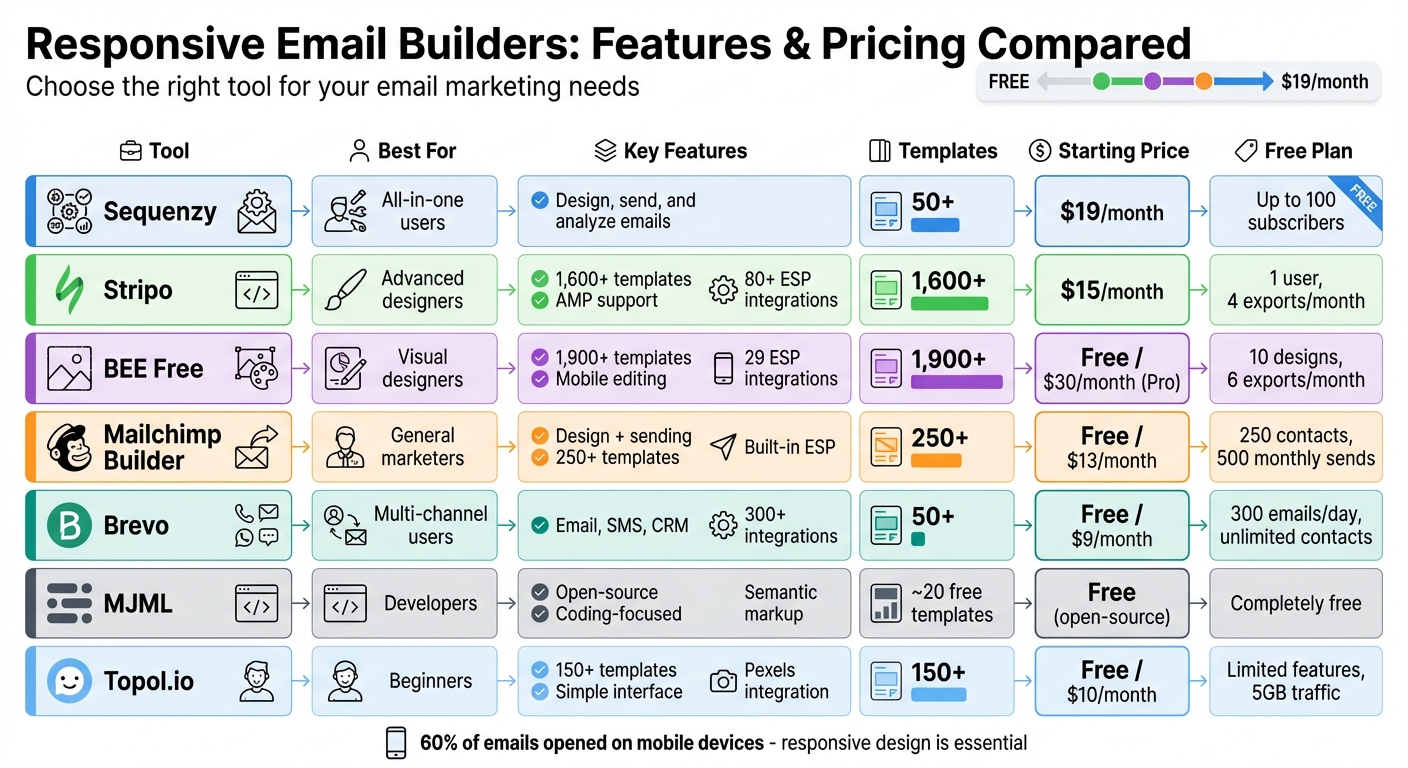
Responsive email builders make creating mobile-friendly emails easy, even without design skills. With over 60% of emails opened on mobile devices, ensuring your emails look good everywhere is a must. This article compares seven popular tools based on responsiveness, template options, export features, and pricing. Here's a quick summary:
- Sequenzy: All-in-one tool for design, sending, and analytics. Starts at $19/month.
- Stripo: Focuses on design with 1,600+ templates and AMP support. Plans start at $15/month.
- BEE Free: Offers 1,900+ templates and mobile-specific editing. Free plan available; paid plans from $30/month.
- Mailchimp Builder: Combines design and sending with a library of 250+ templates. Free plan available; paid plans start at $13/month.
- Brevo: Includes email design, SMS, and CRM tools. Free plan with 300 daily emails; paid plans from $9/month.
- MJML: Developer-focused, free, open-source framework for responsive email coding.
- Topol.io: Simple email builder with 150+ templates. Free plan available; Pro plans start at $10/month.
Quick Comparison
| Tool | Best For | Key Features | Starting Price |
|---|---|---|---|
| Sequenzy | All-in-one users | Design, send, and analyze emails | $19/month |
| Stripo | Advanced designers | 1,600+ templates, AMP support | $15/month |
| BEE Free | Visual designers | 1,900+ templates, mobile editing | Free/$30/month |
| Mailchimp | General marketers | Design + sending, 250+ templates | Free/$13/month |
| Brevo | Multi-channel users | Email, SMS, CRM integration | Free/$9/month |
| MJML | Developers | Open-source, coding-focused | Free |
| Topol.io | Beginners | 150+ templates, simple interface | Free/$10/month |
Each tool has strengths tailored to different needs. Whether you're a developer, small business owner, or part of a large team, there's an option here for you.
Responsive Email Builders Comparison: Features and Pricing
5 Best Email Design Software Tools 2025 (Email Template Builder)
sbb-itb-6e7333f
1. Sequenzy
Sequenzy is one of the best email marketing platforms that combines a visual email builder with built-in sending capabilities, automation, and analytics. Unlike other platforms that make you export HTML for use elsewhere, Sequenzy lets you handle everything - designing and sending emails - right from its dashboard.
Responsiveness
All Sequenzy templates are mobile-friendly, generating clean HTML that works seamlessly with Gmail, Outlook, Apple Mail, and Yahoo. The platform also includes a handy preview tool to check how your emails look across different devices.
Template Variety
Sequenzy's AI-powered editor can create complete email drafts from simple text prompts. It also provides pre-designed blocks for things like pricing tables, feature grids, product showcases, and calls-to-action. With ready-made sequences tailored for over 50 industries - including SaaS (from startups to $10M+ ARR), legal, financial, fitness, education, and e-commerce - it ensures visually consistent emails optimized for any device.
Export Options
Sequenzy eliminates the hassle of exporting HTML by letting you design and send emails within the same platform. For developers, the platform offers an API, Node.js SDK, and native integrations with tools like Stripe, Polar, Creem, and Dodo to facilitate programmatic transactional emails.
Pricing
Sequenzy offers a free tier for up to 100 subscribers. Paid plans begin at $19/month, with options like $29/month for up to 5,000 subscribers and $49/month for 10,000 subscribers, which also include transactional email capabilities. At the 10,000-subscriber level, Sequenzy is 55% cheaper than Mailchimp and 51% cheaper than ConvertKit.
2. Stripo
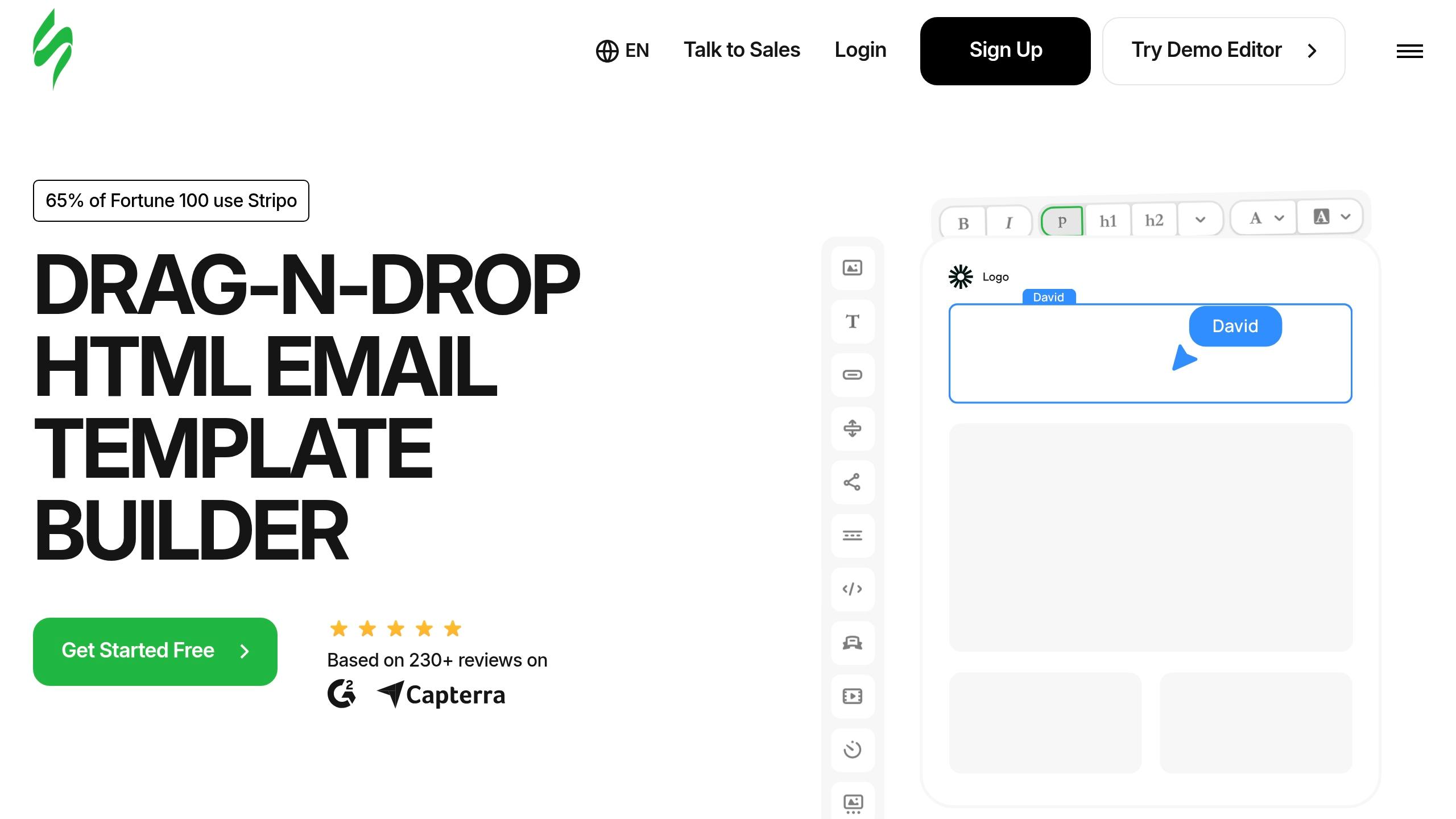
Stripo is a specialized platform for email design, trusted by 1.6 million users worldwide. Unlike all-in-one marketing tools, Stripo focuses exclusively on creating responsive emails. It integrates seamlessly with over 80 email service providers (ESPs), including Mailchimp, HubSpot, Klaviyo, ActiveCampaign, and Salesforce Marketing Cloud. Let’s break down what makes Stripo stand out.
Responsiveness
Stripo takes a mobile-first approach, making it easy to design emails that look great on any device. You can directly edit mobile versions to tweak padding, margins, fonts, and button sizes. Features like element visibility controls and container inversion ensure layouts adapt perfectly to both mobile and desktop screens. Stripo also integrates with Email on Acid, allowing designers to preview emails across 102 different clients - covering mobile, desktop, web, and even dark mode compatibility.
Template Variety
Stripo offers an impressive collection of over 1,600 templates, catering to different industries, campaign goals, and seasonal events. For those looking to add interactive elements, the platform includes 100+ AMP-ready templates with features like carousels, accordions, and forms. These interactive tools can significantly boost engagement - up to 520% in some cases. Additionally, Stripo allows users to save individual content blocks or entire multi-row structures as reusable modules, ensuring consistent branding across campaigns.
Export Options
Stripo simplifies the export process with one-click options for over 80 email platforms, requiring no extra coding. For platforms not directly integrated, users can export designs via Webhooks, Zapier, or as raw HTML/AMP HTML. Stripo also supports direct exports to Gmail and Outlook or lets you download designs as PDF, JPG, PNG, or HTML files. These flexible options ensure your email designs retain their quality and functionality, even when edited within some ESPs' native tools.
Pricing
| Plan | Price (Monthly) | Users | Exports/Month | Test Emails/Day |
|---|---|---|---|---|
| Free | $0 | 1 | 4 | 5 |
| Basic | $15 | 1 | 50 | 50 |
| Medium | $45 | 3 | 300 | 100 |
| Pro | $95 | 10 | Unlimited | 300 |
The free plan provides access to Stripo’s full library of 1,600+ templates and allows users to store up to 10 email designs. Paid plans unlock premium features, including advanced templates, increased export limits, and enhanced email client testing. Opting for annual billing reduces the Pro plan’s cost to $79/month.
3. BEE Free
Next on the list is BEE Free (also known as Beefree), a tool designed with a clear focus on creating visually appealing emails. Available in 150 countries, BEE Free is all about making professional email design accessible without requiring coding skills. Unlike platforms that handle the entire email marketing process, BEE Free zeroes in on design and export, leaving the sending process to your preferred email service provider.
Responsiveness
BEE Free shines when it comes to mobile-friendly designs. It automatically creates responsive templates, but what sets it apart is the Mobile Design Mode. This feature lets you edit the mobile version of your email separately from the desktop version, giving you precise control over how your content appears on smaller screens. This is a big deal, especially since 71.5% of people primarily check their emails on mobile devices. You can tweak mobile-specific elements by hiding rows or blocks, reversing column orders, and adding mobile-only styles. Additionally, it avoids layout issues in email clients like Outlook by steering clear of nested columns. For those using dark mode, there's even a preview feature to ensure your email remains easy to read.
Template Variety
With over 1,900 responsive email and landing page templates, BEE Free offers plenty of options. Templates are grouped into "Collections" for specific purposes, such as welcome emails, abandoned cart reminders, and seasonal promotions. The free plan grants access to all templates, and with just one click, you can transform an email design into a landing page. This feature helps keep your branding consistent across different campaign formats.
Export Options
BEE Free makes exporting your designs seamless. You can export directly to 29 email service providers, including Mailchimp, HubSpot, Salesforce Marketing Cloud, Campaign Monitor, and Brevo. For platforms without built-in integrations, a webhook-based Custom Connector is available. Other export options include downloading a ZIP file of HTML and images, copying the HTML code, exporting as a PDF for offline use, or sending drafts directly to Gmail or Outlook. Plus, a native Canva integration allows you to bring your Canva designs straight into the email builder.
Pricing
| Plan | Price (Monthly) | Key Features |
|---|---|---|
| Starter (Free) | $0 | 10 emails/designs, 6 exports/month, BEE branding, unlimited users |
| Professional | $30 | Unlimited emails and exports, no branding, ideal for small teams (2–3 users) |
| Business | $160 | Unlimited emails and exports, advanced brand controls, great for scaling teams |
| Enterprise | Custom | Multi-level collaboration tools, advanced workspaces, custom pricing |
BEE Free's free plan is generous, offering unlimited users and full access to its template library. However, the limit of 6 exports per month may push frequent users to consider upgrading. Pricing is listed monthly, with no mention of discounts for annual billing.
4. Mailchimp Builder
Mailchimp's builder is designed to ensure emails look great across all devices, offering tools for responsive design and mobile optimization. It comes in two versions: the Classic (Legacy) Builder and the newer WYSIWYG Builder, which allows you to make changes directly on the canvas.
Responsiveness
The New Builder automatically adjusts email layouts for mobile screens, ensuring flawless rendering on any device. It separates desktop and mobile styles for more precise control and incorporates Litmus testing to verify consistent rendering across email clients. This attention to responsiveness supports a wide range of templates that cater to different marketing objectives.
Template Variety
The New Builder offers an impressive library of over 250 pre-designed templates, compared to around 100 in the Classic Builder. These templates are categorized by marketing goals - like "Welcome", "Newsletter", "Sell Products", or "Grow SMS List" - and can also be filtered by industry (e.g., e-commerce, education, nonprofit) and style (e.g., minimalist, bold, professional). Customization is straightforward with a drag-and-drop interface and pre-configured content blocks. For those who prefer more control, the "Code Your Own" option allows importing custom HTML, although this feature requires a Standard plan or higher.
Export Options
Mailchimp also supports exporting custom-coded templates as HTML files. For users who want to back up their accounts, Mailchimp allows the export of all saved templates and campaign data. Moving templates between accounts is easy with the "Share" feature, which generates a shareable link for seamless transfers. Developers can take advantage of the Mailchimp Marketing API (v3.0) to programmatically retrieve campaign content or export data across the account.
Pricing
| Plan | Price (Monthly) | Key Features |
|---|---|---|
| Free | $0 | 250 contacts, 500 monthly sends, basic templates |
| Essentials | $13 (500 contacts) | A/B testing, 24/7 support |
| Standard | $20 (500 contacts) | Custom HTML templates, advanced automations, predictive segmentation |
| Premium | $350 (10,000 contacts) | Multivariate testing, priority phone support, unlimited contacts |
Pricing increases with the number of contacts, and Mailchimp offers a 15% discount for accounts with over 10,000 contacts. To unlock advanced features like custom HTML templates or predictive segmentation, you'll need to upgrade to the Standard plan or higher.
5. Brevo Builder
Brevo, previously known as Sendinblue, combines responsive email design with a comprehensive marketing suite. This includes SMS, WhatsApp, and a built-in CRM. Its drag-and-drop editor ensures your email designs are optimized for all devices automatically.
Responsiveness
Brevo offers dedicated preview modes for both desktop and mobile, allowing users to fine-tune layouts independently for mobile devices. This ensures even complex, multi-column designs retain their integrity across various email clients. As Remy Frost from Labnify highlights:
Brevo gives you more granular control over how your emails appear on different devices. You can preview and adjust mobile layouts separately, which professional designers often prefer.
The platform also includes a Brand Kit Creator, which pulls assets like logos, colors, and fonts directly from your website URL. This feature guarantees consistent branding across all responsive email templates. In recent tests, Brevo achieved an average email deliverability score of 81.07%. Additionally, it offers over 50 pre-made templates tailored for business needs, covering categories such as onboarding, re-engagement, anniversaries, and welcome series.
Template Variety
With around 50 mobile-responsive templates available, even users on Brevo's free plan can access a robust selection. These templates can be customized through the drag-and-drop editor or a dedicated HTML editor. The integrated Brand Library further simplifies the process by automatically applying your brand’s style to every email.
Export Options
Brevo is designed to be an all-in-one platform for managing campaigns rather than just a design tool. It integrates with over 300 external tools and supports multichannel outreach across email, SMS, WhatsApp, web push notifications, and Facebook ads. For those needing advanced integrations, Brevo provides a REST API (v3) that allows for weekly event exports and automated messaging across multiple channels. Users can also incorporate HTML blocks or export/import custom-coded HTML files when needed.
Pricing
Brevo takes a pay-per-email approach instead of charging based on subscriber count, making it an economical choice for businesses with extensive contact lists but infrequent email campaigns. Its free plan is particularly appealing, offering 300 emails per day with unlimited contacts, access to the full template library, and transactional email support - features often locked behind paywalls on other platforms.
| Plan | Price (Monthly) | Key Features |
|---|---|---|
| Free | $0 | Unlimited contacts, 300 emails/day, Sales CRM, Transactional emails |
| Starter | From $9 | Basic features, full template library, no daily sending limit |
| Business | From $18 | Marketing automation, A/B testing, enhanced reporting |
| Enterprise | Custom | Unlimited emails, dedicated account manager, custom integrations |
Brevo has garnered a 4.5/5.0 rating on G2 and was recognized with a "Value-for-Money" badge in 2023 by EmailToolTester. As Sapna B., a Digital Marketing Manager, shared:
The best thing about Brevo is its user interface, through which we can easily create a perfect email campaign; we just need to sign up for the platform and start using its ready-made templates.
Next, we’ll take a closer look at MJML’s approach to responsive email design.
6. MJML
MJML is a free, open-source framework designed for developers who want to create responsive emails using a specialized XML-like markup language. Originally developed by Mailjet in 2015 and later released as open-source, MJML has gained a strong following, with over 9,100 stars on GitHub as of August 2019.
Responsiveness
At its core, MJML simplifies email development by using a transpilation engine that converts custom tags like <mj-column> and <mj-section> into cross-client compatible HTML. This means developers can skip the tedious process of manual table coding and CSS hacks. MJML takes care of column stacking, ensuring multi-column layouts for desktops automatically adapt to single-column designs on mobile devices - no extra effort required.
Its component-based structure includes pre-tested elements such as text blocks, images, buttons, and carousels. These components are optimized to render consistently across major email clients like Outlook, Gmail, and Apple Mail. Paolo Mioni highlights its efficiency:
MJML is very good if you need to do relatively simple layouts very quickly.
However, there is a limitation: MJML supports a maximum of four columns per section to ensure designs look good and function well across different email clients.
Template Variety
MJML offers around 20 free responsive templates that cater to common email needs, such as Black Friday promotions, welcome emails, receipts, and niche designs for industries like real estate and e-commerce. Although this library is smaller compared to visual builders, these templates are highly customizable, giving developers a strong starting point for tailored designs.
Export Options
As a compiler, MJML allows you to export your email designs as standard HTML files through its command-line interface (CLI), online editor, or desktop app. Developers can also export designs as JSON objects for integration into custom applications. Additionally, MJML integrates seamlessly with build tools like Gulp, Webpack, and Grunt.
The desktop app offers direct email-sending features when linked to a Mailjet account. For developers working in IDEs, plugins for VS Code, Atom, and Sublime Text enable real-time previews and on-the-fly compilation. The resulting HTML is compatible with any email service provider that supports HTML imports.
Pricing
MJML is completely free to use as an open-source framework. There are no subscription fees, usage limits, or premium features locked behind paywalls. Both the online editor and desktop app, along with IDE plugins, are available at no cost.
Next, let’s explore how Topol.io balances visual design with technical flexibility.
7. Topol.io
Topol.io is a cost-effective tool designed for creating simple, responsive email designs. It’s an excellent choice for small businesses and marketers looking for straightforward functionality without the need for extensive features. Let’s break down what Topol.io offers in terms of design, export options, and pricing.
Responsiveness
Topol.io ensures its templates are optimized for desktop, mobile, and tablet views. It uses pre-tested components that display consistently across email clients. The platform generates clean HTML5 code, avoiding unnecessary clutter, and includes a built-in preview tool to check layouts on both desktop and mobile before exporting. However, its mobile adaptability is considered "partial" when compared to more advanced tools - not all design elements adjust seamlessly to mobile formats. This makes it a practical choice for users with simpler design needs who don’t require highly advanced mobile editing.
Template Variety
With over 150 HTML templates, Topol.io’s library covers categories like e-commerce, business, and holidays. Most templates are accessible on the free plan, while Pro users get access to premium designs. The platform also allows users to save custom blocks for quicker future designs and offers a free image gallery powered by Pexels.
Export Options
Topol.io supports direct exports to platforms such as Mailchimp, Brevo, SendGrid, and Constant Contact. Users can also export files as HTML5, JSON, or PDF, and the tool integrates with major email service providers, including Gmail and Outlook. For developers, Topol.io provides an embeddable Plugin (SDK) that can be integrated directly into SaaS applications.
Pricing
Topol.io’s Pro plans are priced between $10 and $15 per month, offering features like access for three team members, 5 GB of data traffic, premium templates, and merge tags. A free plan is available for personal use, with limited features and the same 5 GB traffic allowance. For SaaS providers, the Plugin pricing starts at $60/month for the Startup plan (50 prepaid users) and goes up to $600/month for unlimited users. However, unlike competitors such as Stripo or Blocks, Topol.io does not include advanced features like AMP support, a built-in HTML code editor, or AI-driven text and image generators.
Next, we’ll explore how Beefree caters to enterprise-level email design needs.
8. Beefree
Beefree brings powerful team collaboration and brand consistency tools to the table, making it a go-to option for enterprise users. With over 1,900 templates, it has helped achieve an average 24.96% boost in click-through rates. Rated 4.7 out of 5 stars on G2 as of April 2024, and with 82% of users reporting faster email creation, it’s clear that Beefree is designed for marketers with advanced needs, especially those requiring detailed mobile optimization and teamwork features.
Responsiveness
Beefree’s Mobile Design Mode allows users to edit emails directly in a mobile view, ensuring designs look great on smaller screens. Separate settings for mobile and desktop let you fine-tune text sizes, margins, and alignments for each device. Features like stack order control and visibility toggles help maintain a clean, logical layout across platforms. Additional tools, such as a dark mode preview and support for the lang attribute, further enhance accessibility for mobile users.
Enterprise clients have seen real results from these mobile optimization features:
"Ensuring an on-brand mobile experience, in addition to our desktop viewing, is crucial for our readers' consistent content access. It really helped to push our audience retention rates through the roof." - Jeff Miskis, Principal, Facture
Template Variety
Beefree’s library of over 1,900 templates is tailored for enterprise collaboration, featuring industry-specific collections and the option to import custom HTML for seamless brand alignment. These templates cater to a wide range of industries, including e-commerce, real estate, nonprofit, beauty, fashion, and food, as well as seasonal campaigns. Importantly, all plans - even the free Starter tier - offer full access to the template library. Plus, you can convert existing HTML templates into editable designs, making it easier to stay consistent with your branding.
Export Options
Beefree excels in export flexibility. Its Custom Connector uses webhooks to integrate with virtually any ESP or CRM, in addition to its 29 native integrations. You can export designs as HTML (ZIP with images), PDF, PNG, or JPG, or send them directly to Gmail and Outlook. A standout feature lets you transform email designs into landing pages with just one click, streamlining your workflow.
Pricing
Beefree offers a free Starter plan that includes 6 exports per month, 10 designs, and unlimited users. The Professional plan, priced at $30/month (or $25/month annually), includes unlimited exports and brand kits for 2–3 users. For larger teams, the Business plan costs $160/month (or $133.33/month annually) and adds features like approval workflows, an AI visual generator, and real-time co-editing. Enterprise pricing is customized and includes advanced tools like multi-workspace management, SSO, and a dedicated success manager. Impressively, 41% of users reported seeing ROI in less than a month.
Pros and Cons
Responsive email builders come with their own sets of strengths and limitations. Here's a closer look at what each tool offers and where they might fall short, based on the features discussed earlier:
Stripo stands out with its impressive library of over 1,500 templates and support for interactive AMP emails. Its dual-editor setup lets users switch between a drag-and-drop interface and direct CSS/HTML editing, offering precise control over designs. However, the downside is that adding multiple users requires upgrading to higher-priced plans, which could be a challenge for small or growing teams.
Beefree is a favorite among visual designers, thanks to its built-in library of more than 500,000 stock images and GIFs. This feature eliminates the need to source assets elsewhere, saving time. But there's a catch: the free plan includes Beefree branding on emails, which might not appeal to businesses focused on maintaining a polished brand identity.
Mailchimp and Brevo combine email design with delivery services, offering an all-in-one solution. While convenient, this integration limits design flexibility compared to standalone builders, particularly in areas like padding, spacing, and advanced customization options.
MJML is geared toward developers, offering semantic markup that ensures emails are responsive across different clients. As an open-source tool, it's free to use, but it does require coding skills. As Kasey Steinbrinck from Email on Acid aptly said:
Asking an email developer to build a campaign in a drag-and-drop editor is like giving Picasso a box of crayons.
Topol.io is a user-friendly option aimed at beginners. It integrates with Pexels for quick access to images, making it easy to create visually appealing emails. However, its free plan has limited integration options, which might push users to upgrade sooner than anticipated.
Here's a summary of the key benefits and drawbacks for each tool:
| Tool | Best For | Key Advantage | Key Disadvantage |
|---|---|---|---|
| Stripo | Advanced Users | 1,500+ templates & AMP support | Expensive plans for multiple users |
| Beefree | Visual Designers | 500k+ stock images & GIFs | Free plan includes branding |
| Mailchimp | All-in-one Users | Seamless ESP integration | Limited design flexibility |
| MJML | Developers | Responsive emails via semantic markup | Requires coding knowledge |
| Topol.io | Beginners | Easy-to-use; Pexels integration | Limited integrations on free plan |
| Brevo | Integrated Marketing | Simple design within ESP | Less freedom in customization |
Conclusion
This comparison shows that different email builders shine in distinct ways, depending on your project's needs and your level of technical expertise. Choosing the right tool boils down to aligning it with your workflow and specific requirements.
For developers: MJML stands out with its free, open-source framework that gives you complete control using semantic markup. Meanwhile, Sequenzy simplifies SaaS billing workflows by offering native Stripe and Polar integrations, starting at $19/month, so you can skip custom webhook coding.
For small businesses and beginners: Platforms like Mailchimp and Brevo are designed with simplicity in mind, combining email design and sending features in one interface. These are ideal for solo users or small teams who prioritize ease of use over advanced customization options.
For collaborative teams: Stripo is a solid choice, offering tools like workspace organization and shareable preview links for team feedback, with plans starting at $9.99/month. Similarly, Beefree provides collaborative templates and reusable blocks, helping teams save time during the design process.
For visual designers: Tools like BEE Free/Beefree come loaded with over 500,000 stock images and GIFs, so you don’t have to search for assets elsewhere. Additionally, Topol.io integrates with Pexels, making it simple to access high-quality images for crafting visually stunning emails.
Take a closer look at the sections above to pinpoint the email builder that aligns best with your design goals and workflow.
FAQs
How do I choose the right builder for my team?
To find the right email builder for your team, start by evaluating your team's technical expertise, workflow, and specific campaign requirements. If your team lacks coding skills, visual drag-and-drop tools are a great choice for creating designs quickly without needing technical knowledge. On the other hand, if you need more flexibility for advanced templates, code-based tools can provide the customization you’re looking for.
Don’t forget to think about other important factors like scalability, integration options, collaboration features, and whether the builder ensures mobile-friendly designs. These elements are essential for supporting your team’s objectives and crafting impactful email campaigns.
Do I need HTML coding skills to create responsive emails?
No, you don’t need HTML coding skills if you’re using drag-and-drop builders. These tools let you design visually without touching any code. However, if you’re working with HTML email builders and want to fully customize your design, knowing HTML becomes essential.
How can I test my emails across clients like Gmail and Outlook?
Testing your emails with specialized tools is a smart way to ensure they look and perform as intended across various email clients, like Gmail and Outlook. These tools can check for proper display, identify potential spam risks, and analyze factors like visual rendering, inbox placement, and automation workflows. By doing this, you can avoid broken layouts and boost the success of your email campaigns.