Most teams do not need more channels - they need one customer view that works across the channels they already use. If I were buying a CDP for cross-channel personalization, I’d judge it on four things: data fit, identity matching, activation speed, and governance. That matters because 46% of marketers have only a few channels connected, and more than 25% have none connected at all.
Here’s the short version:
- I’d start with 2 to 3 use cases for the next 90 to 180 days
- I’d check whether the CDP can unify data from CRM, site, app, POS, and support tools
- I’d test whether identity stitching and profile updates can support near-live triggers, with a target data loop under 300 milliseconds
- I’d verify what integrations actually sync - fields, timing, backfill, and two-way data flow
- I’d review channel support for email, SMS, push, web, and paid media
- I’d require reporting that shows cross-channel results in one place
- I’d run a 4-week POC with about 500,000 profiles
- I’d score vendors on fit, cost, team load, privacy, and reporting - not on slideware
The main point is simple: the right CDP is the one your team can set up, trust, and use to launch one working journey fast. Everything else comes after that.
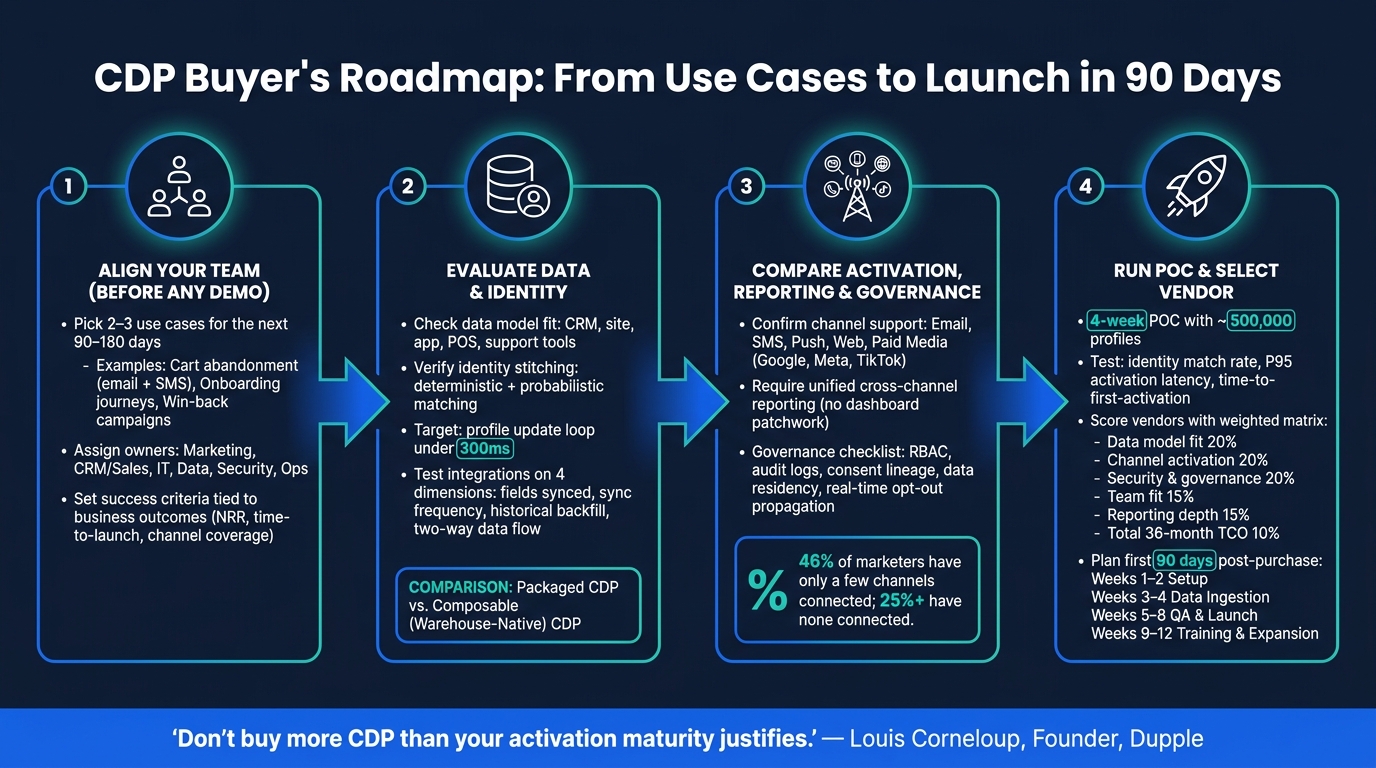
CDP Buyer's Roadmap: From Use Cases to Launch in 90 Days
CDP 101: A Practical Guide to Visitor Stitching
sbb-itb-6e7333f
1. Align your buying team around use cases, owners, and success criteria
CDP deals often slow down when teams shop for what they might need later instead of the two or three journeys they plan to launch in the next 90 to 180 days. The better move is simple: pick the outcomes first, then pick the tool. If you line up use cases before any demo, your shortlist will reflect what the business needs - not who gives the slickest presentation.
Define your first use cases before you talk to vendors
Start with what your team is actually going to build in the next 90 to 180 days. For most teams, that means a small set of practical journeys:
- Cart abandonment sequences across email and SMS
- Onboarding journeys for new customers
- Win-back campaigns for lapsed buyers
After that, rank each use case by revenue impact, implementation effort, and data readiness. That step helps you sort the nice-to-have ideas from the ones you can launch soon. Once the use cases are set, put names next to the work. Who makes the call, and who owns execution?
Assign decision-makers, approvers, and day-to-day operators
Each team should own a clear part of the evaluation and rollout.
| Stakeholder Group | Role in Buying Process | Ongoing Ownership |
|---|---|---|
| Marketing | Define use cases; run campaigns | Campaign execution and audience building |
| CRM / Sales | Define sales and service data needs | Use unified profiles for engagement |
| IT / Engineering | Vet architecture; implement | Pipeline maintenance |
| Data / Analytics | Model identity; monitor quality | Data quality and reporting |
| Security / Legal | Review privacy and consent | Data governance and consent oversight |
| Operations | Workflow integration and operational review | Day-to-day system management |
With the buying team in place, the next step is to get clear on what the CDP must deliver for the business.
Set buying criteria tied to business outcomes
Your evaluation criteria should connect to results the business can measure - not a long feature sheet. Before demos start, agree on what success looks like across a few specific areas: time to launch the first live journey, usable reporting, whether nontechnical users can build segments without engineering help, channel coverage for the journeys you ranked, and the expected effect on net revenue retention (NRR).
This keeps the process grounded. Every criterion should tie back to a business result, so demos stay focused on what the team will use day to day. Those criteria then become your filter for demos, scoring, and final selection.
2. Check data model fit, identity resolution, and integration depth
Once your use cases are clear, look at whether the CDP can model the data those journeys rely on. Don’t start with the UI. Start with the data model. The main question is simple: does this CDP fit the way your customer data is set up?
Verify profile structure and data source coverage
Before you look at campaign tools or activation features, check whether the platform can represent your customer relationships in the first place. B2C CDPs focus on individuals. B2B CDPs also need to support accounts and buying groups. If that structure is off, the platform won’t support the journeys you ranked in section 1.
Your main transaction systems, behavior data, and offline sources - like in-store purchases or call center records - should all be ingestible. If one source is missing, you’ll feel it everywhere. That gap shows up in every audience, every segment, and every triggered flow built on top of it.
Data structure is only the first layer. After that, identity resolution decides whether the profile is usable at all.
Review identity matching, deduplication, and profile freshness
Platforms usually use two core methods: deterministic matching, which relies on exact identifiers, and probabilistic matching, which uses machine learning to predict matches from behavior and device signals.
Deduplication quality varies a lot by vendor. So during the review, ask how each vendor handles anonymous-to-known stitching using your messy customer data - not a clean demo dataset.
Profile freshness matters too. Updates need to reach activation fast enough to support live triggers like cart abandonment. If updates lag, your so-called real-time journeys become batch sends instead.
Test what integrations actually do, not just what vendors claim
This is where a lot of teams get burned. A connector on a slide is not the same as a connector that works the way you need it to.
Focus on four things:
- Which fields sync
- How often they sync
- Whether historical backfill is supported
- Whether data moves in both directions
That last point matters more than many teams expect. If an integration only pushes audiences to your ESP but never pulls back engagement data - opens, clicks, unsubscribes - your CDP profiles go stale and your suppression logic has holes.
Also, connector breadth is not the same thing as connector depth. Even native connectors for top email marketing platforms often need several hours of engineering work to set up field mapping and sync rules. Keep the review tight and concrete: fields, sync frequency, backfill, and two-way flow.
The architecture choice matters here too. Warehouse-native CDPs run on top of your existing Snowflake or BigQuery setup, so the data stays in your warehouse. Packaged CDPs copy data into vendor-managed storage. Neither option is better across the board. The right pick depends on whether your team already has a central warehouse and whether you have the engineering bandwidth to support it.
| Capability | Packaged CDP | Composable (Warehouse-Native) CDP |
|---|---|---|
| Data Storage | Vendor-managed storage | Your data warehouse (Snowflake/BigQuery) |
| Identity Resolution | Transparent/SQL-based | Vendor-managed |
| Setup Speed | Faster for simple use cases | Requires existing warehouse and data engineer |
| Governance | Vendor-managed | Native to your existing warehouse policies |
| Cost Structure | Often per-profile or per-MTU | Usage-based or per-sync |
After you’ve proved the data flow works, the next step is channel activation and governance.
3. Compare channel activation, reporting, and governance before you shortlist vendors
Once your data model checks out, the next step is simple: make sure the CDP can use that data across the channels your team runs today - and show results in one place. This is the point where you tighten the shortlist before a live proof of concept.
Confirm channel support for email, SMS, push, web, and paid media
Some CDPs handle activation inside the platform. Others connect to outside tools. Neither setup is automatically the right one.
If your team already has a strong ESP and ad tech stack, connectors may do the job. If you want to run journeys from one system, a CDP with native activation can cut down on extra handoffs and tool sprawl.
For each channel your team uses, verify the basics:
- Journey orchestration
- Frequency capping
- Suppression logic
- Web personalization
For paid media, check whether the platform syncs audiences to Google, Meta, and TikTok. Then look at sync speed. A vendor may say the connector exists, but if updates lag, that can limit what your team can do in practice.
Require reporting that measures performance across channels
Channel activation is only half the job. The platform also needs to show what those channels produce.
A CDP should measure performance across channels in one place. It shouldn't force your team to patch together separate dashboards just to answer simple questions.
Ask for reporting on audience growth, holdout-tested conversion lift, and channel-level attribution. Also confirm export access to your warehouse or BI tool. Use holdout tests to measure incrementality.
Dashboards inside the CDP help with day-to-day monitoring. But for deeper analysis, most data teams will still want direct access to the raw outputs.
Complete the security, privacy, and governance review
This is the step teams rush most often. It's also where deals can go sideways after the contract is signed.
The core issue is straightforward: do the vendor's controls match your compliance rules?
For U.S.-based companies, consent handling matters a lot. The CDP should centralize consent records and push opt-outs to downstream systems - including your ESPs and ad platforms - in real time.
Beyond consent, verify RBAC, audit logs, consent lineage, and data residency.
Here's one practical point. Governance features that are bolted on, instead of built into the platform, often lead to brittle workflows. Ask vendors whether consent management and audit logging are native or handled through a third-party integration. That answer usually tells you how much engineering work your team will be stuck with after go-live.
If a platform clears these checks, the next move is to test it on one live journey before you buy.
4. Run a proof of concept and choose a rollout plan
Build your proof of concept around one or two live journeys
Once you have a shortlist, test the CDP with live data before you sign. A POC is a live test - not a polished demo. Keep it to 4 weeks and use about 500,000 profiles.
Center the POC on one or two journeys you can measure, like a real-time cart-abandonment trigger or identity matching across markets. The point is simple: see how the platform handles your data in day-to-day use. If compliance affects the decision, add a consent-withdrawal test too. Check match rate, activation latency, and live journey delivery.
Set your pass-fail marks before the POC starts. That means your minimum identity match rate, your P95 activation latency target, and your time-to-first-activation goal should all be locked in up front.
When the POC wraps, compare vendors using the same weighted scorecard.
Use a weighted decision matrix for final selection
Score each vendor against the same criteria you used for the shortlist. This cuts down on gut-feel decisions and gives the buying team one shared frame of reference. Set the weights based on what your team cares about most.
| Criteria | What to evaluate | Suggested weight |
|---|---|---|
| Data model fit | IDR accuracy, support for multiple languages and character sets, profile freshness, deduplication | 20% |
| Channel activation | Native connectors, sync speed, journey orchestration, real-time latency | 20% |
| Security & governance | GDPR/CCPA compliance, jurisdiction-aware consent, data residency | 20% |
| Team fit | No-code segment builder, UI clarity, required FTEs | 15% |
| Reporting depth | Cross-channel attribution, predictive modeling, AI-assisted segments | 15% |
| Total cost (36-month TCO) | License, implementation, annual escalators, internal headcount | 10% |
Total cost is more than the software line item. Include license, implementation, and internal labor. As a working estimate, plan for about 1.5 FTEs to run the platform day to day.
"A perfect unified profile is worthless if no one's using it to run campaigns. Don't buy more CDP than your activation maturity justifies." - Louis Corneloup, Founder, Dupple
After you choose a vendor, start with one high-value journey. Then expand in stages.
Plan your first 90 days after purchase
Use the first 90 days to show impact on retention or expansion with one live journey. The timeline below lays out a practical sequence of work.
| Phase | Timeline | Key activities |
|---|---|---|
| Setup & alignment | Weeks 1–2 | Finalize high-value use cases, assign owners across marketing ops, tech, and data, map data sources |
| Data ingestion | Weeks 3–4 | Ingest core sources such as CRM, web, and POS; configure identity resolution rules; QA initial segments |
| QA and launch | Weeks 5–8 | QA segments, validate data accuracy, monitor P95 latency, launch the first live channel (email or SMS), document governance |
| Training & expansion | Weeks 9–12 | Train operators and define the expansion path for additional channels |
Conclusion: Choose the CDP your team can actually use to improve retention and expansion
Choose the CDP that fits your use cases, data model, and operating team - not the one with the longest feature list.
Once you have a shortlist, start with the first practical test: identity resolution. Identity resolution, along with sub-300-millisecond activation, is the baseline for personalization that people can use in practice.
Then look at activation and measurement. The CDP should support journeys across channels and let your team measure them without jumping between tools. You also want cross-channel reporting in one view, plus native consent propagation across email, SMS, push, and paid media.
After you pick a vendor, the first 90 days should prove the system in one live journey. That early test tells you a lot. Your final choice should line up with your data architecture and your team's technical capacity.
For email activation tools, Email Service Business Directory lists platforms, tools, and agencies, including lifecycle and retention resources.
FAQs
How do I know if my team is ready for a CDP?
Your team is likely ready for a Customer Data Platform when your data setup has outgrown the tools you use today.
Common signs include:
- Managing 5 or more data sources
- Needing identity resolution
- Sharing unified profiles across marketing, sales, and support
You may also be ready if audience building is still manual, personalization only goes so far, or reporting feels scattered across teams and tools.
It also helps to check your technical readiness. For example, do you already have a data warehouse? Do you have engineering support to help with setup, data flow, and ongoing upkeep?
When those pieces start lining up, a CDP usually makes a lot more sense.
What match rate is good enough for a CDP pilot?
There’s no single match rate that counts as “good enough” for a CDP pilot.
A better approach is to test with a representative sample - one that includes messy data, duplicate records, and records with partial consent. That’s the kind of data your team deals with in real life, so that’s what the pilot should be built around.
A strong pilot proves value through one specific, high-value end-to-end journey, not just a percentage on a dashboard. The goal is to show that the system can handle the work that matters: identity resolution, deduplication quality, and the speed of processing and activation.
In plain English, a pilot should answer a simple question: Can this CDP turn messy customer data into something your team can use fast enough to drive action?
Should I choose a packaged or warehouse-native CDP?
It comes down to the data stack you already have - and the team you have to run it.
Choose a warehouse-native CDP if you already use a cloud data warehouse and have SQL or dbt support. That setup usually fits teams that want more control over their data and workflows.
Choose a packaged CDP if you want an all-in-one, plug-and-play system and don't have a data warehouse in place. Packaged CDPs are often simpler to deploy, while warehouse-native CDPs can be more cost-effective and secure.