I assign data authority by field, not by platform. My starting point: CRM owns sales fields, CDP handles cross-source identity, and ESP enforces email sendability. I use 4 controls to settle conflicts: identity matching, source ranking, overwrite rules, and sync limits.
The key distinction: matching records does not decide which value wins. I separate those decisions, protect verified values, and prevent routine imports from clearing suppression.
Quick Comparison
| Control | CRM | CDP | ESP |
|---|---|---|---|
| Identity matching | Record and external IDs; duplicate checks | Cross-source person matching | Contact IDs and send-system keys |
| Source ranking | Field ownership and verification | Field-specific source priority | Consent authority and suppression rules |
| Overwrite rules | Approved writers; blank-only or reviewed changes | Select values after matching | Field mappings; protect opt-outs and bounces |
| Sync limits | API limits, validation, write-back restrictions | Ingestion limits and destination permissions | Import limits, rejected rows, suppression checks |
| Main risk | Duplicates and stale writes | Wrong merges and split profiles | Lost consent and unwanted resubscription |
Before enabling sync, I test delayed updates, retries, blanks, deletions, and unsubscribe propagation. <u>A newer import must not override a better-supported value or restore send eligibility.</u>
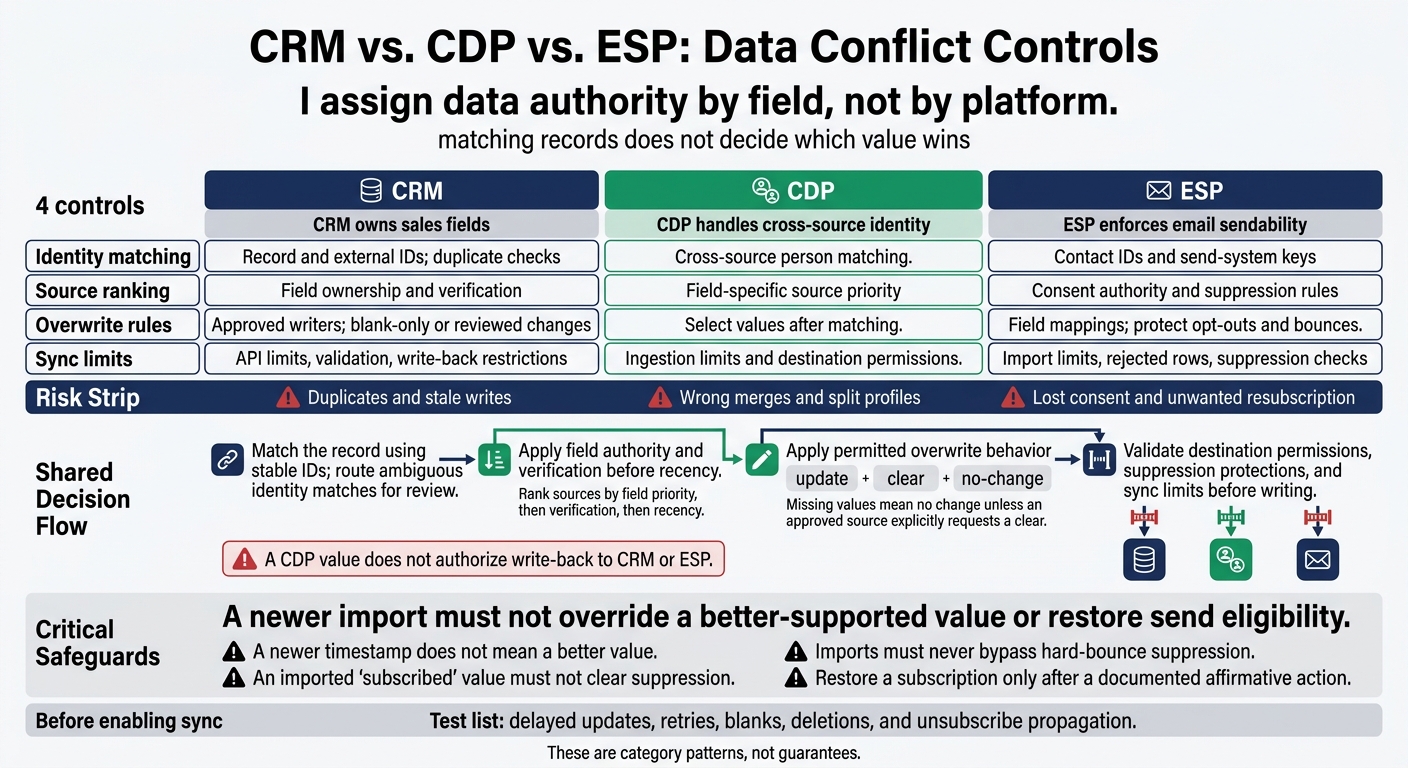
CRM vs. CDP vs. ESP: Data Conflict Controls
Resolving synchronization conflicts with Dynamics 365 for Sales
sbb-itb-6e7333f
CRM: Record Ownership and Update Rules
The CRM stores records for accounts, contacts, leads, opportunities, and service history. Limit automated writes to approved fields and keep verified data separate from enrichment to protect CRM context. Match the record first, then decide which fields can change.
Match CRM Records and Protect Verified Fields
Match the record before updating it. Start with the CRM record ID or a unique external ID. For accounts, use account numbers or company domains. Use normalized email addresses and phone numbers as secondary signals. Email-only matching can confuse shared mailboxes or miss a match when an address changes. Send ambiguous matches for review rather than merging them automatically.
Apply field-level permissions to lifecycle stage, opportunity status, and manually verified relationship details. Track each field’s source, verification status, last verified date, and permitted writers. Approved integrations can fill blanks or update stale, unverified fields, but they cannot overwrite manually verified values.
After matching the record, choose an overwrite rule to determine which value wins.
Compare CRM Field Overwrite Methods
Choose the rule that best protects trusted CRM values.
| Method | Use case | Strengths | Weaknesses | Needed |
|---|---|---|---|---|
| Object-level ownership | One application controls most object fields | Simple to administer | Treats unrelated fields alike | Clear object owner; restricted writes |
| Per-field ownership | CRM, enrichment, and marketing share updates | Protects trusted values | Requires detailed configuration | Field authority matrix; source history |
| Blank-only updates | Fill empty fields | Preserves existing values | Leaves stale values unchanged | Defined blank, null, and clear behavior |
| Newest timestamp wins | Frequently changing attributes | Selects the latest event | Late or wrong updates can look newer | Trusted event times; normalized time zones |
| Human review | Ambiguous or high-risk changes | Protects critical business data | Slower; queues need ownership | Review thresholds; assigned steward |
A newer timestamp does not mean a better value. Compare source event time - not just import time - alongside verification status and field authority. Treat missing values as no change unless an approved source explicitly requests a clear. Keep update, clear, and no-change separate so incomplete exports cannot erase verified data.
Apply these same authority rules during sync to prevent duplicates.
Prevent Duplicate Records and Sync Loops
Use upserts keyed to stable external IDs. Incomplete mappings create duplicates. Some CRMs use separate matching and duplicate rules: matching rules find possible matches, while duplicate rules decide whether to allow, warn, or block the operation.
For bidirectional sync, restrict write-back by field and compare values before writing. Keep origin markers and event IDs to prevent replay, plus field-level source history to investigate stale timestamps and conflicting writes.
Route uncertain account changes, lifecycle reversions, and verified-value conflicts to an exception queue. Include the competing values, timestamps, and a named reviewer. Aim to review high-impact conflicts within 1 business day.
CDPs apply the same record-control logic to identity resolution across sources.
CDP: Identity Matching and Value Selection
CRM rules govern individual records. A CDP resolves profile conflicts across sources. Survivorship decides which value wins when matched records disagree. Profile accuracy depends on identifier quality, match rules, and source priority - not simply more data. The conflict involves both identity and which source wins for each field.
Distinguish Match Rules from Merge Rules
Match first. Merge second. Matching decides whether records belong together. Merging decides what to keep. Configure these rules separately: even a correct identity match can retain the wrong field value. An account ID may identify a business or household, so it cannot establish a person's identity on its own.
| Control | Purpose | Failure risk |
|---|---|---|
| Descriptive attributes | Support matching with name, address, and phone | Mistaking similar details for the same identity |
| Survivorship | Select values by source priority, verification, and recency | Applying one global rule that selects unreliable values |
Rank Data Sources and Protect Identifiers
After matching, set source priority for survivorship. Rank sources by field priority, then verification, then recency. Use CRM for sales-owned fields, loyalty for membership, and the consent system for permissions. A recent import does not mean a value was recently verified.
Protect stable identifiers, but allow corrections that record the old value, replacement, reason, source, reviewer, and timestamp. A CDP value does not authorize write-back to CRM or ESP. Set write-back permissions and assess email platform compatibility by setting validation rules separately for each destination.
Find Incorrect Merges and Fragmented Profiles
Correcting a profile does not remove the need for downstream cleanup.
Check for a single profile containing multiple person IDs and a single person ID appearing in multiple profiles. Investigate whether the IDs are incompatible or the profiles are fragmented. Keep uncertain relationships separate from person identity.
Review the match evidence, pause affected activation, and unmerge where supported. Otherwise, rebuild or correct the affected profiles. Verify event, consent, and audience assignments. Repair downstream CRM and ESP records separately - a CDP correction does not automatically fix them.
ESP: Subscription Rules and Campaign Data
Use the ESP to enforce sendability, not to resolve identity. Lifecycle updates, clicks, and unsubscribes have different rules for subscription, suppression, and campaign-event conflicts. The CDP resolves identity; the ESP controls who can receive messages.
Match ESP Contacts and Set Update Rules
Map each ESP contact to a stable external ID and define how updates work. Keep the ESP contact ID and one stable external ID, including the required send-system key. Document replace, fill blank, append, or lock mappings where supported. When appending, remove outdated tags.
Before changing an address, check whether the contact’s history, suppression, and automations carry over.
Protect Consent and Suppression
Set field-level authority so updates cannot overwrite consent or suppression.
| Field | Proposed authority | Permitted updates | Safeguards |
|---|---|---|---|
| Campaign engagement | ESP; CDP for consolidated analytics | Append-only events | Append only; use immutable event IDs. |
| Subscription status | ESP preference system or consent-management source | Immediate opt-in, opt-out, and preference updates | Enforce by brand, list, topic, and channel. |
| Bounce status | ESP | Provider-generated status updates | Protect hard-bounce suppression. |
| Consent evidence | Consent-management system or source capture system | Append-only consent and withdrawal events | Store timestamp, source, scope, and policy version. |
An imported “subscribed” value must not clear suppression. Imports must never bypass hard-bounce suppression. Document whether an unsubscribe covers a list, topic, brand, or all marketing email.
Honor opt-outs immediately; the law only sets the outer limit. Restore a subscription only after a documented affirmative action. Record the address, scope, timestamp, and evidence, and keep the original withdrawal record.
Check ESP Import and Sync Limits
Check sync delay, mapping direction, field types, quotas, and partial imports. A successful upload can still drop rows. Log batch IDs, source timestamps, accepted and rejected counts, and retries. Use backoff when the API returns rate-limit responses. Repeated imports must not silently replay stale data or restore send eligibility.
Test stale imports, suppression retention, and audit logging before enabling production sync. Next, compare how CRM, CDP, and ESP handle these controls differently.
CRM vs. CDP vs. ESP: Compare Conflict Controls
Compare controls side by side, then assign each field to one system.
Compare Platform Roles and Limits
These are category patterns, not guarantees. Check vendor documentation and test matching and merging separately.
| Criterion | CRM | CDP | ESP |
|---|---|---|---|
| Primary role | Customer and sales records | Unified profiles and events | Campaigns and sendability |
| Identity matching | Record IDs and duplicate rules | Cross-source identity rules | Contact keys and email |
| Source ranking | Ownership and verification | Source priority, quality, freshness | Consent and sync precedence |
| Overwrite logic | Field permissions and validation | Attribute survivorship | |
| Import mappings and suppression | |||
| Synchronization limits | API, batch, object, validation, rate | Event, profile-sharing, identity, ingestion | Import, API, audience, field, suppression |
| Typical authority | Customer and sales master data | Identity and derived audiences | Sendability and campaign activity |
| Main risk | Duplicates, stale writes, sync loops | False merges, fragmentation, wrong values | Consent loss, resubscription, campaign data errors |
The field rule decides which value wins, not the platform’s role.
Compare Rules for Choosing Field Values
Recency only works with a reliable clock. Event time records when the source changed; ingestion time records when the change arrived. A delivery delay must not make an older change the winner.
Treat omitted fields, unknown values, and intentional deletions differently. Keep alternative values as evidence, but govern one current value for each single-value field.
| Rule | Accuracy trade-offs | Automation | Auditability | Platform fit |
|---|---|---|---|---|
| Authoritative-source wins | Protects trusted values; may retain stale data | High | High with decision logs | CRM master fields, consent, verified IDs |
| Most recent update wins | Tracks changes; risks unreliable or delayed updates | High | Medium without source/event times | Time-sensitive attributes |
| Non-null wins | Blocks blank overwrites; may retain wrong values | High | Medium | Basic sync and enrichment |
| Append or preserve both | Retains evidence; unsuitable for single-value fields | Medium | High | Alternate contacts, history, review queues |
| Manual reconciliation | Strong control; slow and less scalable | Low | High | High-risk records and merges |
| Field-level rules | Aligns ownership and risk; needs governance | High | High when documented | Recommended field-by-field operating model |
Verify Settings and Test Data Conflicts
Document the rules before enabling sync. Include object and field owners, permitted writers, stable external-ID mappings, match thresholds where applicable, duplicate rules, field precedence, stale-update safeguards, and consent protections. Store sync timestamps in UTC and clearly label local times.
Test conflicting values, out-of-order events, retries, nulls, intentional deletions, unsubscribe propagation, and ambiguous identity matches. Log old and new values, source, event ID, event and ingestion timestamps, rule version, and destination result. Route unresolved conflicts to an exception queue.
Monitor duplicates, fragmented profiles, bounce changes, unexpected field churn, and suppression mismatches. Retest after mapping or API changes.
Conclusion: Assign Authority to Each Field
Assign authority by field, not by platform. CRM usually owns customer and sales records, CDP resolves cross-source identity, and ESP enforces sendability.
FAQs
How do I resolve conflicts between equally trusted sources?
Assign a primary source of truth for each data type. Your CRM typically owns contact information, while your email platform manages engagement metrics. Document these rules and apply them in your integration logic so the designated system takes precedence.
Include a last_updated timestamp in UTC with every data update. Reconcile discrepancies regularly during low-traffic periods.
How do I preserve consent when an email address changes?
Use one authoritative consent record and the same sync process across systems. Store consent as a live profile field, and sync consent timestamps accurately in MM/DD/YYYY HH:MM format.
Send opt-outs to downstream tools immediately so the person stays excluded from activations and campaigns. Set strict sync rules to apply unsubscribes and suppression across platforms. Protect suppression-related fields from being overwritten during updates or enrichment.
Which data conflicts should I fix first?
Fix hard-bounce suppression first to keep bad records out of lifecycle flows and protect your sender reputation. Next, resolve customer identities and remove duplicate records to create a unified customer profile. Address field conflicts, including mismatched formats and mapping errors, that cause synchronization failures. Then automate validation at entry to stop invalid data from entering your systems.